

Encapsulate ESP packets within TCP headers
FortiOS supports encapsulation of IKE and ESP packets within Transmission Control Protocol (TCP) headers, in accordance with RFC 8229. This allows IKE & ESP packets to be assigned a TCP port number that enables them to traverse over carrier networks where direct IPsec traffic is blocked or impeded by carrier-grade NAT. This standards-based TCP encapsulation method is also supported across multiple vendors, ensuring that you can maintain a secure and efficient network, while also having the flexibility to choose the hardware that aligns best with your requirements.

|
This feature only works with IKE version 2, and it does not support ADVPN or NPU offloading. |
You can choose between a standards-based (RFC 8229) or Fortinet-proprietary method to encapsulate IKE and ESP traffic within TCP headers, depending on your deployment requirements. This table can help you determine the appropriate encapsulation method based on your VPN scenario:
|
Encapsulation method |
Dialup IPsec VPN using FortiClient |
IPsec VPN between FortiGate to FortiGate |
IPsec VPN between FortiGate and 3rd party device |
|---|---|---|---|
|
Fortinet propriety ( |
Not supported |
Supported. See Example. |
Not supported |
|
RFC 8229 compliant ( |
Supported. For example, see Dialup IPsec VPN using custom TCP port. |
Supported. |
Supported. |
To configure TCP encapsulation for IPsec VPN:
config vpn ipsec phase1-interface
    edit <name>
        set ike-version 2
        set transport {auto | udp | tcp}
        set fortinet-esp {enable | disable}
        set fallback-tcp-threshold <integer>
    next
end
|
Option |
Description |
||
|---|---|---|---|
|
transport {udp | udp-fallback-tcp | tcp} |
Set the IKE transport protocol:
|
||
|
fortinet-esp {enable | disable} |
The Fortinet propriety feature is designed to offload IPsec VPN traffic to Fortinet’s NP (Network Processor) ASICs to improve performance. This command enables or disables encapsulation of ESP (Encapsulating Security Payload) packets within non-standard TCP headers.
|
||
|
fallback-tcp-threshold <integer> |
Set the timeout before IKE/IPsec traffic falls back to TCP, in seconds (1 - 300, default = 15). |
To configure a custom TCP port for IKE/IPsec traffic:
By default, FortiGate encapsulates IKE and ESP traffic within TCP header using TCP port 4500. If required, the TCP port number can be customized to use a different port, based on network requirements or to avoid conflicts.
config system settings
    set ike-tcp-port <port>
end
|
Option |
Description |
|---|---|
|
ike-tcp-port <port> |
Set the TCP port for IKE/IPsec traffic (1 - 65535, default = 4500). By default, IKE listens on port 4500 when |
|
|
When using TCP port 443 for IKE/IPsec traffic, GUI access can be affected for interfaces that are bound to an IPsec tunnel when the GUI admin port is also using port 443. To ensure continued functionality, change either the IKE/IPsec port or the administrative access port. See GUI warnings for IKE-TCP port conflicts. To change the administrative access port:config system global
set admin-sport <port>
end
For port conflicts with ZTNA and Agentless VPN, ZTNA and Agentless VPN will take precedence. To avoid any port conflicts with other services, review the FortiOS Ports guide for other incoming ports used on the FortiGate. |
Example
In this example, IPsec VPN crosses over a carrier network and UDP packets are not allowed.
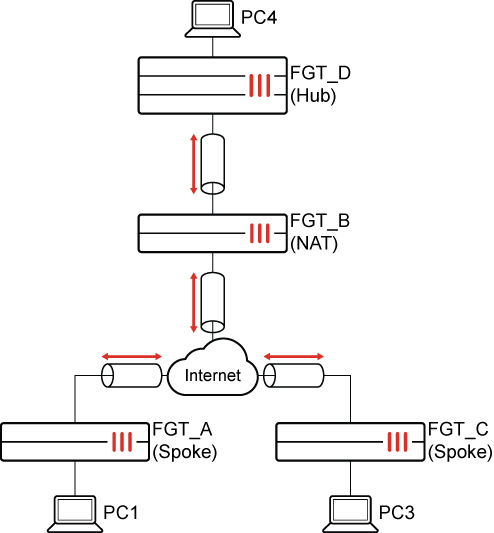
To encapsulate ESP packets within TCP headers:
-
On each FortiGate, configure the IKE TCP port setting:
config system settings set ike-tcp-port 1443 end -
Disable anti-replay in the global settings on the FGT_B (NAT) FortiGate (see step 7 for more information):
config system global set anti-replay disable set hostname "FGT-B" end -
Configure the FGT_A (spoke) FortiGate.
-
Configure the IPsec phase 1 settings:
config vpn ipsec phase1-interface edit "spoke" set interface "wan1" set ike-version 2 set peertype any set net-device disable set proposal aes128-sha256 aes256-sha256 aes128gcm-prfsha256 aes256gcm-prfsha384 chacha20poly1305-prfsha256 set transport tcp set fortinet-esp enable set remote-gw 173.1.1.1 set psksecret ********** next end -
Configure the IPsec phase 2 settings:
config vpn ipsec phase2-interface
    edit "spoke"
        set phase1name "spoke"
        set proposal aes128-sha1 aes256-sha1 aes128-sha256 aes256-sha256 aes128gcm aes256gcm chacha20poly1305
        set src-subnet 10.1.100.0 255.255.255.0
    next
end
IKE and ESP will be encapsulated into TCP, and ESP packets encapsulated into a non-standard TCP header.
-
-
Configure the FGT_C (spoke) FortiGate.
-
Configure the IPsec phase 1 settings:
config vpn ipsec phase1-interface edit "Spoke" set interface "wan1" set ike-version 2 set peertype any set net-device disable set proposal aes128-sha256 aes256-sha256 aes128gcm-prfsha256 aes256gcm-prfsha384 chacha20poly1305-prfsha256 set transport auto set fortinet-esp enable set auto-transport-threshold 10 set remote-gw 173.1.1.1 set psksecret ********** next end -
Configure the IPsec phase 2 settings:
config vpn ipsec phase2-interface
    edit "Spoke"
        set phase1name "Spoke"
        set proposal aes128-sha1 aes256-sha1 aes128-sha256 aes256-sha256 aes128gcm aes256gcm chacha20poly1305
        set src-subnet 192.168.4.0 255.255.255.0
    next
end
IKE will use UDP encapsulation first. If it fails to establish in 10 seconds, it will fall back to TCP. ESP packets are encapsulated into a non-standard TCP header.
-
-
Configure the FGT_D (hub) FortiGate.
-
Configure the IPsec phase 1 settings:
config vpn ipsec phase1-interface edit "Hub" set type dynamic set interface "port25" set ike-version 2 set peertype any set net-device disable set proposal aes128-sha256 aes256-sha256 aes128gcm-prfsha256 aes256gcm-prfsha384 chacha20poly1305-prfsha256 set dpd on-idle set transport tcp set fortinet-esp enable set psksecret ********** set dpd-retryinterval 60 next end -
Configure the IPsec phase 2 settings:
config vpn ipsec phase2-interface
    edit "Hub"
        set phase1name "Hub"
        set proposal aes128-sha1 aes256-sha1 aes128-sha256 aes256-sha256 aes128gcm aes256gcm chacha20poly1305
    next
end
-
-
Verify the IPsec VPN tunnel state on FGT_D (hub):
# diagnose vpn ike gateway list

vd: root/0
name: Hub_0
version: 2
interface: port25 33
addr: 173.1.1.1:1443 -> 173.1.1.2:23496
tun_id: 173.1.1.2/::10.0.0.4
remote_location: 0.0.0.0
network-id: 0
transport: TCP
created: 733s ago
peer-id: 11.101.1.1
peer-id-auth: no
nat: peer
PPK: no
IKE SA: created 1/1  established 1/1  time 0/0/0 ms
IPsec SA: created 1/1  established 1/1  time 0/0/0 ms

  id/spi: 3 f050ac7a151a3b31/3b46b71108eea2e2
  direction: responder
  status: established 733-733s ago = 0ms
  proposal: aes128-sha256
  child: no
  SK_ei: 619dfbeb679345f7-531692a72da85727
  SK_er: 5b6a1625b2ce71cf-13b339289ca99b9d
  SK_ai: a61818128c0d5390-b6d15cf9eb58e0f6-4e8c552e6265387b-4f79dc3acdd5d092
  SK_ar: 64fb56b13ee65bd2-6ea1fb268b3ffad9-818c8e4d302a1176-c8978a8ce91d9856
  PPK: no
  message-id sent/recv: 11/2
  QKD: no
  lifetime/rekey: 86400/85396
  DPD sent/recv: 0000000c/0000000c
  peer-id: 11.101.1.1

vd: root/0
name: Hub_2
version: 2
interface: port25 33
addr: 173.1.1.1:1443 -> 173.1.1.2:12186
tun_id: 10.0.0.4/::10.0.0.6
remote_location: 0.0.0.0
network-id: 0
transport: TCP
created: 645s ago
peer-id: 172.16.200.3
peer-id-auth: no
nat: peer
PPK: no
IKE SA: created 1/1  established 1/1  time 0/0/0 ms
IPsec SA: created 1/1  established 1/1  time 0/0/0 ms

  id/spi: 17 7eb5a40cd324d2fc/f04fec6d8d77d996
  direction: responder
  status: established 645-645s ago = 0ms
  proposal: aes128-sha256
  child: no
  SK_ei: c1fe2027086b046b-0f15c6e2d25a255d
  SK_er: 3eac9a73b4dd2961-900c0af7f0e18abf
  SK_ai: e21ca3934cca7a85-af425d12baf40693-0c30e3f6d98a6a7d-273b33cc49155092
  SK_ar: 1bef95d13784e8e1-9894c1b3628e158a-3cbfe4f7a730d9de-c9150844e3ff2002
  PPK: no
  message-id sent/recv: 10/2
  QKD: no
  lifetime/rekey: 86400/85484
  DPD sent/recv: 0000000b/0000000b
  peer-id: 172.16.200.3
-
Verify the ESP packets sniffed on the NAT device.

In the packet capture, ESP packets are encapsulated into TCP ACK packets with the same sequence number. This is why anti-replay must be disabled on the NAT FortiGate.