Fortinet white logo
Fortinet white logo

Administration Guide

Managing collector agent connection failures

Managing collector agent connection failures

Maintaining a stable connection to the collector agent is vital to the operations of FSSO. However, it is also important to plan for failures and mitigate against connection issues.

One option is to configure multiple collector agent servers. The primary server (first server in the configuration) will be preferred. If it is offline, then the second server will be polled and so on down the list of five servers. The FortiGate polls every 10 seconds to check connectivity. If the FortiGate fails over to the next server, there is no automatic fail back mechanism when a preferred server comes back online. You must disconnect the current server for the preferred server to become primary.

Another method to mitigate against connection issues is to configure the logon-timeout option. This option is used to manage how long authenticated FSSO users on the FortiGate will remain on the list of authenticated FSSO users when a network connection to the collector agent is lost.

config user fsso
    edit <name>
        set server <string>
        set password <string>
        set logon-timeout <integer>
    next
end

Option

Description

logon-timeout <integer>

Enter the interval to keep logons after the FSSO server is down, in minutes (1 - 2880, default = 5).

Example

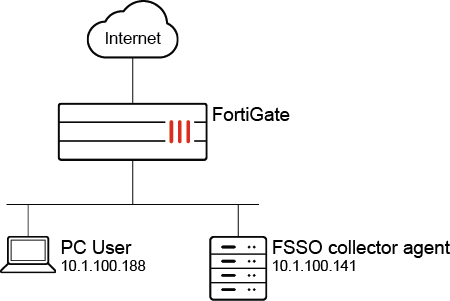
In this example, the logon timeout is set for four minutes.

To configure the FSSO logon timeout:
  1. Set the timeout value:

    config user fsso
        edit "ad"
            set server "10.1.100.141"
            set password ********
            set logon-timeout 4
        next
    end
  2. Log on to a PC with a valid FSSO user account.

  3. Enable real-time debugging and check for authd polling collector agent information. During this time, the connection to the collector agent is lost:

    # diagnose debug enable 
    # diagnose debug application authd -1
    # diagnose debug application fssod -1 				
    021-06-10 16:20:41 authd_timer_run: 2 expired
    2021-06-10 16:20:41 authd_epoll_work: timeout 39970
    2021-06-10 16:20:46 fsae_io_ctx_process_msg[ad]: received heartbeat 100031
    2021-06-10 16:20:46 authd_epoll_work: timeout 1690
    2021-06-10 16:20:47 authd_timer_run: 1 expired
    2021-06-10 16:20:47 authd_epoll_work: timeout 39990
    2021-06-10 16:20:56 fsae_io_ctx_process_msg[ad]: received heartbeat 100032
    2021-06-10 16:20:56 authd_epoll_work: timeout 31550
    2021-06-10 16:21:00 _event_error[ad]: error occurred in epoll_in: Success
    2021-06-10 16:21:00 disconnect_server_only[ad]: disconnecting
    2021-06-10 16:21:00 authd_timer_run: 1 expired
    2021-06-10 16:21:00 authd_epoll_work: timeout 9620
  4. After about three minutes, check that the FSSO user is still in the list of authenticated users and can connect to the internet:

    # diagnose firewall auth l
    10.1.100.188, TEST1
            type: fsso, id: 0, duration: 229, idled: 229
            server: ad
            packets: in 0 out 0, bytes: in 0 out 0
            user_id: 16777219
            group_id: 3 33554433
            group_name: ad CN=GROUP1,OU=TESTING,DC=FORTINET-FSSO,DC=COM
    
    ----- 1 listed, 0 filtered ------
  5. After four minutes, check the debugs again. Note that the FSSO users are cleared:

    ...
    2021-06-10 16:24:57 authd_timer_run: 3 expired
    2021-06-10 16:24:57 authd_epoll_work: timeout 60000
    2021-06-10 16:24:59 [fsae_db_logoff:248]: vfid 0, ip 10.1.100.188, id(0), port_range_sz(0)  
    2021-06-10 16:24:59 [authd_fp_notify_logoff:444]: vfid 0, ip 10.1.100.188, id 0
    2021-06-10 16:24:59 [authd_fp_on_user_logoff:412]: vfid 0, ip 10.1.100.188
    2021-06-10 16:24:59 [authd_fp_on_user_logoff:412]: vfid 0, ip 10.1.100.188
    2021-06-10 16:24:59 [authd_fp_on_user_logoff:412]: vfid 0, ip 10.1.100.188
    2021-06-10 16:24:59 [authd_fpc_on_msg:545]: code 0, type 132, len 28 seq 0
    2021-06-10 16:24:59 [authd_fp_on_user_logoff:412]: vfid 0, ip 10.1.100.188
    2021-06-10 16:24:59 authd_epoll_work: timeout 21990
    
    # diagnose firewall auth l
    
    ----- 0 listed, 0 filtered ------

    After the connection to the collector agent is restored, all users remain in the list of authenticated users and are synchronized to the FortiGate. The users do not need to log in again for authentication.

Managing collector agent connection failures

Managing collector agent connection failures

Maintaining a stable connection to the collector agent is vital to the operations of FSSO. However, it is also important to plan for failures and mitigate against connection issues.

One option is to configure multiple collector agent servers. The primary server (first server in the configuration) will be preferred. If it is offline, then the second server will be polled and so on down the list of five servers. The FortiGate polls every 10 seconds to check connectivity. If the FortiGate fails over to the next server, there is no automatic fail back mechanism when a preferred server comes back online. You must disconnect the current server for the preferred server to become primary.

Another method to mitigate against connection issues is to configure the logon-timeout option. This option is used to manage how long authenticated FSSO users on the FortiGate will remain on the list of authenticated FSSO users when a network connection to the collector agent is lost.

config user fsso
    edit <name>
        set server <string>
        set password <string>
        set logon-timeout <integer>
    next
end

Option

Description

logon-timeout <integer>

Enter the interval to keep logons after the FSSO server is down, in minutes (1 - 2880, default = 5).

Example

In this example, the logon timeout is set for four minutes.

To configure the FSSO logon timeout:
  1. Set the timeout value:

    config user fsso
        edit "ad"
            set server "10.1.100.141"
            set password ********
            set logon-timeout 4
        next
    end
  2. Log on to a PC with a valid FSSO user account.

  3. Enable real-time debugging and check for authd polling collector agent information. During this time, the connection to the collector agent is lost:

    # diagnose debug enable 
    # diagnose debug application authd -1
    # diagnose debug application fssod -1 				
    021-06-10 16:20:41 authd_timer_run: 2 expired
    2021-06-10 16:20:41 authd_epoll_work: timeout 39970
    2021-06-10 16:20:46 fsae_io_ctx_process_msg[ad]: received heartbeat 100031
    2021-06-10 16:20:46 authd_epoll_work: timeout 1690
    2021-06-10 16:20:47 authd_timer_run: 1 expired
    2021-06-10 16:20:47 authd_epoll_work: timeout 39990
    2021-06-10 16:20:56 fsae_io_ctx_process_msg[ad]: received heartbeat 100032
    2021-06-10 16:20:56 authd_epoll_work: timeout 31550
    2021-06-10 16:21:00 _event_error[ad]: error occurred in epoll_in: Success
    2021-06-10 16:21:00 disconnect_server_only[ad]: disconnecting
    2021-06-10 16:21:00 authd_timer_run: 1 expired
    2021-06-10 16:21:00 authd_epoll_work: timeout 9620
  4. After about three minutes, check that the FSSO user is still in the list of authenticated users and can connect to the internet:

    # diagnose firewall auth l
    10.1.100.188, TEST1
            type: fsso, id: 0, duration: 229, idled: 229
            server: ad
            packets: in 0 out 0, bytes: in 0 out 0
            user_id: 16777219
            group_id: 3 33554433
            group_name: ad CN=GROUP1,OU=TESTING,DC=FORTINET-FSSO,DC=COM
    
    ----- 1 listed, 0 filtered ------
  5. After four minutes, check the debugs again. Note that the FSSO users are cleared:

    ...
    2021-06-10 16:24:57 authd_timer_run: 3 expired
    2021-06-10 16:24:57 authd_epoll_work: timeout 60000
    2021-06-10 16:24:59 [fsae_db_logoff:248]: vfid 0, ip 10.1.100.188, id(0), port_range_sz(0)  
    2021-06-10 16:24:59 [authd_fp_notify_logoff:444]: vfid 0, ip 10.1.100.188, id 0
    2021-06-10 16:24:59 [authd_fp_on_user_logoff:412]: vfid 0, ip 10.1.100.188
    2021-06-10 16:24:59 [authd_fp_on_user_logoff:412]: vfid 0, ip 10.1.100.188
    2021-06-10 16:24:59 [authd_fp_on_user_logoff:412]: vfid 0, ip 10.1.100.188
    2021-06-10 16:24:59 [authd_fpc_on_msg:545]: code 0, type 132, len 28 seq 0
    2021-06-10 16:24:59 [authd_fp_on_user_logoff:412]: vfid 0, ip 10.1.100.188
    2021-06-10 16:24:59 authd_epoll_work: timeout 21990
    
    # diagnose firewall auth l
    
    ----- 0 listed, 0 filtered ------

    After the connection to the collector agent is restored, all users remain in the list of authenticated users and are synchronized to the FortiGate. The users do not need to log in again for authentication.