
Fortinet white logo
Fortinet white logo

Administration Guide

Vulnerabilities

Vulnerabilities

On the Security Fabric > Security Rating page, the Vulnerabilities tab displays PSIRT advisory and Outbreak detection entries that are included in the downloaded Security Rating package:
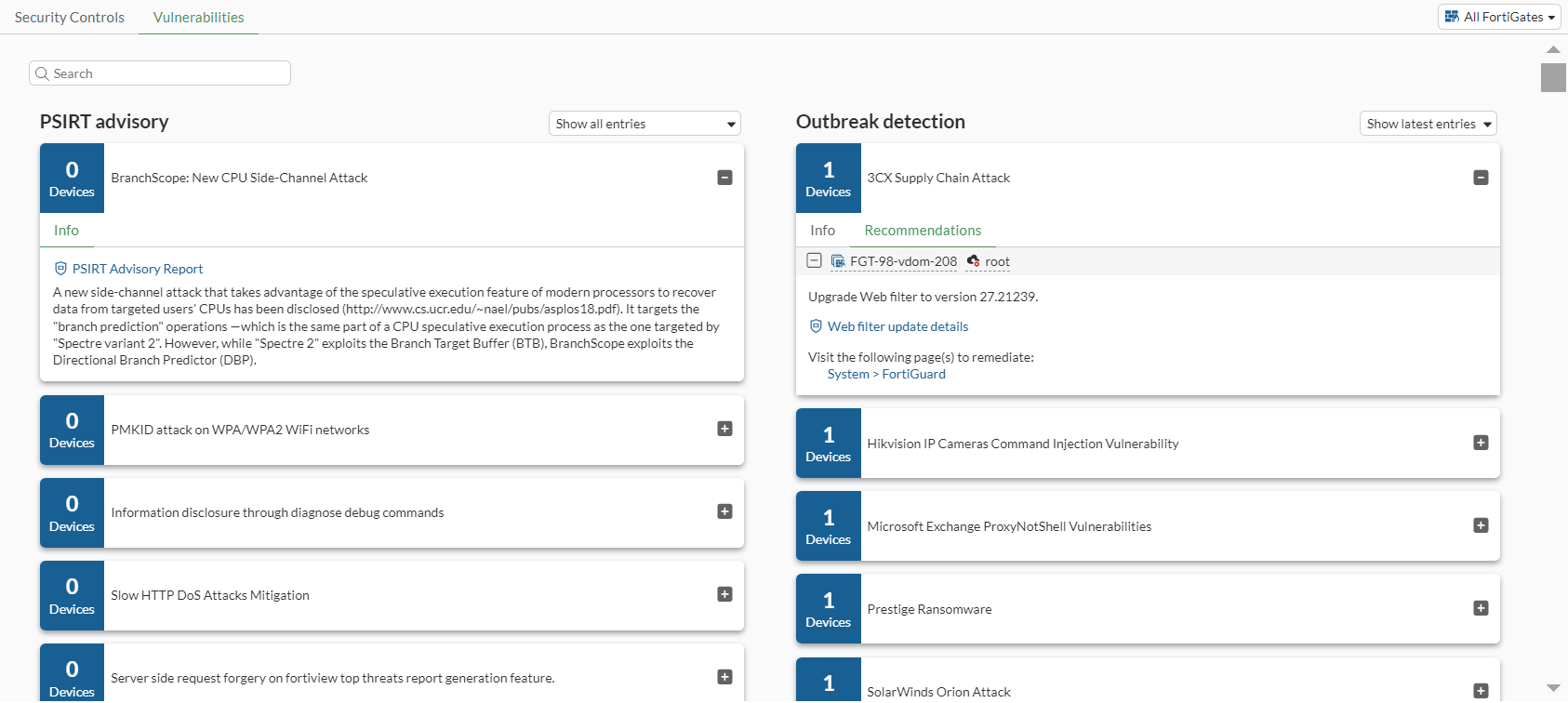
PSIRT-related notifications

On a FortiGate with a valid Firmware license, the separate Security Rating package downloaded from FortiGuard supports PSIRT vulnerabilities, which are highlighted in security rating results. PSIRT Package Definitions are part of the Firmware entitlement.

To verify the FortiGuard license entitlement in the GUI:
  1. Go to System > FortiGuard and expand the License Information table.

  2. Expand the Firmware & General Updates section.

  3. Check that PSIRT Check definitions appears in the list and the license is valid.
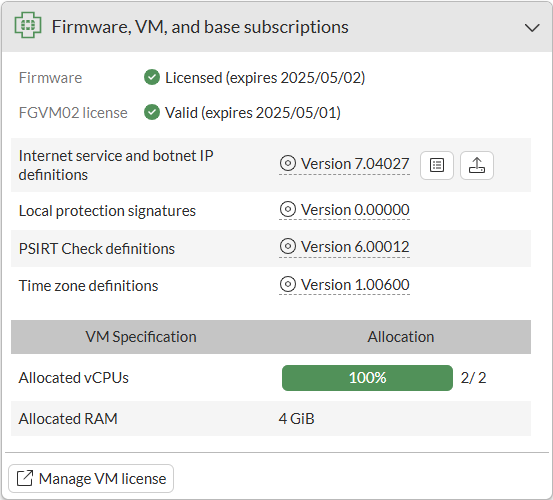
To verify the FortiGuard license entitlement in the CLI:
# diagnose autoupdate versions
...
Security Rating Data Package
---------
Version: 5.00022
Contract Expiry Date: Fri Nov 24 2023
Last Updated using scheduled update on Mon Sep 11 09:44:21 2023
Last Update Attempt: Tue Sep 12 16:29:10 2023
Result: No Updates

The following notifications are visible in the GUI.

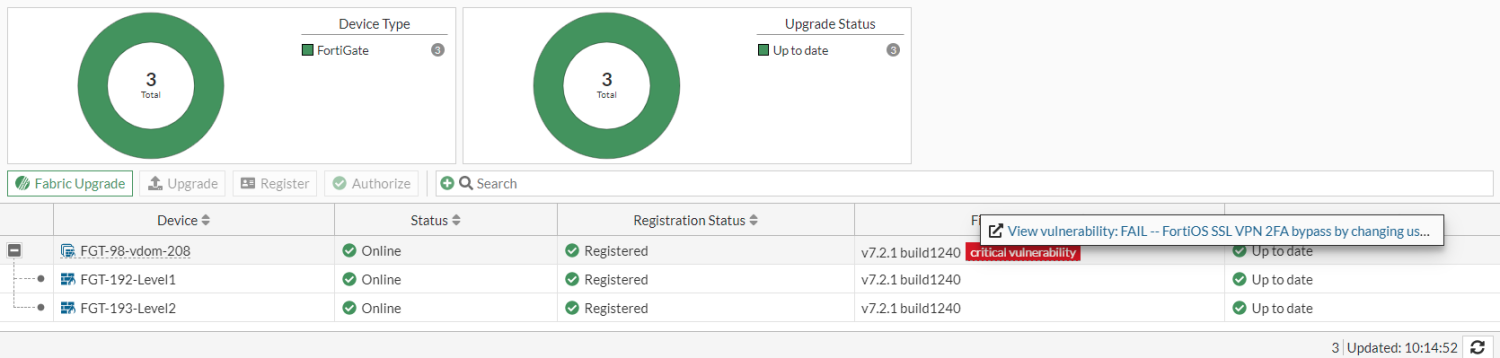
  • Warning message: if the security rating result indicates a vulnerability with a critical severity, then the FortiOS GUI displays a warning message in the header and a new notification under the bell icon. The View Vulnerability link appears in the header for global administrators.


    Clicking the warning message redirects to the System > Firmware & Registration page, where administrators are encouraged to update any affected Fortinet Fabric devices to the latest firmware releases to resolve the critical vulnerabilities.

  • Tooltip: a tooltip for the critical vulnerability label on the System > Firmware & Registration page lists the vulnerability, and it links to the Security Fabric > Security Rating page where more details about the vulnerability are displayed.
To view vulnerability results after performing security rating scan:
# diagnose report-runner vuln-read
Index: 0
Name: FG-IR-23-001: FortiOS / FortiManager / FortiAnalyzer / FortiWeb / FortiProxy / FortiSwitchManager - Heap buffer underflow in administrative interface
FortiGate Serial: FGVM02TM23000000
To clear the vulnerability result:
# diagnose report-runner vuln-clean 
Deleted temporary critical vulnerability file

FortiGuard IoT vulnerability-related checks

There are two rating checks in the Security Posture report related to IoT vulnerabilities:

  • The FortiGuard IoT Detection Subscription rating check will pass if the System > FortiGuard page shows that the IoT Detection Definitions (under the Attack Surface Security Rating entitlement) is licensed. In this example, the result is marked as Passed because the license is valid.
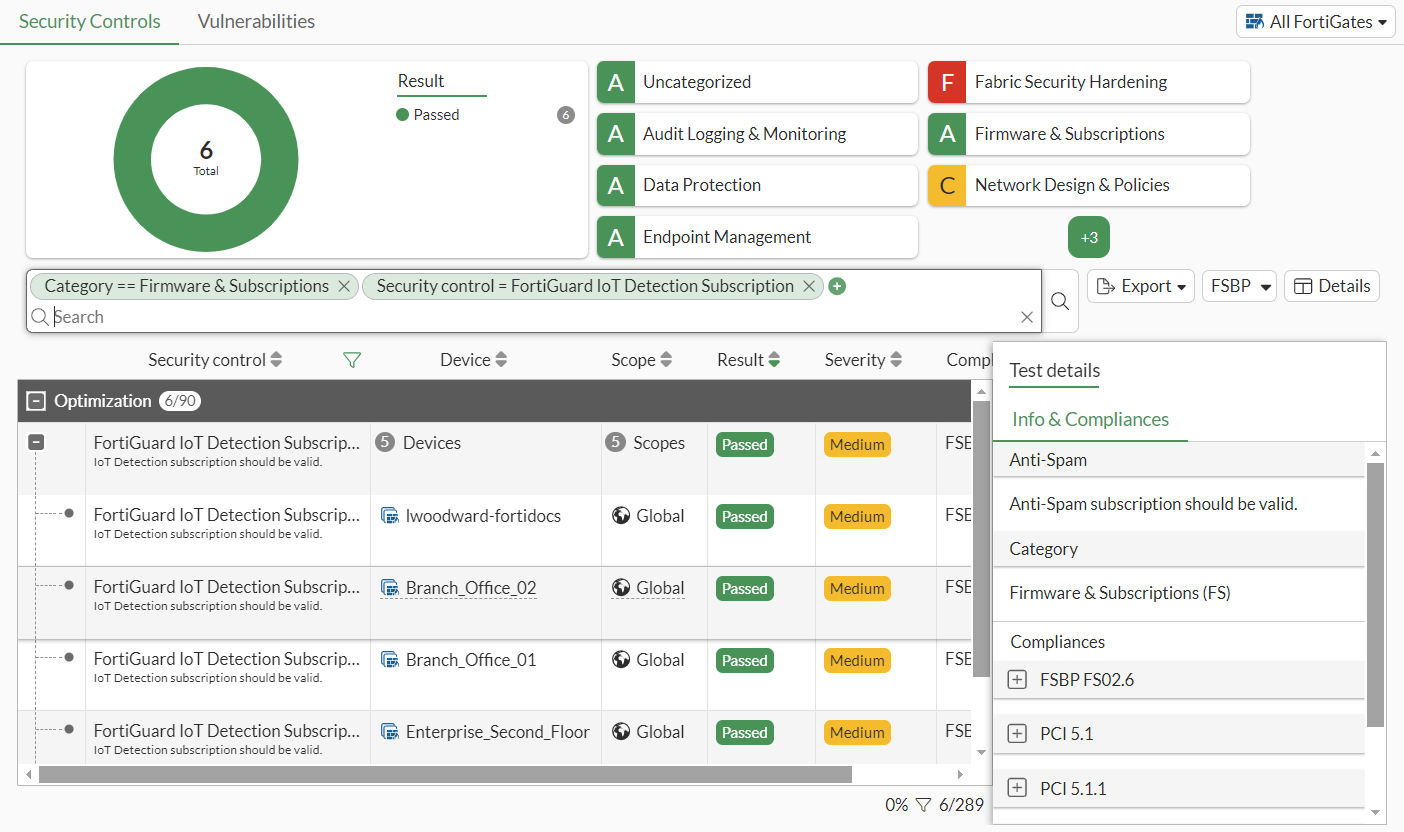
  • The FortiGuard IoT Vulnerability rating check will fail if any IoT vulnerabilities are found.

    Hover over the device name to display the tooltip, which includes an option to View IoT Vulnerabilities.

Note

To detect IoT vulnerabilities, the FortiGate must have a valid IoT Definitions license, device detection must be configured on a LAN interface used by IoT devices, and a firewall policy with an application control sensor must be configured.

Vulnerabilities

Vulnerabilities

On the Security Fabric > Security Rating page, the Vulnerabilities tab displays PSIRT advisory and Outbreak detection entries that are included in the downloaded Security Rating package:

PSIRT-related notifications

On a FortiGate with a valid Firmware license, the separate Security Rating package downloaded from FortiGuard supports PSIRT vulnerabilities, which are highlighted in security rating results. PSIRT Package Definitions are part of the Firmware entitlement.

To verify the FortiGuard license entitlement in the GUI:
  1. Go to System > FortiGuard and expand the License Information table.

  2. Expand the Firmware & General Updates section.

  3. Check that PSIRT Check definitions appears in the list and the license is valid.

To verify the FortiGuard license entitlement in the CLI:
# diagnose autoupdate versions
...
Security Rating Data Package
---------
Version: 5.00022
Contract Expiry Date: Fri Nov 24 2023
Last Updated using scheduled update on Mon Sep 11 09:44:21 2023
Last Update Attempt: Tue Sep 12 16:29:10 2023
Result: No Updates

The following notifications are visible in the GUI.

  • Warning message: if the security rating result indicates a vulnerability with a critical severity, then the FortiOS GUI displays a warning message in the header and a new notification under the bell icon. The View Vulnerability link appears in the header for global administrators.

    Clicking the warning message redirects to the System > Firmware & Registration page, where administrators are encouraged to update any affected Fortinet Fabric devices to the latest firmware releases to resolve the critical vulnerabilities.

  • Tooltip: a tooltip for the critical vulnerability label on the System > Firmware & Registration page lists the vulnerability, and it links to the Security Fabric > Security Rating page where more details about the vulnerability are displayed.

To view vulnerability results after performing security rating scan:
# diagnose report-runner vuln-read
Index: 0
Name: FG-IR-23-001: FortiOS / FortiManager / FortiAnalyzer / FortiWeb / FortiProxy / FortiSwitchManager - Heap buffer underflow in administrative interface
FortiGate Serial: FGVM02TM23000000
To clear the vulnerability result:
# diagnose report-runner vuln-clean 
Deleted temporary critical vulnerability file

FortiGuard IoT vulnerability-related checks

There are two rating checks in the Security Posture report related to IoT vulnerabilities:

  • The FortiGuard IoT Detection Subscription rating check will pass if the System > FortiGuard page shows that the IoT Detection Definitions (under the Attack Surface Security Rating entitlement) is licensed. In this example, the result is marked as Passed because the license is valid.

  • The FortiGuard IoT Vulnerability rating check will fail if any IoT vulnerabilities are found.

    Hover over the device name to display the tooltip, which includes an option to View IoT Vulnerabilities.

Note

To detect IoT vulnerabilities, the FortiGate must have a valid IoT Definitions license, device detection must be configured on a LAN interface used by IoT devices, and a firewall policy with an application control sensor must be configured.