

Static SNAT
In static SNAT all internal IP addresses are always mapped to the same public IP address. This is a port address translation, Since we have 60416 available port numbers, this one public IP address can handle the conversion of 60,416 internal IP addresses to the same service, where a service is defined by a specified protocol, destination IP address, and destination port.
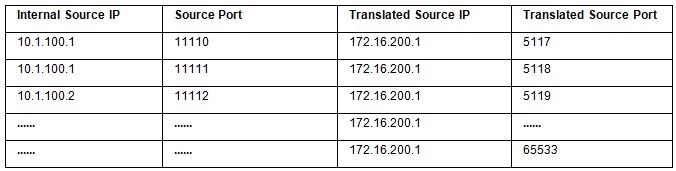
FortiGate firewall configurations commonly use the Outgoing Interface address.
Sample configuration
The following example of static SNAT uses an internal network with subnet 10.1.100.0/24 (vlan20) and an external/ISP network with subnet 172.16.200.0/24 (vlan30).
When the clients in internal network need to access the servers in external network, We need to translate IP addresses from 10.1.100.0/24 to an IP address 172.16.200.0/24, In this example, we implement static SNAT by creating a firewall policy.
To configure static NAT:
-
Go to Policy & Objects > Firewall Policy and click Create New.
-
Configure the required policy parameters.
-
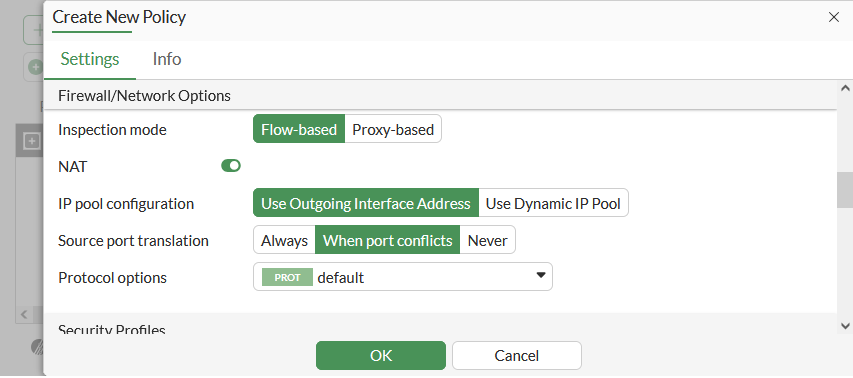
Enable NAT and select Use Outgoing Interface Address. For packets that match this policy, its source IP address is translated to the IP address of the outgoing interface.
-
The default setting for Source Port Translation is When Port Conflicts, which uses the original source port unless there is a conflict. If required, set it to Always to always change the source port for Source NAT, or Never to prevent Source NAT from changing a session's source port.
-
Click OK.