
Fortinet white logo
Fortinet white logo

Administration Guide

IPAM conflict markers

IPAM conflict markers

The IPAM Interfaces tab displays conflict markers when there are IP pool IP address conflicts with manually configured IP addresses. Administrators can use the Edit Interface dialog to manually resolve the conflict.

To resolve conflicts in the GUI:
  1. Go to Network > IPAM and select the IPAM Interfaces tab.

  2. Hover your mouse over the conflict marker. The conflict marker information is displayed.
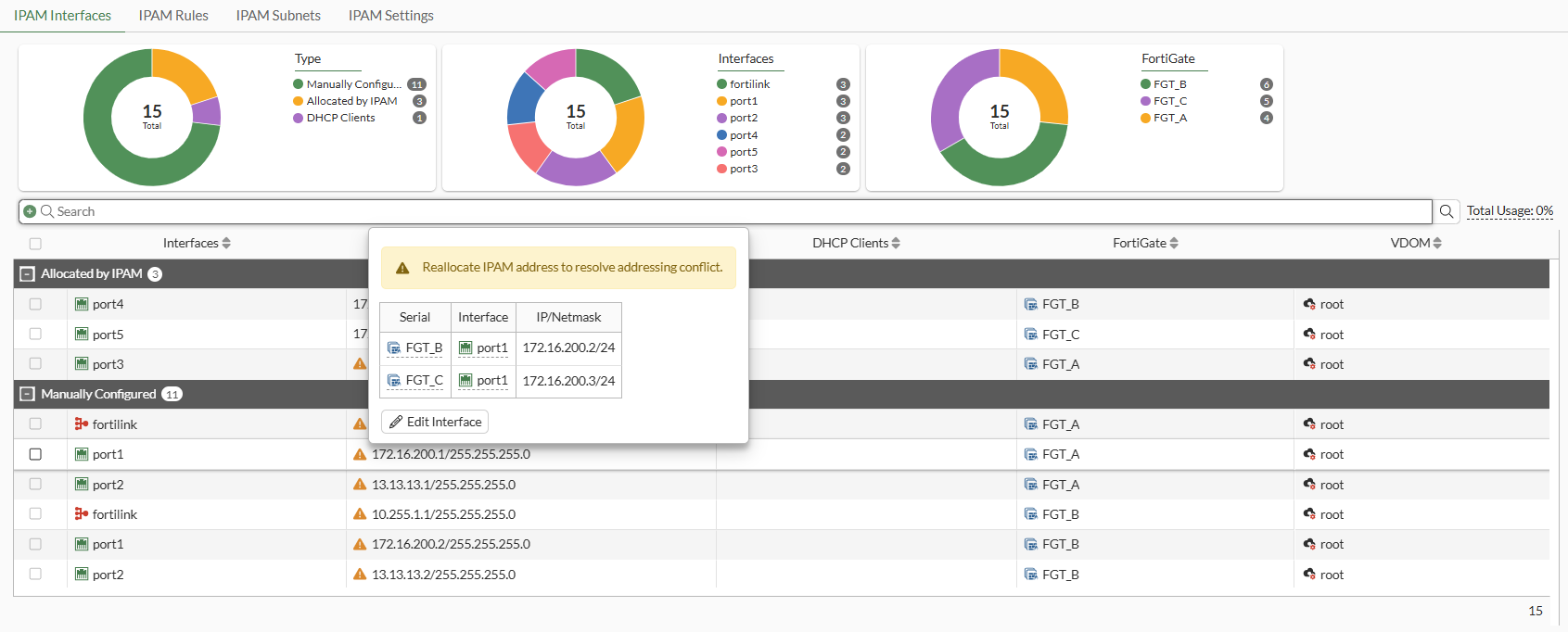
  3. Click Edit Interface. The Edit Interface pane opens.

  4. Enter a new IP address and netmask in the IP/Netmask field.

  5. Click OK.

IPAM conflict markers

IPAM conflict markers

The IPAM Interfaces tab displays conflict markers when there are IP pool IP address conflicts with manually configured IP addresses. Administrators can use the Edit Interface dialog to manually resolve the conflict.

To resolve conflicts in the GUI:
  1. Go to Network > IPAM and select the IPAM Interfaces tab.

  2. Hover your mouse over the conflict marker. The conflict marker information is displayed.

  3. Click Edit Interface. The Edit Interface pane opens.

  4. Enter a new IP address and netmask in the IP/Netmask field.

  5. Click OK.