
Fortinet white logo
Fortinet white logo

Administration Guide

GUI warnings for IKE-TCP port conflicts

GUI warnings for IKE-TCP port conflicts

For FortiOS 7.6.1 and above, TCP port 443 is used by default to encapsulate ESP packets within TCP headers using its proprietary solution. See Encapsulate ESP packets within TCP headers for more information.

Starting in FortiOS 7.6.3, if administrators assign port 443 for HTTPS administrative access on an interface that is also bound to an IPsec tunnel, FortiOS will display a warning indicating that HTTPS access on that port will no longer be available. This is because port 443 is also used for IKE over TCP, and in such cases, IKE takes precedence over HTTPS, resulting in the loss of GUI access on that interface.

Note

The default IKE-TCP value of port 443 is only applicable to new FortiGate configurations with FortiOS 7.6.1 and above. If FortiOS is upgraded to 7.6.1 and above, the ike-tcp-port value from before the upgrade is retained.

Furthermore, by default IKE listens on port 4500 when ike-tcp-port is configured as 4500. If ike-tcp-port is configured on any other port, the IKE daemon listens on port 4500 and port 11443 while traffic enters on the ike-tcp-port and redirects to port 11443. Therefore, when the ike-tcp-port is set to 443 by default, do not use port 443, 11443, or 4500 for HTTPS GUI access.

Warnings that may appear include the following:

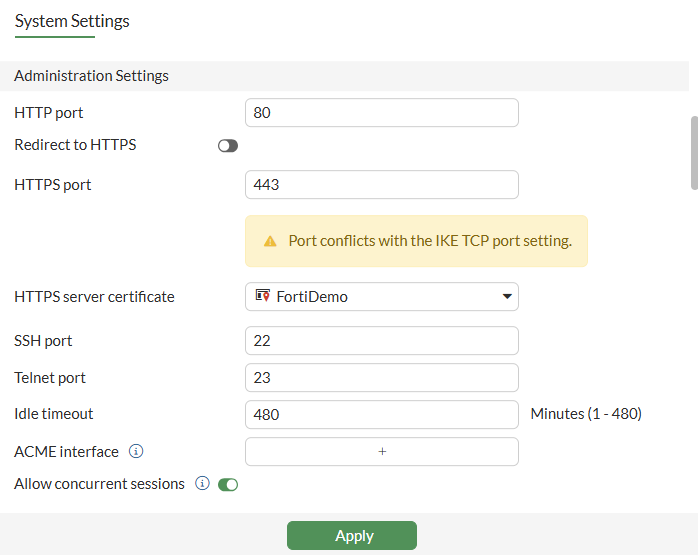
  • In System > Settings, a warning is displayed for the Administrator Settings > HTTPS port field when the entered HTTPS port conflicts with the IKE-TCP port.
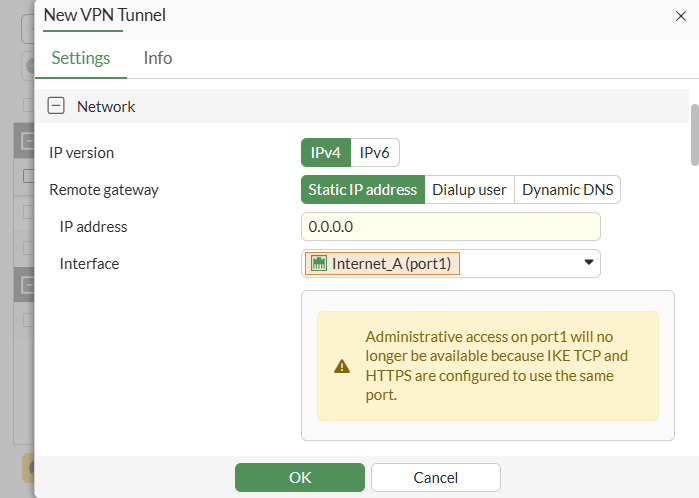
  • In VPN > VPN Tunnels, a warning is displayed for the Network > Interface field when the HTTPS port conflicts with IKE-TCP port and the selected port has HTTPS allow access.
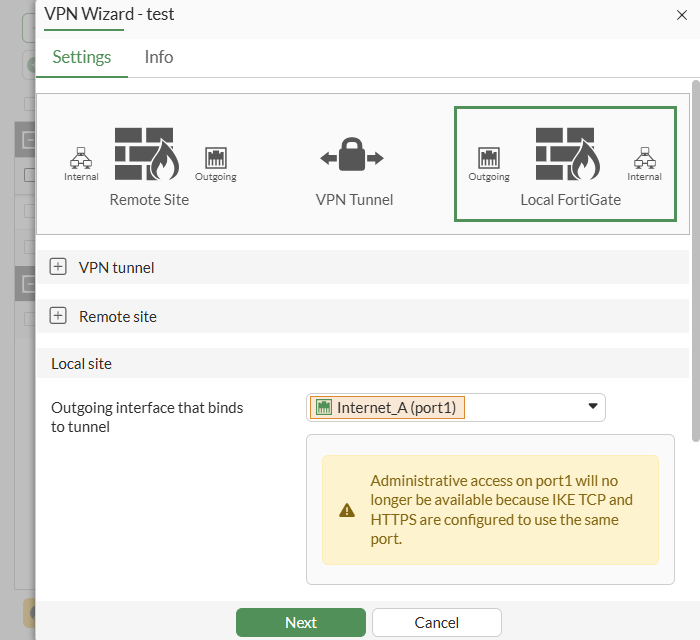
  • In VPN > VPN Tunnels, a warning is displayed in the Local Site > Outgoing interface that binds to tunnel field when the HTTPS port conflicts with IKE-TCP port and the selected port has HTTPS allow access.
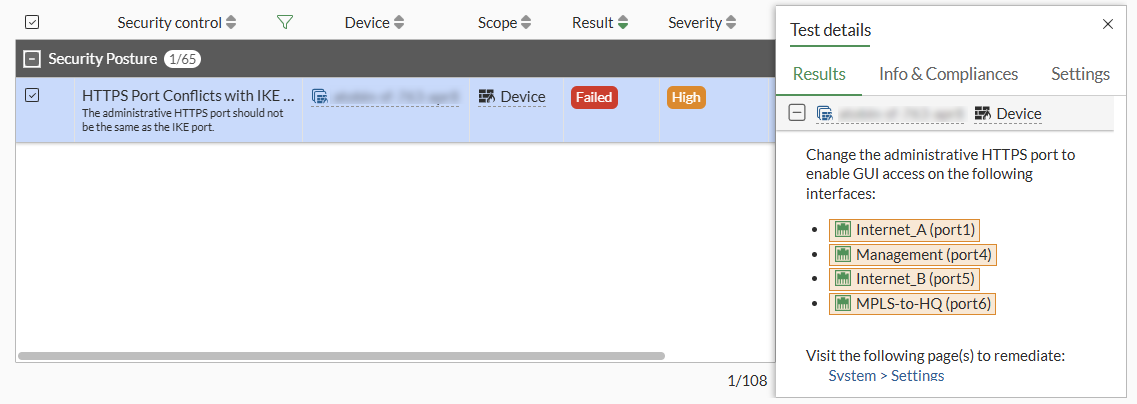
  • In Security Fabric > Security Rating, a Security Posture failure is flagged for the HTTPS Port Conflict with IKE Port check, indicating a configuration issue. Likewise, a Security Ratings Insights recommendation is listed. This occurs when the HTTPS port conflicts with the IKE port.
GUI warnings for IKE-TCP port conflicts

GUI warnings for IKE-TCP port conflicts

For FortiOS 7.6.1 and above, TCP port 443 is used by default to encapsulate ESP packets within TCP headers using its proprietary solution. See Encapsulate ESP packets within TCP headers for more information.

Starting in FortiOS 7.6.3, if administrators assign port 443 for HTTPS administrative access on an interface that is also bound to an IPsec tunnel, FortiOS will display a warning indicating that HTTPS access on that port will no longer be available. This is because port 443 is also used for IKE over TCP, and in such cases, IKE takes precedence over HTTPS, resulting in the loss of GUI access on that interface.

Note

The default IKE-TCP value of port 443 is only applicable to new FortiGate configurations with FortiOS 7.6.1 and above. If FortiOS is upgraded to 7.6.1 and above, the ike-tcp-port value from before the upgrade is retained.

Furthermore, by default IKE listens on port 4500 when ike-tcp-port is configured as 4500. If ike-tcp-port is configured on any other port, the IKE daemon listens on port 4500 and port 11443 while traffic enters on the ike-tcp-port and redirects to port 11443. Therefore, when the ike-tcp-port is set to 443 by default, do not use port 443, 11443, or 4500 for HTTPS GUI access.

Warnings that may appear include the following:

  • In System > Settings, a warning is displayed for the Administrator Settings > HTTPS port field when the entered HTTPS port conflicts with the IKE-TCP port.

  • In VPN > VPN Tunnels, a warning is displayed for the Network > Interface field when the HTTPS port conflicts with IKE-TCP port and the selected port has HTTPS allow access.

  • In VPN > VPN Tunnels, a warning is displayed in the Local Site > Outgoing interface that binds to tunnel field when the HTTPS port conflicts with IKE-TCP port and the selected port has HTTPS allow access.

  • In Security Fabric > Security Rating, a Security Posture failure is flagged for the HTTPS Port Conflict with IKE Port check, indicating a configuration issue. Likewise, a Security Ratings Insights recommendation is listed. This occurs when the HTTPS port conflicts with the IKE port.