

FortiSASE-Sovereign NEW
FortiSASE-Sovereign is Fortinet’s sovereign SASE solution that offers a turnkey, private SASE service that ensures data remains within designated jurisdictions, while giving its customers complete control over their deployment locations, features, and infrastructure. See the FortiSASE-Sovereign Architecture Guide for more information.
FortiOS 7.6.5 and later supports FortiSASE-Sovereign licensing bundles for the FortiGate 91G and 901G devices.
After applying the FortiSASE-Sovereign license in FortiOS, the following restrictions apply:
-
The Policy & Objects pane is restricted in the GUI, and the
config firewallcommand is restricted in the CLI. -
The restore option is restricted in the GUI, and the
exec restorecommand is restricted in the CLI.
With the FortiSASE-Sovereign license installed and activated, go to the FortiSASE-Sovereign portal to complete the onboarding process. See Log on to FortiSASE-Sovereign for more information. Completion of the FortiSASE-Sovereign onboarding process enables sovereign SASE in FortiOS and further restricts the FortiOS GUI and CLI:
-
All administrator sessions are logged out of FortiOS.
-
The Network Interfaces pane becomes read-only in the GUI.
-
Configurations can no longer be restored to FortiOS using the GUI and CLI.
After applying the license and completing the FortiSASE-Sovereign onboarding process, use FortiSASE-Sovereign to manage FortiGate configurations.

|
Do not manually enable sovereign SASE in FortiOS because it will cause the FortiSASE-Sovereign onboarding process to fail. config system sov-sase
set status enable
end
|
Enabling FortiSASE-Sovereign
To enable FortiSASE-Sovereign in the GUI:
-
In FortiOS, apply the FortiSASE-Sovereign license.
-
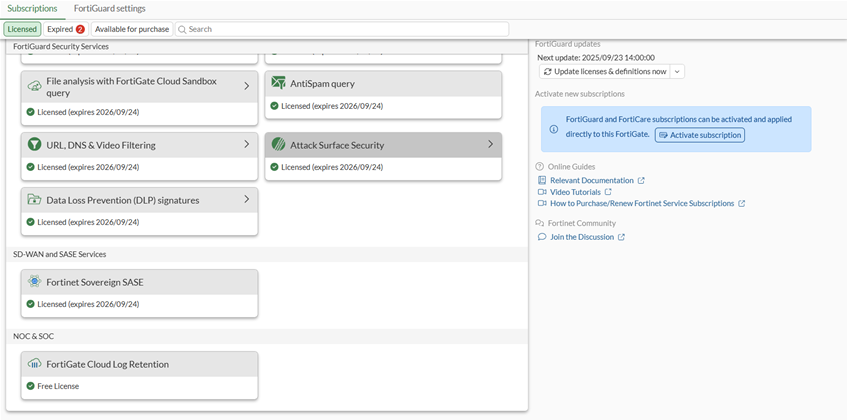
Verify the license is activated by going to System > FortiGuard to see the Fortinet Sovereign SASE license status.
-
In the FortiSASE-Sovereign portal, complete the onboarding process. See Log on to FortiSASE-Sovereign for more information.
The onboarding process enables sovereign SASE on FortiOS.
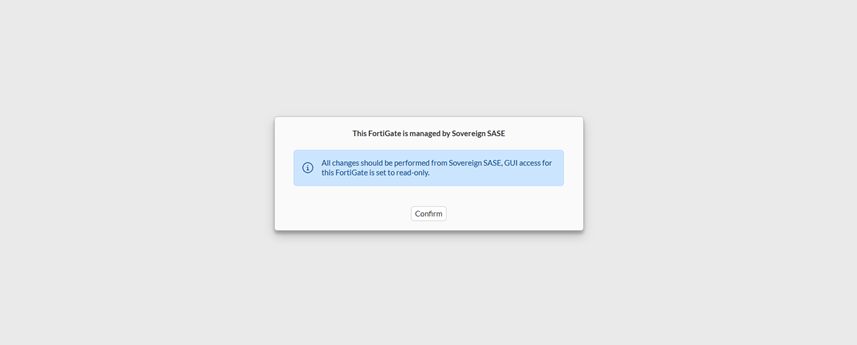
All admin sessions are logged out of FortiOS, and a confirmation dialog box is displayed:
-
In FortiOS, click Confirm.
The FortiOS GUI and CLI become restricted.
-
Use FortiSASE-Sovereign portal for FortiGate configuration.
To enable FortiSASE-Sovereign in the CLI:
-
In FortiOS, apply the FortiSASE-Sovereign license.
-
In the FortiSASE-Sovereign portal, complete the onboarding process. See Log on to FortiSASE-Sovereign for more information.
The onboarding process enables sovereign SASE on FortiOS.
config system sov-sase set status enable endAll admin sessions are logged out of FortiOS, and the CLI becomes read-only, except for the following commands:
config system cloud-service
config system sdn-vpn
config system sov-sase
Disabling FortiSASE-Sovereign
Disabling sovereign SASE forces a factory reset of the FortiGate.
To disable FortiSASE-Sovereign:
config system sov-sase
    set status disable
end
Sovereign SASE status will be disabled and the system will be reset to factory default state.
Do you want to continue?