
Fortinet white logo
Fortinet white logo

Administration Guide

OSPF with IPsec VPN for network redundancy

OSPF with IPsec VPN for network redundancy

This is a sample configuration of using OSPF with IPsec VPN to set up network redundancy. Route selection is based on OSPF cost calculation. You can configure ECMP or primary/secondary routes by adjusting OSPF path cost.
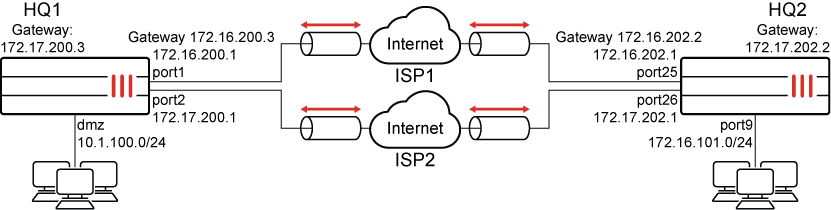
Because the GUI can only complete part of the configuration, we recommend using the CLI.

To configure OSPF with IPsec VPN to achieve network redundancy using the CLI:
  1. Configure the WAN interface and static route.

    Each FortiGate has two WAN interfaces connected to different ISPs. The ISP1 link is for the primary FortiGate and the IPS2 link is for the secondary FortiGate.

    1. Configure HQ1:

      config system interface
          edit "port1"
              set alias to_ISP1
              set ip 172.16.200.1 255.255.255.0
          next
          edit "port2"
              set alias to_ISP2
              set ip 172.17.200.1 255.255.255.0
          next
      end
      config router static
          edit 1
              set gateway 172.16.200.3
              set device "port1"
          next
          edit 2
              set gateway 172.17.200.3
              set device "port2"
              set priority 100
          next
      end
    2. Configure HQ2:

      config system interface
          edit "port25"
              set alias to_ISP1
              set ip 172.16.202.1 255.255.255.0
          next
          edit "port26"
              set alias to_ISP2
              set ip 172.17.202.1 255.255.255.0
          next
      end
      config router static
          edit 1
              set gateway 172.16.202.2
              set device "port25"
          next
          edit 2
              set gateway 172.17.202.2
              set device "port26"
              set priority 100
          next
      end
  2. Configure the internal (protected subnet) interface:

    1. Configure HQ1:

      config system interface
          edit "dmz"
              set ip 10.1.100.1 255.255.255.0
          next
      end
    2. Configure HQ2:

      config system interface
          edit "port9"
              set ip 172.16.101.1 255.255.255.0
          next
      end
  3. Configure IPsec phase1-interface and phase-2 interface. On each FortiGate, configure two IPsec tunnels: a primary and a secondary:

    1. Configure HQ1:

      config vpn ipsec phase1-interface
          edit "pri_HQ2"
              set interface "port1"
              set peertype any
              set net-device enable
              set proposal aes128-sha256 aes256-sha256 aes128-sha1 aes256-sha1
              set remote-gw 172.16.202.1
              set psksecret sample1
          next
          edit "sec_HQ2"
              set interface "port2"
              set peertype any
              set net-device enable
              set proposal aes128-sha256 aes256-sha256 aes128-sha1 aes256-sha1
              set remote-gw 172.17.202.1
              set psksecret sample2
          next   
      end  
      config vpn ipsec phase2-interface
          edit "pri_HQ2"
              set phase1name "pri_HQ2"
              set proposal aes128-sha1 aes256-sha1 aes128-sha256 aes256-sha256 aes128gcm aes256gcm chacha20poly1305
              set auto-negotiate enable
          next
          edit "sec_HQ2"
              set phase1name "sec_HQ2"
              set proposal aes128-sha1 aes256-sha1 aes128-sha256 aes256-sha256 aes128gcm aes256gcm chacha20poly1305
              set auto-negotiate enable
          next   
      end
    2. Configure HQ2:

      config vpn ipsec phase1-interface
          edit "pri_HQ1"
              set interface "port25"
              set peertype any
              set net-device enable
              set proposal aes128-sha256 aes256-sha256 aes128-sha1 aes256-sha1
              set remote-gw 172.16.200.1
              set psksecret sample1
          next
          edit "sec_HQ1"
              set interface "port26"
              set peertype any
              set net-device enable
              set proposal aes128-sha256 aes256-sha256 aes128-sha1 aes256-sha1
              set remote-gw 172.17.200.1
              set psksecret sample2
          next 
      end
      config vpn ipsec phase2-interface
          edit "pri_HQ1"
              set phase1name "pri_HQ1"
              set proposal aes128-sha1 aes256-sha1 aes128-sha256 aes256-sha256 aes128gcm aes256gcm chacha20poly1305
              set auto-negotiate enable
          next
          edit "sec_HQ1"
              set phase1name "sec_HQ1"
              set proposal aes128-sha1 aes256-sha1 aes128-sha256 aes256-sha256 aes128gcm aes256gcm chacha20poly1305
              set auto-negotiate enable
          next   
      end
  4. Configure an inbound and outbound firewall policy for each IPsec tunnel:

    1. Configure HQ1:

      config firewall policy
          edit 1
              set name "pri_inbound"
              set srcintf "pri_HQ2"
              set dstintf "dmz"
              set srcaddr "172.16.101.0"
              set dstaddr "10.1.100.0"
              set action accept
              set schedule "always"
              set service "ALL"
          next
          edit 2
              set name "pri_outbound"
              set srcintf "dmz"
              set dstintf "pri_HQ2"
              set srcaddr "10.1.100.0"
              set dstaddr "172.16.101.0"
              set action accept
              set schedule "always"
              set service "ALL"
          next
          edit 3
              set name "sec_inbound"
              set srcintf "sec_HQ2"
              set dstintf "dmz"
              set srcaddr "172.16.101.0"
              set dstaddr "10.1.100.0"
              set action accept
              set schedule "always"
              set service "ALL"
          next
          edit 4
              set name "sec_outbound"
              set srcintf "dmz"
              set dstintf "sec_HQ2"
              set srcaddr "10.1.100.0"
              set dstaddr "172.16.101.0"
              set action accept
              set schedule "always"
              set service "ALL"
          next  
      end
    2. Configure HQ2:

      config firewall policy
          edit 1
              set name "pri_inbound"
              set srcintf "pri_HQ1"
              set dstintf "port9"
              set srcaddr "10.1.100.0"
              set dstaddr "172.16.101.0"
              set action accept
              set schedule "always"
              set service "ALL"
          next
          edit 2
              set name "pri_outbound"
              set srcintf "port9"
              set dstintf "pri_HQ1"
              set srcaddr "10.1.100.0"
              set dstaddr "172.16.101.0"
              set action accept
              set schedule "always"
              set service "ALL"
          next
          edit 3
              set name "sec_inbound"
              set srcintf "sec_HQ1"
              set dstintf "port9"
              set srcaddr "10.1.100.0"
              set dstaddr "172.16.101.0"
              set action accept
              set schedule "always"
              set service "ALL"
          next
          edit 4
              set name "sec_outbound"
              set srcintf "port9"
              set dstintf "sec_HQ1"
              set srcaddr "172.16.101.0"
              set dstaddr "10.1.100.0"
              set action accept
              set schedule "always"
              set service "ALL"
          next  
      end
  5. Assign an IP address to the IPsec tunnel interface:

    1. Configure HQ1:

      config system interface
          edit "pri_HQ2"
              set ip 10.10.10.1 255.255.255.255
              set remote-ip 10.10.10.2 255.255.255.255
          next
          edit "sec_HQ2"
              set ip 10.10.11.1 255.255.255.255
              set remote-ip 10.10.11.2 255.255.255.255
          next    
      end
    2. Configure HQ2:

      config system interface
          edit "pri_HQ1"
              set ip 10.10.10.2 255.255.255.255
              set remote-ip 10.10.10.1 255.255.255.255
          next
          edit "sec_HQ1"
              set ip 10.10.11.2 255.255.255.255
              set remote-ip 10.10.11.1 255.255.255.255
          next
      end
  6. Configure OSPF:

    1. Configure HQ1:

      config router ospf
          set router-id 1.1.1.1
          config area
              edit 0.0.0.0
              next
          end
          config ospf-interface
              edit "pri_HQ2"
                  set interface "pri_HQ2"
                  set cost 10
                  set network-type point-to-point
              next
              edit "sec_HQ2"
                  set interface "sec_HQ2"
                  set cost 20
                  set network-type point-to-point
              next
          end
          config network
              edit 1
                  set prefix 10.10.10.0 255.255.255.0
              next
              edit 2
                  set prefix 10.10.11.0 255.255.255.0
              next
              edit 3
                  set prefix 10.1.100.0 255.255.255.0
              next
          end
      end
    2. Configure HQ2:

      config router ospf
          set router-id 2.2.2.2
          config area
              edit 0.0.0.0
              next
          end
          config ospf-interface
              edit "pri_HQ1"
                  set interface "pri_HQ1"
                  set cost 10
                  set network-type point-to-point
              next
              edit "sec_HQ1"
                  set interface "sec_HQ1"
                  set cost 20
                  set network-type point-to-point
              next
          end
          config network
              edit 1
                  set prefix 10.10.10.0 255.255.255.0
              next
              edit 2
                  set prefix 10.10.11.0 255.255.255.0
              next
              edit 3
                  set prefix 172.16.101.0 255.255.255.0
              next
          end
      end
To check VPN and OSPF states using diagnose and get commands:
  1. Run the HQ1 # diagnose vpn ike gateway list command. The system should return the following:

    vd: root/0
    name: pri_HQ2
    version: 1
    interface: port1 11
    addr: 172.16.200.1:500 -> 172.16.202.1:500
    virtual-interface-addr: 10.10.10.1 -> 10.10.10.2
    created: 1024s ago
    IKE SA: created 1/1 established 1/1 time 0/0/0 ms
    IPsec SA: created 1/3 established 1/2 time 0/5/10 ms
        id/spi: 45 d184777257b4e692/e2432f834aaf5658 direction: responder status: established 1024-1024s ago = 0ms proposal: aes128-sha256 key: 9ed41fb06c983344-189538046f5ad204 lifetime/rekey: 86400/85105 DPD sent/recv: 00000003/00000000
    vd: root/0
    name: sec_HQ2
    version: 1
    interface: port2 12
    addr: 172.17.200.1:500 -> 172.17.202.1:500
    virtual-interface-addr: 10.10.11.1 -> 10.10.11.2
    created: 346s ago
    IKE SA: created 1/1 established 1/1 time 0/0/0 ms
    IPsec SA: created 1/1 established 1/1 time 0/10/15 ms
        id/spi: 48 d909ed68636b1ea5/163015e73ea050b8 direction: initiator status: established 0-0s ago = 0ms proposal: aes128-sha256 key: b9e93c156bdf4562-29db9fbafa256152 lifetime/rekey: 86400/86099 DPD sent/recv: 00000000/00000000
  2. Run the HQ1 # diagnose vpn tunnel list command. The system should return the following:

    list all ipsec tunnel in vd 0
    name=pri_HQ2 ver=1 serial=1 172.16.200.1:0->172.16.202.1:0 tun_id=172.16.202.1
    bound_if=11 lgwy=static/1 tun=intf/0 mode=auto/1 encap=none/528 options[0210]=create_dev frag-rfc accept_traffic=1
    proxyid_num=1 child_num=0 refcnt=14 ilast=2 olast=2 ad=/0
    stat: rxp=102 txp=105 rxb=14064 txb=7816
    dpd: mode=on-demand on=1 idle=20000ms retry=3 count=0 seqno=3
    natt: mode=none draft=0 interval=0 remote_port=0
    proxyid=pri_HQ2 proto=0 sa=1 ref=2 serial=1 auto-negotiate
        src: 0:0.0.0.0/0.0.0.0:0 dst: 0:0.0.0.0/0.0.0.0:0 SA: ref=3 options=18227 type=00 soft=0 mtu=1438 expire=42254/0B replaywin=2048
            seqno=6a esn=0 replaywin_lastseq=00000067 itn=0
        life: type=01 bytes=0/0 timeout=42932/43200 dec: spi=1071b4ee esp=aes key=16 032036b24a4ec88da63896b86f3a01db
            ah=sha1 key=20 3962933e24c8da21c65c13bc2c6345d643199cdf
        enc: spi=ec89b7e3 esp=aes key=16 92b1d85ef91faf695fca05843dd91626
            ah=sha1 key=20 2de99d1376506313d9f32df6873902cf6c08e454
        dec:pkts/bytes=102/7164, enc:pkts/bytes=105/14936
    name=sec_HQ2 ver=1 serial=2 172.17.200.1:0->172.17.202.1:0 tun_id=172.17.202.1
    bound_if=12 lgwy=static/1 tun=intf/0 mode=auto/1 encap=none/528 options[0210]=create_dev frag-rfc accept_traffic=1
    proxyid_num=1 child_num=0 refcnt=14 ilast=3 olast=0 ad=/0
    stat: rxp=110 txp=114 rxb=15152 txb=8428
    dpd: mode=on-demand on=1 idle=20000ms retry=3 count=0 seqno=3
    natt: mode=none draft=0 interval=0 remote_port=0
    proxyid=sec_HQ2 proto=0 sa=1 ref=2 serial=1 auto-negotiate
        src: 0:0.0.0.0/0.0.0.0:0 dst: 0:0.0.0.0/0.0.0.0:0 SA: ref=3 options=18227 type=00 soft=0 mtu=1438 expire=42927/0B replaywin=2048
            seqno=2 esn=0 replaywin_lastseq=00000002 itn=0
        life: type=01 bytes=0/0 timeout=42931/43200 dec: spi=1071b4ef esp=aes key=16 bcdcabdb7d1c7c695d1f2e0f5441700a
            ah=sha1 key=20 e7a0034589f82eb1af41efd59d0b2565fef8d5da
        enc: spi=ec89b7e4 esp=aes key=16 234240b69e61f6bdee2b4cdec0f33bea
            ah=sha1 key=20 f9d4744a84d91e5ce05f5984737c2a691a3627e8
        dec:pkts/bytes=1/68, enc:pkts/bytes=1/136
  3. Run the HQ1 # get router info ospf neighbor command. The system should return the following:

    OSPF process 0, VRF 0:
    Neighbor ID Pri State Dead Time Address Interface
    2.2.2.2 1. Full/ - 00:00:37 10.10.10.2 pri_HQ2
    2.2.2.2 1. Full/ - 00:00:32 10.10.11.2 sec_HQ2
  4. Run the HQ1 # get router info routing-table ospf command. The system should return the following:

    Routing table for VRF=0
    O 172.16.101.0/24 [110/20] via 10.10.10.2, pri_HQ2 , 00:03:21

    In case the primary tunnel is down after route convergence.

  5. Run the HQ1 # get router info routing-table ospf command. The system should return the following:

    Routing table for VRF=0
    O 172.16.101.0/24 [110/110] via 10.10.11.2, sec_HQ2 , 00:00:01

OSPF with IPsec VPN for network redundancy

OSPF with IPsec VPN for network redundancy

This is a sample configuration of using OSPF with IPsec VPN to set up network redundancy. Route selection is based on OSPF cost calculation. You can configure ECMP or primary/secondary routes by adjusting OSPF path cost.

Because the GUI can only complete part of the configuration, we recommend using the CLI.

To configure OSPF with IPsec VPN to achieve network redundancy using the CLI:
  1. Configure the WAN interface and static route.

    Each FortiGate has two WAN interfaces connected to different ISPs. The ISP1 link is for the primary FortiGate and the IPS2 link is for the secondary FortiGate.

    1. Configure HQ1:

      config system interface
          edit "port1"
              set alias to_ISP1
              set ip 172.16.200.1 255.255.255.0
          next
          edit "port2"
              set alias to_ISP2
              set ip 172.17.200.1 255.255.255.0
          next
      end
      config router static
          edit 1
              set gateway 172.16.200.3
              set device "port1"
          next
          edit 2
              set gateway 172.17.200.3
              set device "port2"
              set priority 100
          next
      end
    2. Configure HQ2:

      config system interface
          edit "port25"
              set alias to_ISP1
              set ip 172.16.202.1 255.255.255.0
          next
          edit "port26"
              set alias to_ISP2
              set ip 172.17.202.1 255.255.255.0
          next
      end
      config router static
          edit 1
              set gateway 172.16.202.2
              set device "port25"
          next
          edit 2
              set gateway 172.17.202.2
              set device "port26"
              set priority 100
          next
      end
  2. Configure the internal (protected subnet) interface:

    1. Configure HQ1:

      config system interface
          edit "dmz"
              set ip 10.1.100.1 255.255.255.0
          next
      end
    2. Configure HQ2:

      config system interface
          edit "port9"
              set ip 172.16.101.1 255.255.255.0
          next
      end
  3. Configure IPsec phase1-interface and phase-2 interface. On each FortiGate, configure two IPsec tunnels: a primary and a secondary:

    1. Configure HQ1:

      config vpn ipsec phase1-interface
          edit "pri_HQ2"
              set interface "port1"
              set peertype any
              set net-device enable
              set proposal aes128-sha256 aes256-sha256 aes128-sha1 aes256-sha1
              set remote-gw 172.16.202.1
              set psksecret sample1
          next
          edit "sec_HQ2"
              set interface "port2"
              set peertype any
              set net-device enable
              set proposal aes128-sha256 aes256-sha256 aes128-sha1 aes256-sha1
              set remote-gw 172.17.202.1
              set psksecret sample2
          next   
      end  
      config vpn ipsec phase2-interface
          edit "pri_HQ2"
              set phase1name "pri_HQ2"
              set proposal aes128-sha1 aes256-sha1 aes128-sha256 aes256-sha256 aes128gcm aes256gcm chacha20poly1305
              set auto-negotiate enable
          next
          edit "sec_HQ2"
              set phase1name "sec_HQ2"
              set proposal aes128-sha1 aes256-sha1 aes128-sha256 aes256-sha256 aes128gcm aes256gcm chacha20poly1305
              set auto-negotiate enable
          next   
      end
    2. Configure HQ2:

      config vpn ipsec phase1-interface
          edit "pri_HQ1"
              set interface "port25"
              set peertype any
              set net-device enable
              set proposal aes128-sha256 aes256-sha256 aes128-sha1 aes256-sha1
              set remote-gw 172.16.200.1
              set psksecret sample1
          next
          edit "sec_HQ1"
              set interface "port26"
              set peertype any
              set net-device enable
              set proposal aes128-sha256 aes256-sha256 aes128-sha1 aes256-sha1
              set remote-gw 172.17.200.1
              set psksecret sample2
          next 
      end
      config vpn ipsec phase2-interface
          edit "pri_HQ1"
              set phase1name "pri_HQ1"
              set proposal aes128-sha1 aes256-sha1 aes128-sha256 aes256-sha256 aes128gcm aes256gcm chacha20poly1305
              set auto-negotiate enable
          next
          edit "sec_HQ1"
              set phase1name "sec_HQ1"
              set proposal aes128-sha1 aes256-sha1 aes128-sha256 aes256-sha256 aes128gcm aes256gcm chacha20poly1305
              set auto-negotiate enable
          next   
      end
  4. Configure an inbound and outbound firewall policy for each IPsec tunnel:

    1. Configure HQ1:

      config firewall policy
          edit 1
              set name "pri_inbound"
              set srcintf "pri_HQ2"
              set dstintf "dmz"
              set srcaddr "172.16.101.0"
              set dstaddr "10.1.100.0"
              set action accept
              set schedule "always"
              set service "ALL"
          next
          edit 2
              set name "pri_outbound"
              set srcintf "dmz"
              set dstintf "pri_HQ2"
              set srcaddr "10.1.100.0"
              set dstaddr "172.16.101.0"
              set action accept
              set schedule "always"
              set service "ALL"
          next
          edit 3
              set name "sec_inbound"
              set srcintf "sec_HQ2"
              set dstintf "dmz"
              set srcaddr "172.16.101.0"
              set dstaddr "10.1.100.0"
              set action accept
              set schedule "always"
              set service "ALL"
          next
          edit 4
              set name "sec_outbound"
              set srcintf "dmz"
              set dstintf "sec_HQ2"
              set srcaddr "10.1.100.0"
              set dstaddr "172.16.101.0"
              set action accept
              set schedule "always"
              set service "ALL"
          next  
      end
    2. Configure HQ2:

      config firewall policy
          edit 1
              set name "pri_inbound"
              set srcintf "pri_HQ1"
              set dstintf "port9"
              set srcaddr "10.1.100.0"
              set dstaddr "172.16.101.0"
              set action accept
              set schedule "always"
              set service "ALL"
          next
          edit 2
              set name "pri_outbound"
              set srcintf "port9"
              set dstintf "pri_HQ1"
              set srcaddr "10.1.100.0"
              set dstaddr "172.16.101.0"
              set action accept
              set schedule "always"
              set service "ALL"
          next
          edit 3
              set name "sec_inbound"
              set srcintf "sec_HQ1"
              set dstintf "port9"
              set srcaddr "10.1.100.0"
              set dstaddr "172.16.101.0"
              set action accept
              set schedule "always"
              set service "ALL"
          next
          edit 4
              set name "sec_outbound"
              set srcintf "port9"
              set dstintf "sec_HQ1"
              set srcaddr "172.16.101.0"
              set dstaddr "10.1.100.0"
              set action accept
              set schedule "always"
              set service "ALL"
          next  
      end
  5. Assign an IP address to the IPsec tunnel interface:

    1. Configure HQ1:

      config system interface
          edit "pri_HQ2"
              set ip 10.10.10.1 255.255.255.255
              set remote-ip 10.10.10.2 255.255.255.255
          next
          edit "sec_HQ2"
              set ip 10.10.11.1 255.255.255.255
              set remote-ip 10.10.11.2 255.255.255.255
          next    
      end
    2. Configure HQ2:

      config system interface
          edit "pri_HQ1"
              set ip 10.10.10.2 255.255.255.255
              set remote-ip 10.10.10.1 255.255.255.255
          next
          edit "sec_HQ1"
              set ip 10.10.11.2 255.255.255.255
              set remote-ip 10.10.11.1 255.255.255.255
          next
      end
  6. Configure OSPF:

    1. Configure HQ1:

      config router ospf
          set router-id 1.1.1.1
          config area
              edit 0.0.0.0
              next
          end
          config ospf-interface
              edit "pri_HQ2"
                  set interface "pri_HQ2"
                  set cost 10
                  set network-type point-to-point
              next
              edit "sec_HQ2"
                  set interface "sec_HQ2"
                  set cost 20
                  set network-type point-to-point
              next
          end
          config network
              edit 1
                  set prefix 10.10.10.0 255.255.255.0
              next
              edit 2
                  set prefix 10.10.11.0 255.255.255.0
              next
              edit 3
                  set prefix 10.1.100.0 255.255.255.0
              next
          end
      end
    2. Configure HQ2:

      config router ospf
          set router-id 2.2.2.2
          config area
              edit 0.0.0.0
              next
          end
          config ospf-interface
              edit "pri_HQ1"
                  set interface "pri_HQ1"
                  set cost 10
                  set network-type point-to-point
              next
              edit "sec_HQ1"
                  set interface "sec_HQ1"
                  set cost 20
                  set network-type point-to-point
              next
          end
          config network
              edit 1
                  set prefix 10.10.10.0 255.255.255.0
              next
              edit 2
                  set prefix 10.10.11.0 255.255.255.0
              next
              edit 3
                  set prefix 172.16.101.0 255.255.255.0
              next
          end
      end
To check VPN and OSPF states using diagnose and get commands:
  1. Run the HQ1 # diagnose vpn ike gateway list command. The system should return the following:

    vd: root/0
    name: pri_HQ2
    version: 1
    interface: port1 11
    addr: 172.16.200.1:500 -> 172.16.202.1:500
    virtual-interface-addr: 10.10.10.1 -> 10.10.10.2
    created: 1024s ago
    IKE SA: created 1/1 established 1/1 time 0/0/0 ms
    IPsec SA: created 1/3 established 1/2 time 0/5/10 ms
        id/spi: 45 d184777257b4e692/e2432f834aaf5658 direction: responder status: established 1024-1024s ago = 0ms proposal: aes128-sha256 key: 9ed41fb06c983344-189538046f5ad204 lifetime/rekey: 86400/85105 DPD sent/recv: 00000003/00000000
    vd: root/0
    name: sec_HQ2
    version: 1
    interface: port2 12
    addr: 172.17.200.1:500 -> 172.17.202.1:500
    virtual-interface-addr: 10.10.11.1 -> 10.10.11.2
    created: 346s ago
    IKE SA: created 1/1 established 1/1 time 0/0/0 ms
    IPsec SA: created 1/1 established 1/1 time 0/10/15 ms
        id/spi: 48 d909ed68636b1ea5/163015e73ea050b8 direction: initiator status: established 0-0s ago = 0ms proposal: aes128-sha256 key: b9e93c156bdf4562-29db9fbafa256152 lifetime/rekey: 86400/86099 DPD sent/recv: 00000000/00000000
  2. Run the HQ1 # diagnose vpn tunnel list command. The system should return the following:

    list all ipsec tunnel in vd 0
    name=pri_HQ2 ver=1 serial=1 172.16.200.1:0->172.16.202.1:0 tun_id=172.16.202.1
    bound_if=11 lgwy=static/1 tun=intf/0 mode=auto/1 encap=none/528 options[0210]=create_dev frag-rfc accept_traffic=1
    proxyid_num=1 child_num=0 refcnt=14 ilast=2 olast=2 ad=/0
    stat: rxp=102 txp=105 rxb=14064 txb=7816
    dpd: mode=on-demand on=1 idle=20000ms retry=3 count=0 seqno=3
    natt: mode=none draft=0 interval=0 remote_port=0
    proxyid=pri_HQ2 proto=0 sa=1 ref=2 serial=1 auto-negotiate
        src: 0:0.0.0.0/0.0.0.0:0 dst: 0:0.0.0.0/0.0.0.0:0 SA: ref=3 options=18227 type=00 soft=0 mtu=1438 expire=42254/0B replaywin=2048
            seqno=6a esn=0 replaywin_lastseq=00000067 itn=0
        life: type=01 bytes=0/0 timeout=42932/43200 dec: spi=1071b4ee esp=aes key=16 032036b24a4ec88da63896b86f3a01db
            ah=sha1 key=20 3962933e24c8da21c65c13bc2c6345d643199cdf
        enc: spi=ec89b7e3 esp=aes key=16 92b1d85ef91faf695fca05843dd91626
            ah=sha1 key=20 2de99d1376506313d9f32df6873902cf6c08e454
        dec:pkts/bytes=102/7164, enc:pkts/bytes=105/14936
    name=sec_HQ2 ver=1 serial=2 172.17.200.1:0->172.17.202.1:0 tun_id=172.17.202.1
    bound_if=12 lgwy=static/1 tun=intf/0 mode=auto/1 encap=none/528 options[0210]=create_dev frag-rfc accept_traffic=1
    proxyid_num=1 child_num=0 refcnt=14 ilast=3 olast=0 ad=/0
    stat: rxp=110 txp=114 rxb=15152 txb=8428
    dpd: mode=on-demand on=1 idle=20000ms retry=3 count=0 seqno=3
    natt: mode=none draft=0 interval=0 remote_port=0
    proxyid=sec_HQ2 proto=0 sa=1 ref=2 serial=1 auto-negotiate
        src: 0:0.0.0.0/0.0.0.0:0 dst: 0:0.0.0.0/0.0.0.0:0 SA: ref=3 options=18227 type=00 soft=0 mtu=1438 expire=42927/0B replaywin=2048
            seqno=2 esn=0 replaywin_lastseq=00000002 itn=0
        life: type=01 bytes=0/0 timeout=42931/43200 dec: spi=1071b4ef esp=aes key=16 bcdcabdb7d1c7c695d1f2e0f5441700a
            ah=sha1 key=20 e7a0034589f82eb1af41efd59d0b2565fef8d5da
        enc: spi=ec89b7e4 esp=aes key=16 234240b69e61f6bdee2b4cdec0f33bea
            ah=sha1 key=20 f9d4744a84d91e5ce05f5984737c2a691a3627e8
        dec:pkts/bytes=1/68, enc:pkts/bytes=1/136
  3. Run the HQ1 # get router info ospf neighbor command. The system should return the following:

    OSPF process 0, VRF 0:
    Neighbor ID Pri State Dead Time Address Interface
    2.2.2.2 1. Full/ - 00:00:37 10.10.10.2 pri_HQ2
    2.2.2.2 1. Full/ - 00:00:32 10.10.11.2 sec_HQ2
  4. Run the HQ1 # get router info routing-table ospf command. The system should return the following:

    Routing table for VRF=0
    O 172.16.101.0/24 [110/20] via 10.10.10.2, pri_HQ2 , 00:03:21

    In case the primary tunnel is down after route convergence.

  5. Run the HQ1 # get router info routing-table ospf command. The system should return the following:

    Routing table for VRF=0
    O 172.16.101.0/24 [110/110] via 10.10.11.2, sec_HQ2 , 00:00:01