

Types of security posture tags
Security posture tags are tags retrieved from FortiClient EMS once a FortiGate is connected to an EMS through the security fabric connector. FortiGate can retrieve different categories of tags from EMS:
|
Category |
Description |
|---|---|
|
Security posture tags (Zero trust tags in earlier EMS versions) |
Generated from tagging rules configured on FortiClient EMS. Tags are based on various posture checks that can be applied to the endpoints. Tags are synchronized from EMS to FortiGate by default.
|
|
Classification tags |
Custom tags manually assigned by the EMS administrator to endpoints.
|
|
FortiGuard outbreak alert tags |
Outbreak alerts inform EMS about vulnerabilities on an application or endpoint that is part of a recent outbreak. |
|
Fabric tags |
Fabric tags are retrieved from FortiAnalyzer to EMS when endpoint logs trigger indicators of compromise (IOC) on a specific endpoint.
|
For more information about each type of tag on FortiClient EMS, see Fabric Devices.
By default, only security posture tags/zero trust tags are synchronized from EMS to FortiGate. On EMS, you can enable other tags to be synchronized.
To synchronize classification tags from EMS:
-
From FortiClient EMS, go to Endpoints > All Endpoints.
-
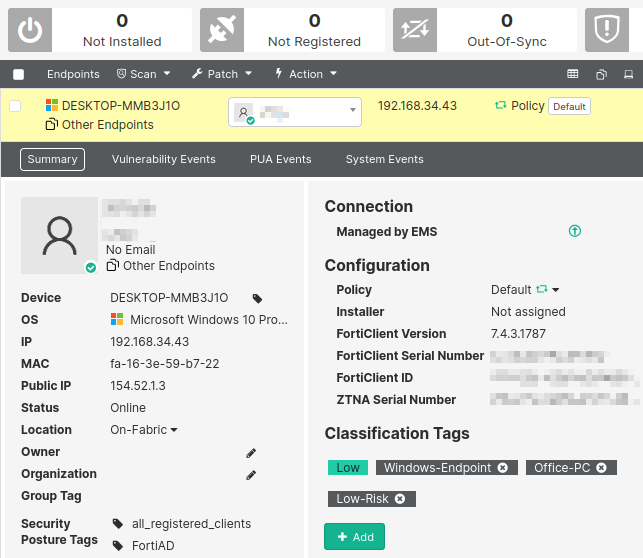
Select an endpoint to view its summary.
-
Under Classification Tags, click Add to add a new custom tag.
-
From Fabric & Connectors > Fabric Devices, find the FortiGate that requires the use of these tags.
-
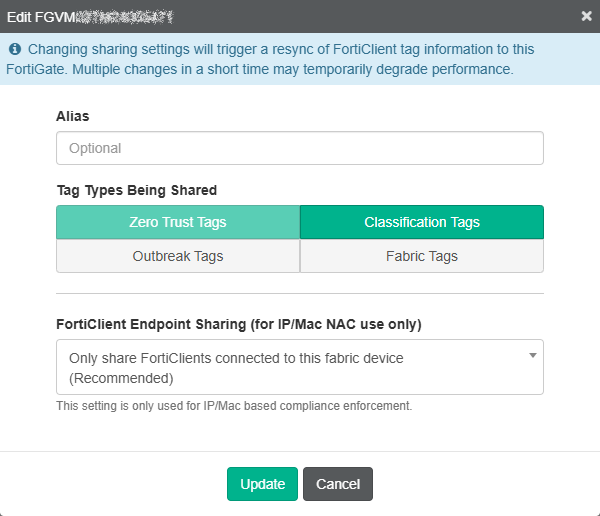
Click Edit to update its synchronization settings.
-
Under Tag Types Being Shared, select all types that apply. In this example, Classification Tags is selected in addition to the default Zero Trust Tags.
-
Click Update to save.
-
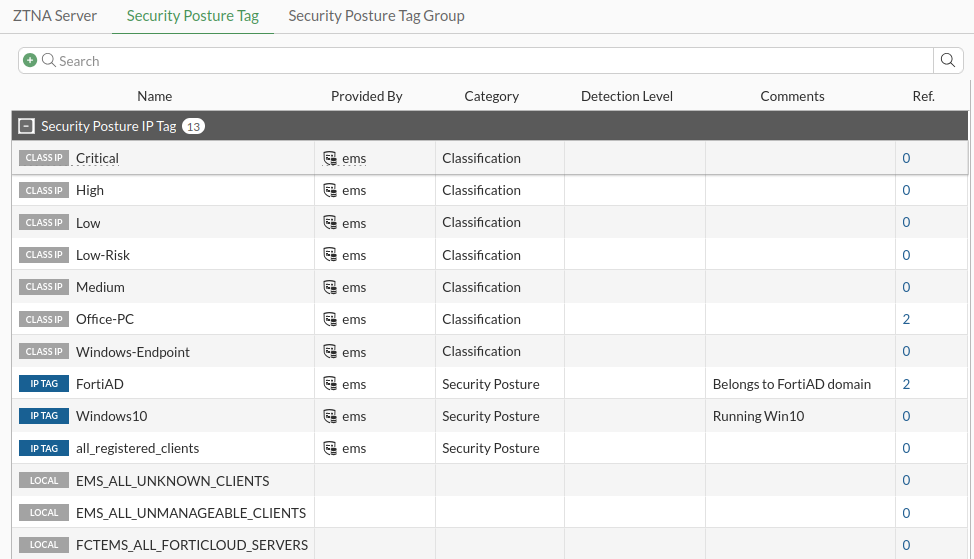
On the FortiGate, go to Policy & Objects > ZTNA. Switch to the Security Posture Tags tab.
Aside from the Security Posture type tags generated from tagging rules, Classification type tags are also retrieved.
IP versus MAC security posture tags
FortiOS utilizes security posture tags in ZTNA policies and standard firewall policies, however each policy type uses different information from within the tag.
ZTNA policy
ZTNA policies allow users to securely access resources through an encrypted access proxy. This simplifies remote access by reducing the need for remote access VPN and allowing only specific application access. ZTNA policies do not rely on the IP address or MAC address of the connecting clients. Instead, the aim of ZTNA is to provide device identification, user authentication, and role-based application access. This means that using an IP or MAC security posture tag will yield the same result.
Firewall policy
Firewall policies use ZTNA security posture tags in the source and destination fields to provide an additional factor for identification when implementing role-based zero trust access. This means that the tag address type (IP or MAC) is considered by the FortiGate and must be selected appropriately. These policies typically apply to local on-net users, and may also be used for remote users when paired with VPNs.

|
FortiGate will only learn the IP/MAC address information of directly connected FortiClient endpoints (for example, the gateway of the FortiClient). FortiGates may also learn the IP and MAC address for FortiClient endpoints that are directly connected to another FortiGate when EMS has been configured to share this tagging information with other FortiGates in a Security Fabric. See Configuring EMS to share tagging information with multiple FortiGates for more details. |
Using any versus all tags inside a ZTNA policy
When configuring the ZTNA policy to control access, the Security posture tags option can be set to Any or All:
-
When set to Any, an endpoint must satisfy only one of the defined security posture tags to pass this check.
-
When set to All, an endpoint must satisfy all of the defined security posture tags to pass this check.
Example 1: Using the Any of tag
-
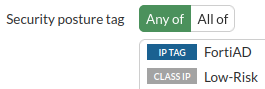
A simple ZTNA policy is configured where the Security posture tag is set to Any of, with the tags FortiAD and Low-Risk.
-
An endpoint with only the FortiAD tag connects.
-
The endpoint can connect to the server.
-
From the CLI, ZTNA logs indicate that the traffic was allowed.
# execute log filter field subtype ztna
# execute log display
…
2: date=2025-01-07 time=10:57:00 eventtime=1736276220378088305 tz="-0800" logid="0005000024" type="traffic" subtype="ztna" level="notice" vd="root" srcip=10.0.3.2 srcport=17322 srcintf="port3" srcintfrole="wan" dstcountry="Reserved" srccountry="Reserved" dstip=10.0.3.10 dstport=9043 dstintf="root" dstintfrole="undefined" sessionid=8876 srcuuid="b458a65a-f759-51ea-d7df-ef2e750026d1" service="tcp/9043" proxyapptype="http" proto=6 action="accept" policyid=17 policytype="policy" poluuid="8065fc36-cd28-51ef-cd5a-84f5ae253c13" policyname="ZTNA-webserver-allow" appcat="unscanned" duration=0 vip="ZTNA-webserver" accessproxy="ZTNA-webserver" clientdevicemanageable="unknown" clientcert="no" wanin=0 rcvdbyte=0 wanout=0 lanin=1764 sentbyte=1764 lanout=3049
Example 2: Using the All of tag
-
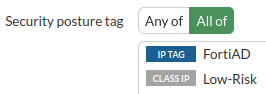
A simple ZTNA policy is configured where the Security posture tag is set to All of, with the tags FortiAD and Low-Risk.
-
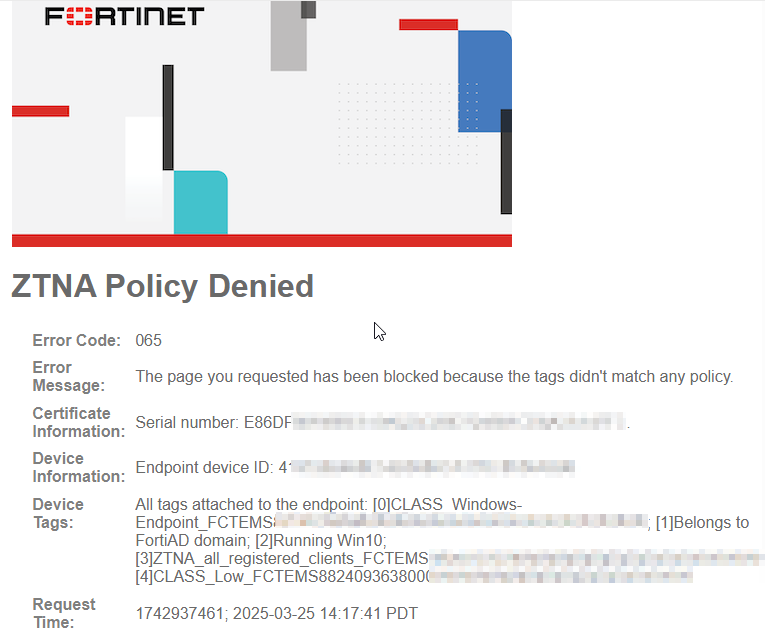
An endpoint with the following tags connects:
-
Low (this is a different tag than Low-Risk, the tag configured in the policy)
-
Windows-Endpoint
-
FortiAD
-
Windows10
-
all_registered_clients
-
-
It is unable to connect to the server, and a denied message appears.
-
From the CLI, ZTNA logs indicate that the implicit policy denied traffic. Tags are logged under
clientdevicetags, and it indicates the tags registered to the endpoint. Low-Risk is not associated with this endpoint.# execute log filter field subtype ztna # execute log display 5 logs found. 5 logs returned. 7: date=2025-03-25 time=14:17:42 eventtime=1742937461544682088 tz="-0700" logid="0005000024" type="traffic" subtype="ztna" level="notice" vd="root" srcip=192.168.34.43 srcport=56662 srcintf="port1" srcintfrole="undefined" dstcountry="Reserved" srccountry="Reserved" dstip=192.168.34.181 dstport=443 dstintf="root" dstintfrole="undefined" sessionid=2811 service="HTTPS" proxyapptype="http" proto=6 action="deny" policyid=0 policytype="policy" trandisp="dnat" tranip=192.168.34.181 tranport=443 appcat="unscanned" duration=0 vip="ZTNA-server" accessproxy="ZTNA-server" clientdeviceid="4197282468E54B0080CA170C8536A596" clientdevicemanageable="manageable" clientdeviceems="FCTEMS8824093638" clientdevicetags="CLASS_Windows-Endpoint/FortiAD/Windows10/all_registered_clients/CLASS_Low" clientcert="yes" emsconnection="online" msg="Traffic denied because failed to match a policy or proxy-policy" wanin=0 rcvdbyte=0 wanout=0 lanin=3710 sentbyte=3710 lanout=7061 fctuid="4197282468E54B0080CA170C8536A596" crscore=30 craction=13107 crlevel="high"