

Dialup IPsec VPN using custom TCP port
Dialup IPsec VPN traditionally relies on UDP but can now operate over TCP. This enhancement enables VPN traffic from FortiClient to traverse restrictive firewalls that only permit TCP-based traffic. You can configure an IPsec VPN tunnel to exclusively use UDP or TCP, or you can configure the tunnel automatically switch to TCP mode when the firewall blocks UDP.
In high-latency or congested networks, UDP-based VPN connections may suffer from packet loss or performance degradation. TCP, with its built-in error correction and retransmission mechanisms, enhances the reliability and stability of VPN connections in such environments.
Dialup IPsec over TCP is particularly advantageous in mobile or dynamic settings such as public WiFi, hotel networks, or cellular data where network conditions and restrictions often vary. This feature ensures more seamless and dependable VPN connectivity across a broader range of scenarios.

|
The custom TCP port functionality for IPsec is exclusively supported with IKE version 2 (IKEv2), and does not support NPU offloading. |
Example
In this example, FortiGate is configured as a dialup IPsec server using IKE version 2 (IKEv2) and operating on a custom TCP port (5500). IKEv2 is configured to use EAP for user authentication. The initial setup leverages the VPN wizard to create the dialup IPsec tunnel. After the tunnel is created by the wizard, you use the CLI to customize the IKE settings and enable the use of TCP port 5500.
On the client side, FortiClient is managed by FortiClient EMS and configured to act as the dialup IPsec client. The client is configured to connect to the FortiGate server over the custom TCP port 5500. This feature requires FortiClient 7.4.1 or later.
For a detailed description of the steps to configure FortiClient EMS to use the custom TCP port 5500 for IPsec VPN connections, see IPsec VPN over TCP.
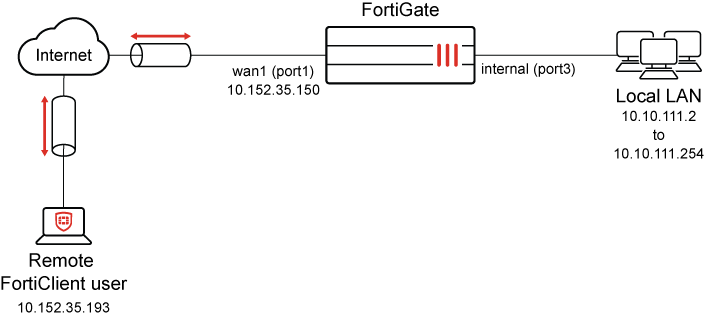
To configure FortiGate as IPsec dialup server using VPN Wizard:
-
Go to VPN > VPN Wizard, and enter the following:
Field
Value
Tunnel name
v2_psk-120
Select a template
Remote Access
-
Click Begin.
-
Under VPN Tunnel section, enter the following:
Field
Value
VPN client type
FortiClient
Authentication method
Pre-shared key
Pre-shared key
Enter suitable key
IKE
Version 2
Transport
Auto
This can be changed to TCP encapsulation in the CLI.
Use Fortinet encapsulation
Disable
The Fortinet propriety feature is designed to offload IPsec VPN traffic to Fortinet’s NP (Network Processor) ASICs to improve performance. This command enables or disables encapsulation of ESP (Encapsulating Security Payload) packets within non-standard TCP headers.
-
disable: Encapsulates ESP packets using standard TCP headers. This is the default option. -
enable: Encapsulates ESP packets using non-standard TCP headers.
This feature is not supported in the following scenarios:
-
When FortiGate is configured as Dialup IPsec VPN server for remote access when using FortiClient as dialup client.
-
In multi-vendor environments that use TCP encapsulation for ESP packets.
Make sure that this setting is disabled for these two scenarios to ensure uninterrupted ESP packet flow encapsulated within real TCP headers.
NAT traversal
Enable
Keepalive frequency
10
EAP peer identification
EAP identity request
User authentication method
Phase 1 interface
Use dropdown to select user group IPSEC. To configure user groups for authentication, see User groups.
(Optional) To use multiple user groups, select Inherit from policy. See Using single or multiple user groups for user authentication for details.
DNS Server
Specify
Server IP
8.8.8.8
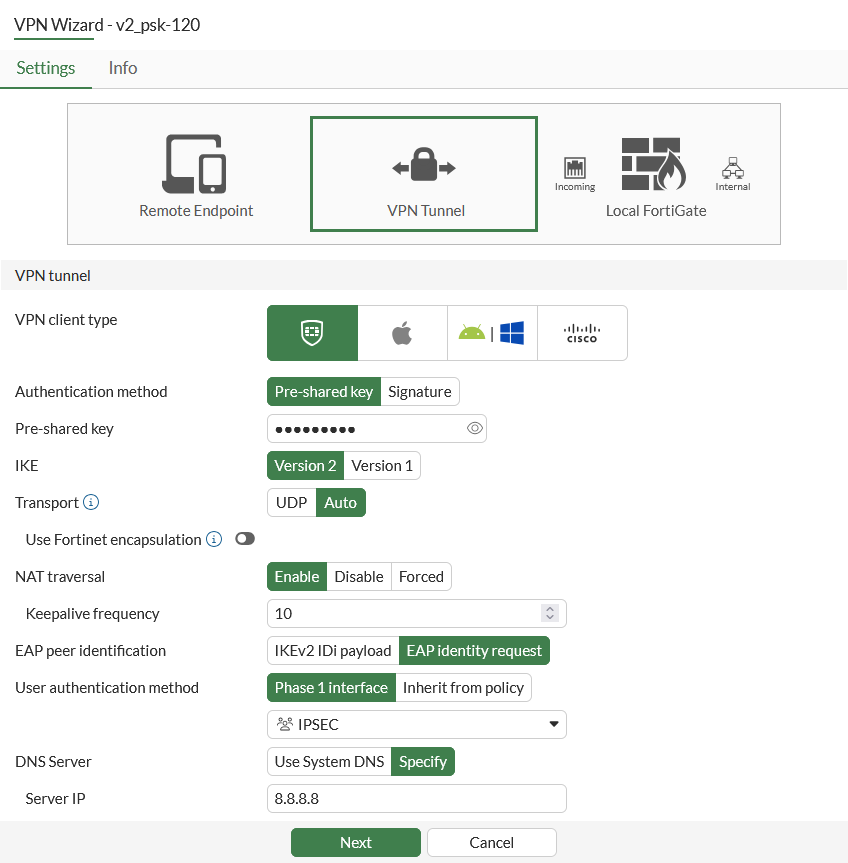
-
-
Click Next.
-
Under Remote Endpoint section, enter the following:
Field
Value
Address to assign to connected endpoints
9.5.6.7-9.5.6.70
Subnet for connected endpoints
255.255.255.255
FortiClient settings
Security posture gateway matching
Disable
EMS SN verification
Disable
Save password
Enable
Auto Connect
Enable
Always up (keep alive)
Enable
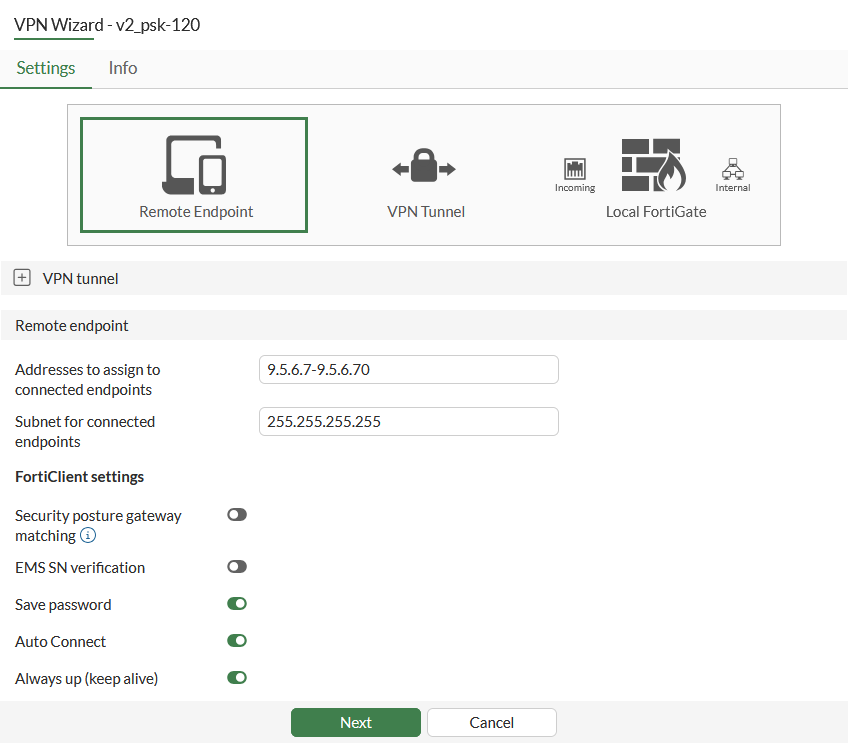
-
Click Next.
-
Under Local FortiGate section, enter the following:
Field
Value
Incoming interface that binds to tunnel
wan1(port1)
Create and add interface to Zone
Enable
Local interface
internal (port3)
Local Address
internal network
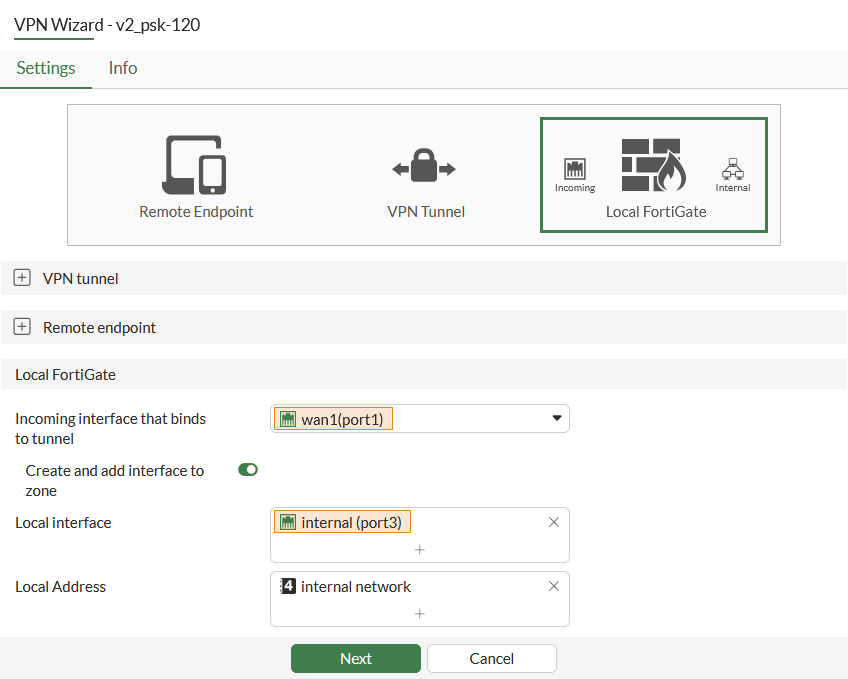
-
Click Next.
-
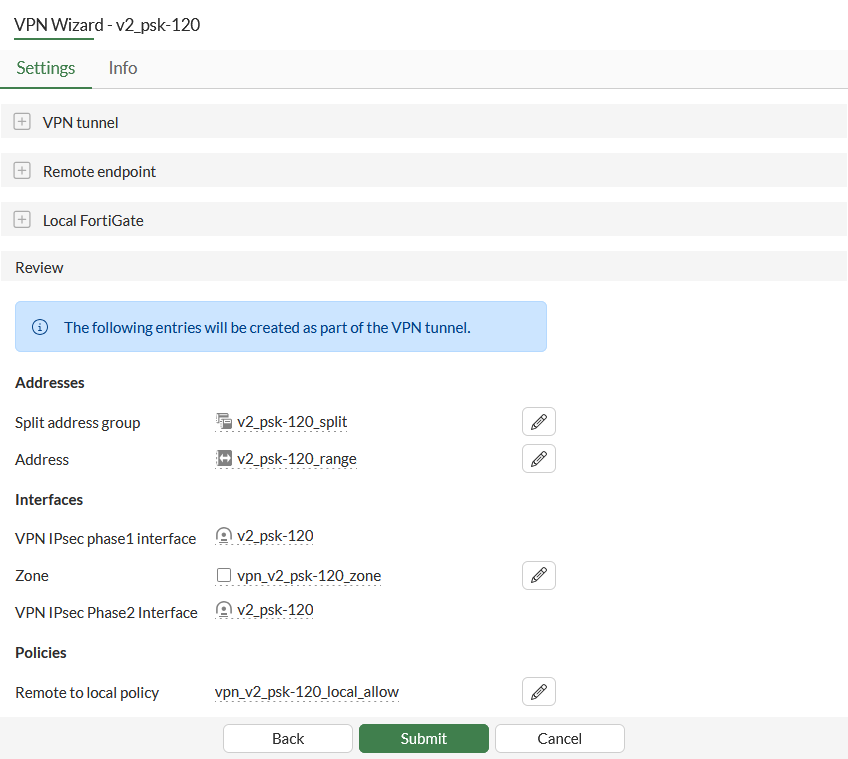
Under Review section, review the configuration pending configuration by the wizard.
-
Click Submit.
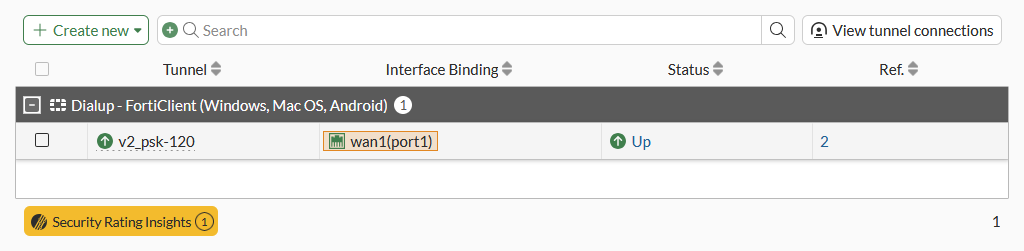
The tunnel is configured and visible under VPN > VPN Tunnels.
-
Change the transport protocol to TCP encapsulation in the CLI:
config vpn ipsec phase1-interface
    edit "v2_psk-120"
        set transport tcp
    next
end
To configure FortiGate as IPsec dialup server using the CLI:
-
Configure a local user:
config user local edit "ipsec" set type password set passwd ***** next end -
Configure a local user group:
config user group edit "IPSEC" set member "ipsec" next end -
Configure the internal interface and its address group.
The internal interface connects to the corporate internal network. Traffic from this interface routes out the IPsec VPN tunnel. Creating an address group for the protected network behind this FortiGate causes traffic to this network group to go through the IPsec tunnel.
config system interface edit "port3" set vdom "root" set ip 10.100.55.1 255.255.255.0 set type physical set alias "internal" next end config firewall address edit "internal network" set subnet 10.10.111.0 255.255.255.0 next end config firewall addrgrp edit "v2_psk-120_split" set member "internal network" next end -
Configure the WAN interface and default route.
The WAN interface is the interface connected to the ISP and it is recommended to configure it with a static IP address to ensure that the IPsec VPN configuration on the branch stays unchanged if the WAN IP changes on the HQ. The IPsec tunnel is established over the WAN interface.
config system interface edit "port1" set vdom "root" set ip 10.152.35.150 255.255.255.0 set type physical set alias "wan1" next end config router static edit 1 set gateway 10.152.35.151 set device "port1" next end -
Configure IPsec Phase 1 interface:
config vpn ipsec phase1-interface
    edit "v2_psk-120"
        set type dynamic
        set interface "port1"
        set ike-version 2
        set peertype any
        set net-device disable
        set mode-cfg enable
        set ipv4-dns-server1 8.8.8.8
        set proposal aes128-sha256 aes256-sha256 aes128gcm-prfsha256 aes256gcm-prfsha384 chacha20poly1305-prfsha256
        set dhgrp 20 21
        set eap enable
        set eap-identity send-request
        set authusrgrp "IPSEC"
        set transport tcp
        set fortinet-esp disable
        set ipv4-start-ip 9.5.6.7
        set ipv4-end-ip 9.5.6.70
        set ipv4-split-include "v2_psk-120_split"
        set save-password enable
        set client-auto-negotiate enable
        set client-keep-alive enable
        set psksecret *******
    next
end
One or more user groups for user authentication can be configured under a single IPsec VPN tunnel. See Using single or multiple user groups for user authentication for details.
-
Configure IPsec Phase 2 interface:
config vpn ipsec phase2-interface edit "v2_psk-120" set phase1name "v2_psk-120" set proposal aes128-sha1 aes256-sha1 aes128-sha256 aes256-sha256 aes128gcm aes256gcm chacha20poly1305 set dhgrp 20 21 next end -
Configure firewall policies to allow traffic from IPsec tunnel to internal network:
config firewall policy
    edit 1
        set name "vpn_v2_psk-120_local_allow"
        set srcintf "vpn_v2_psk-120_zone"
        set dstintf "port3"
        set action accept
        set srcaddr "v2_psk-120_range"
        set dstaddr "internal network"
        set schedule "always"
        set service "ALL"
        set nat enable
    next
end
To view and modify the TCP port used by IKEv2 using the CLI:
-
On the top-right corner of the FortiGate GUI, click the _> icon to open a CLI console.
For other methods to connect to CLI, see Connecting to the CLI.
-
Enter the following command to see the default TCP IKE port used by FortiGate:
show full-configuration system settings | grep ike-tcp
    set ike-tcp-port 443
Notice the setting
ike-tcp-portset to443by default. -
Use the following commands to modify the default TCP port to use a custom port 5500:
config system settings
    set ike-tcp-port 5500
end
ike-tcp-port <port>
Set the TCP port for IKE/IPsec traffic (1 - 65535, default = 443).
When using TCP port 443 for IKE/IPsec traffic, GUI access can be affected for interfaces that are bound to an IPsec tunnel when the GUI admin port is also using port 443. To ensure continued functionality, change either the IKE/IPsec port or the administrative access port.
To change the administrative access port:
config system global
    set admin-sport <port>
end
admin-sport <port>
Set the administrative access port for HTTPS (1 - 65535, default = 443).
For port conflicts with ZTNA and Agentless VPN, ZTNA and Agentless VPN will take precedence. To avoid any port conflicts with other services, review the FortiOS Ports guide for other incoming ports used on the FortiGate.
To verify the VPN connection:
-
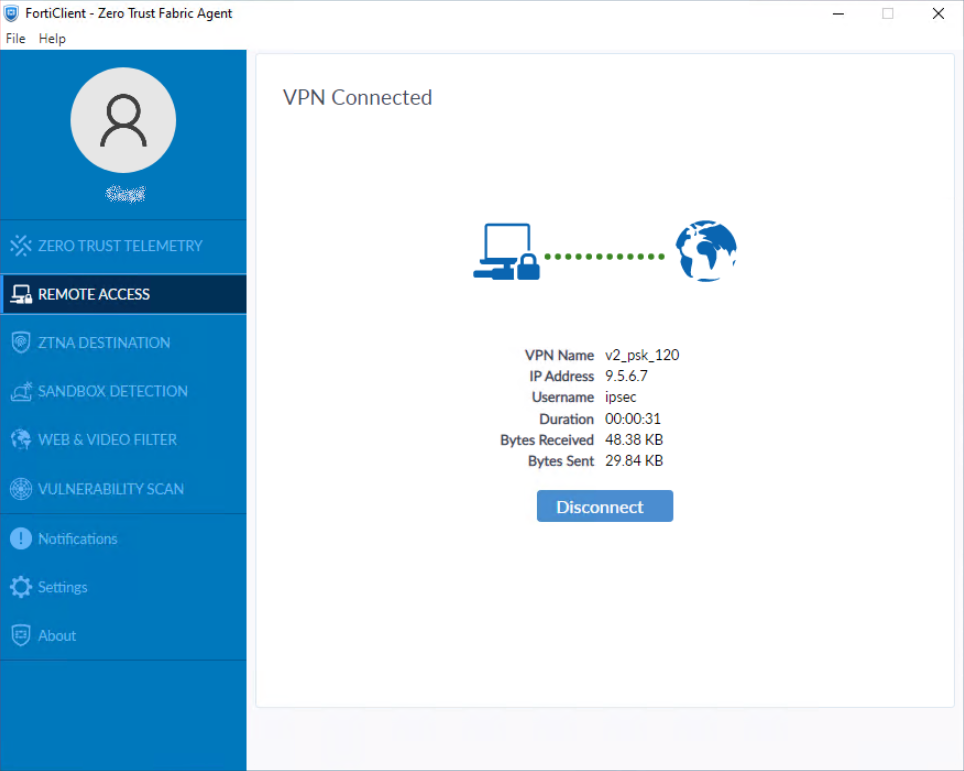
Using FortiClient, connect to the IPsec VPN gateway.
-
On FortiGate, run
diagnose vpn ike gateway listto verify the IPsec VPN tunnel status.Note that
addrshows the custom TCP port value, andtransportshowsTCP:vd: root/0 name: v2_psk-120_0 version: 2 interface: port1 3 addr: 10.152.35.150:5500 -> 10.152.35.193:54854 tun_id: 9.5.6.7/::10.0.0.23 remote_location: 0.0.0.0 network-id: 0 transport: TCP virtual-interface-addr: 169.254.1.1 -> 169.254.1.1 created: 592s ago eap-user: ipsec 2FA: no peer-id: 120 peer-id-auth: no FortiClient UID: B70BAD123010487E86DB102969115E99 assigned IPv4 address: 9.5.6.7/255.255.255.255 nat: me peer pending-queue: 0 PPK: no IKE SA: created 1/1 established 1/1 time 80/80/80 ms IPsec SA: created 1/1 established 1/1 time 0/0/0 ms id/spi: 23 93b6803bff7cff00/f89d6f9965fbf3a7 direction: responder status: established 592-592s ago = 80ms proposal: aes256-sha256 child: no SK_ei: f93108f3f8d9a94e-3e0a78289defb329-4d1ae67365f2cb56-e0d471a57ccb4f8d SK_er: 58b37cf4d2e96cb3-cb7e334a48905459-ac8e4ff743c86e5c-630454f2e35b97e6 SK_ai: fc83b139808121a2-1dd68396d804e28d-bd619c0c4778dbda-9a1eb9e6fdf13808 SK_ar: edad89ee56bf9ecc-81443426c00c78f5-0574d6b71163a43b-d9ebf04c3ae4b87f PPK: no message-id sent/recv: 0/124 QKD: no lifetime/rekey: 86400/85537 DPD sent/recv: 00000000/00000000 peer-id: 120
-
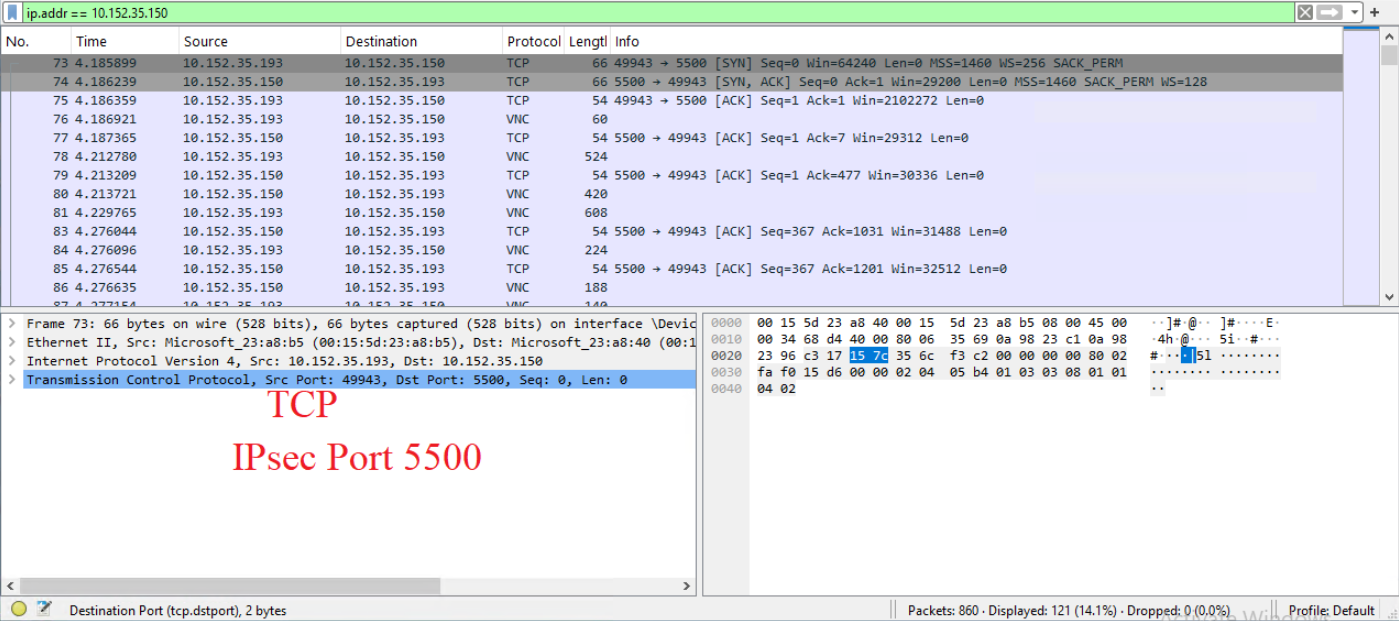
Run a packet capture using the packet capture tool on FortiGate GUI under Network > Diagnostic tab for wan1(port1) interface with TCP port number 5500.
For more information, see Using the packet capture tool.
-
(Optional) Run the packet capture using the following command:
diagnose sniffer packet wan1 “port 5500” 4 0 l.
For more information, see Performing a sniffer trace or packet capture.

|
Because there is no NP offloading for the RFC compliant version of IPsec over TCP, its performance is lower than standard ESP and ESP over UDP, which fully utilizes NP offloading to accelerate the performance. When picking the transport, it is recommended to configure auto, which allows clients to select the transport automatically, preferring UDP over TCP. |