
Fortinet white logo
Fortinet white logo

Administration Guide

Security rating visibility

Security rating visibility

Security ratings tests that are not relevant can be hidden, streamlining the user experience by displaying only pertinent information.

A Security Fabric is not required for this feature. If multiple FortiGates are in a Security Fabric, hidden security ratings can be synchronized from the root FortiGate device to downstream FortiGate devices, or overridden locally on the downstream devices.

To disable showing a security rating control in the default report:
  1. Go to Security Fabric > Security Rating.

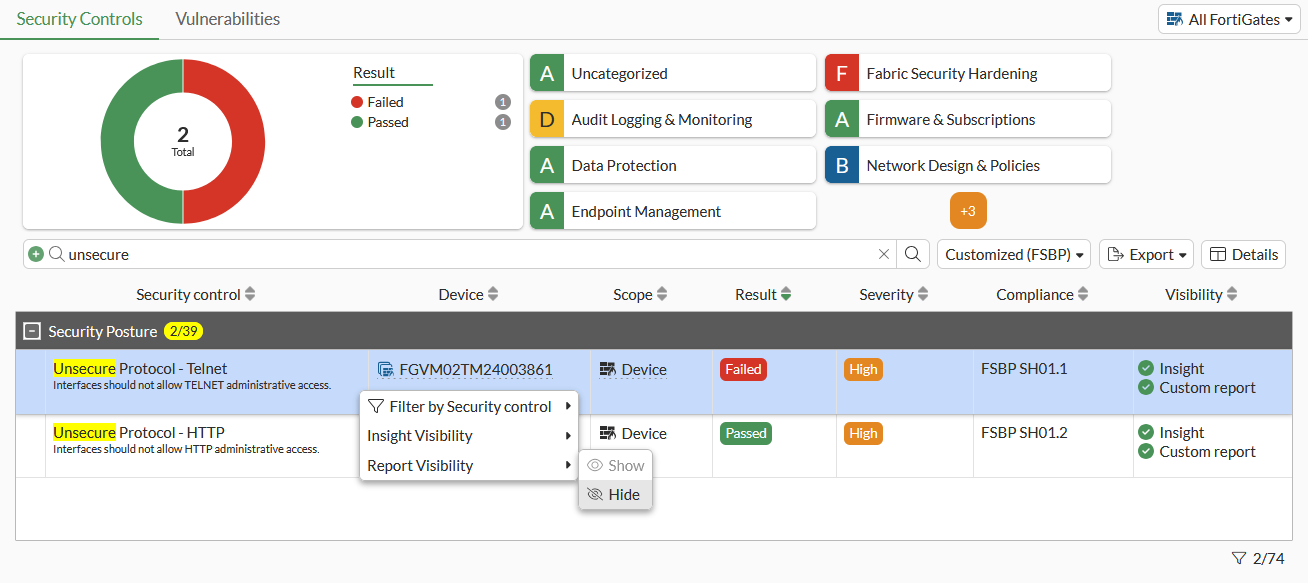
  2. Find Unsecure Protocol - Telnet in the table, right-click on it, and select Report Visibility > Hide.
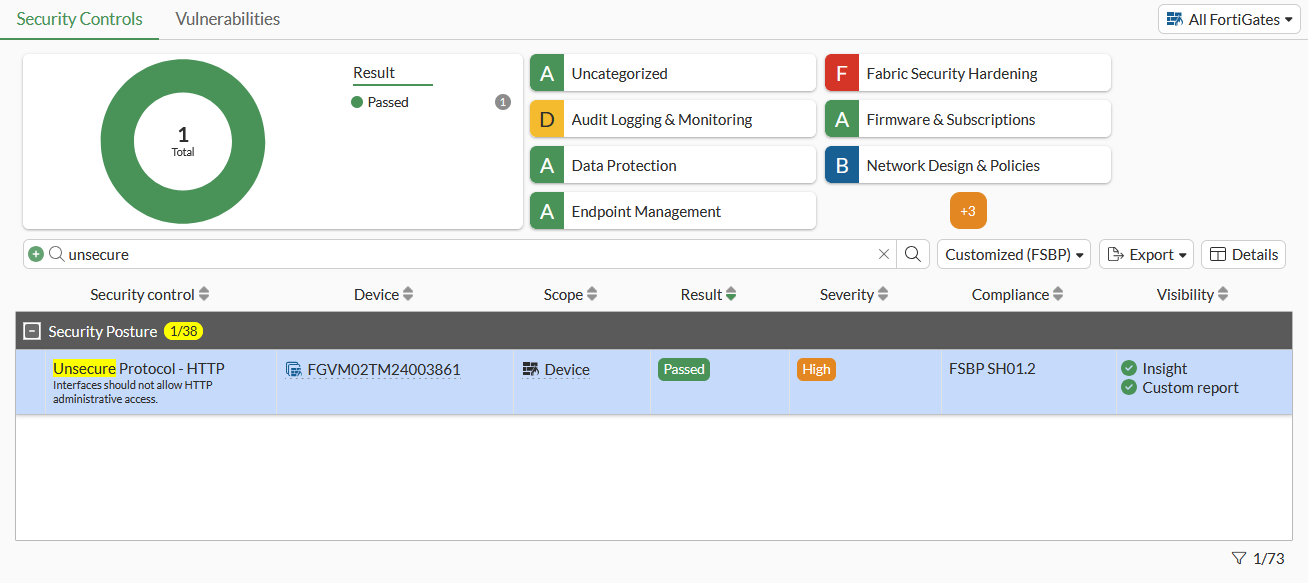
    The Unsecure Protocol - Telnet control is no longer shown in the list.
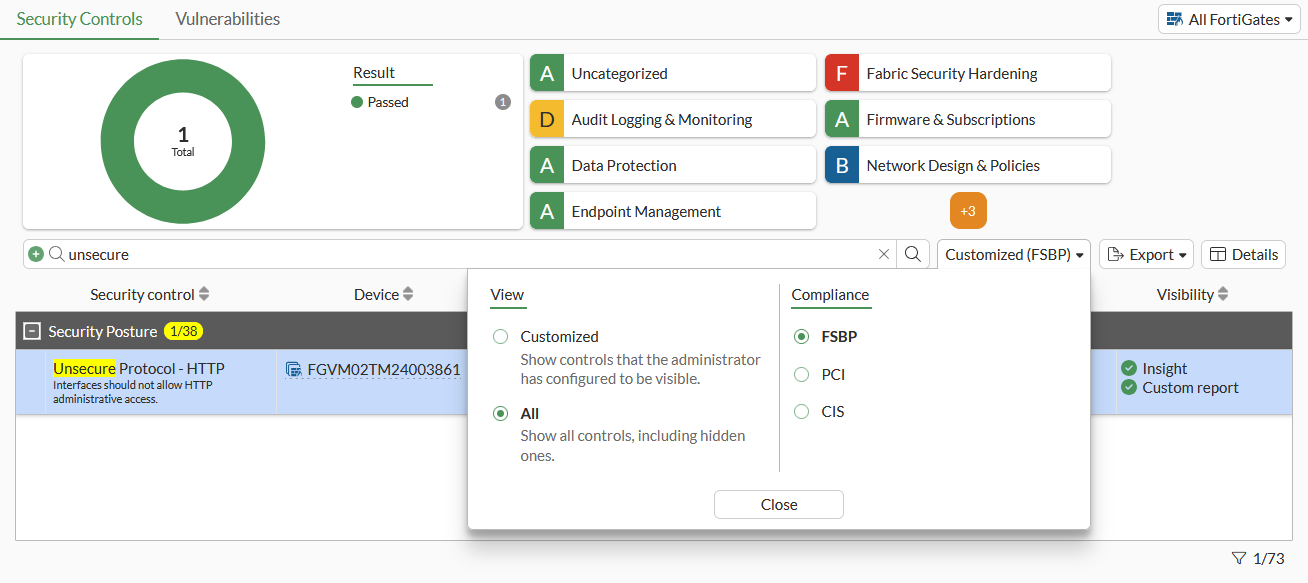
  3. Change the View to All to show the Unsecure Protocol - Telnet control in the table when Report Visibility is set to Hide.
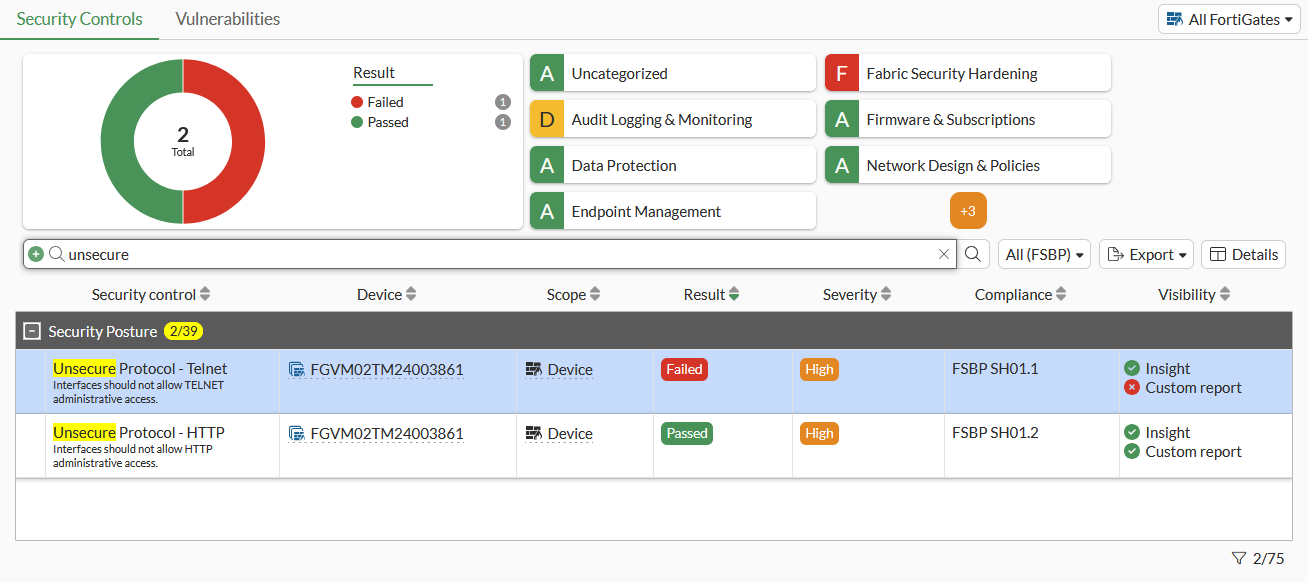
    All hidden controls are then shown in the table.
Note

The Visibility column is not shown by default. Edit the column settings to show it in the table. See Column settings for details.

To disable showing a security rating control as an insight across the GUI:
  1. Go to Network > Interfaces.

  2. Edit an interface to enable TELNET administrative access.

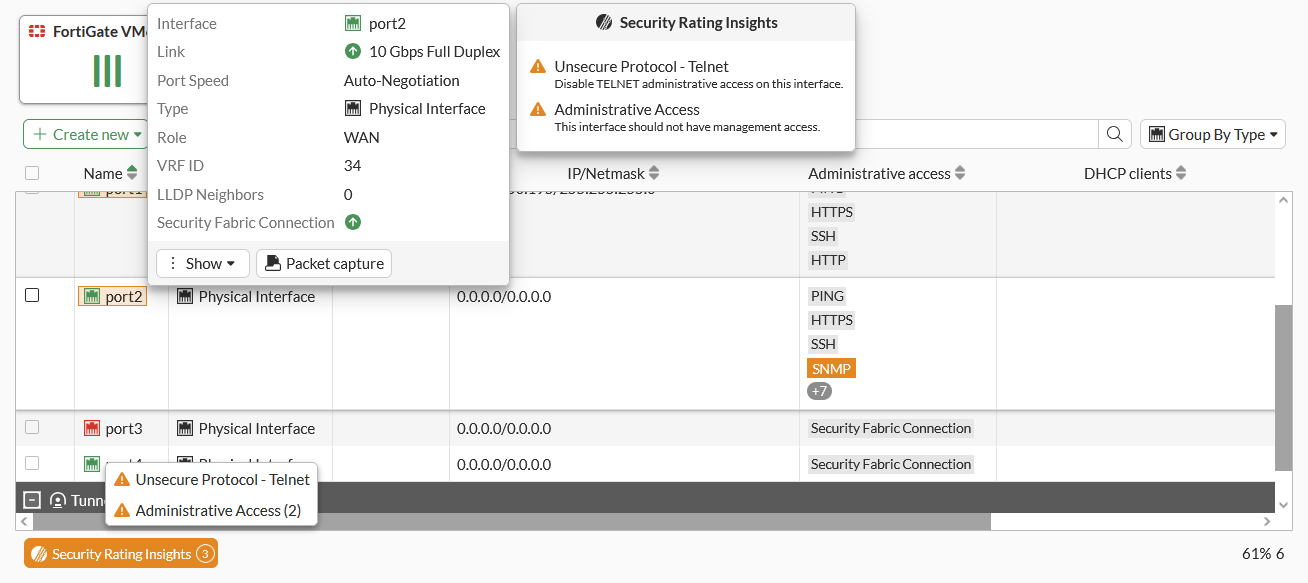
  3. Click on the Security Rating Insights, or hover over the interface name to see the Unsecure Protocol - Telnet warning.

  4. Go to Security Fabric > Security Rating.

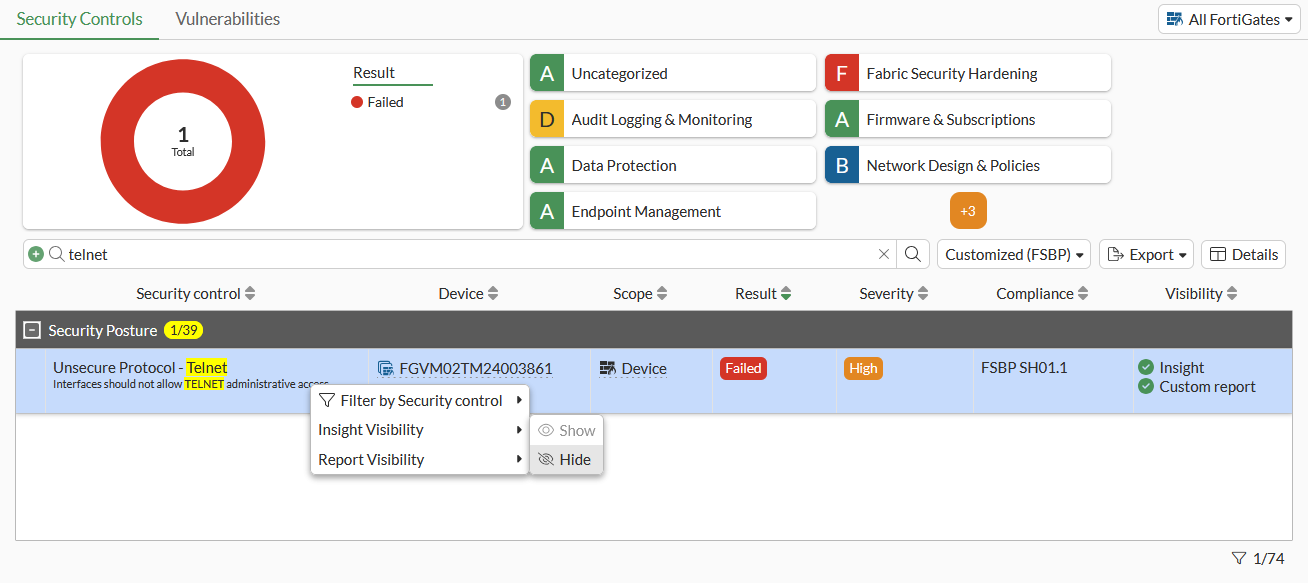
  5. Find Unsecure Protocol - Telnet in the table, right-click on it, and select Insight Visibility > Hide.

  6. Go to Network > Interfaces.

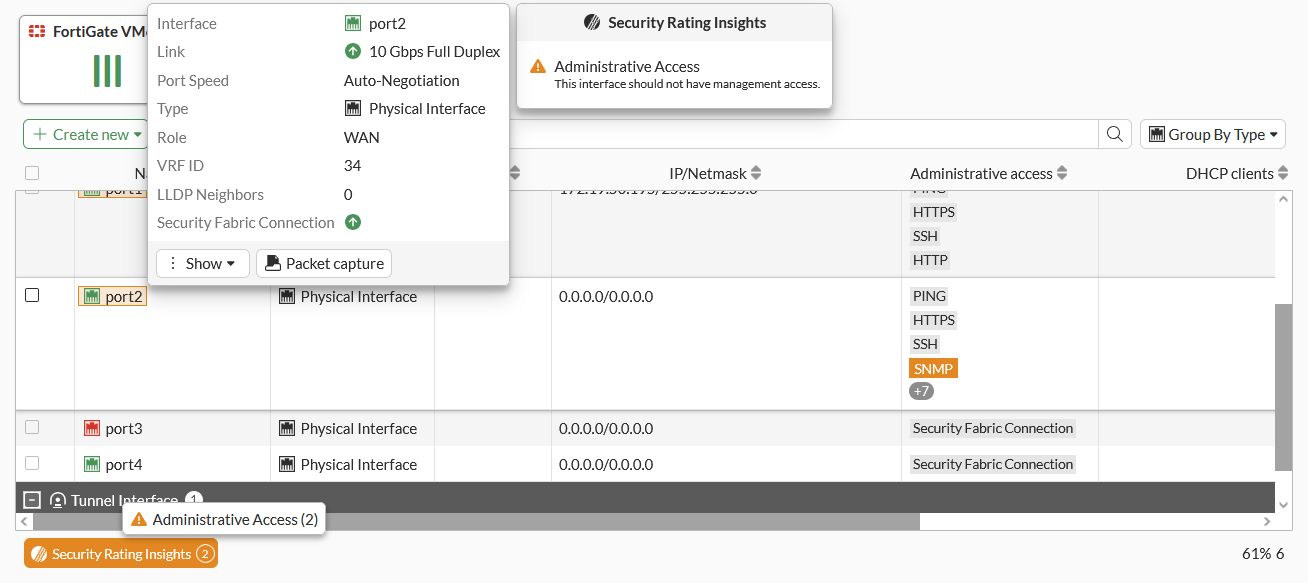
  7. Click on the Security Rating Insights, or hover over the interface name to see that the Unsecure Protocol - Telnet warning is no longer shown.

To configure security rating control in the CLI:
config system security-rating controls
   edit <control name>
      set display-report {enable | disable}
      set display-insight {enable | disable}
    next
end

Variable

Description

display-report {enable | disable}

Enable/disable displaying the Security Rating control in the default report (default = enable).

display-insight {enable | disable}

Enable/disable displaying the Security Rating control as an insight across the GUI (default = enable).

Note

Security rating control names are hidden in the CLI until they are configured.

To configure synchronizing security rating visibility settings on downstream devices in a Security Fabric:
config system csf
    set configuration-sync {default | local}
end
config system security-rating settings
    set override-sync {enable | disable}
end

Variable

Description

configuration-sync {default | local}

Configuration sync mode.

  • default: Synchronize configuration for IPAM, FortiAnalyzer, FortiSandbox, and Central Management to root node (default).

  • local: Do not synchronize configuration with root node.

override-sync {enable | disable}

Enable/disable overriding Security Rating control settings that are synchronized from the Security Fabric's root FortiGate (default = disable).

When configuration-sync is set to local, the system security-rating settings command is not available.

Security rating visibility

Security rating visibility

Security ratings tests that are not relevant can be hidden, streamlining the user experience by displaying only pertinent information.

A Security Fabric is not required for this feature. If multiple FortiGates are in a Security Fabric, hidden security ratings can be synchronized from the root FortiGate device to downstream FortiGate devices, or overridden locally on the downstream devices.

To disable showing a security rating control in the default report:
  1. Go to Security Fabric > Security Rating.

  2. Find Unsecure Protocol - Telnet in the table, right-click on it, and select Report Visibility > Hide.

    The Unsecure Protocol - Telnet control is no longer shown in the list.

  3. Change the View to All to show the Unsecure Protocol - Telnet control in the table when Report Visibility is set to Hide.

    All hidden controls are then shown in the table.

Note

The Visibility column is not shown by default. Edit the column settings to show it in the table. See Column settings for details.

To disable showing a security rating control as an insight across the GUI:
  1. Go to Network > Interfaces.

  2. Edit an interface to enable TELNET administrative access.

  3. Click on the Security Rating Insights, or hover over the interface name to see the Unsecure Protocol - Telnet warning.
  4. Go to Security Fabric > Security Rating.

  5. Find Unsecure Protocol - Telnet in the table, right-click on it, and select Insight Visibility > Hide.
  6. Go to Network > Interfaces.

  7. Click on the Security Rating Insights, or hover over the interface name to see that the Unsecure Protocol - Telnet warning is no longer shown.
To configure security rating control in the CLI:
config system security-rating controls
   edit <control name>
      set display-report {enable | disable}
      set display-insight {enable | disable}
    next
end

Variable

Description

display-report {enable | disable}

Enable/disable displaying the Security Rating control in the default report (default = enable).

display-insight {enable | disable}

Enable/disable displaying the Security Rating control as an insight across the GUI (default = enable).

Note

Security rating control names are hidden in the CLI until they are configured.

To configure synchronizing security rating visibility settings on downstream devices in a Security Fabric:
config system csf
    set configuration-sync {default | local}
end
config system security-rating settings
    set override-sync {enable | disable}
end

Variable

Description

configuration-sync {default | local}

Configuration sync mode.

  • default: Synchronize configuration for IPAM, FortiAnalyzer, FortiSandbox, and Central Management to root node (default).

  • local: Do not synchronize configuration with root node.

override-sync {enable | disable}

Enable/disable overriding Security Rating control settings that are synchronized from the Security Fabric's root FortiGate (default = disable).

When configuration-sync is set to local, the system security-rating settings command is not available.