

Block HTTPS upload traffic that includes credit card information
This configuration will block HTTPS upload traffic that includes credit card information. The predefined data type for credit card is used in the dictionary.
To block HTTPS upload traffic that includes credit card information in the GUI:
-
Configure the DLP dictionary:
-
Go to Security Profiles > Data Loss Prevention, select the Dictionary tab, and click Create New.
-
Enter a name (dic-case1).
-
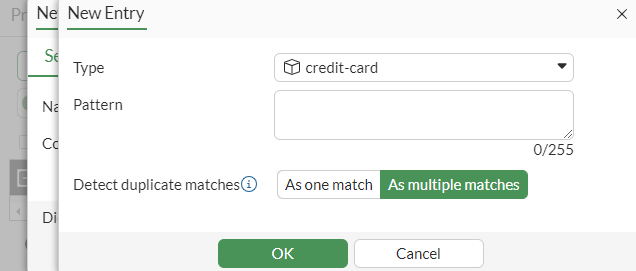
In the Dictionary Entries section, click Create New.
-
Set the Type to credit-card and click OK.
-
Click OK.
-
Click OK to save the dictionary.
-
-
Configure the DLP sensor:
-
Go to Security Profiles > Data Loss Prevention, select the Sensor tab, and click Create New.
-
Enter a name (sensor-case1).
-
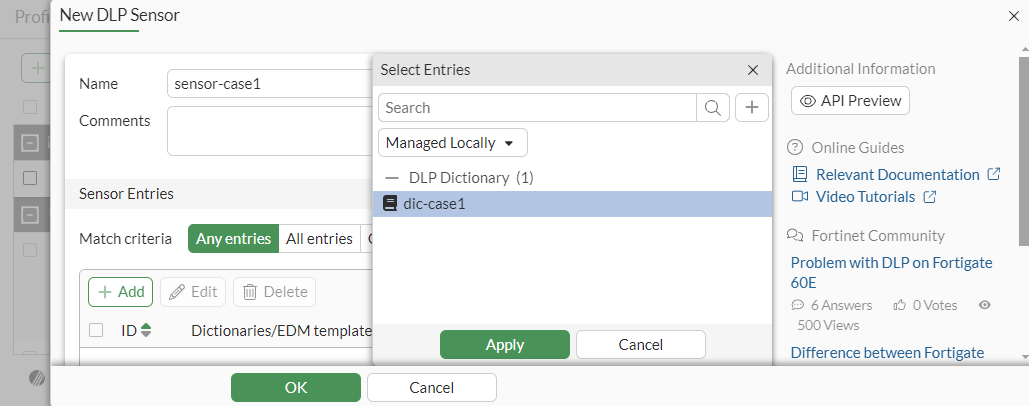
In the Sensor Entries section, click Add. The Select Entries pane is displayed.
-
Select Managed Locally from the dropdown menu.
-
Select dic-case1 and click Apply.
-
Click Apply.
-
Click OK to save the sensor.
-
-
Configure the DLP profile:
-
Go to Security Profiles > Data Loss Prevention, select the Profile tab, and click Create New.
-
Enter a name (profile-case1).
-
In the Rules section, click Create New.
-
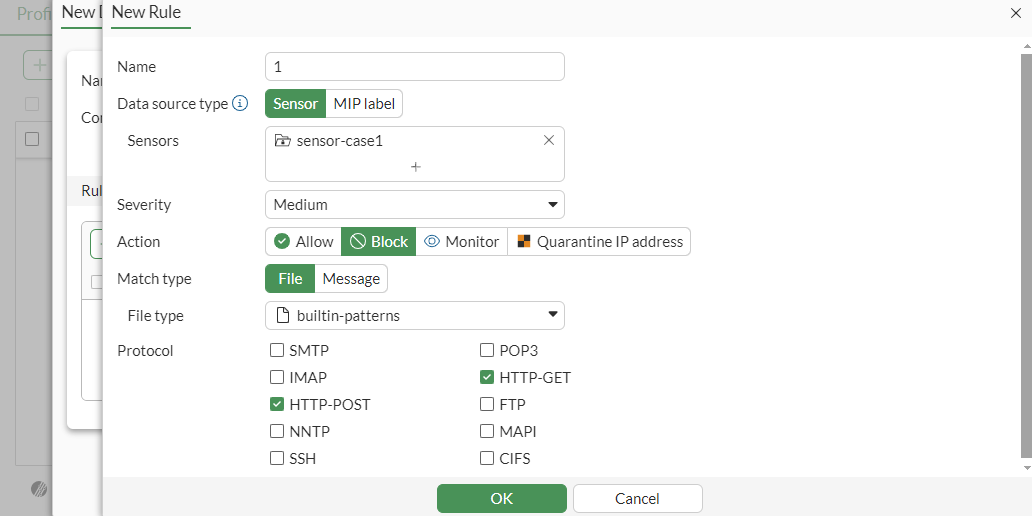
Configure the following settings:
Name
1
Sensors
sensor-case1
Severity
Medium
Action
Block
Type
File
File type
builtin-patterns
Protocol
HTTP-POST, HTTP-GET
-
Click OK.
-
Click OK to save the profile.
-
-
Add the DLP profile to a firewall policy:
-
Go to Policy & Objects > Firewall Policy and click Create New.
-
Set the Inspection Mode to Proxy-based.
-
In the Security Profiles section, enable DLP Profile and select profile-case1.
-
Configure the other settings as needed.
-
Click OK.
When a credit card is included in HTTP POST traffic, the file is blocked and a DLP log is generated.
-
To block HTTPS upload traffic that includes credit card information in the CLI:
-
Configure the DLP dictionary:
config dlp dictionary edit "dic-case1" config entries edit 1 set type "credit-card" next end next end -
Configure the DLP sensor:
config dlp sensor edit "sensor-case1" config entries edit 1 set dictionary "dic-case1" next end next end -
Configure the DLP profile:
config dlp profile edit "profile-case1" set feature-set proxy config rule edit 1 set name "1" set proto http-get http-post set filter-by sensor set file-type 1 set sensor "sensor-case1" set action block next end next end -
Add the DLP profile to a firewall policy:
config firewall policy
    edit 1
        set srcintf "port2"
        set dstintf "port1"
        set action accept
        set srcaddr "all"
        set dstaddr "all"
        set srcaddr6 "all"
        set dstaddr6 "all"
        set schedule "always"
        set service "ALL"
        set utm-status enable
        set inspection-mode proxy
        set profile-protocol-options "protocol"
        set ssl-ssh-profile "protocols"
        set dlp-profile "profile-case1"
        set nat enable
    next
end
When a credit card is included in HTTP POST traffic, a replacement message appears because it is blocked. A DLP log is generated.
Sample log
From Windows, the following command below can be used to generate a sample log, using the cURL tool to post data, which contains a sample credit card number. See sample-data for sample credit card numbers.
# curl –k -d 4024007149133315 https://172.16.200.55/card.doc -o?

1: date=2022-10-26 time=11:25:01 eventtime=1666808700281057923 tz="-0700" logid="0954024576" type="utm" subtype="dlp" eventtype="dlp" level="warning" vd="root" ruleid=1 rulename="1" dlpextra="builtin-patterns;sensor-case1" filtertype="sensor" filtercat="file" severity="medium" policyid=1 poluuid="891a526a-51cd-51ed-577a-6505bec88af9" policytype="policy" sessionid=3905 epoch=2143297701 eventid=0 srcip=10.1.100.11 srcport=40370 srccountry="Reserved" srcintf="port2" srcintfrole="undefined" srcuuid="502d2c8e-51cd-51ed-a24e-a091f4ff6fed" dstip=172.16.200.55 dstport=443 dstcountry="Reserved" dstintf="port1" dstintfrole="undefined" dstuuid="502d2c8e-51cd-51ed-a24e-a091f4ff6fed" proto=6 service="HTTPS" filetype="msoffice" direction="outgoing" action="block" hostname="172.16.200.55" url="https://172.16.200.55/card.doc" agent="curl/7.83.1" httpmethod="POST" filename="card.doc" filesize=108 profile="profile-case1"