
Fortinet white logo
Fortinet white logo

Administration Guide

Port enforcement check

Port enforcement check

Most networking applications run on specific ports. For example, SSH runs on port 22, and Facebook runs on ports 80 and 443.

If the default network service is enabled in the application control profile, the IPS engine performs a check at the application profile level, and any detected application signatures running on the non-standard TCP/IP port are blocked. This means that each allowed application runs on its default port.

Default ports for network services are defined by FortiGuard. See Application Control Service.

In the following example, an application sensor is configured to enforce FTP on port 21.

To configure port enforcement check in the GUI:
  1. Go to Security Profiles > Application Control.

  2. Create a new application sensor or edit an existing one.

  3. In Options, enable Block applications detected on non-default ports.
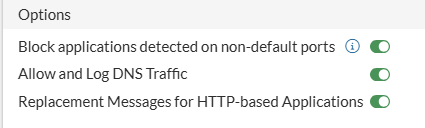
  4. In Application and Filter Overrides, you can configure actions for individual applications, overriding the action configured for their category.

    1. Click Create New.

    2. Select the desired action from the dropdown list in the upper left corner. For example, select Allow.

      Note

      When an application is configured with an action of Monitor or Allow, when its traffic is detected on non-standard ports (as defined in FortiGuard application signatures) then the application will be blocked. An application configured with an action of Block will have its traffic blocked regardless of the port its traffic is detected on.

    3. Select the desired applications. For example, select FTP.

    4. Click OK. The entries are displayed in a table.

  5. Click OK.

To configure port enforcement check in the CLI:
config application list
    edit <name>
        set enforce-default-app-port enable
        config entries
            edit 1
                set application 15896
                set action pass
            next
        end
    next
end

With the above GUI or CLI configuration, FTP traffic (application 15896 in the CLI) with the standard port (port 21) is allowed, while a non-standard port (port 2121) is blocked.

Port enforcement check

Port enforcement check

Most networking applications run on specific ports. For example, SSH runs on port 22, and Facebook runs on ports 80 and 443.

If the default network service is enabled in the application control profile, the IPS engine performs a check at the application profile level, and any detected application signatures running on the non-standard TCP/IP port are blocked. This means that each allowed application runs on its default port.

Default ports for network services are defined by FortiGuard. See Application Control Service.

In the following example, an application sensor is configured to enforce FTP on port 21.

To configure port enforcement check in the GUI:
  1. Go to Security Profiles > Application Control.

  2. Create a new application sensor or edit an existing one.

  3. In Options, enable Block applications detected on non-default ports.

  4. In Application and Filter Overrides, you can configure actions for individual applications, overriding the action configured for their category.

    1. Click Create New.

    2. Select the desired action from the dropdown list in the upper left corner. For example, select Allow.

      Note

      When an application is configured with an action of Monitor or Allow, when its traffic is detected on non-standard ports (as defined in FortiGuard application signatures) then the application will be blocked. An application configured with an action of Block will have its traffic blocked regardless of the port its traffic is detected on.

    3. Select the desired applications. For example, select FTP.

    4. Click OK. The entries are displayed in a table.

  5. Click OK.

To configure port enforcement check in the CLI:
config application list
    edit <name>
        set enforce-default-app-port enable
        config entries
            edit 1
                set application 15896
                set action pass
            next
        end
    next
end

With the above GUI or CLI configuration, FTP traffic (application 15896 in the CLI) with the standard port (port 21) is allowed, while a non-standard port (port 2121) is blocked.