
Fortinet white logo
Fortinet white logo

Administration Guide

Hub learns egress shaping value from spoke over IKE

Hub learns egress shaping value from spoke over IKE

With peer egress shaping for IPsec tunnels enabled, IKE bandwidth negotiation is used for traffic shaping. This configuration is useful for speed tests of large-scale SD-WAN deployments with thousands of sites using diverse connections (4G/5G, satellite, broadband).

A static configuration of per-tunnel egress shaping values on spokes is automatically communicated to hubs during IKEv2 negotiation. The hub then immediately applies persistent policing based on these spoke-defined values, ensuring consistent QoS without performance overhead for variable-connectivity scenarios.

config vpn ipsec phase1-interface
    edit <tunnel_name>
        set ike-version 2
        set peer-egress-shaping {enable | disable}
        set peer-egress-shaping-value <integer>  
    next
end

Command

Description

peer-egress-shaping {enable | disable}

Enable/disable peer egress shaping.

peer-egress-shaping-value <integer>

Configure outbound bandwidth to use for peer egress shaping, in kbps (0 - 80000000, default = 0).

Example

In this hub and spoke example, a peer-egress-shaping-value is configured on the spoke, and the hub learns the value through IKE negotiations. Subsequently, the hub applies the shaping value to its shaping profile, which enforces egress traffic policing on the overlay tunnel to the spoke.
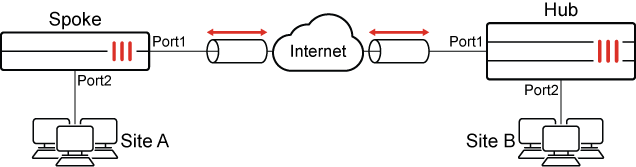
The IP addresses are:

FortiGate

Interface

IP Address

Spoke

Port2

10.1.100.1

Port1

172.16.200.1

Hub

Port1

172.16.200.4

Port2

192.168.5.4

The basic configuration steps are:

  1. Configure the hub:

    1. Configure IPsec VPN

    2. Configure a static route

    3. Configure firewall policies

    4. Configure the shaping class

    5. Configure the shaping profile

    6. Apply the shaping profile to the hub's tunnel interface

  2. Configure the spoke:

    1. Configure IPsec VPN

    2. Configure a static route

    3. Configure firewall policies

Configure the hub

To configure IPsec VPN on the hub:
config vpn ipsec phase1-interface
    edit "tospokes"
        set type dynamic
        set interface "port1"
        set ike-version 2
        set peertype any
        set net-device disable
        set peer-egress-shaping enable
        set mode-cfg enable
        set proposal aes128-sha256 aes256-sha256 aes128gcm-prfsha256 aes256gcm-prfsha384 chacha20poly1305-prfsha256
        set add-route disable
        set dpd on-idle
        set npu-offload disable
        set auto-discovery-sender enable
        set transport auto
        set ipv4-start-ip 100.100.100.10
        set ipv4-end-ip 100.100.100.20
        set ipv4-netmask 255.255.255.0
        set psksecret ******
        set dpd-retryinterval 60
    next
end
config vpn ipsec phase2-interface
    edit "tospokes"
        set phase1name "tospokes"
        set proposal aes128-sha1 aes256-sha1 aes128-sha256 aes256-sha256 aes128gcm aes256gcm chacha20poly1305
    next
end
To configure a static route on the hub:
config router static
    edit 1
        set device "tospokes"
    next
end
To configure firewall policies on the hub:
config firewall policy
    edit 1
        set srcintf "port2"
        set dstintf "tospokes"
        set action accept
        set srcaddr "all"
        set dstaddr "all"
        set schedule "always"
        set service "ALL"
    next
    edit 2
        set srcintf "tospokes"
        set dstintf "port2"
        set action accept
        set srcaddr "all"
        set dstaddr "all"
        set schedule "always"
        set service "ALL"
    next
end
To configure the shaping class on the hub:
config firewall traffic-class
    edit 2
        set class-name "class_id_2"
    next
end
To configure the shaping profile on the hub:
config firewall shaping-profile
    edit "hub_spoke"
        set type policing
        set default-class-id 2
        config shaping-entries
            edit 1
                set class-id 2
                set guaranteed-bandwidth-percentage 100
                set maximum-bandwidth-percentage 100
            next
        end
    next
end
To apply the shaping profile to the hub's tunnel interface:
config system interface
    edit "tospokes"
        set egress-shaping-profile "hub_spoke"
        set outbandwidth 0 
    next
end

When configuring egress shaping on a tunnel interface, do not manually set the outbandwidth value. It is dynamically obtained from the PEER_EGRESS_SHAPING_VALUE for each tunnel and should be left at its default value of 0.

Configure the spoke

To configure IPsec VPN on the spoke:
config vpn ipsec phase1-interface
    edit "tohub-d"
        set interface "port1"
        set ike-version 2
        set peertype any
        set net-device disable
        set peer-egress-shaping enable
        set peer-egress-shaping-value 500
        set mode-cfg enable
        set proposal aes128-sha256 aes256-sha256 aes128gcm-prfsha256 aes256gcm-prfsha384 chacha20poly1305-prfsha256
        set add-route disable
        set auto-discovery-receiver enable
        set auto-discovery-shortcuts dependent
        set transport auto
        set remote-gw 172.16.200.4
        set psksecret ******
    next
end
config vpn ipsec phase2-interface
    edit "tohub-d"
        set phase1name "tohub-d"
        set proposal aes128-sha1 aes256-sha1 aes128-sha256 aes256-sha256 aes128gcm aes256gcm chacha20poly1305
        set auto-negotiate enable
    next
end
To configure a static route on the spoke:
config router static
    edit 1
        set device "tohub-d"
    next
end
To configure firewall policies on the spoke:
config firewall policy
    edit 1
        set srcintf "port2"
        set dstintf "tohub-d"
        set action accept
        set srcaddr "all"
        set dstaddr "all"
        set schedule "always"
        set service "ALL"
    next
    edit 2
        set srcintf "tohub-d"
        set dstintf "port2"
        set action accept
        set srcaddr "all"
        set dstaddr "all"
        set schedule "always"
        set service "ALL"
    next
end

Verification

  1. Verify that traffic can be sent from Site A to Site B:

    # ping 192.168.5.55
    Pinging 192.168.5.55 with 32 bytes of data:
    Reply from 192.168.5.55: bytes=32 time=2ms TTL=62
    Reply from 192.168.5.55: bytes=32 time=2ms TTL=62
    Reply from 192.168.5.55: bytes=32 time=1ms TTL=62
    Reply from 192.168.5.55: bytes=32 time<1ms TTL=62
    
    Ping statistics for 192.168.5.55:
        Packets: Sent = 4, Received = 4, Lost = 0 (0% loss),
    Approximate round trip times in milli-seconds:
        Minimum = 0ms, Maximum = 2ms, Average = 1ms
    
  2. Check the hub tunnel shaping:

    # diagnose vpn tunnel list | grep -A 5 "egress traffic control"
    egress traffic control:
            bandwidth=500(kbps) lock_hit=0 default_class=2 n_active_class=1
            class-id=2      allocated-bandwidth=500(kbps)   guaranteed-bandwidth=500(kbps)
                            max-bandwidth=500(kbps)         current-bandwidth=1(kbps)
                            priority=high   forwarded_bytes=1512
                            dropped_packets=0       dropped_bytes=0
  3. Confirm IKE negotiation on the hub:

    # diagnose debug application ike -1
    ike V=root:0:ac59d6f4e4dc005e/0000000000000000:6: responder received SA_INIT msg 
    ike V=root:0:ac59d6f4e4dc005e/0000000000000000:6: received notify type NAT_DETECTION_SOURCE_IP 
    ike V=root:0:ac59d6f4e4dc005e/0000000000000000:6: received notify type NAT_DETECTION_DESTINATION_IP 
    ike V=root:0:ac59d6f4e4dc005e/0000000000000000:6: received notify type FRAGMENTATION_SUPPORTED 
    ike V=root:0:ac59d6f4e4dc005e/0000000000000000:6: received notify type AUTO_DISCOVERY_RECEIVER 
    ike V=root:0:ac59d6f4e4dc005e/0000000000000000:6: received notify type PEER_EGRESS_SHAPING 
    ike V=root:0:ac59d6f4e4dc005e/0000000000000000:6: incoming proposal:
    ike V=root:0:ac59d6f4e4dc005e/0000000000000000:6: proposal id = 1: 
    ... 
    ike V=root:0:tospokes:6: processing notify type NAT_DETECTION_SOURCE_IP 
    ike V=root:0:tospokes:6: processing NAT-D payload 
    ike V=root:0:tospokes:6: NAT not detected 
    ike V=root:0:tospokes:6: process NAT-D ike V=root:0:tospokes:6: processing notify type NAT_DETECTION_DESTINATION_IP 
    ike V=root:0:tospokes:6: processing NAT-D payload 
    ike V=root:0:tospokes:6: NAT not detected ike V=root:0:tospokes:6: process NAT-D 
    ike V=root:0:tospokes:6: processing notify type FRAGMENTATION_SUPPORTED 
    ike V=root:0:tospokes:6: processing notify type AUTO_DISCOVERY_RECEIVER 
    ike V=root:0:tospokes:6: processing notify type PEER_EGRESS_SHAPING
    ike V=root:0:tospokes:6: received peer egress shaping 
    ike V=root:0:tospokes:6: responder preparing SA_INIT msg 
    ... 
    ike V=root:0:tospokes:6: processing notify type INITIAL_CONTACT 
    ike V=root:0:tospokes:6: processing notify type MESSAGE_ID_SYNC_SUPPORTED
    ike V=root:0:tospokes:6: processing notify type PEER_EGRESS_SHAPING_VALUE 
    ike V=root:0:tospokes:6: received peer egress shaping value=500 
    ike V=root:0:tospokes:6: peer identifier IPV4_ADDR 172.16.200.1 
    ike V=root:0:tospokes:6: re-validate gw ID 
    ike V=root:0:tospokes:6: gw validation OK 
    ...
  4. Confirm IKE negotiation on the spoke:

    # diagnose debug application ike -1 
    ike V=root:0:tohub-d:3: processing notify type FRAGMENTATION_SUPPORTED
    ike V=root:0:tohub-d:3: processing notify type AUTO_DISCOVERY_SENDER
    ike V=root:0:tohub-d:3: processing notify type PEER_EGRESS_SHAPING 
    ike V=root:0:tohub-d:3: received peer egress shaping 
    ike V=root:0:tohub-d:3: incoming proposal: ike V=root:0:tohub-d:3: proposal id = 1: 
    ... 
    ike V=root:0:tohub-d:3: authentication succeeded 
    ike V=root:0:tohub-d:3: processing notify type MESSAGE_ID_SYNC_SUPPORTED 
    ike V=root:0:tohub-d:3: processing notify type INTERFACE_ADDR4 
    ike V=root:0:tohub-d:3: INTERFACE-ADDR4 100.100.100.4 
    ike V=root:0:tohub-d:3: processing notify type PEER_EGRESS_SHAPING_VALUE 
    ike V=root:0:tohub-d:3: received peer egress shaping value=0 
    ike V=root:0:tohub-d:3: processing notify type ADVPN_EXT_IP4 
    ike V=root:0:tohub-d:3: ext IP = 172.16.200.1

Hub learns egress shaping value from spoke over IKE

Hub learns egress shaping value from spoke over IKE

With peer egress shaping for IPsec tunnels enabled, IKE bandwidth negotiation is used for traffic shaping. This configuration is useful for speed tests of large-scale SD-WAN deployments with thousands of sites using diverse connections (4G/5G, satellite, broadband).

A static configuration of per-tunnel egress shaping values on spokes is automatically communicated to hubs during IKEv2 negotiation. The hub then immediately applies persistent policing based on these spoke-defined values, ensuring consistent QoS without performance overhead for variable-connectivity scenarios.

config vpn ipsec phase1-interface
    edit <tunnel_name>
        set ike-version 2
        set peer-egress-shaping {enable | disable}
        set peer-egress-shaping-value <integer>  
    next
end

Command

Description

peer-egress-shaping {enable | disable}

Enable/disable peer egress shaping.

peer-egress-shaping-value <integer>

Configure outbound bandwidth to use for peer egress shaping, in kbps (0 - 80000000, default = 0).

Example

In this hub and spoke example, a peer-egress-shaping-value is configured on the spoke, and the hub learns the value through IKE negotiations. Subsequently, the hub applies the shaping value to its shaping profile, which enforces egress traffic policing on the overlay tunnel to the spoke.

The IP addresses are:

FortiGate

Interface

IP Address

Spoke

Port2

10.1.100.1

Port1

172.16.200.1

Hub

Port1

172.16.200.4

Port2

192.168.5.4

The basic configuration steps are:

  1. Configure the hub:

    1. Configure IPsec VPN

    2. Configure a static route

    3. Configure firewall policies

    4. Configure the shaping class

    5. Configure the shaping profile

    6. Apply the shaping profile to the hub's tunnel interface

  2. Configure the spoke:

    1. Configure IPsec VPN

    2. Configure a static route

    3. Configure firewall policies

Configure the hub

To configure IPsec VPN on the hub:
config vpn ipsec phase1-interface
    edit "tospokes"
        set type dynamic
        set interface "port1"
        set ike-version 2
        set peertype any
        set net-device disable
        set peer-egress-shaping enable
        set mode-cfg enable
        set proposal aes128-sha256 aes256-sha256 aes128gcm-prfsha256 aes256gcm-prfsha384 chacha20poly1305-prfsha256
        set add-route disable
        set dpd on-idle
        set npu-offload disable
        set auto-discovery-sender enable
        set transport auto
        set ipv4-start-ip 100.100.100.10
        set ipv4-end-ip 100.100.100.20
        set ipv4-netmask 255.255.255.0
        set psksecret ******
        set dpd-retryinterval 60
    next
end
config vpn ipsec phase2-interface
    edit "tospokes"
        set phase1name "tospokes"
        set proposal aes128-sha1 aes256-sha1 aes128-sha256 aes256-sha256 aes128gcm aes256gcm chacha20poly1305
    next
end
To configure a static route on the hub:
config router static
    edit 1
        set device "tospokes"
    next
end
To configure firewall policies on the hub:
config firewall policy
    edit 1
        set srcintf "port2"
        set dstintf "tospokes"
        set action accept
        set srcaddr "all"
        set dstaddr "all"
        set schedule "always"
        set service "ALL"
    next
    edit 2
        set srcintf "tospokes"
        set dstintf "port2"
        set action accept
        set srcaddr "all"
        set dstaddr "all"
        set schedule "always"
        set service "ALL"
    next
end
To configure the shaping class on the hub:
config firewall traffic-class
    edit 2
        set class-name "class_id_2"
    next
end
To configure the shaping profile on the hub:
config firewall shaping-profile
    edit "hub_spoke"
        set type policing
        set default-class-id 2
        config shaping-entries
            edit 1
                set class-id 2
                set guaranteed-bandwidth-percentage 100
                set maximum-bandwidth-percentage 100
            next
        end
    next
end
To apply the shaping profile to the hub's tunnel interface:
config system interface
    edit "tospokes"
        set egress-shaping-profile "hub_spoke"
        set outbandwidth 0 
    next
end

When configuring egress shaping on a tunnel interface, do not manually set the outbandwidth value. It is dynamically obtained from the PEER_EGRESS_SHAPING_VALUE for each tunnel and should be left at its default value of 0.

Configure the spoke

To configure IPsec VPN on the spoke:
config vpn ipsec phase1-interface
    edit "tohub-d"
        set interface "port1"
        set ike-version 2
        set peertype any
        set net-device disable
        set peer-egress-shaping enable
        set peer-egress-shaping-value 500
        set mode-cfg enable
        set proposal aes128-sha256 aes256-sha256 aes128gcm-prfsha256 aes256gcm-prfsha384 chacha20poly1305-prfsha256
        set add-route disable
        set auto-discovery-receiver enable
        set auto-discovery-shortcuts dependent
        set transport auto
        set remote-gw 172.16.200.4
        set psksecret ******
    next
end
config vpn ipsec phase2-interface
    edit "tohub-d"
        set phase1name "tohub-d"
        set proposal aes128-sha1 aes256-sha1 aes128-sha256 aes256-sha256 aes128gcm aes256gcm chacha20poly1305
        set auto-negotiate enable
    next
end
To configure a static route on the spoke:
config router static
    edit 1
        set device "tohub-d"
    next
end
To configure firewall policies on the spoke:
config firewall policy
    edit 1
        set srcintf "port2"
        set dstintf "tohub-d"
        set action accept
        set srcaddr "all"
        set dstaddr "all"
        set schedule "always"
        set service "ALL"
    next
    edit 2
        set srcintf "tohub-d"
        set dstintf "port2"
        set action accept
        set srcaddr "all"
        set dstaddr "all"
        set schedule "always"
        set service "ALL"
    next
end

Verification

  1. Verify that traffic can be sent from Site A to Site B:

    # ping 192.168.5.55
    Pinging 192.168.5.55 with 32 bytes of data:
    Reply from 192.168.5.55: bytes=32 time=2ms TTL=62
    Reply from 192.168.5.55: bytes=32 time=2ms TTL=62
    Reply from 192.168.5.55: bytes=32 time=1ms TTL=62
    Reply from 192.168.5.55: bytes=32 time<1ms TTL=62
    
    Ping statistics for 192.168.5.55:
        Packets: Sent = 4, Received = 4, Lost = 0 (0% loss),
    Approximate round trip times in milli-seconds:
        Minimum = 0ms, Maximum = 2ms, Average = 1ms
    
  2. Check the hub tunnel shaping:

    # diagnose vpn tunnel list | grep -A 5 "egress traffic control"
    egress traffic control:
            bandwidth=500(kbps) lock_hit=0 default_class=2 n_active_class=1
            class-id=2      allocated-bandwidth=500(kbps)   guaranteed-bandwidth=500(kbps)
                            max-bandwidth=500(kbps)         current-bandwidth=1(kbps)
                            priority=high   forwarded_bytes=1512
                            dropped_packets=0       dropped_bytes=0
  3. Confirm IKE negotiation on the hub:

    # diagnose debug application ike -1
    ike V=root:0:ac59d6f4e4dc005e/0000000000000000:6: responder received SA_INIT msg 
    ike V=root:0:ac59d6f4e4dc005e/0000000000000000:6: received notify type NAT_DETECTION_SOURCE_IP 
    ike V=root:0:ac59d6f4e4dc005e/0000000000000000:6: received notify type NAT_DETECTION_DESTINATION_IP 
    ike V=root:0:ac59d6f4e4dc005e/0000000000000000:6: received notify type FRAGMENTATION_SUPPORTED 
    ike V=root:0:ac59d6f4e4dc005e/0000000000000000:6: received notify type AUTO_DISCOVERY_RECEIVER 
    ike V=root:0:ac59d6f4e4dc005e/0000000000000000:6: received notify type PEER_EGRESS_SHAPING 
    ike V=root:0:ac59d6f4e4dc005e/0000000000000000:6: incoming proposal:
    ike V=root:0:ac59d6f4e4dc005e/0000000000000000:6: proposal id = 1: 
    ... 
    ike V=root:0:tospokes:6: processing notify type NAT_DETECTION_SOURCE_IP 
    ike V=root:0:tospokes:6: processing NAT-D payload 
    ike V=root:0:tospokes:6: NAT not detected 
    ike V=root:0:tospokes:6: process NAT-D ike V=root:0:tospokes:6: processing notify type NAT_DETECTION_DESTINATION_IP 
    ike V=root:0:tospokes:6: processing NAT-D payload 
    ike V=root:0:tospokes:6: NAT not detected ike V=root:0:tospokes:6: process NAT-D 
    ike V=root:0:tospokes:6: processing notify type FRAGMENTATION_SUPPORTED 
    ike V=root:0:tospokes:6: processing notify type AUTO_DISCOVERY_RECEIVER 
    ike V=root:0:tospokes:6: processing notify type PEER_EGRESS_SHAPING
    ike V=root:0:tospokes:6: received peer egress shaping 
    ike V=root:0:tospokes:6: responder preparing SA_INIT msg 
    ... 
    ike V=root:0:tospokes:6: processing notify type INITIAL_CONTACT 
    ike V=root:0:tospokes:6: processing notify type MESSAGE_ID_SYNC_SUPPORTED
    ike V=root:0:tospokes:6: processing notify type PEER_EGRESS_SHAPING_VALUE 
    ike V=root:0:tospokes:6: received peer egress shaping value=500 
    ike V=root:0:tospokes:6: peer identifier IPV4_ADDR 172.16.200.1 
    ike V=root:0:tospokes:6: re-validate gw ID 
    ike V=root:0:tospokes:6: gw validation OK 
    ...
  4. Confirm IKE negotiation on the spoke:

    # diagnose debug application ike -1 
    ike V=root:0:tohub-d:3: processing notify type FRAGMENTATION_SUPPORTED
    ike V=root:0:tohub-d:3: processing notify type AUTO_DISCOVERY_SENDER
    ike V=root:0:tohub-d:3: processing notify type PEER_EGRESS_SHAPING 
    ike V=root:0:tohub-d:3: received peer egress shaping 
    ike V=root:0:tohub-d:3: incoming proposal: ike V=root:0:tohub-d:3: proposal id = 1: 
    ... 
    ike V=root:0:tohub-d:3: authentication succeeded 
    ike V=root:0:tohub-d:3: processing notify type MESSAGE_ID_SYNC_SUPPORTED 
    ike V=root:0:tohub-d:3: processing notify type INTERFACE_ADDR4 
    ike V=root:0:tohub-d:3: INTERFACE-ADDR4 100.100.100.4 
    ike V=root:0:tohub-d:3: processing notify type PEER_EGRESS_SHAPING_VALUE 
    ike V=root:0:tohub-d:3: received peer egress shaping value=0 
    ike V=root:0:tohub-d:3: processing notify type ADVPN_EXT_IP4 
    ike V=root:0:tohub-d:3: ext IP = 172.16.200.1