
Fortinet white logo
Fortinet white logo

Administration Guide

KEV information in IoT/OT vulnerabilities

KEV information in IoT/OT vulnerabilities

Known Exploited Vulnerabilities (KEVs) information is included in IoT/OT vulnerabilities in the user/device store. KEV counts and warnings are displayed in the Assets widget on the Asset & Identities dashboard, enhancing security visibility.

Note

To enable device detection for IoT/OT devices, device identification must be enabled on the interface and utm-status must be enabled in firewall policy:

config system interface
    edit <interface>
        set device-identification enable
    next
end
config firewall policy
    edit <policy ID>
        set utm-status enable
    next
end

Example

When Ubuntu is updated and upgraded from an older version, like 18.04, using the sudo apt-get update && sudo apt-get -y upgrade command, OT device information is logged in an appctrl log and sent to WAD:

1: date=2024-11-15 time=10:00:53 eventtime=1731621653528292983 tz="+1200" logid="1059028704" type="utm" subtype="app-ctrl" eventtype="signature" level="information" vd="vd1" appid=10000501 srcip=10.1.100.11 srccountry="Reserved" dstip=91.189.91.81 dstcountry="United States" srcport=37186 dstport=80 srcintf="port2" srcintfrole="undefined" dstintf="port1" dstintfrole="undefined" proto=6 service="HTTP" direction="outgoing" policyid=1 poluuid="b8a98718-dfc9-51ee-3aff-53c8c1b65d82" policytype="policy" sessionid=1469 applist="g-default" action="pass" appcat="OT" app="Canonical.Ubuntu" hostname="ca.archive.ubuntu.com" incidentserialno=170919395 url="/ubuntu/dists/bionic/InRelease" agent="Debian APT-HTTP/1.3 (1.6.17)" httpmethod="GET" msg="OT: Canonical.Ubuntu" clouddevice="Vendor=Canonical, Product=Ubuntu, Version=18.04" apprisk="low"

WAD then sends a device query to FortiGuard to retrieve the vulnerability list for this OT device. The KEV information is included in the vulnerability list and can be viewed in the GUI and CLI.

To view the KEV information in the GUI:
  1. Go to Dashboard > Assets & Identities.

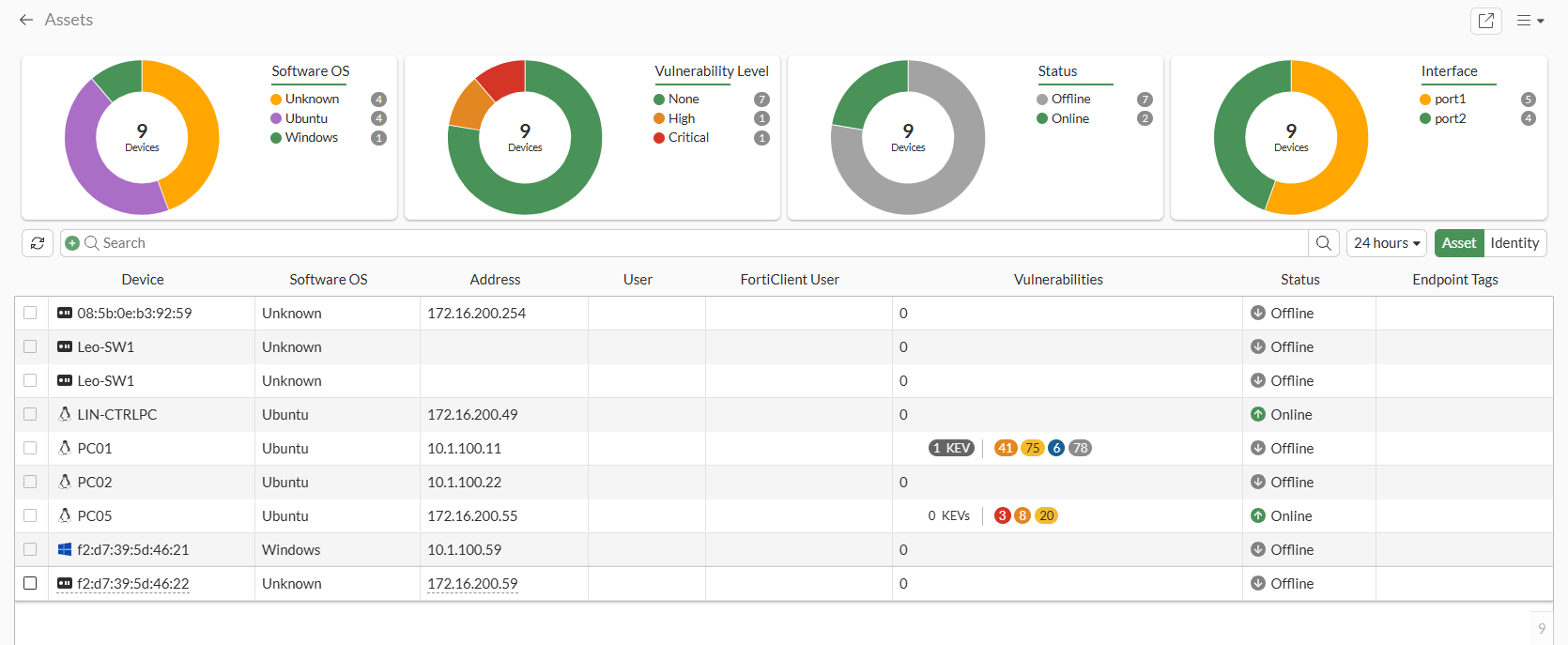
  2. Expand the Assets widget. The KEV vulnerabilities are shown in the Vulnerabilities column:
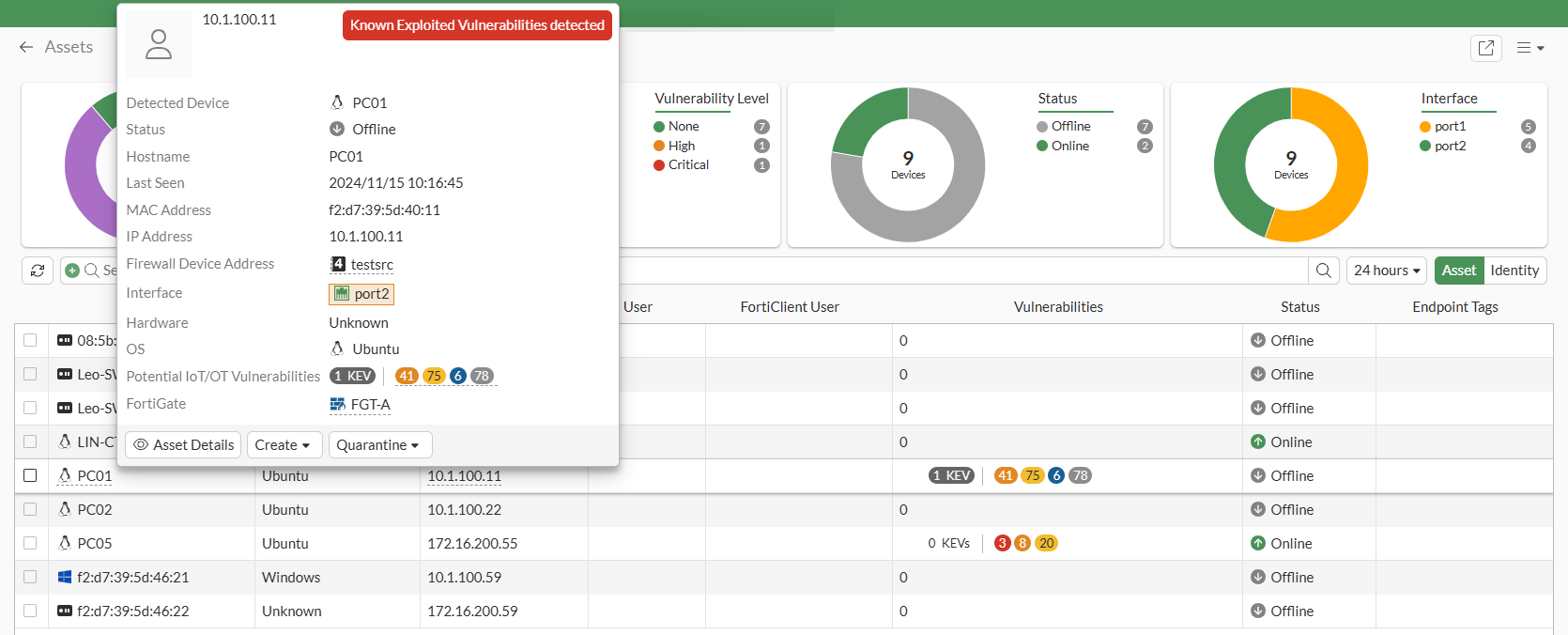
  3. Hover over the device name. In the tooltip, a Known Exploited Vulnerabilities detected label is added when KEVs are detected for IoT/OT:
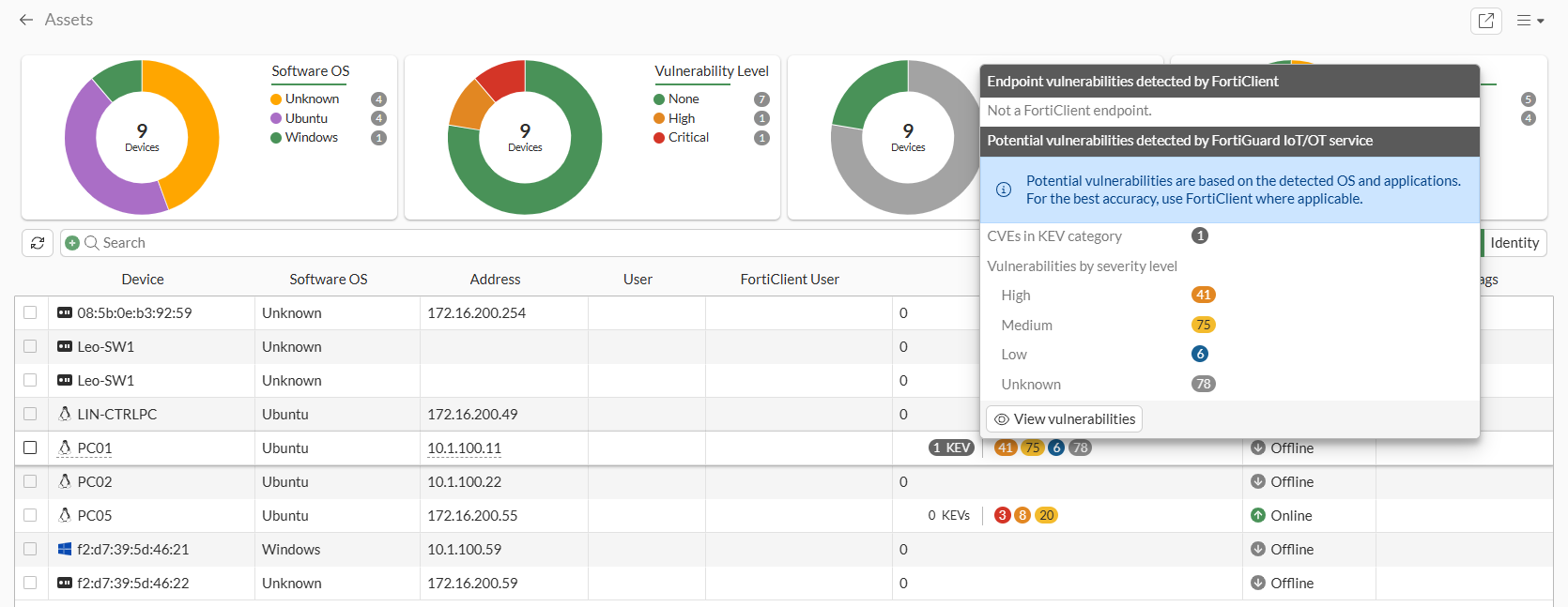
  4. Hover over the vulnerabilities. In the tooltip, the CVEs in KEV category field shows the number of potential KEVs detected by the FortiGuard IoT/OT service:
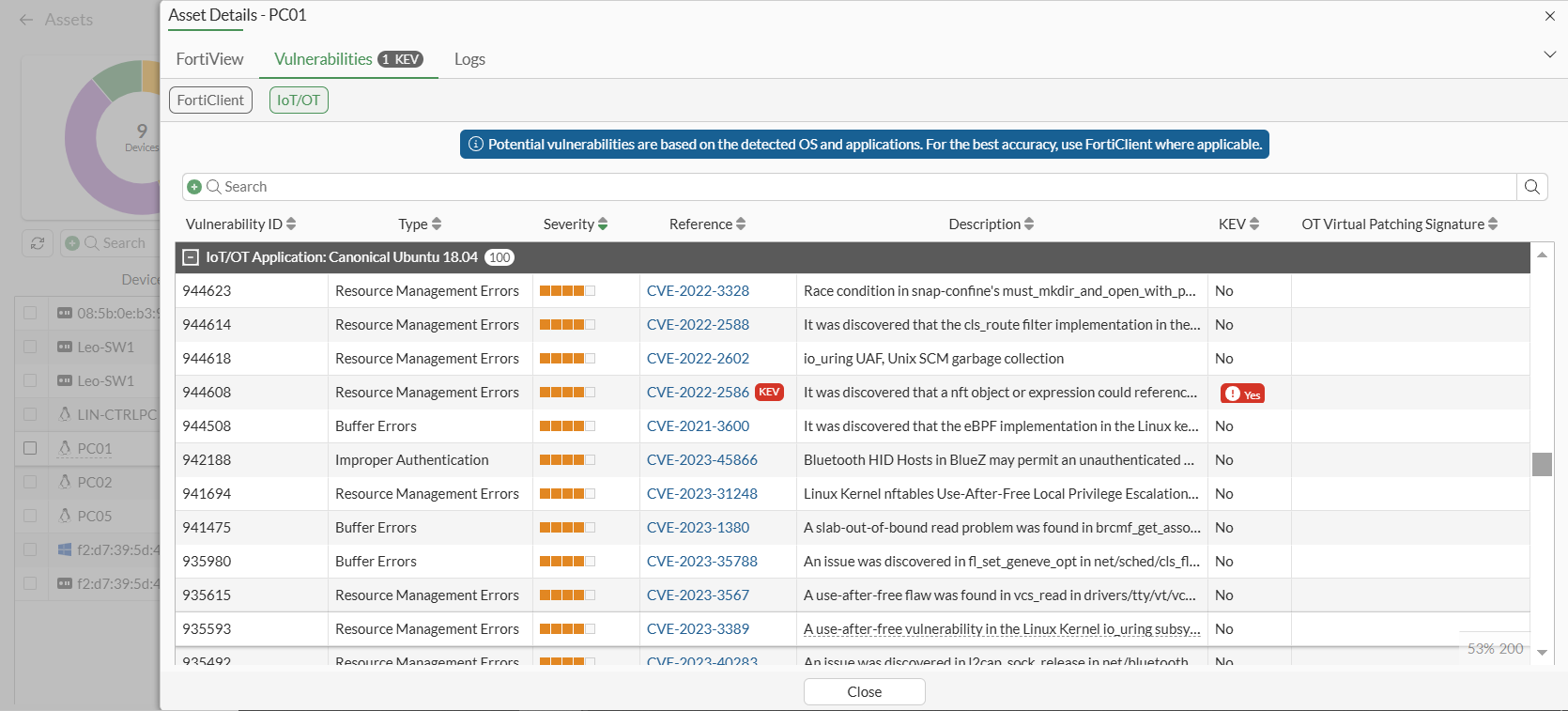
  5. In the tooltip, click View vulnerabilities to open the Asset Details pane on the Vulnerabilities tab and select IoT/OT.

    A KEV label is shown as a critical severity label next to the CVE-ID in the Reference column, and a KEV column can be added to show if a vulnerability has a KEV.
To view the KEV information in the CLI:
# diagnose user-device-store device memory list

Record #1:
        device_info
                'ipv4_address' = '10.1.100.11'
                'mac' = 'f2:d7:39:5d:40:11'
                'hardware_type' = 'Unknown'
                'vdom' = 'vd1'
                'os_name' = 'Ubuntu'
                'hostname' = 'PC01'
                'last_seen' = '1731621105'
                'host_src' = 'mwbs'
                'unjoined_forticlient_endpoint' = 'false'
                'is_online' = 'false'
                'active_start_time' = '1731612432'
                'is_fortiguard_src' = 'false'
                'purdue_level' = '3'
                'iot_vuln_count' = '200'
                'iot_kev_count' = '1'
                'max_vuln_level' = 'High'
                'total_vuln_count' = '200'
                'device_type' = 'OT'
                'generation' = '16'
        interface_info
                'ipv4_address' = '10.1.100.11'
                'mac' = 'f2:d7:39:5d:40:11'
                'master_mac' = 'f2:d7:39:5d:40:11'
                'detected_interface' = 'port2'
                'last_seen' = '1731621105'
                'is_master_device' = 'true'
                'is_detected_interface_role_wan' = 'false'
                'detected_interface_fortitelemetry' = 'false'
                'is_online' = 'false'
                'is_fortiguard_src' = 'false'
        iot_info
                'vendor' = 'Canonical'
                'product' = 'Ubuntu'
                'version-min' = '18.04'
                'validity' = 'true'
                'outdated' = 'false'
                'db_date_updated' = '2024-11-14T20:40:07'
                'kev_db_date_released' = '2024-11-14T18:00:41' 
        iot_vulnerability
                'vulnerability_id' = '944608'
                'severity' = '3'
                'type' = 'Resource Management Errors'
                'description' = 'It was discovered that a nft object or expression could reference a nft set on a different nft table, leading to a use-after-free once that table was deleted.'
                'references' = 'CVE-2022-2586'
                'kevs' = 'CVE-2022-2586'
                'date_added' = '2024-01-15T09:00:30'
                'date_updated' = '2024-01-15T09:00:30'

KEV information in IoT/OT vulnerabilities

KEV information in IoT/OT vulnerabilities

Known Exploited Vulnerabilities (KEVs) information is included in IoT/OT vulnerabilities in the user/device store. KEV counts and warnings are displayed in the Assets widget on the Asset & Identities dashboard, enhancing security visibility.

Note

To enable device detection for IoT/OT devices, device identification must be enabled on the interface and utm-status must be enabled in firewall policy:

config system interface
    edit <interface>
        set device-identification enable
    next
end
config firewall policy
    edit <policy ID>
        set utm-status enable
    next
end

Example

When Ubuntu is updated and upgraded from an older version, like 18.04, using the sudo apt-get update && sudo apt-get -y upgrade command, OT device information is logged in an appctrl log and sent to WAD:

1: date=2024-11-15 time=10:00:53 eventtime=1731621653528292983 tz="+1200" logid="1059028704" type="utm" subtype="app-ctrl" eventtype="signature" level="information" vd="vd1" appid=10000501 srcip=10.1.100.11 srccountry="Reserved" dstip=91.189.91.81 dstcountry="United States" srcport=37186 dstport=80 srcintf="port2" srcintfrole="undefined" dstintf="port1" dstintfrole="undefined" proto=6 service="HTTP" direction="outgoing" policyid=1 poluuid="b8a98718-dfc9-51ee-3aff-53c8c1b65d82" policytype="policy" sessionid=1469 applist="g-default" action="pass" appcat="OT" app="Canonical.Ubuntu" hostname="ca.archive.ubuntu.com" incidentserialno=170919395 url="/ubuntu/dists/bionic/InRelease" agent="Debian APT-HTTP/1.3 (1.6.17)" httpmethod="GET" msg="OT: Canonical.Ubuntu" clouddevice="Vendor=Canonical, Product=Ubuntu, Version=18.04" apprisk="low"

WAD then sends a device query to FortiGuard to retrieve the vulnerability list for this OT device. The KEV information is included in the vulnerability list and can be viewed in the GUI and CLI.

To view the KEV information in the GUI:
  1. Go to Dashboard > Assets & Identities.

  2. Expand the Assets widget. The KEV vulnerabilities are shown in the Vulnerabilities column:

  3. Hover over the device name. In the tooltip, a Known Exploited Vulnerabilities detected label is added when KEVs are detected for IoT/OT:

  4. Hover over the vulnerabilities. In the tooltip, the CVEs in KEV category field shows the number of potential KEVs detected by the FortiGuard IoT/OT service:

  5. In the tooltip, click View vulnerabilities to open the Asset Details pane on the Vulnerabilities tab and select IoT/OT.

    A KEV label is shown as a critical severity label next to the CVE-ID in the Reference column, and a KEV column can be added to show if a vulnerability has a KEV.

To view the KEV information in the CLI:
# diagnose user-device-store device memory list

Record #1:
        device_info
                'ipv4_address' = '10.1.100.11'
                'mac' = 'f2:d7:39:5d:40:11'
                'hardware_type' = 'Unknown'
                'vdom' = 'vd1'
                'os_name' = 'Ubuntu'
                'hostname' = 'PC01'
                'last_seen' = '1731621105'
                'host_src' = 'mwbs'
                'unjoined_forticlient_endpoint' = 'false'
                'is_online' = 'false'
                'active_start_time' = '1731612432'
                'is_fortiguard_src' = 'false'
                'purdue_level' = '3'
                'iot_vuln_count' = '200'
                'iot_kev_count' = '1'
                'max_vuln_level' = 'High'
                'total_vuln_count' = '200'
                'device_type' = 'OT'
                'generation' = '16'
        interface_info
                'ipv4_address' = '10.1.100.11'
                'mac' = 'f2:d7:39:5d:40:11'
                'master_mac' = 'f2:d7:39:5d:40:11'
                'detected_interface' = 'port2'
                'last_seen' = '1731621105'
                'is_master_device' = 'true'
                'is_detected_interface_role_wan' = 'false'
                'detected_interface_fortitelemetry' = 'false'
                'is_online' = 'false'
                'is_fortiguard_src' = 'false'
        iot_info
                'vendor' = 'Canonical'
                'product' = 'Ubuntu'
                'version-min' = '18.04'
                'validity' = 'true'
                'outdated' = 'false'
                'db_date_updated' = '2024-11-14T20:40:07'
                'kev_db_date_released' = '2024-11-14T18:00:41' 
        iot_vulnerability
                'vulnerability_id' = '944608'
                'severity' = '3'
                'type' = 'Resource Management Errors'
                'description' = 'It was discovered that a nft object or expression could reference a nft set on a different nft table, leading to a use-after-free once that table was deleted.'
                'references' = 'CVE-2022-2586'
                'kevs' = 'CVE-2022-2586'
                'date_added' = '2024-01-15T09:00:30'
                'date_updated' = '2024-01-15T09:00:30'