

Embedded SD-WAN SLA information in ICMP probes
In the hub and spoke SD-WAN design, in order for traffic to pass symmetrically from spoke to hub and hub to spoke, it is essential for the hub to know which IPsec overlay is in SLA and out of SLA. Prior to introducing embedded SLA information in ICMP probes, it is common practice for spokes to use the SD-WAN neighbor feature and route-map-out-preferable setting to signal the health of each overlay to the hub. However, this requires BGP to be configured per overlay, and to manipulate BGP routes using custom BGP communities.
With embedded SLA information in ICMP probes, spokes can communicate their SLA for each overlay directly through ICMP probes to the hub. The hub learns these SLAs and maps the status for each spoke and its corresponding overlays.
The hub uses the SLA status to apply priorities to the IKE routes, giving routes over IPsec overlays that are within SLAs a lower priority value and routes over overlays out of SLAs a higher priority value. If BGP is used, recursively resolved BGP routes can inherit the priority from its parent.
Embedded SLA information in ICMP probes allows hub and spoke SD-WAN to be designed with a BGP on loopback topology, or without BGP at all. The following topology outlines an example of the BGP on loopback design where each spoke is peered with the hub and route reflector on the loopback interface.
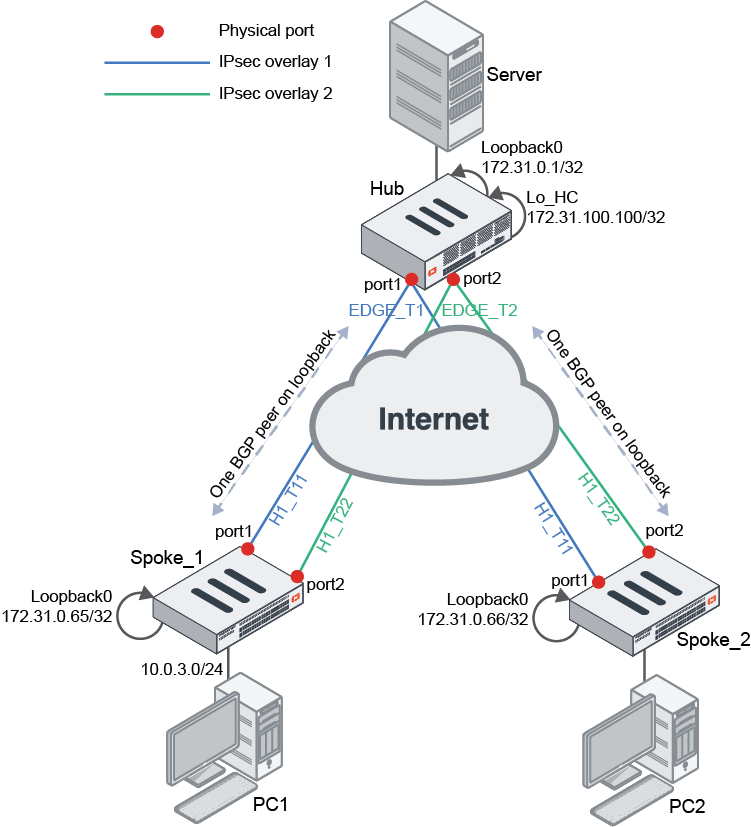
In this topology, each FortiGate’s BGP router ID is based on its Loopback0 interface. Each spoke has SLA health checks defined to send ICMP probes to the server’s Lo_HC interface on 172.31.100.100. The ICMP probes include embedded SLA information for each SD-WAN overlay member.
Related SD-WAN settings:
config system sdwan
    config health-check
        edit <name>
            set detect-mode {active | passive | prefer-passive | remote}
            set embed-measured-health {enable | disable}
            config sla
                edit <id>
                    set priority-in-sla <integer>
                    set priority-out-sla <integer>
                next
            end
            set sla-id-redistribute <id>
        next
    end
end
|
detect-mode {active | passive | prefer-passive | remote} |
Set the mode that determines how to detect the server:
|
|
embed-measured-health {enable | disable} |
Enable/disable embedding SLA information in ICMP probes (default = disable). |
|
set priority-in-sla <integer> |
Set the priority that will be set to the IKE route when the corresponding overlay is in SLA (0 - 65535). |
|
set priority-out-sla <integer> |
Set the priority that will be set to the IKE route when the corresponding overlay is out of SLA (0 - 65535). |
|
sla-id-redistribute <id> |
Set the SLA entry (ID) that will be applied to the IKE routes (0 - 32, default = 0). |
Related BGP setting:
config router bgp
    set recursive-inherit-priority {enable | disable}
end
|
recursive-inherit-priority {enable | disable} |
Enable/disable allowing recursive resolved BGP routes to inherit priority from its parent (default = disable). |
Example with BGP on loopback SD-WAN
This example demonstrates the configurations needed to configure the SD-WAN and BGP settings for the preceding topology. It is assumed that IPsec VPN overlays are already configured per the topology, and that loopback interfaces are already configured on each FortiGate.
Configuring the Spoke_1 FortiGate
In the SD-WAN settings, note the following requirements:
- Configure the SD-WAN zones and members. For each SD-WAN member, define the source of its probes to be the Loopback0 interface IP.
- Configure the SLA health check to point to the Hub’s Lo_HC interface and IP. Enable
embed-measured-health. - Configure an SD-WAN service rule to route traffic based on the maximize bandwidth (SLA) algorithm to prefer member H1_T11 over H1_T22.
- Configure
set exchange-interface-ip enableandset exchange-ip-addr4to the Loopback0 interface IP. Theexchange-interface-ip optionis automatically turned on when ADVPN has already been configured. If ADVPN has not been configured, thenset exchange-interface-ip enablemust be configured beforeset exchange-ip-addr4can be configured.
To configure the SD-WAN settings:
config system sdwan
    set status enable
    config zone
        edit "virtual-wan-link"
        next
        edit "overlay"
        next
    end
    config members
        edit 1
            set interface "H1_T11"
            set zone "overlay"
            set source 172.31.0.65
        next
        edit 4
            set interface "H1_T22"
            set zone "overlay"
            set source 172.31.0.65
        next
    end
    config health-check
        edit "HUB"
            set server "172.31.100.100"
            set embed-measured-health enable
            set members 0
            config sla
                edit 1
                    set link-cost-factor latency
                    set latency-threshold 100
                next
            end
        next
    end
    config service
        edit 1
            set mode sla
            set dst "CORP_LAN"
            set src "CORP_LAN"
            config sla
                edit "HUB"
                    set id 1
                next
            end
            set priority-members 1 4
        next
    end
end
To configure the BGP settings:
config router bgp
    set as 65001
    set router-id 172.31.0.65
    config neighbor
        edit "172.31.0.1"
            set remote-as 65001
            set update-source "Loopback0"
        next
    end
    config network
        edit 1
            set prefix 10.0.3.0 255.255.255.0
        next
    end
end
To add the loopback IP to the IPsec interface settings:
config vpn ipsec phase1-interface
    edit "H1_T11"
        set exchange-interface-ip enable
        set exchange-ip-addr4 172.31.0.65
    next
    edit "H1_T22"
        set exchange-interface-ip enable
        set exchange-ip-addr4 172.31.0.65
    next
end
Configuring the hub FortiGate
In the SD-WAN settings, note the following requirements:
- Configure the SD-WAN zone and members.
- Configure the SLA health checks to detect SLAs based on the remote site (spoke). This must be defined for each SD-WAN member:
- For the SLA, specify the same link cost factor and metric as the spoke (100).
- Define the IKE route priority for in and out of SLA. Lower priority values have higher priority than higher priority values.
- Define the SLA entry ID that will be applied to the IKE routes.
- Configure
set exchange-interface-ip enableandset exchange-ip-addr4to the Loopback0 interface IP. Theexchange-interface-ip optionis automatically turned on when ADVPN has already been configured. If ADVPN has not been configured, thenset exchange-interface-ip enablemust be configured beforeset exchange-ip-addr4can be configured.
To configure the SD-WAN settings:
config system sdwan
    set status enable
    config zone
        edit "virtual-wan-link"
        next
    end
    config members
        edit 1
            set interface "EDGE_T1"
        next
        edit 2
            set interface "EDGE_T2"
        next
    end
    config health-check
        edit "1"
            set detect-mode remote
            set sla-id-redistribute 1
            set members 1
            config sla
                edit 1
                    set link-cost-factor latency
                    set latency-threshold 100
                    set priority-in-sla 10
                    set priority-out-sla 20
                next
            end
        next
        edit "2"
            set detect-mode remote
            set sla-id-redistribute 1
            set members 2
            config sla
                edit 1
                    set link-cost-factor latency
                    set latency-threshold 100
                    set priority-in-sla 15
                    set priority-out-sla 25
                next
            end
        next
    end
end
In the BGP settings, note the following requirements:
- Enable
recursive-inherit-priorityto inherit the route priority from its parent, which is the priority defined in the health check SLA settings. - Configure the other BGP settings similar to a regular BGP hub.
To configure the BGP settings:
config router bgp
    set as 65001
    set router-id 172.31.0.1
    set recursive-inherit-priority enable
    config neighbor-group
        edit "EDGE"
            set remote-as 65001
            set update-source "Loopback0"
            set route-reflector-client enable
        next
    end
    config neighbor-range
        edit 1
            set prefix 172.31.0.64 255.255.255.192
            set neighbor-group "EDGE"
        next
    end
end
To add the loopback IP to the IPsec interface settings:
config vpn ipsec phase1-interface
    edit "EDGE_T1"
        set exchange-interface-ip enable
        set exchange-ip-addr4 172.31.0.1
    next
    edit "EDGE_T2"
        set exchange-interface-ip enable
        set exchange-ip-addr4 172.31.0.1
    next
end
Testing and verification
Once the hub and spokes are configured, verify that SLA statuses are passed from the spoke to the hub.
To verify that the SLA statuses are passed from the spoke to the hub:
-
On Spoke_1, display the status of the health-checks for H1_T11 and H1_T22:
# diagnose sys sdwan  health-check
Health Check(HUB):
Seq(1 H1_T11): state(alive), packet-loss(0.000%) latency(0.228), jitter(0.018), mos(4.404), bandwidth-up(999999), bandwidth-dw(1000000), bandwidth-bi(1999999) sla_map=0x1
Seq(4 H1_T22): state(alive), packet-loss(0.000%) latency(0.205), jitter(0.007), mos(4.404), bandwidth-up(999998), bandwidth-dw(1000000), bandwidth-bi(1999998) sla_map=0x1
-
On Spoke_1, display the status and order of the overlays in the SD-WAN service rule:
# diagnose sys sdwan service
Service(1): Address Mode(IPV4) flags=0x200 use-shortcut-sla
 Tie break: cfg
  Gen(1), TOS(0x0/0x0), Protocol(0: 1->65535), Mode(sla), sla-compare-order
  Members(2):
    1: Seq_num(1 H1_T11), alive, sla(0x1), gid(0), cfg_order(0), local cost(0), selected
    2: Seq_num(4 H1_T22), alive, sla(0x1), gid(0), cfg_order(3), local cost(0), selected
  Src address(1):
        10.0.0.0-10.255.255.255
  Dst address(1):
        10.0.0.0-10.255.255.255
Both overlays are within SLA, so H1_T11 is preferred due to its
cfg-order.Spoke_1’s SLA information for H1_T11 and H1_T22 is embedded into the ICMP probes destined for the hub’s Lo_HC interface. The hub receives this information and maps the SLAs correspondingly per spoke and overlay based on the same SLA targets.
As a result, since all SLAs are within target, the hub sets the routes over each overlay as follows:
Hub SD-WAN member
Overlay
SLA status
Priority for IKE routes
1
EDGE_T1
0x1 – within SLA
10
2
EDGE_T2
0x1 – within SLA
15
-
Verify that the spoke has sent its health check result to hub.
-
On the hub, display the status of the health checks for EDGE_T1 and EDGE_T2:
# diagnose sys sdwan health-check remote
Remote Health Check: 2(2)
  Passive remote statistics of EDGE_T2(22):
EDGE_T2_0(172.31.3.5): timestamp=02-09 16:19:11, latency=1.056, jitter=0.582, pktloss=0.000%
Remote Health Check: 1(1)
  Passive remote statistics of EDGE_T1(21):
EDGE_T1_0(172.31.3.1): timestamp=02-09 16:19:11, latency=1.269, jitter=0.675, pktloss=0.000%
-
-
When there are multiple spokes, additional options can be used to filter a spoke by health check name, or health check name and the member's sequence number (
diagnose system sdwan health-check remote <hc_name> <seq_num>).-
To filter the health check by health check name:
# diagnose sys sdwan health-check remote 1
Remote Health Check: 1(1)
  Passive remote statistics of EDGE_T1(21):
EDGE_T1_0(172.31.3.1): timestamp=02-09 16:43:37, latency=1.114, jitter=0.473, pktloss=0.000%
When this method is used, the output displays all the members of the specified health check name.
-
To filter the health check by health check name and the member's sequence number:
# diagnose sys sdwan health-check remote 1 1
Remote Health Check: 1(1)
  Passive remote statistics of EDGE_T1(21):
EDGE_T1_0(172.31.3.1): timestamp=02-09 16:43:41, latency=1.178, jitter=0.497, pktloss=0.000%
When this method is used, the output displays the specified member of the specified health check name.

If the
detect-modeis set toremote, usediagnose sys sdwan health-check remotein lieu ofdiagnose sys sdwan health-check. -
-
Simultaneously, BGP recursive routes inherit the priority based on the parent IKE routes. The recursively resolved BGP routes that pass through EDGE_T1 will have a priority of 10, and routes that pass through EDGE_T2 will have a priority of 15. Therefore, traffic from the hub to the spoke will be routed to EDGE_T1.
Verify the routing tables.
-
Static:
# get router info routing-table static Routing table for VRF=0 S 172.31.0.65/32 [15/0] via EDGE_T1 tunnel 10.0.0.69 vrf 0, [10/0] [15/0] via EDGE_T2 tunnel 172.31.0.65 vrf 0, [15/0] -
BGP:
# get router info routing-table bgp
Routing table for VRF=0
B       10.0.3.0/24 [200/0] via 172.31.0.65 (recursive via EDGE_T1 tunnel 10.0.0.69 vrf 0 [10]), 04:32:53
                                            (recursive via EDGE_T2 tunnel 172.31.0.65 vrf 0 [15]), 04:32:53, [1/0]
-
Next, test by making the health checks over the spokes' H1_T11 tunnel out of SLA. This should trigger traffic to start flowing from the spokes' H1_T22 tunnel. Consequently, the SLA statuses are passed from the spoke to the hub, and the hub will start routing traffic to EDGE_T2.
To verify that the hub will start routing traffic to EDGE_T2 when the spoke H1_T11 tunnel is out of SLA:
-
On Spoke_1, display the status of the health checks for H1_T11 and H1_T22:
# diagnose sys sdwan health-check
Health Check(HUB):
Seq(1 H1_T11): state(alive), packet-loss(0.000%) latency(120.228), jitter(0.013), mos(4.338), bandwidth-up(999999), bandwidth-dw(1000000), bandwidth-bi(1999999) sla_map=0x0
Seq(4 H1_T22): state(alive), packet-loss(0.000%) latency(0.220), jitter(0.008), mos(4.404), bandwidth-up(999998), bandwidth-dw(1000000), bandwidth-bi(1999998) sla_map=0x1
-
Verify the routing tables.
-
Static:
# get router info routing-table static
Routing table for VRF=0
S       172.31.0.65/32 [15/0] via EDGE_T2 tunnel 172.31.0.65 vrf 0, [15/0]
                       [15/0] via EDGE_T1 tunnel 10.0.0.69 vrf 0, [20/0]
The priority for EDGE_T1 has changed from 10 to 20.
-
BGP:
# get router info routing-table bgp
Routing table for VRF=0
B       10.0.3.0/24 [200/0] via 172.31.0.65 (recursive via EDGE_T2 tunnel 172.31.0.65 vrf 0 [15]), 00:01:19
                                            (recursive via EDGE_T1 tunnel 10.0.0.69 vrf 0 [20]), 00:01:19, [1/0]
EDGE_T2 is now preferred. The priority for EDGE_T1 has changed from 10 to 20.
-
Spoke_1’s SLA information for H1_T11 embedded into the ICMP probes has now changed.
As a result, the hub sets the routes over each overlay as follows:
|
Hub SD-WAN member |
Overlay |
SLA status |
Priority for IKE routes |
|---|---|---|---|
|
1 |
EDGE_T1 |
0x0 – out of SLA |
20 |
|
2 |
EDGE_T2 |
0x1 – within SLA |
15 |
The BGP recursive routes inherit the priority based on the parent IKE routes. Since priority for IKE routes on EDGE_T1 has changed to 20, recursively resolved BGP routes passing through EDGE_T1 has also dropped to 20. As a result, hub to spoke_1 traffic will go over EDGE_T2.