

Site-to-site IPv4 over IPv6 VPN example
In this example, two private networks with IPv4 addressing communicate securely over IPv6 infrastructure.
The following topology is used for this example:
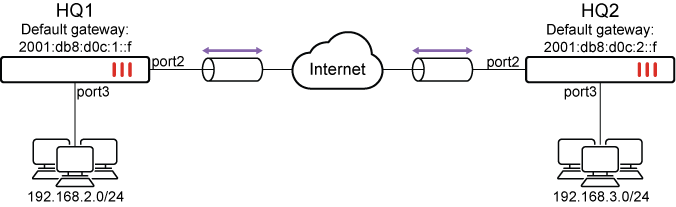
-
Port2 connects to the IPv6 public network and port3 connects to the IPv4 local network.
-
HQ1 port2 IPv6 address is 2001:db8:d0c:1::e and port3 IPv4 address is 192.168.2.1.
-
HQ2 port2 IPv6 address is 2001:db8:d0c:2::e and port3 IPv4 address is 192.168.3.1.

|
Please note that the IPv6 addresses used in this example are for illustrative purposes only and should not be used in your environment. The 2001:db8::/32 prefix is a special IPv6 prefix designated for use in documentation examples. See RFC 3849 for more information. |
To configure the example in the GUI:
-
Configure the HQ1 FortiGate.
-
Configure the IPv6 address on port2 and IPv4 address on port3:
-
Go to Network > Interfaces and edit port2.
-
Set IPv6 addressing mode to Manual and enter the IPv6 Address/Prefix.
IPv6 Address/Prefix 2001:db8:d0c:1::e/64 -
Click OK.
-
Go to Network > Interfaces and edit port3.
-
Set Addressing mode to Manual and enter the IP/Netmask.
IP/Netmask 192.168.2.1/24
-
-
Configure IPsec settings:
-
Go to VPN > IPsec Wizard and enter a VPN name.
-
Set Template type to Custom.
-
Click Next.
-
Configure the following Network settings:
IP Version IPv6 Remote Gateway Static IP Address IP Address 2001:db8:d0c:2::e Interface port2 -
Configure the following Authentication settings:
Method Pre-shared Key Pre-shared Key sample -
Configure the following New Phase 2 settings:
Local Address addr_subnet Remote Address addr_subnet
-
-
Configure the IPv4 firewall policy to allow IPv4 traffic from port3 to the IPsec interface:
-
Go to Policy & Objects > Firewall Policy.
-
Click Create New.
-
Name the policy and configure the following parameters:
Incoming Interface port3 Outgoing Interface to_HQ2 Source all Destination all Schedule always Service ALL Action ACCEPT -
Click OK.
-
-
Configure the IPv4 firewall policy to allow IPv4 traffic from the IPsec interface to port3:
-
Go to Policy & Objects > Firewall Policy.
-
Click Create New.
-
Name the policy and configure the following parameters:
Incoming Interface to_HQ2 Outgoing Interface port3 Source all Destination all Schedule always Service ALL Action ACCEPT -
Click OK.
-
-
Configure the static routes:
-
Go to Network > Static Routes.
-
Click Create New > IPv6 Static Route.
-
Configure the following settings for the default route to the remote VPN gateway:
Destination 0.0.0.0/0.0.0.0 Gateway Address 2001:db8:d0c:1::f Interface port2 -
Select OK.
-
Repeat the first two steps for IPv4 Static Route and configure the following settings for the route to the remote protected network:
Destination 192.168.3.0/24 Interface to_HQ2 -
Select OK.
-
Repeat the first two steps for IPv4 Static Route and configure the following settings for the blackhole route:
Destination 192.168.3.0/24 Interface Blackhole Administrative Distance 254 -
Select OK.
-
-
-
Configure the HQ2 FortiGate:
-
Configure the IPv6 address on port2 and IPv4 address on port3:
-
Go to Network > Interfaces and edit port2.
-
Set IPv6 addressing mode to Manual and enter the IPv6 Address/Prefix.
IPv6 Address/Prefix 2001:db8:d0c:2::e/64 -
Click OK.
-
Go to Network > Interfaces and edit port3.
-
Set Addressing mode to Manual and enter the IP/Netmask.
IP/Netmask 192.168.3.1/24
-
-
Configure IPsec settings:
-
Go to VPN > IPsec Wizard and enter a VPN name.
-
Set Template type to Custom.
-
Click Next.
-
Configure the following Network settings:
IP Version IPv6 Remote Gateway Static IP Address IP Address 2001:db8:d0c:1::e Interface port2 -
Configure the following Authentication settings:
Method Pre-shared Key Pre-shared Key sample -
Configure the following New Phase 2 settings:
Local Address addr_subnet Remote Address addr_subnet
-
-
Configure the IPv4 firewall policy to allow IPv4 traffic from port3 to the IPsec interface:
-
Go to Policy & Objects > Firewall Policy.
-
Click Create New.
-
Name the policy and configure the following parameters:
Incoming Interface port3 Outgoing Interface to_HQ1 Source all Destination all Schedule always Service ALL Action ACCEPT -
Click OK.
-
-
Configure the IPv4 firewall policy to allow IPv4 traffic from the IPsec interface to port3:
-
Go to Policy & Objects > Firewall Policy.
-
Click Create New.
-
Name the policy and configure the following parameters:
Incoming Interface to_HQ1 Outgoing Interface port3 Source all Destination all Schedule always Service ALL Action ACCEPT -
Click OK.
-
-
Configure the static routes:
-
Go to Network > Static Routes.
-
Click Create New > IPv6 Static Route.
-
Configure the following settings for the default route to the remote VPN gateway:
Destination 0.0.0.0/0.0.0.0 Gateway Address 2001:db8:d0c:2::f Interface port2 -
Select OK.
-
Repeat the first two steps for IPv4 Static Route and configure the following settings for the route to the remote protected network:
Destination 192.168.2.0/24 Interface to_HQ1 -
Select OK.
-
Repeat the first two steps for IPv4 Static Route and configure the following settings for the blackhole route:
Destination 192.168.2.0/24 Interface Blackhole Administrative Distance 254 -
Select OK.
-
-
To configure the example in the CLI:
-
Configure the HQ1 FortiGate.
-
Configure the IPv6 address on port2 and IPv4 address on port3:
config system interface edit port2 config ipv6 set ip6-address 2001:db8:d0c:1::e/64 end next edit port3 set ip 192.168.2.1/24 next end -
Configure IPsec settings:
config vpn ipsec phase1-interface edit "to_HQ2" set interface port2 set ip-version 6 set peertype any set proposal aes128-sha256 aes256-sha256 aes128-sha1 aes256-sha1 set remote-gw6 2001:db8:d0c:2::e set psksecret sample next end config vpn ipsec phase2-interface edit "to_HQ2" set phase1name "to_HQ2" set proposal aes128-sha1 aes256-sha1 aes128-sha256 aes256-sha256 aes128gcm aes256gcm chacha20poly1305 set src-addr-type subnet set dst-addr-type subnet next end -
Configure the IPv4 firewall policy to allow IPv4 traffic between port3 to the IPsec interface:
config firewall policy edit 1 set srcintf "port3" set dstintf "to_HQ2" set srcaddr "all" set dstaddr "all" set action accept set schedule "always" set service "ALL" set logtraffic "all" next edit 2 set srcintf "to_HQ2" set dstintf "port3" set srcaddr "all" set dstaddr "all" set action accept set schedule "always" set service "ALL" set logtraffic "all" next end -
Configure the static routes:
config router static6
    edit 1
        set gateway 2001:db8:d0c:1::f
        set device "port2"
    next
end
config router static
    edit 1
        set dst 192.168.3.0 255.255.255.0
        set device "to_HQ2"
    next
    edit 2
        set dst 192.168.3.0 255.255.255.0
        set device blackhole
        set distance 254
    next
end
-
-
Configure the HQ2 FortiGate.
-
Configure the IPv6 address on port2 and IPv4 address on port3:
config system interface edit port2 config ipv6 set ip6-address 2001:db8:d0c:2::e/64 end next edit port3 set ip 192.168.3.1/24 next end -
Configure IPsec settings:
config vpn ipsec phase1-interface edit "to_HQ1" set interface port2 set ip-version 6 set peertype any set proposal aes128-sha256 aes256-sha256 aes128-sha1 aes256-sha1 set remote-gw6 2001:db8:d0c:1::e set psksecret sample next end config vpn ipsec phase2-interface edit "to_HQ2" set phase1name "to_HQ1" set proposal aes128-sha1 aes256-sha1 aes128-sha256 aes256-sha256 aes128gcm aes256gcm chacha20poly1305 set src-addr-type subnet set dst-addr-type subnet next end -
Configure the IPv4 firewall policy to allow IPv4 traffic between port3 to the IPsec interface:
config firewall policy edit 1 set srcintf "port3" set dstintf "to_HQ1" set srcaddr "all" set dstaddr "all" set action accept set schedule "always" set service "ALL" set logtraffic "all" next edit 2 set srcintf "to_HQ1" set dstintf "port3" set srcaddr "all" set dstaddr "all" set action accept set schedule "always" set service "ALL" set logtraffic "all" next end -
Configure the static routes:
config router static6
    edit 1
        set gateway 2001:db8:d0c:2::f
        set device "port2"
    next
end
config router static
    edit 1
        set dst 192.168.2.0 255.255.255.0
        set device "to_HQ1"
    next
    edit 2
        set dst 192.168.2.0 255.255.255.0
        set device blackhole
        set distance 254
    next
end
-
Verification
The following commands are useful to check IPsec phase1/phase2 interface status:
-
Run the
diagnose vpn ike gateway listcommand on HQ1. The system should return the following:vd: root/0 name: to_HQ2 version: 1 interface: port2 6 addr: 2001:db8:d0c:1::e:500 -> 2001:db8:d0c:2::e:500 tun_id: 10.0.0.1/::10.0.0.1 remote_location: 0.0.0.0 network-id: 0 created: 7215s ago peer-id: 2001:db8:d0c:2::e peer-id-auth: no IKE SA: created 1/1 established 1/1 time 0/0/0 ms IPsec SA: created 1/2 established 1/2 time 0/5/10 ms id/spi: 160 8d7231820bb5ffd9/6c840a4c11b57927 direction: initiator status: established 7215-7215s ago = 0ms proposal: aes128-sha256 key: 32d8521a77d98529-5fe4b67914d30f87 lifetime/rekey: 86400/78884 DPD sent/recv: 00000007/00000003 peer-id: 2001:db8:d0c:2::e
-
Run the
diagnose vpn tunnel listcommand on HQ1. The system should return the following:list all ipsec tunnel in vd 0 ------------------------------------------------------ name=to_HQ2 ver=1 serial=1 2001:db8:d0c:1::e:0->2001:db8:d0c:2::e:0 tun_id=10.0.0.1 tun_id6=::10.0.0.1 dst_mtu=1500 dpd-link=on weight=1 bound_if=6 lgwy=static/1 tun=intf mode=auto/1 encap=none/552 options[0228]=npu frag-rfc run_state=0 role=primary accept_traffic=1 overlay_id=0 proxyid_num=1 child_num=0 refcnt=4 ilast=581 olast=581 ad=/0 stat: rxp=4 txp=4 rxb=26312 txb=26312 dpd: mode=on-demand on=1 idle=20000ms retry=3 count=0 seqno=7 natt: mode=none draft=0 interval=0 remote_port=0 fec: egress=0 ingress=0 proxyid=to_HQ2 proto=0 sa=1 ref=2 serial=2 src: 0:0.0.0.0-255.255.255.255:0 dst: 0:0.0.0.0-255.255.255.255:0 SA: ref=3 options=10202 type=00 soft=0 mtu=1422 expire=42116/0B replaywin=2048 seqno=5 esn=0 replaywin_lastseq=00000005 qat=0 rekey=0 hash_search_len=1 life: type=01 bytes=0/0 timeout=42902/43200 dec: spi=97511f0d esp=aes key=16 c7323977434f48604c37d7be423f7519 ah=sha1 key=20 ee8f9b457cec9b3c2e614db058bb97896d7ef8d9 enc: spi=0f65cc65 esp=aes key=16 8b78642018b02165d1ef29ad3d8215c8 ah=sha1 key=20 f2adca47b0b3925a87e329a237f0fd521e0afd19 dec:pkts/bytes=8/52624, enc:pkts/bytes=8/52984 npu_flag=00 npu_rgwy=2001:db8:d0c:2::e npu_lgwy=2001:db8:d0c:1::e npu_selid=1 dec_npuid=0 enc_npuid=0 run_tally=0