

OSPF graceful restart upon a topology change
In OSPF graceful restart mode, the restart-on-topology-change option can be used to keep restarting the router in graceful restart mode when a topology change is detected during a restart.
config router ospf
    set restart-on-topology-change {enable | disable}
end

|
OSPFv3 graceful restart mode upon a topology change can be used in OSPF6: config router ospf6
set restart-on-topology-change {enable | disable}
end
|
Example
In this example, a restarting router (one of the FG-300Es in the HA cluster) informs its neighbors using grace LSAs before restarting its OSPF process. When the helper router (the FG-601E) receives the grace LSAs, it enters helper mode to help with the graceful restart until the graceful period expires. It will act as though there are no changes on the restarting router (FG-300E). A generic router simulates a topology change during the restart event.
If restart-on-topology-change is enabled on the restarting router, it will not exit the graceful restart mode even when a topology change is detected.
If restart-on-topology-change is disabled on the restarting router, it will exit graceful restart mode when a topology change is detected.
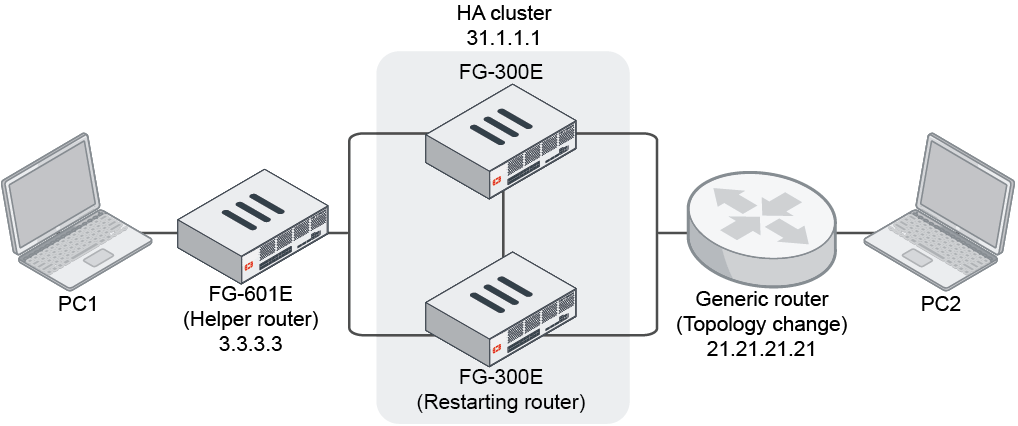
To configure the restarting router:
config router ospf
    set router-id 31.1.1.1
    set restart-mode graceful-restart
    set restart-period 180
    set restart-on-topology-change enable
    config area
        edit 0.0.0.0
        next
    end
    config network
        edit 1
            set prefix 172.16.200.0 255.255.255.0
        next
        edit 2
            set prefix 31.1.1.1 255.255.255.255
        next
    end
end
To configure the restarting helper router:
config router ospf
    set router-id 3.3.3.3
    set restart-mode graceful-restart
    config area
        edit 0.0.0.0
        next
    end
    config network
        edit 1
            set prefix 172.16.200.0 255.255.255.0
        next
        edit 2
            set prefix 3.3.3.3 255.255.255.255
        next
    end
end
Testing the configuration
Topology change with continuing graceful restart enabled:
When restart-on-topology-change is enabled and there is a topology change during the HA OSPF graceful restart, the graceful restart will continue. The routes on the helper router (FG-601E) are still there and no traffic will drop.
# get router info ospf neighbor
OSPF process 0, VRF 0:
Neighbor ID     Pri   State           Dead Time   Address         Interface
31.1.1.1          1   Full/DR         00:14:47*   172.16.200.31   port1
# get router info routing-table ospf
Routing table for VRF=0
O       21.21.21.21/32 [110/300] via 172.16.200.31, port1, 00:09:55
O       31.1.1.1/32 [110/200] via 172.16.200.31, port1, 00:55:31
O       100.21.1.0/24 [110/200] via 172.16.200.31, port1, 00:12:31
# get router info ospf neighbor
OSPF process 0, VRF 0:
Neighbor ID     Pri   State           Dead Time   Address         Interface
31.1.1.1          1   Full/DR         00:14:47*   172.16.200.31   port1
# get router info routing-table ospf
Routing table for VRF=0
O       21.21.21.21/32 [110/300] via 172.16.200.31, port1, 00:10:07
O       31.1.1.1/32 [110/200] via 172.16.200.31, port1, 00:55:43
O       100.21.1.0/24 [110/200] via 172.16.200.31, port1, 00:12:43
# get router info ospf neighbor
OSPF process 0, VRF 0:
Neighbor ID     Pri   State           Dead Time   Address         Interface
31.1.1.1          1   Full/DR         00:14:38*   172.16.200.31   port1
# get router info routing-table ospf
Routing table for VRF=0
O       21.21.21.21/32 [110/300] via 172.16.200.31, port1, 00:10:17
O       31.1.1.1/32 [110/200] via 172.16.200.31, port1, 00:55:53
O       100.21.1.0/24 [110/200] via 172.16.200.31, port1, 00:12:53
# get router info ospf neighbor
OSPF process 0, VRF 0:
Neighbor ID     Pri   State           Dead Time   Address         Interface
31.1.1.1          1   Full/DR         00:00:38    172.16.200.31   port1
# get router info routing-table ospf
Routing table for VRF=0
O       21.21.21.21/32 [110/300] via 172.16.200.31, port1, 00:10:37
O       31.1.1.1/32 [110/200] via 172.16.200.31, port1, 00:56:13
O       100.21.1.0/24 [110/200] via 172.16.200.31, port1, 00:13:13
Topology change with continuing graceful restart disabled:
When restart-on-topology-change is disabled and there is a topology change during the HA OSPF graceful restart, the graceful restart will exit. The routes on the helper router (FG-601E) are lost and traffic will drop.
# get router info ospf neighbor
OSPF process 0, VRF 0:
Neighbor ID     Pri   State           Dead Time   Address         Interface
31.1.1.1          1   Full/DR         00:14:57*   172.16.200.31   port1
# get router info routing-table ospf
Routing table for VRF=0
O       21.21.21.21/32 [110/300] via 172.16.200.31, port1, 00:11:16
O       31.1.1.1/32 [110/200] via 172.16.200.31, port1, 00:56:52
O       100.21.1.0/24 [110/200] via 172.16.200.31, port1, 00:13:52
# get router info ospf neighbor
OSPF process 0, VRF 0:
Neighbor ID     Pri   State           Dead Time   Address         Interface
31.1.1.1          1   Full/DR         00:14:42*   172.16.200.31   port1
# get router info routing-table ospf
Routing table for VRF=0
O       21.21.21.21/32 [110/300] via 172.16.200.31, port1, 00:11:31
O       31.1.1.1/32 [110/200] via 172.16.200.31, port1, 00:57:07
O       100.21.1.0/24 [110/200] via 172.16.200.31, port1, 00:14:07
# get router info ospf neighbor
OSPF process 0, VRF 0:
Neighbor ID     Pri   State           Dead Time   Address         Interface
31.1.1.1          1   Full/DR         00:14:40*   172.16.200.31   port1
No routes are lost:
# get router info routing-table ospf
Routing table for VRF=0
O       31.1.1.1/32 [110/200] via 172.16.200.31, port1, 00:57:09
# get router info ospf neighbor
OSPF process 0, VRF 0:
Neighbor ID     Pri   State           Dead Time   Address         Interface
31.1.1.1          1   Full/DR         00:14:38*   172.16.200.31   port1
No routes are lost:
# get router info routing-table ospf
Routing table for VRF=0
O       31.1.1.1/32 [110/200] via 172.16.200.31, port1, 00:57:11
No routes are lost:
# get router info routing-table ospf
Routing table for VRF=0
O       21.21.21.21/32 [110/300] via 172.16.200.31, port1, 00:04:42
O       31.1.1.1/32 [110/200] via 172.16.200.31, port1, 01:01:59
O       100.21.1.0/24 [110/200] via 172.16.200.31, port1, 00:04:42