

Allow FortiClient to join OCVPN
Administrators can configure remote access for FortiClient within an OCVPN hub. This provides simple configurations to allow a user group access to an overlay network.
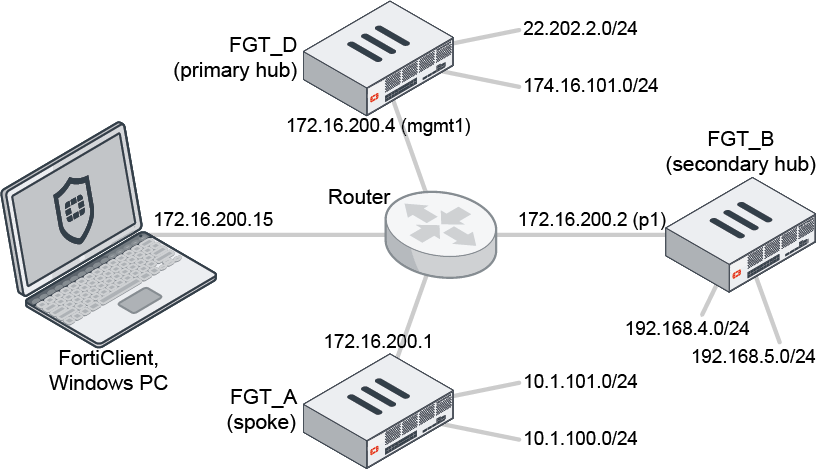
To configure remote FortiClient access to an OCVPN hub in the GUI:
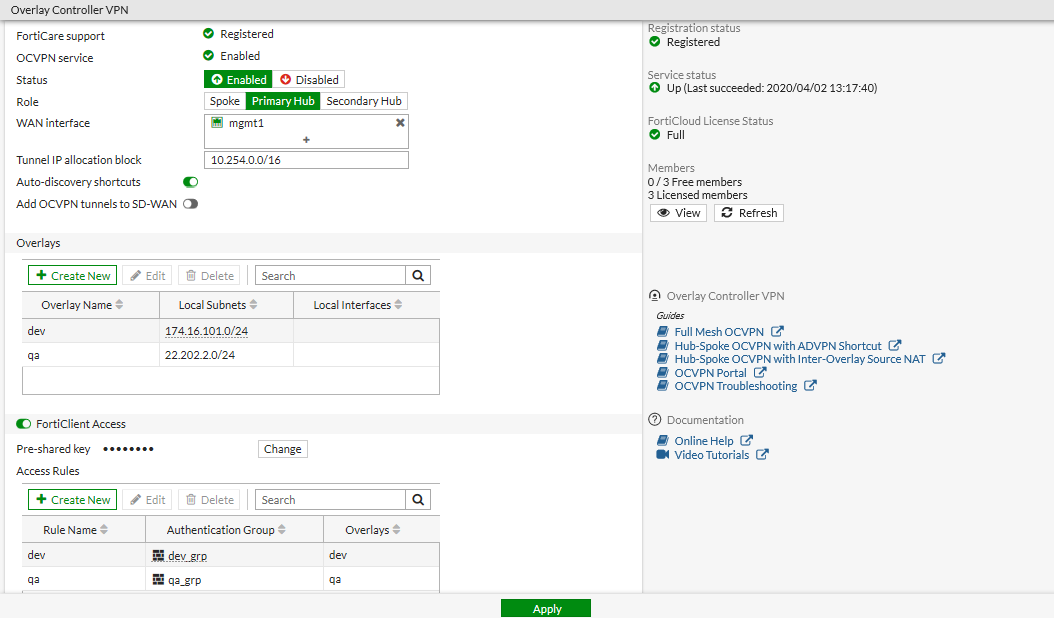
- On the primary hub, configure the users and user groups required for the FortiClient dialup user authentication and authorization. In this example, there are two user groups (dev_grp and qa_grp).
- Go to VPN > Overlay Controller VPN and in the Overlays section, click Create New.
- Enter a name and the local subnet (174.16.101.0/24 for dev and 22.202.2.0/24 for qa).
- Enable FortiClient Access.
- In the Access Rules section, click Create New.
- Enter a name, and select the authentication groups and overlays.The authentication groups will be used by the IPsec phase 1 interface for authentication, and by firewall policies for authorization. The overlay allows access to the resource.
- Click OK.
- Create more rules if needed.
- Click Apply.
To view the tunnel status and activity in the GUI:
- Go to Dashboard > Network.
- Click the IPsec widget to expand to full screen view.

To configure remote FortiClient access to an OCVPN hub in the CLI:
config vpn ocvpn
    set status enable
    set role primary-hub
    set wan-interface "mgmt1"
    set ip-allocation-block 10.254.0.0 255.255.0.0
    config overlays
        edit "dev"
            config subnets
                edit 1
                    set subnet 174.16.101.0 255.255.255.0
                next
            end
        next
        edit "qa"
            config subnets
                edit 1
                    set subnet 22.202.2.0 255.255.255.0
                next
            end
        next
    end
    config forticlient-access
        set status enable
        set psksecret xxxxxxxxxxxx
        config auth-groups
            edit "dev"
                set auth-group "dev_grp"
                set overlays "dev"
            next
            edit "qa"
                set auth-group "qa_grp"
                set overlays "qa"
            next
        end
    end
end
To view the tunnel status and activity in the CLI:
# diagnose vpn ike gateway list

vd: root/0
name: _OCVPN_FCT0_0
version: 1
interface: mgmt1 4
addr: 172.16.200.4:4500 -> 172.16.200.15:64916
tun_id: 172.16.200.15
created: 110s ago
xauth-user: usera
groups:
  dev_grp 1
assigned IPv4 address: 10.254.128.1/255.255.255.255
nat: peer
IKE SA: created 1/1  established 1/1  time 20/20/20 ms
IPsec SA: created 1/1  established 1/1  time 0/0/0 ms

  id/spi: 72 1ccd2abf2d981123/fd8da107f9e4d312
  direction: responder
  status: established 110-110s ago = 20ms
  proposal: aes256-sha256
  key: 105a0291b0c05219-3decdf78938a7bea-78943651e1720536-625114d66e46f668
  lifetime/rekey: 86400/86019
  DPD sent/recv: 00000000/00000af3
To view data on the PC running FortiClient:
C:\ route print
===========================================================================

IPv4 Route Table
===========================================================================
Active Routes:
Network Destination        Netmask          Gateway       Interface  Metric
          0.0.0.0          0.0.0.0       10.1.100.5      10.1.100.13    281
       10.1.100.0    255.255.255.0     10.254.128.2     10.254.128.1      1
      10.1.100.13  255.255.255.255         On-link       10.1.100.13    281
       10.1.101.0    255.255.255.0     10.254.128.2     10.254.128.1      1
        10.6.30.0    255.255.255.0         On-link        10.6.30.13    281
       10.6.30.13  255.255.255.255         On-link        10.6.30.13    281
      10.6.30.255  255.255.255.255         On-link        10.6.30.13    281
       10.254.0.0      255.255.0.0     10.254.128.2     10.254.128.1      1
     10.254.128.1  255.255.255.255         On-link      10.254.128.1    257
       22.202.2.0    255.255.255.0     10.254.128.2     10.254.128.1      1
        127.0.0.0        255.0.0.0         On-link         127.0.0.1    331
        127.0.0.1  255.255.255.255         On-link         127.0.0.1    331
  127.255.255.255  255.255.255.255         On-link         127.0.0.1    331
     172.16.200.4  255.255.255.255       10.1.100.5      10.1.100.13     25
     174.16.101.0    255.255.255.0     10.254.128.2     10.254.128.1      1
        224.0.0.0        240.0.0.0         On-link         127.0.0.1    331
        224.0.0.0        240.0.0.0         On-link      10.254.128.1    257
        224.0.0.0        240.0.0.0         On-link        10.6.30.13    281
        224.0.0.0        240.0.0.0         On-link       10.1.100.13    281
  255.255.255.255  255.255.255.255         On-link         127.0.0.1    331
  255.255.255.255  255.255.255.255         On-link      10.254.128.1    257
  255.255.255.255  255.255.255.255         On-link        10.6.30.13    281
  255.255.255.255  255.255.255.255         On-link       10.1.100.13    281
===========================================================================
Persistent Routes:
  Network Address          Netmask  Gateway Address  Metric
          0.0.0.0          0.0.0.0       10.1.100.5  Default
The PC can access the dev resource overlay, but not qa:
C:\Users\tester>ping 174.16.101.44

Pinging 174.16.101.44 with 32 bytes of data:
Reply from 174.16.101.44: bytes=32 time=1ms TTL=63
Reply from 174.16.101.44: bytes=32 time=1ms TTL=63
Reply from 174.16.101.44: bytes=32 time=1ms TTL=63
Reply from 174.16.101.44: bytes=32 time=1ms TTL=63

Ping statistics for 174.16.101.44:
    Packets: Sent = 4, Received = 4, Lost = 0 (0% loss),
Approximate round trip times in milli-seconds:
    Minimum = 1ms, Maximum = 1ms, Average = 1ms

C:\Users\tester>ping 22.202.2.2

Pinging 22.202.2.2 with 32 bytes of data:
Request timed out.
Request timed out.
Request timed out.
Request timed out.

Ping statistics for 22.202.2.2:
    Packets: Sent = 4, Received = 0, Lost = 4 (100% loss),