Lowest cost (SLA) strategy
When using Lowest Cost (SLA) mode (sla in the CLI), SD-WAN will choose the lowest cost link that satisfies SLA to forward traffic. The lowest possible cost is 0. If multiple eligible links have the same cost, the Interface preference order will be used to select a link.
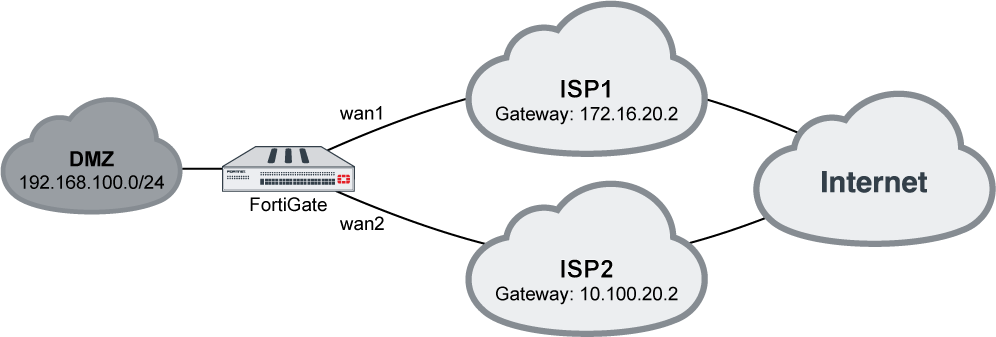
In this example, your wan1 and wan2 SD-WAN interfaces connect to two ISPs that both go to the public internet. The cost of wan2 is less than that of wan1. You want to configure Gmail services to use the lowest cost interface, but the link quality must meet a standard of latency: 10ms, and jitter: 5ms.
To configure an SD-WAN rule to use Lowest Cost (SLA):
- On the FortiGate, add wan1 and wan2 as SD-WAN members, then add a policy and static route. See SD-WAN quick start for details.
- Go to Network > SD-WAN, select the Performance SLAs tab, and click Create New.
- Enter a name for the performance SLA, such as google, and set the Server to google.com.
- Enable SLA Target. Set the Latency threshold to 10 ms, and the Jitter threshold to 5 ms. See Health checks for more details.
- Click OK.
- Go to Network > SD-WAN, select the SD-WAN Rules tab, and click Create New.
- Enter a name for the rule, such as gmail.
- Configure the following settings:
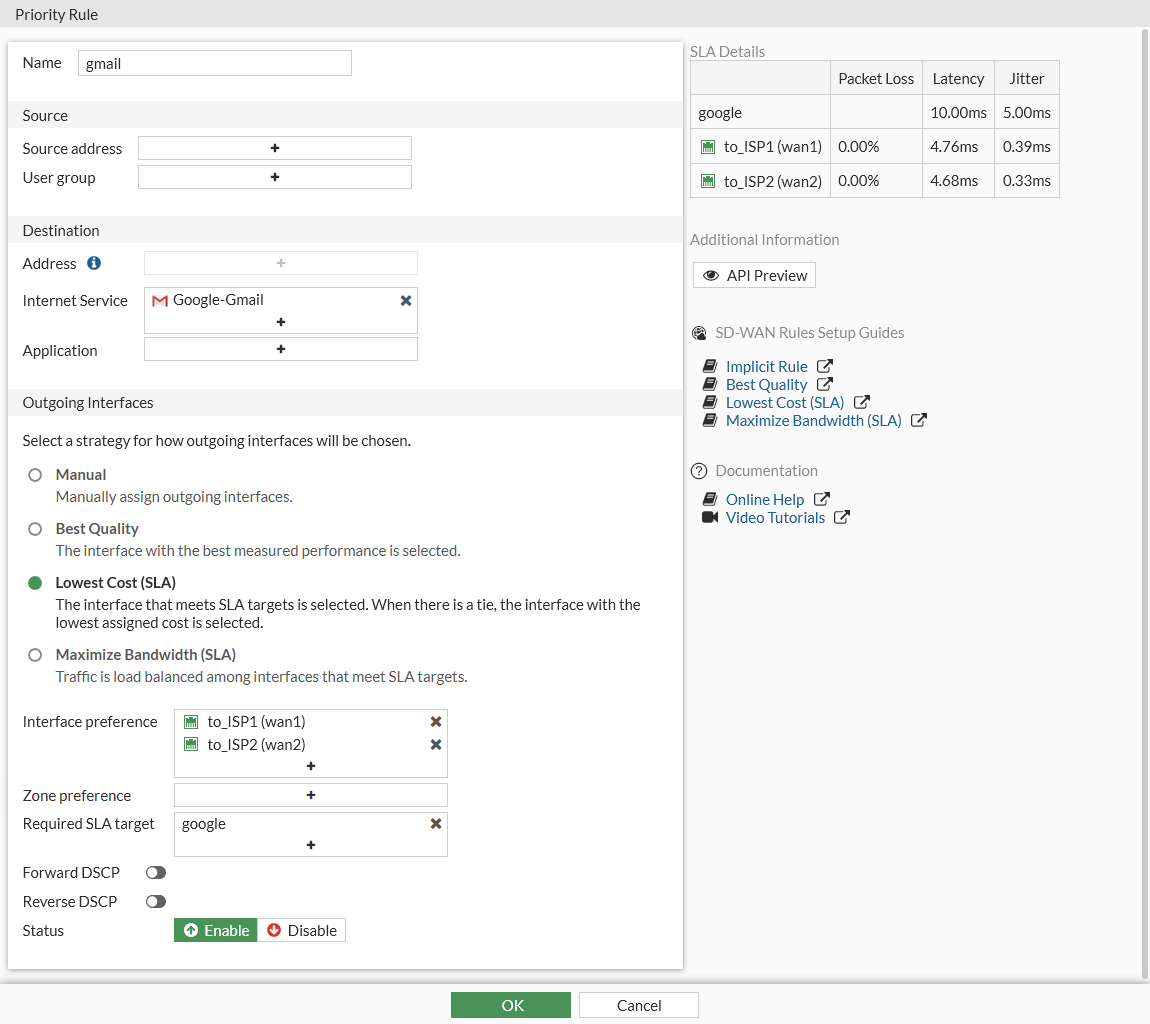
Internet Service
Google-Gmail
Strategy
Lowest Cost (SLA)
Interface preference
wan1 and wan2
Required SLA target
google
- Click OK.
To configure an SD-WAN rule to use SLA:
config system sdwan
    config members
        edit 1
            set interface "wan1"
            set cost 10
        next
        edit 2
            set interface "wan2"
            set cost 5
        next
    end
    config health-check
        edit "google"
            set server "google.com"
            set members 1 2
            config sla
                edit 1
                    set latency-threshold 10
                    set jitter-threshold 5
                next
            end
        next
    end
    config service
        edit 1
            set name "gmail"
            set mode sla
            set internet-service enable
            set internet-service-id 65646
            config sla
                edit "google"
                    set id 1
                next
            end
            set priority-members 1 2
        next
    end
end

|
If no SD-WAN zone is specified, members are added to the default virtual-wan-link zone. |

|
The CLI command |
To diagnose the Performance SLA status:
FGT # diagnose sys sdwan health-check google
Health Check(google):
Seq(1): state(alive), packet-loss(0.000%) latency(14.563), jitter(4.334) sla_map=0x0
Seq(2): state(alive), packet-loss(0.000%) latency(12.633), jitter(6.265) sla_map=0x0

FGT # diagnose sys sdwan service 1
Service(1): Address Mode(IPV4) flags=0x0

    TOS(0x0/0x0), Protocol(0: 1->65535), Mode(sla)
    Members:<<BR>>

        1: Seq_num(2), alive, sla(0x1), cfg_order(1), selected
        2: Seq_num(1), alive, sla(0x1), cfg_order(0), selected

    Internet Service: Google.Gmail(65646)
When both wan1 and wan2 meet the SLA requirements, Gmail traffic will only use wan2. If only wan1 meets the SLA requirements, Gmail traffic will only use wan1, even though it has a higher cost. If neither interface meets the requirements, wan2 will be used.
If both interface had the same cost and both met the SLA requirements, the first link configured in set priority-members would be used.