

Redundant hub and spoke VPN
A redundant hub and spoke configuration allows VPN connections to radiate from a central FortiGate unit (the hub) to multiple remote peers (the spokes). Traffic can pass between private networks behind the hub and private networks behind the remote peers. Traffic can also pass between remote peer private networks through the hub.
This is a sample configuration of hub and spoke IPsec VPN. The following applies for this scenario:
-
The spokes have two WAN interfaces and two IPsec VPN tunnels for redundancy.
-
The secondary VPN tunnel is up only when the primary tunnel is down by dead peer detection.
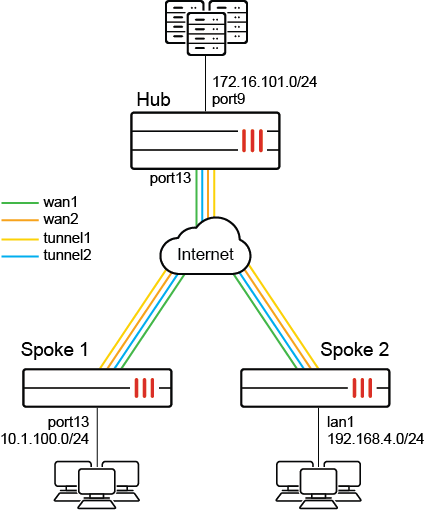
Because the GUI can only complete part of the configuration, we recommend using the CLI.
To configure redundant hub and spoke VPN using the FortiOS CLI:
-
Configure the hub.
-
Configure the WAN, internal interface, and static route:
config system interface edit "port13" set alias "WAN" set ip 172.16.202.1 255.255.255.0 next edit "port9" set alias "Internal" set ip 172.16.101.1 255.255.255.0 next end config router static edit 1 set gateway 172.16.202.2 set device "port13" next end -
Configure the IPsec phase1-interface and phase2-interface:
config vpn ipsec phase1-interface edit "hub" set type dynamic set interface "port13" set peertype any set net-device enable set proposal aes128-sha256 aes256-sha256 aes128-sha1 aes256-sha1 set dpd on-idle set psksecret sample set dpd-retryinterval 60 next end config vpn ipsec phase2-interface edit "hub" set phase1name "hub" set proposal aes128-sha1 aes256-sha1 aes128-sha256 aes256-sha256 aes128gcm aes256gcm chacha20poly1305 next end -
Configure the firewall policy:
config firewall policy
    edit 1
        set name "spoke-hub"
        set srcintf "hub"
        set dstintf "port9"
        set srcaddr "all"
        set dstaddr "172.16.101.0"
        set action accept
        set schedule "always"
        set service "ALL"
    next
    edit 2
        set name "spoke-spoke"
        set srcintf "hub"
        set dstintf "hub"
        set srcaddr "all"
        set dstaddr "all"
        set action accept
        set schedule "always"
        set service "ALL"
    next
end
-
-
Configure the spokes.
-
Configure the WAN, internal interface, and static route:
-
Configure Spoke1:
config system interface edit "port1" set ip 172.16.200.1 255.255.255.0 next edit "wan1" set mode dhcp set distance 10 set priority 100 next edit "dmz" set ip 10.1.100.1 255.255.255.0 next end config router static edit 1 set gateway 172.16.200.2 set device "port1" next end -
Configure Spoke2:
config system interface
    edit "wan1"
        set ip 172.16.200.3 255.255.255.0
    next
    edit "wan2"
        set mode dhcp
        set distance 10
        set priority 100
    next
    edit "lan1"
        set ip 192.168.4.1 255.255.255.0
    next
end
config router static
    edit 1
        set gateway 172.16.200.2
        set device "wan1"
    next
end
-
-
Configure IPsec phase1-interface and phase2-interface:
-
Configure Spoke1:
config vpn ipsec phase1-interface edit "primary" set interface "port1" set peertype any set net-device enable set proposal aes128-sha256 aes256-sha256 aes128-sha1 aes256-sha1 set remote-gw 172.16.202.1 set psksecret sample next edit "secondary" set interface "wan1" set peertype any set net-device enable set proposal aes128-sha256 aes256-sha256 aes128-sha1 aes256-sha1 set remote-gw 172.16.202.1 set monitor "primary" set psksecret sample next end config vpn ipsec phase2-interface edit "primary" set phase1name "primary" set proposal aes128-sha1 aes256-sha1 aes128-sha256 aes256-sha256 aes128gcm aes256gcm chacha20poly1305 set auto-negotiate enable set src-subnet 10.1.100.0 255.255.255.0 next edit "secondary" set phase1name "secondary" set proposal aes128-sha1 aes256-sha1 aes128-sha256 aes256-sha256 aes128gcm aes256gcm chacha20poly1305 set auto-negotiate enable set src-subnet 10.1.100.0 255.255.255.0 next end -
Configure Spoke2:
config vpn ipsec phase1-interface
    edit "primary"
        set interface "wan1"
        set peertype any
        set net-device enable
        set proposal aes128-sha256 aes256-sha256 aes128-sha1 aes256-sha1
        set remote-gw 172.16.202.1
        set psksecret sample
        next
    edit "secondary"
        set interface "wan2"
        set peertype any
        set net-device enable
        set proposal aes128-sha256 aes256-sha256 aes128-sha1 aes256-sha1
        set remote-gw 172.16.202.1
        set monitor "primary"
        set psksecret sample
    next
end
config vpn ipsec phase2-interface
    edit "primary"
        set phase1name "primary"
        set proposal aes128-sha1 aes256-sha1 aes128-sha256 aes256-sha256 aes128gcm aes256gcm chacha20poly1305
        set auto-negotiate enable
        set src-subnet 192.168.4.0 255.255.255.0
    next
    edit "secondary"
        set phase1name "secondary"
        set proposal aes128-sha1 aes256-sha1 aes128-sha256 aes256-sha256 aes128gcm aes256gcm chacha20poly1305
        set auto-negotiate enable
        set src-subnet 192.168.4.0 255.255.255.0
    next
end
-
-
Configure the firewall policy:
-
Configure Spoke1:
config firewall policy edit 1 set srcintf "dmz" set dstintf "primary" "secondary" set srcaddr "10.1.100.0" set dstaddr "172.16.101.0" set action accept set schedule "always" set service "ALL" next end -
Configure Spoke2:
config firewall policy
    edit 1
        set srcintf "lan1"
        set dstintf "primary" "secondary"
        set srcaddr "192.168.4.0"
        set dstaddr "172.16.101.0"
        set action accept
        set schedule "always"
        set service "ALL"
    next
end
-
-
Configure the static route:
-
Configure Spoke1:
config router static edit 3 set dst 172.16.101.0 255.255.255.0 set distance 1 set device "primary" next edit 4 set dst 172.16.101.0 255.255.255.0 set distance 3 set device "secondary" next end -
Configure Spoke2:
config router static
    edit 3
        set dst 172.16.101.0 255.255.255.0
        set distance 1
        set device "primary"
    next
    edit 4
        set dst 172.16.101.0 255.255.255.0
        set distance 3
        set device "secondary"
    next
end
-
-
-
Run
diagnoseandgetcommands.-
Run the
Spoke1 # diagnose vpn tunnel listcommand. The system should return the following:name=primary ver=1 serial=1 172.16.200.1:0->172.16.202.1:0 tun_id=172.16.202.1 bound_if=11 lgwy=static/1 tun=intf/0 mode=auto/1 encap=none/528 options[0210]=create_dev frag-rfc accept_traffic=1 proxyid_num=1 child_num=0 refcnt=15 ilast=0 olast=0 ad=/0 stat: rxp=1879 txp=1881 rxb=225480 txb=112860 dpd: mode=on-demand on=1 idle=20000ms retry=3 count=0 seqno=1 natt: mode=none draft=0 interval=0 remote_port=0 proxyid=primary proto=0 sa=1 ref=2 serial=2 auto-negotiate src: 0:10.1.100.0/255.255.255.0:0 dst: 0:0.0.0.0/0.0.0.0:0 SA: ref=3 options=18227 type=00 soft=0 mtu=1438 expire=41002/0B replaywin=2048 seqno=758 esn=0 replaywin_lastseq=00000758 itn=0 life: type=01 bytes=0/0 timeout=42901/43200 dec: spi=0908732f esp=aes key=16 20770dfe67ea22dd8ec32c44d84ef4d5 ah=sha1 key=20 edc89fc2ec06309ba13de95e7e486f9b795b8707 enc: spi=a1d9eed1 esp=aes key=16 8eeea2526fba062e680d941083c8b5d1 ah=sha1 key=20 f0f5deaf88b2a69046c3154e9f751739b3f411f5 dec:pkts/bytes=1879/112740, enc:pkts/bytes=1879/225480 name=secondary ver=1 serial=2 172.17.200.1:0->172.16.202.1:0 tun_id=172.16.202.1 bound_if=5 lgwy=static/1 tun=intf/0 mode=auto/1 encap=none/528 options[0210]=create_dev frag-rfc accept_traffic=0 proxyid_num=1 child_num=0 refcnt=10 ilast=1892 olast=1892 ad=/0 stat: rxp=0 txp=0 rxb=0 txb=0 dpd: mode=on-demand on=0 idle=20000ms retry=3 count=0 seqno=0 natt: mode=none draft=0 interval=0 remote_port=0 proxyid=secondary proto=0 sa=0 ref=2 serial=2 auto-negotiate src: 0:10.1.100.0/255.255.255.0:0 dst: 0:0.0.0.0/0.0.0.0:0 -
Run the
Spoke1 # get router info routing-table staticcommand. The system should return the following:Routing table for VRF=0 ................ S 172.16.101.0/24 [1/0] is directly connected, primary
-