

Configuring the category override rule
This topic includes information about configuring following category types:

|
Once you have configured the category override rules, ensure that the override category is active in a web filter profile. See Sub-category actions for more information. |
To create a FortiGuard category override:
-
Go to Security Profiles > Web Rating Overrides and click Create New.
-
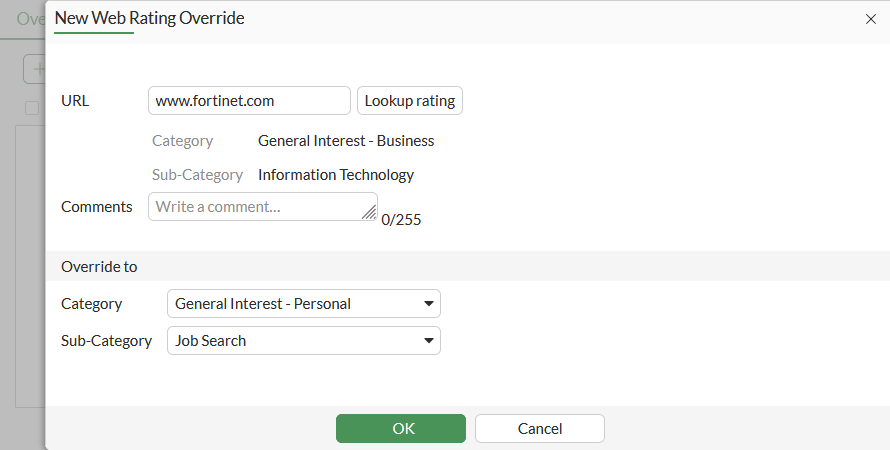
Configure the following settings:
URL
Enter the URL to override.
Lookup rating
Select to view any current Category and Sub-Category ratings.
Comments
Enter a comment (optional).
Override to
Category
Select a FortiGuard category, external feed remote category, or a Custom Category.
Sub-Category
Select a sub-category to further define the rating. If Custom Category was selected for the Category, you can select from a list of categories you created.
-
Click OK.
See Example 1: Override a FortiGuard category with another FortiGuard category for a sample configuration.
To create a custom local category override:
-
Create a custom category :
-
Go to Security Profiles > Web Rating Overrides.
-
Click Custom Categories, then click Create New.
-
Configure the following settings:
Name
Enter a unique name for the category.
Status
Enable/disable the status of the category.
-
Click OK.
-
-
Create a web rating override:
-
Go to Security Profiles > Web Rating Overrides and click Create New.
-
Configure the following settings:
URL
Enter the URL to override.
Lookup rating
Select to view any current Category and Sub-Category ratings.
Comments
Enter a comment (optional).
Override to
Category
Select Custom Category.
Sub-Category
Select the custom category that was just created.
-
Click OK.
See Example 3: Override a FortiGuard category with a custom local category for a sample configuration.
-
To create an external feed remote category override:
-
Go to Security Fabric > External Connectors and click Create New.
-
In the External Feeds section, click FortiGuard Category.
-
Enter a name for the external feed. This will also be the name of the remote category.
-
Enter the URL of external resource that contains the list of URLs that will be overridden in this remote category.
-
Configure the remaining settings as needed, then click OK.
See Example 2: Override a FortiGuard category with a remote categoryfor a sample configuration.