
Fortinet white logo
Fortinet white logo

Administration Guide

Manual failover of FortiGates deployed in an A-P architecture with VWP and using wildcard VLAN

Manual failover of FortiGates deployed in an A-P architecture with VWP and using wildcard VLAN

When the bounce-intf-upon-failover command is enabled, all monitored interfaces, includes aggregate interface members, are explicitly brought down during failover on the secondary device. This enhancement addresses a previous limitation where only the native VLAN received Gratuitous ARPs, leaving non-native VLANs unaware of the failover event.

config system ha
    set bounce-intf-upon-failover {enable | disable}
end

Example
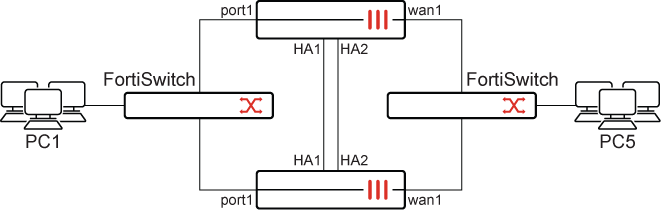
  1. Configure HA with bounce-intf-upon-failover enabled:

    config system ha
        set group-id 222
        set group-name "FG_HA"
        set mode a-p
        set password **********
        set hbdev "ha1" 50 "ha2" 100
        set encryption enable
        set authentication enable
        set session-pickup enable
        set override disable
        set monitor "wan1" "port1"
        set ipsec-phase2-proposal aes256gcm
        set bounce-intf-upon-failover enable
    end
  2. Configure vlan20 on port1:

    config system interface
        edit "vlan20"
            set vdom "root"
            set device-identification enable
            set snmp-index 36
            set interface "port1"
            set vlanid 20
        next
    end
  3. Configure VWP with members vlan20 and wan1:

    config system virtual-wire-pair
        edit "sss"
            set member "vlan20" "wan1"
        next
    end
  4. Initiate a ping from PC1 to PC5 which go through the Virtual-Wire-Pair

  5. Check the FDB table on the primary device:

    diagnose netlink brctl name host sss_v.b
    show bridge control interface sss_v.b host.
    fdb: hash size=8192, used=10, num=10, depth=1, gc_time=4, ageing_time=300, version_count=160109
    Bridge sss_v.b host table
    port no device  devname mac addr                ttl     attributes
      2     7       wan1    e0:23:ff:34:e0:90       1        Hit(1)
      2     7       wan1    00:09:0f:09:de:02       0       Local Static
      1     41      vlan20  00:0c:29:10:48:dc       93       Hit(93)
      2     7       wan1    e0:23:ff:fc:f4:02       2        Hit(2)
      2     7       wan1    02:42:ac:10:c8:2c       275
      2     7       wan1    02:42:ac:10:c8:37       0        Hit(0)
      1     41      vlan20  00:00:5e:00:01:01       0        Hit(0)
      2     7       wan1    00:0c:29:10:48:e6       93       Hit(93)
      1     41      vlan20  02:42:0a:01:64:16       0        Hit(0)
      1     41      vlan20  00:09:0f:09:de:06       0       Local Static
  6. Check the FDB table on the secondary device:

    diagnose netlink brctl name host sss_v.b
    show bridge control interface sss_v.b host.
    fdb: hash size=8192, used=10, num=10, depth=1, gc_time=4, ageing_time=300, version_count=0
    Bridge sss_v.b host table
    port no device  devname mac addr                ttl     attributes
      1     41      vlan20  00:03:e3:89:49:f2       150
      1     41      vlan20  00:0c:29:10:48:dc       145
      2     7       wan1    04:d5:90:04:f8:9c       0       Local Static
      2     7       wan1    02:42:ac:10:c8:2c       193
      1     41      vlan20  02:42:0a:01:64:0b       49
      2     7       wan1    02:42:ac:10:c8:37       189
      1     41      vlan20  00:00:5e:00:01:01       0
      2     7       wan1    00:0c:29:10:48:e6       49
      1     41      vlan20  02:42:0a:01:64:16       189
      1     41      vlan20  04:d5:90:04:f8:a0       0       Local Static
  7. Check the MAC address table on the incoming switch:

    # diagnose switch  mac-address list
    
    MAC: 04:d5:90:04:f8:a0  VLAN: 20 Port: port1(port-id 1)
      Flags: 0x00000041 [ hit dynamic ]
    
    MAC: e8:1c:ba:f2:a4:d6  VLAN: 20 Port: port2(port-id 2)
      Flags: 0x00000041 [ hit dynamic ]
    
    MAC: 00:00:5e:00:01:01  VLAN: 20 Port: port3(port-id 3)
      Flags: 0x00000041 [ hit dynamic ]
    
    MAC: e0:23:ff:fc:f4:02  VLAN: 20 Port: port2(port-id 2)
      Flags: 0x00000041 [ hit dynamic ]
    
    MAC: 02:42:0a:01:64:16  VLAN: 20 Port: port21(port-id 21)
      Flags: 0x00000041 [ hit dynamic ]
    
    MAC: 02:42:ac:10:c8:37  VLAN: 20 Port: port2(port-id 2)
      Flags: 0x00000041 [ hit dynamic ]
    
    MAC: e0:23:ff:95:70:96  VLAN: 1 Port: internal(port-id 29)
      Flags: 0x00000060 [ static ]
    
    MAC: 00:09:0f:09:6f:09  VLAN: 20 Port: port2(port-id 2)
      Flags: 0x00000041 [ hit dynamic ]
    
    MAC: 00:0c:29:10:48:e6  VLAN: 20 Port: port2(port-id 2)
      Flags: 0x00000041 [ hit dynamic ]
    
    MAC: 00:0c:29:10:48:dc  VLAN: 20 Port: port21(port-id 21)
      Flags: 0x00000041 [ hit dynamic ]
    
    MAC: 00:03:e3:89:49:f2  VLAN: 20 Port: port19(port-id 19)
      Flags: 0x00000041 [ hit dynamic ]
    
    Total Displayed: 11
  8. Initiate HA failover:

    execute ha failover set x
  9. Confirm that the ping traffic is still going.

  10. Recheck the FDB tables and note that the primary and secondary have switched.

  11. Check the MAC address table on the incoming switch:

    # diagnose switch mac-address list
    
    MAC: 04:d5:90:04:f8:a0  VLAN: 20 Port: port1(port-id 1)
      Flags: 0x00000041 [ hit dynamic ]
    
    MAC: e8:1c:ba:f2:a4:d6  VLAN: 20 Port: port2(port-id 2)
      Flags: 0x00000041 [ hit dynamic ]
    
    MAC: 00:00:5e:00:01:01  VLAN: 20 Port: port3(port-id 3)
      Flags: 0x00000041 [ hit dynamic ]
    
    MAC: e0:23:ff:fc:f4:02  VLAN: 20 Port: port1(port-id 1)
      Flags: 0x00000041 [ hit dynamic ]
    
    MAC: 02:42:0a:01:64:16  VLAN: 20 Port: port21(port-id 21)
      Flags: 0x00000041 [ hit dynamic ]
    
    MAC: 02:42:ac:10:c8:37  VLAN: 20 Port: port1(port-id 1)
      Flags: 0x00000041 [ hit dynamic ]
    
    MAC: e0:23:ff:95:70:96  VLAN: 1 Port: internal(port-id 29)
      Flags: 0x00000060 [ static ]
    
    MAC: e0:23:ff:34:e0:90  VLAN: 20 Port: port1(port-id 1)
      Flags: 0x00000041 [ hit dynamic ]
    
    MAC: e0:23:ff:34:e0:8f  VLAN: 20 Port: port1(port-id 1)
      Flags: 0x00000041 [ hit dynamic ]
    
    MAC: 00:0c:29:18:2d:90  VLAN: 20 Port: port1(port-id 1)
      Flags: 0x00000041 [ hit dynamic ]
    
    MAC: 00:0c:29:10:48:e6  VLAN: 20 Port: port1(port-id 1)
      Flags: 0x00000041 [ hit dynamic ]
    
    MAC: 00:0c:29:10:48:dc  VLAN: 20 Port: port21(port-id 21)
      Flags: 0x00000041 [ hit dynamic ]
    
    MAC: 00:09:0f:09:de:03  VLAN: 20 Port: port1(port-id 1)
      Flags: 0x00000041 [ hit dynamic ]
    
    MAC: 00:09:0f:09:de:02  VLAN: 20 Port: port1(port-id 1)
      Flags: 0x00000041 [ hit dynamic ]
    
    MAC: 00:03:e3:89:49:f2  VLAN: 20 Port: port19(port-id 19)
      Flags: 0x00000041 [ hit dynamic ]
    
    Total Displayed: 15
  12. Check the FortiSwitch logs:

    # execute log display
    420 logs found.
    10 logs returned.
    
    1: 2025-07-10 17:35:14 log_id=0105008255 type=event subtype=spanning_tree pri=notice vd=root user="stp_daemon" action=state-change unit="primary" switch.physical-port="port2" instanceid="0" event="state migration" oldstate="discarding" newstate="forwarding" msg="primary port port2 instance 0 changed state from discarding to forwarding"
    
    2: 2025-07-10 17:35:12 log_id=0105008255 type=event subtype=spanning_tree pri=notice vd=root user="stp_daemon" action=role-change unit="primary" switch.physical-port="port2" instanceid="0" event="role migration" oldrole="disabled" newrole="designated" msg="primary port port2 instance 0 changed role from disabled to designated"
    
    3: 2025-07-10 17:35:12 log_id=0100001400 type=event subtype=link pri=information vd=root unit="primary" switch.physical-port="port2" status="up" msg="primary switch port port2 has come up"
    
    4: 2025-07-10 17:35:09 log_id=0105008255 type=event subtype=spanning_tree pri=notice vd=root user="stp_daemon" action=state-change unit="primary" switch.physical-port="port2" instanceid="0" event="state migration" oldstate="forwarding" newstate="discarding" msg="primary port port2 instance 0 changed state from forwarding to discarding"
    
    5: 2025-07-10 17:35:09 log_id=0105008255 type=event subtype=spanning_tree pri=notice vd=root user="stp_daemon" action=role-change unit="primary" switch.physical-port="port2" instanceid="0" event="role migration" oldrole="designated" newrole="disabled" msg="primary port port2 instance 0 changed role from designated to disabled"
    
    6: 2025-07-10 17:35:09 log_id=0100001401 type=event subtype=link pri=information vd=root unit="primary" switch.physical-port="port2" status="down" msg="primary switch port port2 has gone down"
    
    7: 2025-07-10 17:20:10 log_id=0103032001 type=event subtype=system pri=information vd=root user="admin" ui=console action=login status=success reason=none profile="super_admin" msg="Administrator admin logged in successfully from console"
    
    8: 2025-07-10 17:19:30 log_id=0103032002 type=event subtype=system pri=alert vd=root user="8TZWR/tWanTlR11x9Diizg==" ui=console action=login status=failed reason="name_invalid" msg="Administrator 8TZWR/tWanTlR11x9Diizg== login failed from console because of invalid user name"
    
    9: 2025-07-10 11:10:33 log_id=0105008255 type=event subtype=spanning_tree pri=notice vd=root user="stp_daemon" action=state-change unit="primary" switch.physical-port="port9" instanceid="0" event="state migration" oldstate="discarding" newstate="forwarding" msg="primary port port9 instance 0 changed state from discarding to forwarding"
    
    10: 2025-07-10 11:10:32 log_id=0105008255 type=event subtype=spanning_tree pri=notice vd=root user="stp_daemon" action=state-change unit="primary" switch.physical-port="port3" instanceid="0" event="state migration" oldstate="discarding" newstate="forwarding" msg="primary port port3 instance 0 changed state from discarding to forwarding"

Manual failover of FortiGates deployed in an A-P architecture with VWP and using wildcard VLAN

Manual failover of FortiGates deployed in an A-P architecture with VWP and using wildcard VLAN

When the bounce-intf-upon-failover command is enabled, all monitored interfaces, includes aggregate interface members, are explicitly brought down during failover on the secondary device. This enhancement addresses a previous limitation where only the native VLAN received Gratuitous ARPs, leaving non-native VLANs unaware of the failover event.

config system ha
    set bounce-intf-upon-failover {enable | disable}
end

Example

  1. Configure HA with bounce-intf-upon-failover enabled:

    config system ha
        set group-id 222
        set group-name "FG_HA"
        set mode a-p
        set password **********
        set hbdev "ha1" 50 "ha2" 100
        set encryption enable
        set authentication enable
        set session-pickup enable
        set override disable
        set monitor "wan1" "port1"
        set ipsec-phase2-proposal aes256gcm
        set bounce-intf-upon-failover enable
    end
  2. Configure vlan20 on port1:

    config system interface
        edit "vlan20"
            set vdom "root"
            set device-identification enable
            set snmp-index 36
            set interface "port1"
            set vlanid 20
        next
    end
  3. Configure VWP with members vlan20 and wan1:

    config system virtual-wire-pair
        edit "sss"
            set member "vlan20" "wan1"
        next
    end
  4. Initiate a ping from PC1 to PC5 which go through the Virtual-Wire-Pair

  5. Check the FDB table on the primary device:

    diagnose netlink brctl name host sss_v.b
    show bridge control interface sss_v.b host.
    fdb: hash size=8192, used=10, num=10, depth=1, gc_time=4, ageing_time=300, version_count=160109
    Bridge sss_v.b host table
    port no device  devname mac addr                ttl     attributes
      2     7       wan1    e0:23:ff:34:e0:90       1        Hit(1)
      2     7       wan1    00:09:0f:09:de:02       0       Local Static
      1     41      vlan20  00:0c:29:10:48:dc       93       Hit(93)
      2     7       wan1    e0:23:ff:fc:f4:02       2        Hit(2)
      2     7       wan1    02:42:ac:10:c8:2c       275
      2     7       wan1    02:42:ac:10:c8:37       0        Hit(0)
      1     41      vlan20  00:00:5e:00:01:01       0        Hit(0)
      2     7       wan1    00:0c:29:10:48:e6       93       Hit(93)
      1     41      vlan20  02:42:0a:01:64:16       0        Hit(0)
      1     41      vlan20  00:09:0f:09:de:06       0       Local Static
  6. Check the FDB table on the secondary device:

    diagnose netlink brctl name host sss_v.b
    show bridge control interface sss_v.b host.
    fdb: hash size=8192, used=10, num=10, depth=1, gc_time=4, ageing_time=300, version_count=0
    Bridge sss_v.b host table
    port no device  devname mac addr                ttl     attributes
      1     41      vlan20  00:03:e3:89:49:f2       150
      1     41      vlan20  00:0c:29:10:48:dc       145
      2     7       wan1    04:d5:90:04:f8:9c       0       Local Static
      2     7       wan1    02:42:ac:10:c8:2c       193
      1     41      vlan20  02:42:0a:01:64:0b       49
      2     7       wan1    02:42:ac:10:c8:37       189
      1     41      vlan20  00:00:5e:00:01:01       0
      2     7       wan1    00:0c:29:10:48:e6       49
      1     41      vlan20  02:42:0a:01:64:16       189
      1     41      vlan20  04:d5:90:04:f8:a0       0       Local Static
  7. Check the MAC address table on the incoming switch:

    # diagnose switch  mac-address list
    
    MAC: 04:d5:90:04:f8:a0  VLAN: 20 Port: port1(port-id 1)
      Flags: 0x00000041 [ hit dynamic ]
    
    MAC: e8:1c:ba:f2:a4:d6  VLAN: 20 Port: port2(port-id 2)
      Flags: 0x00000041 [ hit dynamic ]
    
    MAC: 00:00:5e:00:01:01  VLAN: 20 Port: port3(port-id 3)
      Flags: 0x00000041 [ hit dynamic ]
    
    MAC: e0:23:ff:fc:f4:02  VLAN: 20 Port: port2(port-id 2)
      Flags: 0x00000041 [ hit dynamic ]
    
    MAC: 02:42:0a:01:64:16  VLAN: 20 Port: port21(port-id 21)
      Flags: 0x00000041 [ hit dynamic ]
    
    MAC: 02:42:ac:10:c8:37  VLAN: 20 Port: port2(port-id 2)
      Flags: 0x00000041 [ hit dynamic ]
    
    MAC: e0:23:ff:95:70:96  VLAN: 1 Port: internal(port-id 29)
      Flags: 0x00000060 [ static ]
    
    MAC: 00:09:0f:09:6f:09  VLAN: 20 Port: port2(port-id 2)
      Flags: 0x00000041 [ hit dynamic ]
    
    MAC: 00:0c:29:10:48:e6  VLAN: 20 Port: port2(port-id 2)
      Flags: 0x00000041 [ hit dynamic ]
    
    MAC: 00:0c:29:10:48:dc  VLAN: 20 Port: port21(port-id 21)
      Flags: 0x00000041 [ hit dynamic ]
    
    MAC: 00:03:e3:89:49:f2  VLAN: 20 Port: port19(port-id 19)
      Flags: 0x00000041 [ hit dynamic ]
    
    Total Displayed: 11
  8. Initiate HA failover:

    execute ha failover set x
  9. Confirm that the ping traffic is still going.

  10. Recheck the FDB tables and note that the primary and secondary have switched.

  11. Check the MAC address table on the incoming switch:

    # diagnose switch mac-address list
    
    MAC: 04:d5:90:04:f8:a0  VLAN: 20 Port: port1(port-id 1)
      Flags: 0x00000041 [ hit dynamic ]
    
    MAC: e8:1c:ba:f2:a4:d6  VLAN: 20 Port: port2(port-id 2)
      Flags: 0x00000041 [ hit dynamic ]
    
    MAC: 00:00:5e:00:01:01  VLAN: 20 Port: port3(port-id 3)
      Flags: 0x00000041 [ hit dynamic ]
    
    MAC: e0:23:ff:fc:f4:02  VLAN: 20 Port: port1(port-id 1)
      Flags: 0x00000041 [ hit dynamic ]
    
    MAC: 02:42:0a:01:64:16  VLAN: 20 Port: port21(port-id 21)
      Flags: 0x00000041 [ hit dynamic ]
    
    MAC: 02:42:ac:10:c8:37  VLAN: 20 Port: port1(port-id 1)
      Flags: 0x00000041 [ hit dynamic ]
    
    MAC: e0:23:ff:95:70:96  VLAN: 1 Port: internal(port-id 29)
      Flags: 0x00000060 [ static ]
    
    MAC: e0:23:ff:34:e0:90  VLAN: 20 Port: port1(port-id 1)
      Flags: 0x00000041 [ hit dynamic ]
    
    MAC: e0:23:ff:34:e0:8f  VLAN: 20 Port: port1(port-id 1)
      Flags: 0x00000041 [ hit dynamic ]
    
    MAC: 00:0c:29:18:2d:90  VLAN: 20 Port: port1(port-id 1)
      Flags: 0x00000041 [ hit dynamic ]
    
    MAC: 00:0c:29:10:48:e6  VLAN: 20 Port: port1(port-id 1)
      Flags: 0x00000041 [ hit dynamic ]
    
    MAC: 00:0c:29:10:48:dc  VLAN: 20 Port: port21(port-id 21)
      Flags: 0x00000041 [ hit dynamic ]
    
    MAC: 00:09:0f:09:de:03  VLAN: 20 Port: port1(port-id 1)
      Flags: 0x00000041 [ hit dynamic ]
    
    MAC: 00:09:0f:09:de:02  VLAN: 20 Port: port1(port-id 1)
      Flags: 0x00000041 [ hit dynamic ]
    
    MAC: 00:03:e3:89:49:f2  VLAN: 20 Port: port19(port-id 19)
      Flags: 0x00000041 [ hit dynamic ]
    
    Total Displayed: 15
  12. Check the FortiSwitch logs:

    # execute log display
    420 logs found.
    10 logs returned.
    
    1: 2025-07-10 17:35:14 log_id=0105008255 type=event subtype=spanning_tree pri=notice vd=root user="stp_daemon" action=state-change unit="primary" switch.physical-port="port2" instanceid="0" event="state migration" oldstate="discarding" newstate="forwarding" msg="primary port port2 instance 0 changed state from discarding to forwarding"
    
    2: 2025-07-10 17:35:12 log_id=0105008255 type=event subtype=spanning_tree pri=notice vd=root user="stp_daemon" action=role-change unit="primary" switch.physical-port="port2" instanceid="0" event="role migration" oldrole="disabled" newrole="designated" msg="primary port port2 instance 0 changed role from disabled to designated"
    
    3: 2025-07-10 17:35:12 log_id=0100001400 type=event subtype=link pri=information vd=root unit="primary" switch.physical-port="port2" status="up" msg="primary switch port port2 has come up"
    
    4: 2025-07-10 17:35:09 log_id=0105008255 type=event subtype=spanning_tree pri=notice vd=root user="stp_daemon" action=state-change unit="primary" switch.physical-port="port2" instanceid="0" event="state migration" oldstate="forwarding" newstate="discarding" msg="primary port port2 instance 0 changed state from forwarding to discarding"
    
    5: 2025-07-10 17:35:09 log_id=0105008255 type=event subtype=spanning_tree pri=notice vd=root user="stp_daemon" action=role-change unit="primary" switch.physical-port="port2" instanceid="0" event="role migration" oldrole="designated" newrole="disabled" msg="primary port port2 instance 0 changed role from designated to disabled"
    
    6: 2025-07-10 17:35:09 log_id=0100001401 type=event subtype=link pri=information vd=root unit="primary" switch.physical-port="port2" status="down" msg="primary switch port port2 has gone down"
    
    7: 2025-07-10 17:20:10 log_id=0103032001 type=event subtype=system pri=information vd=root user="admin" ui=console action=login status=success reason=none profile="super_admin" msg="Administrator admin logged in successfully from console"
    
    8: 2025-07-10 17:19:30 log_id=0103032002 type=event subtype=system pri=alert vd=root user="8TZWR/tWanTlR11x9Diizg==" ui=console action=login status=failed reason="name_invalid" msg="Administrator 8TZWR/tWanTlR11x9Diizg== login failed from console because of invalid user name"
    
    9: 2025-07-10 11:10:33 log_id=0105008255 type=event subtype=spanning_tree pri=notice vd=root user="stp_daemon" action=state-change unit="primary" switch.physical-port="port9" instanceid="0" event="state migration" oldstate="discarding" newstate="forwarding" msg="primary port port9 instance 0 changed state from discarding to forwarding"
    
    10: 2025-07-10 11:10:32 log_id=0105008255 type=event subtype=spanning_tree pri=notice vd=root user="stp_daemon" action=state-change unit="primary" switch.physical-port="port3" instanceid="0" event="state migration" oldstate="discarding" newstate="forwarding" msg="primary port port3 instance 0 changed state from discarding to forwarding"