Fortinet white logo
Fortinet white logo

Administration Guide

Local entries for SAML users

Local entries for SAML users

FortiOS supports SAML users when configuring local users, expanding its ability to define individual remote users for policy enforcement.

Administrators can create local entries for SAML users, enabling precise, user-specific control in both firewall policies and agentless VPNs. This streamlines policy management and enhances flexibility for environments using SAML authentication.

A working SAML IdP connection must already be configured.

To configure a local SAML user in the GUI:
  1. Go to User & Authentication > Single Sign-On and confirm that a SAML IdP connection is configured. See SAML for more information.

  2. Go to User & Authentication > User Definition and click Create New.
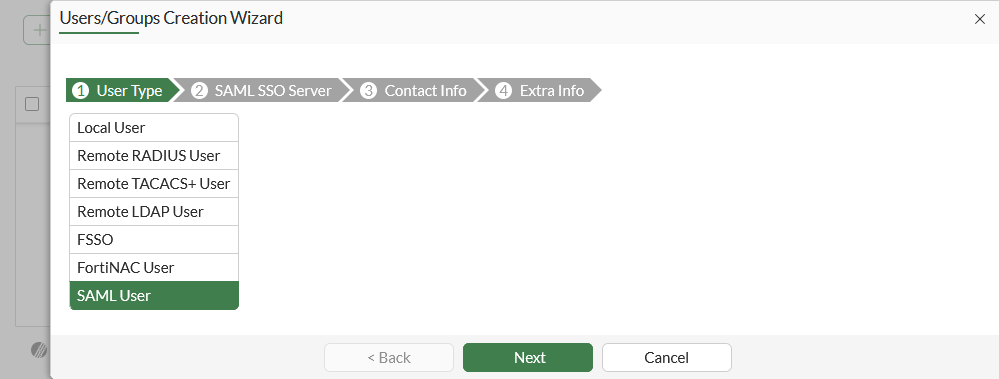
  3. Select SAML User, then click Next.

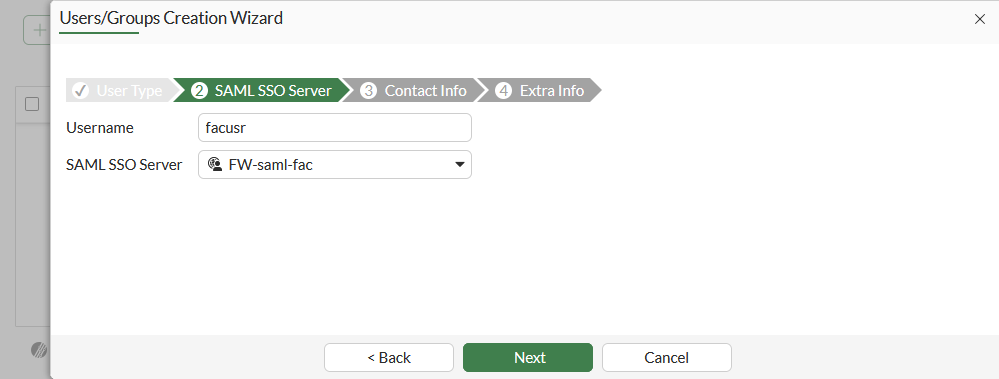
  4. Enter a Username and select a SAML SSO Server, then click Next.
  5. Optionally, enable and configure Two-factor Authentication, then click Next.

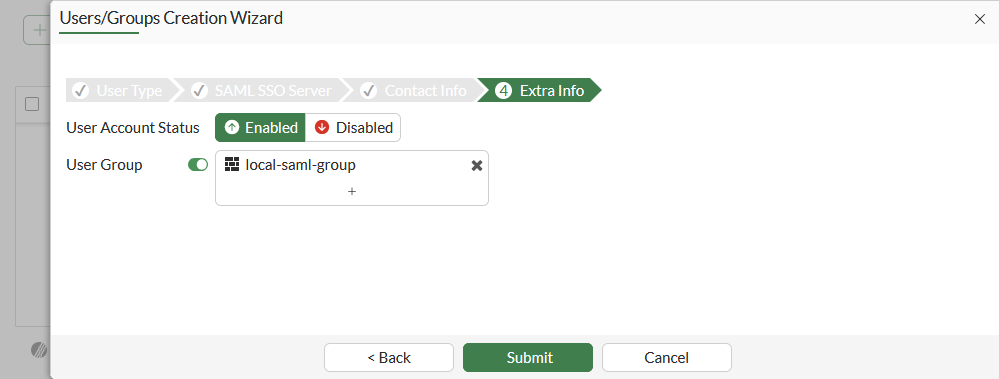
  6. Add the SAML user to a local user group, then click Submit.
To configure a local SAML user in the CLI:
  1. Make sure that a SAML server is configure:

    show user saml
       edit "FW-saml-fac"
            set entity-id "http://10.1.100.7:1000/metadata/"
            set single-sign-on-url "https://10.1.100.7:1003/saml/acs"
            set single-logout-url "https://10.1.100.7:1003/saml/sls"
            set idp-entity-id "http://10.1.100.195/saml-idp/77778888/metadata/"
            set idp-single-sign-on-url "https://10.1.100.195/saml-idp/77778888/login/"
            set idp-single-logout-url "https://10.1.100.195/saml-idp/77778888/logout/"
            set idp-cert "REMOTE_Cert_2"
            set user-name "username"
            set group-name "group"
            set digest-method sha1
        next
    end
  2. Configure the local user as a SAML user, and map them to the SAML user:

    config user local
        edit "facusr"
            set type saml
            set saml-server "FW-saml-fac"
        next
    end
  3. Optionally, add the user to a group:

    config user group
        edit "local-saml-group"
            set member "facusr"
        next
    end

Verification

To test the local SAML user on an agentless VPN portal in the GUI:
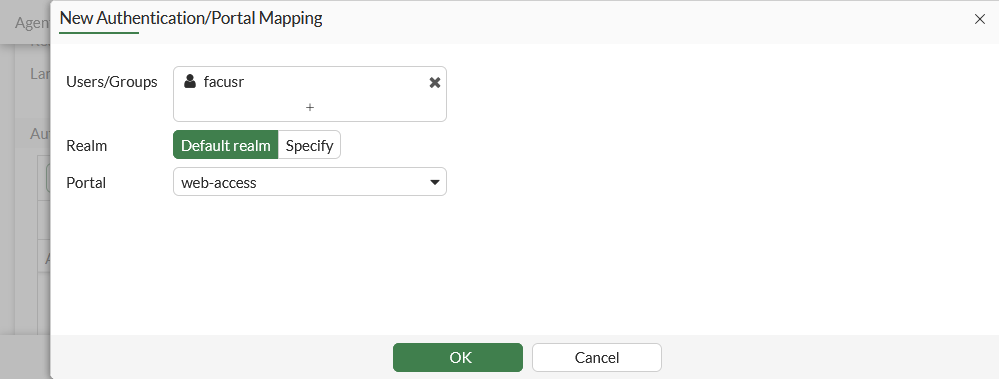
  1. Add the user to an agentless VPN portal mapping:

    1. Go to VPN > Agentless VPN Settings.

    2. In the Authentication/Portal Mapping table click Create New.

    3. Set Users/Groups to the SAML user. The user group that the SAML user was added to could also be used.

    4. Set Portal to web-access.

    5. Click OK.

    6. Click Apply.

  2. On a client PC, connect to the agentless VPN portal and enter valid SAML user credentials for authentication to access the portal page.

  3. On the FortiGate, check the connection in the FortiView VPN widget.

To test the local SAML user on an agentless VPN portal in the CLI:
  1. Add the user to an agentless VPN portal mapping:

    config vpn ssl settings
        config authentication-rule
            edit 1
                set users "facusr"
                set portal "web-access"
            next
        end
    end

    The user group that the SAML user was added to could also be used:

    config vpn ssl settings
        config authentication-rule
            edit 1
                set groups "local-saml-group"
            next
        end
    end
  2. On a client PC, connect to the agentless VPN portal and enter valid SAML user credentials for authentication to access the portal page.

  3. On the FortiGate, check the connection:

    # get vpn ssl monitor
    Agentless VPN Login Users:
    |Index|User  |Group|Auth Type|Idle-Timeout|Auth-Timeout|From        |HTTP in/out|HTTPS in/out|Two-factor Auth|
    |0|   facuser|N/A  |256(1)|273|28772                   |10.1.100.188|0/0|0/0|0| 
To test the local SAML user used in a policy in the CLI:
  1. Add the user to a firewall policy:

    config firewall policy
        edit 2
            set users "facusr"
        next
    end

    The user group that the SAML user was added to could also be used:

    config firewall policy
        edit 2
            set groups "local-saml-group"
        next
    end
  2. On a client PC, use a browser to connect to an external website. The browser will redirect to the IdP login screen for authentication.

  3. Enter valid SAML user credentials for authentication. After successful authentication, the browser reroutes to the external website.

  4. On the FortiGate, check the list of authenticated users:

    # diagnose firewall auth list 
    
    10.1.100.188, facuser
            src_mac: 00:0c:29:44:be:b9
            type: fw, id: 0, duration: 63, idled: 12
            expire: 237
            flag(804): hard no_idle
            server: FW-saml-fac
            packets: in 29 out 39, bytes: in 12594 out 4409
            user_id: 16777229
            group_id:
            group_name:
    
    ----- 1 listed, 0 filtered ------

Local entries for SAML users

Local entries for SAML users

FortiOS supports SAML users when configuring local users, expanding its ability to define individual remote users for policy enforcement.

Administrators can create local entries for SAML users, enabling precise, user-specific control in both firewall policies and agentless VPNs. This streamlines policy management and enhances flexibility for environments using SAML authentication.

A working SAML IdP connection must already be configured.

To configure a local SAML user in the GUI:
  1. Go to User & Authentication > Single Sign-On and confirm that a SAML IdP connection is configured. See SAML for more information.

  2. Go to User & Authentication > User Definition and click Create New.

  3. Select SAML User, then click Next.

  4. Enter a Username and select a SAML SSO Server, then click Next.

  5. Optionally, enable and configure Two-factor Authentication, then click Next.

  6. Add the SAML user to a local user group, then click Submit.

To configure a local SAML user in the CLI:
  1. Make sure that a SAML server is configure:

    show user saml
       edit "FW-saml-fac"
            set entity-id "http://10.1.100.7:1000/metadata/"
            set single-sign-on-url "https://10.1.100.7:1003/saml/acs"
            set single-logout-url "https://10.1.100.7:1003/saml/sls"
            set idp-entity-id "http://10.1.100.195/saml-idp/77778888/metadata/"
            set idp-single-sign-on-url "https://10.1.100.195/saml-idp/77778888/login/"
            set idp-single-logout-url "https://10.1.100.195/saml-idp/77778888/logout/"
            set idp-cert "REMOTE_Cert_2"
            set user-name "username"
            set group-name "group"
            set digest-method sha1
        next
    end
  2. Configure the local user as a SAML user, and map them to the SAML user:

    config user local
        edit "facusr"
            set type saml
            set saml-server "FW-saml-fac"
        next
    end
  3. Optionally, add the user to a group:

    config user group
        edit "local-saml-group"
            set member "facusr"
        next
    end

Verification

To test the local SAML user on an agentless VPN portal in the GUI:
  1. Add the user to an agentless VPN portal mapping:

    1. Go to VPN > Agentless VPN Settings.

    2. In the Authentication/Portal Mapping table click Create New.

    3. Set Users/Groups to the SAML user. The user group that the SAML user was added to could also be used.

    4. Set Portal to web-access.

    5. Click OK.

    6. Click Apply.

  2. On a client PC, connect to the agentless VPN portal and enter valid SAML user credentials for authentication to access the portal page.

  3. On the FortiGate, check the connection in the FortiView VPN widget.

To test the local SAML user on an agentless VPN portal in the CLI:
  1. Add the user to an agentless VPN portal mapping:

    config vpn ssl settings
        config authentication-rule
            edit 1
                set users "facusr"
                set portal "web-access"
            next
        end
    end

    The user group that the SAML user was added to could also be used:

    config vpn ssl settings
        config authentication-rule
            edit 1
                set groups "local-saml-group"
            next
        end
    end
  2. On a client PC, connect to the agentless VPN portal and enter valid SAML user credentials for authentication to access the portal page.

  3. On the FortiGate, check the connection:

    # get vpn ssl monitor
    Agentless VPN Login Users:
    |Index|User  |Group|Auth Type|Idle-Timeout|Auth-Timeout|From        |HTTP in/out|HTTPS in/out|Two-factor Auth|
    |0|   facuser|N/A  |256(1)|273|28772                   |10.1.100.188|0/0|0/0|0| 
To test the local SAML user used in a policy in the CLI:
  1. Add the user to a firewall policy:

    config firewall policy
        edit 2
            set users "facusr"
        next
    end

    The user group that the SAML user was added to could also be used:

    config firewall policy
        edit 2
            set groups "local-saml-group"
        next
    end
  2. On a client PC, use a browser to connect to an external website. The browser will redirect to the IdP login screen for authentication.

  3. Enter valid SAML user credentials for authentication. After successful authentication, the browser reroutes to the external website.

  4. On the FortiGate, check the list of authenticated users:

    # diagnose firewall auth list 
    
    10.1.100.188, facuser
            src_mac: 00:0c:29:44:be:b9
            type: fw, id: 0, duration: 63, idled: 12
            expire: 237
            flag(804): hard no_idle
            server: FW-saml-fac
            packets: in 29 out 39, bytes: in 12594 out 4409
            user_id: 16777229
            group_id:
            group_name:
    
    ----- 1 listed, 0 filtered ------