

VLAN inside VXLAN
VLANs can be assigned to VXLAN interfaces. In a data center network where VXLAN is used to create an L2 overlay network and for multitenant environments, a customer VLAN tag can be assigned to VXLAN interface. This allows the VLAN tag from VLAN traffic to be encapsulated within the VXLAN packet.
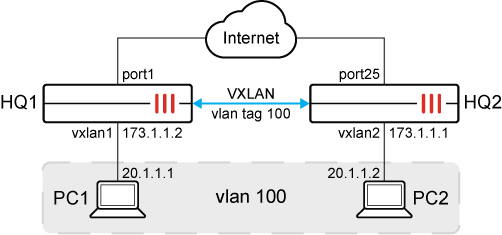
To configure VLAN inside VXLAN on HQ1:
-
Configure VXLAN:
config system vxlan edit "vxlan1" set interface port1 set vni 1000 set remote-ip 173.1.1.1 next end -
Configure system interface:
config system interface edit vlan100 set vdom root set vlanid 100 set interface dmz next edit vxlan100 set type vlan set vlanid 100 set vdom root set interface vxlan1 next end -
Configure software-switch:
config system switch-interface
    edit sw1
        set vdom root
        set member vlan100 vxlan100
        set intra-switch-policy implicit
    next
end

|
The default |

|
Instead of creating a software-switch, it is possible to use a virtual-wire-pair as well. See Virtual wire pair with VXLAN. |
To configure VLAN inside VXLAN on HQ2:
-
Configure VXLAN:
config system vxlan edit "vxlan2" set interface port25 set vni 1000 set remote-ip 173.1.1.2 next end -
Configure system interface:
config system interface edit vlan100 set vdom root set vlanid 100 set interface port20 next edit vxlan100 set type vlan set vlanid 100 set vdom root set interface vxlan2 next end -
Configure software-switch:
config system switch-interface
    edit sw1
        set vdom root
        set member vlan100 vxlan100
    next
end
To verify the configuration:
Ping PC1 from PC2.
The following is captured on HQ2:
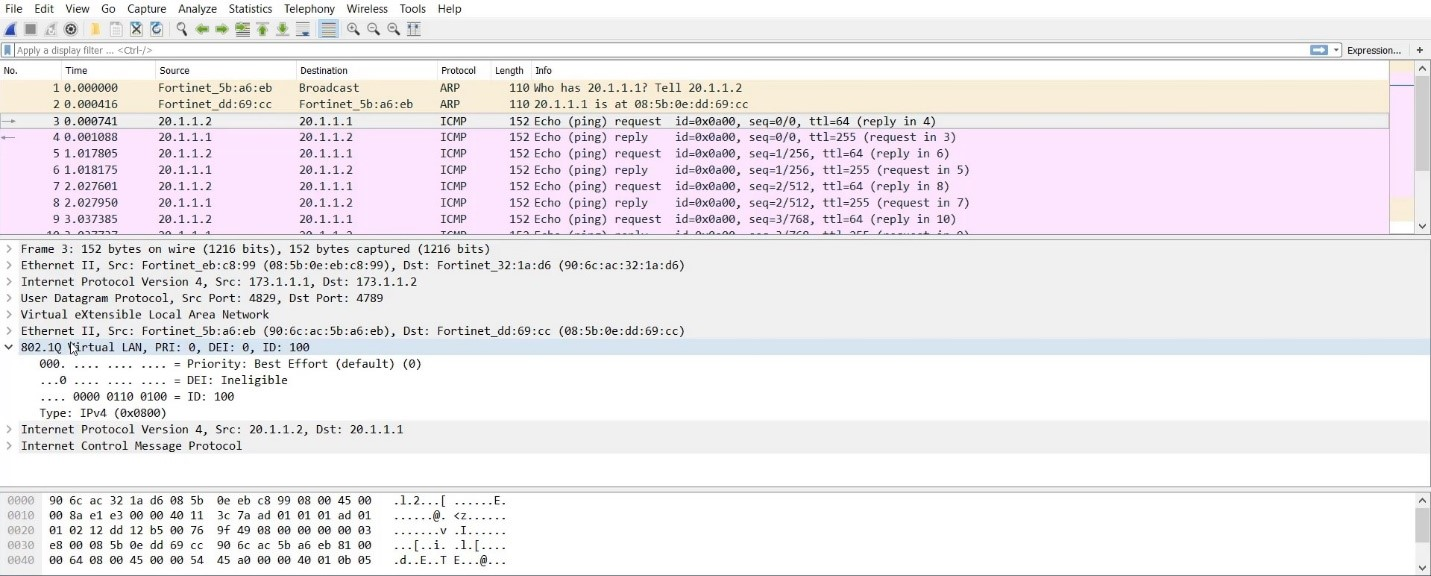
This captures the VXLAN traffic between 172.1.1.1 and 172.1.1.2 with the VLAN 100 tag inside.