Fortinet white logo
Fortinet white logo

Administration Guide

FortiAI Example Tasks

FortiAI Example Tasks

The FortiAI Assistant supports a variety of tasks that help you investigate virtual server status, analyze traffic logs, and access FortiADC product knowledge using natural-language queries. Each example below demonstrates a specific capability with a sample prompt and the corresponding FortiAI Assistant response.

Product Knowledge and Feature Assistance
Virtual Server and Pool Management
Log Analysis and Security Summaries
Generating Lua Scripts with Text-to-Script
tooltip icon

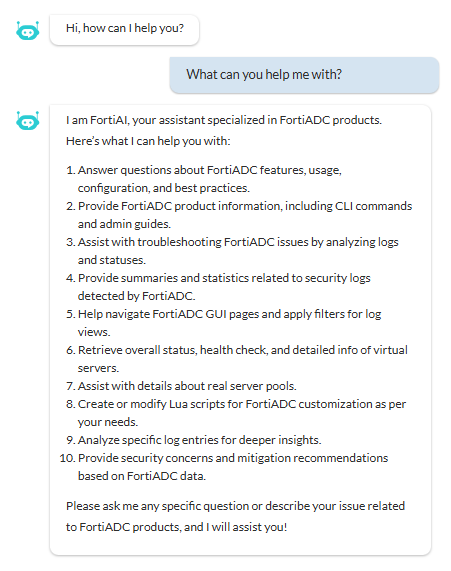
You can prompt the FortiAI Assistant to help at any time. For example, try asking:

“What can you help me with?”

Product Knowledge and Feature Assistance

FortiAI uses Retrieval-Augmented Generation (RAG) to provide grounded, up-to-date information directly from FortiADC documentation.

Example 1: Requesting configuration guidance

Prompt:

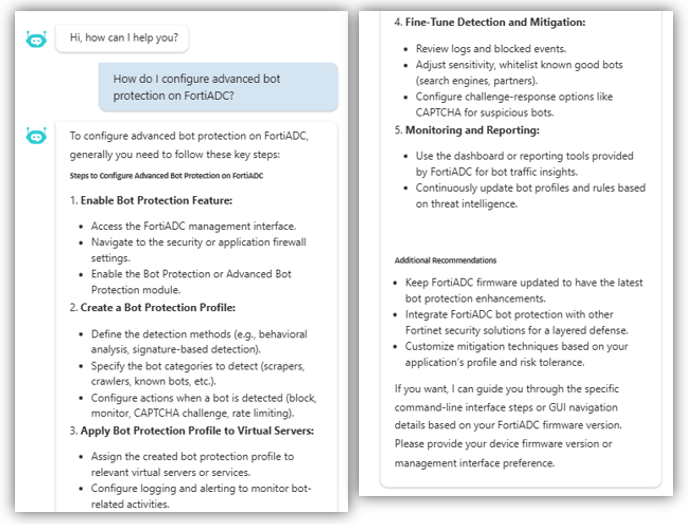
How do I configure advanced bot protection on FortiADC?

What FortiAI does:

Researches the official Administration Guide and returns a summarized configuration checklist. It also provides verified hyperlinks to the specific documentation pages for deeper reading.
Example 2: Asking about feature functionality

Prompt:

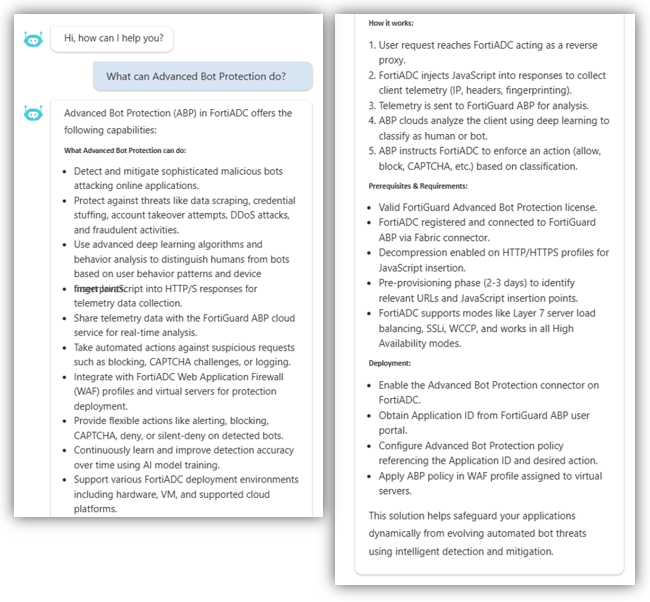
What can Advanced Bot Protection do?

What FortiAI does:

Provides a comprehensive summary of the module's capabilities and suggests related security features you may want to configure.
Virtual Server and Pool Management

The assistant can interact with your current configuration to retrieve real-time status and provide direct navigation to monitoring views.

Example 3: Show virtual server information

Prompt:

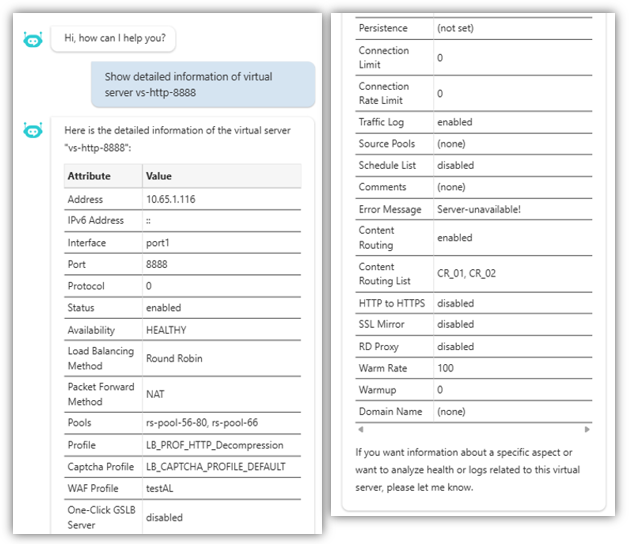
Show detailed information of virtual server vs-http-8888

What FortiAI does:

Queries the system database and generates a real-time status card in the chat pane, displaying the VS IP, port, and the health status of all associated real servers.
Example 4: Go to the FortiView page for an object

Prompt:

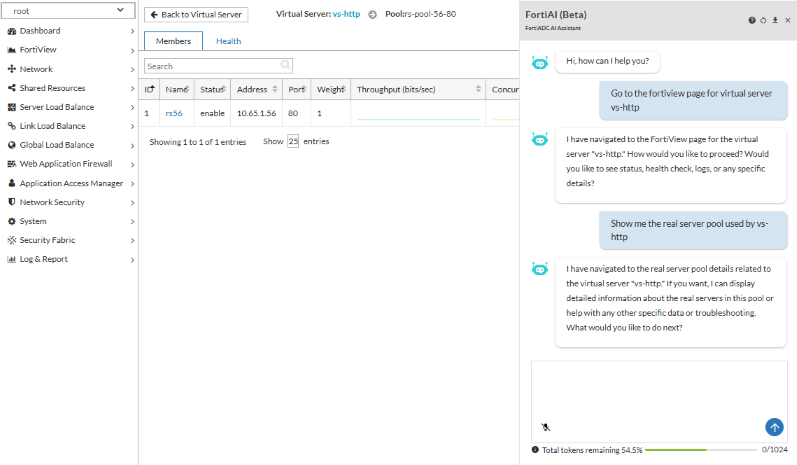
Go to the fortiview page for virtual server vs-http

Show me the real server pool used by vs-http

What FortiAI does:

Directs the management console to the relevant FortiView monitoring tab for the requested object.
Example 5: Check health check history

Prompt:

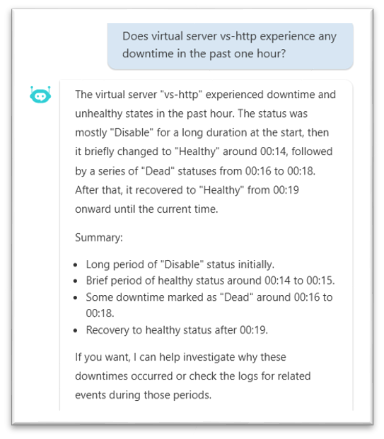
Check if virtual server vs-http experience any downtime in past one hour

What FortiAI does:

Scans the event logs for health check failures within the specified time frame and returns a summary of "Up/Down" transitions.
Log Analysis and Security Summaries

FortiAI streamlines security investigations by summarizing trends and executing GUI actions like page redirection and filter application.

Example 6: Summarizing top attack types

Prompt:

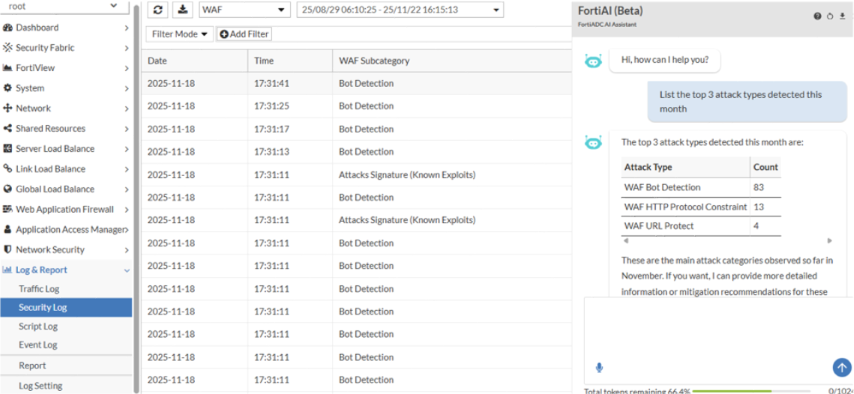
List the top 3 attack types detected in this month

What FortiAI does:

Redirects to the relevant Attack Log and aggregates the data to returns a ranked list of security violations with detection counts.
Example 7: Show logs with filters

Prompt:

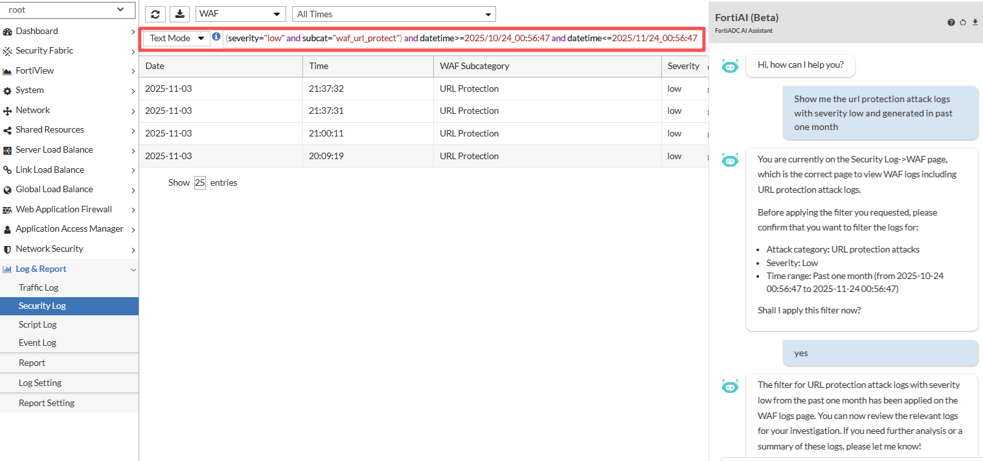
Show me the url protection attack logs with severity low and generated in past one month

What FortiAI does:

Navigates to the relevant log page (if not already on the page), then generates a filter based on your query.
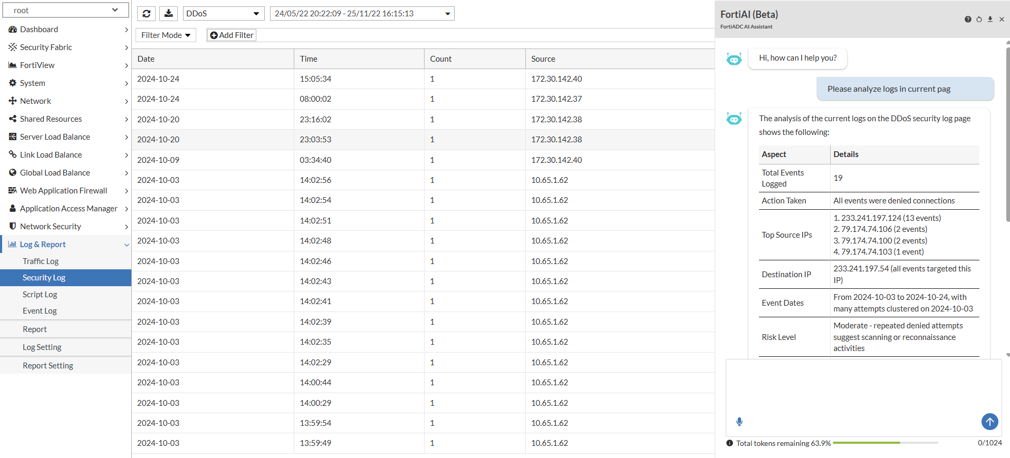
Example 8: Analyzing logs on the current page

Prompt:

Please analyze logs in current page

What FortiAI does:

Analyzes the visible logs in your current view to identify frequent source IPs or notable traffic patterns.
Generating Lua Scripts with Text-to-Script

The assistant simplifies traffic management by generating functional automation drafts.

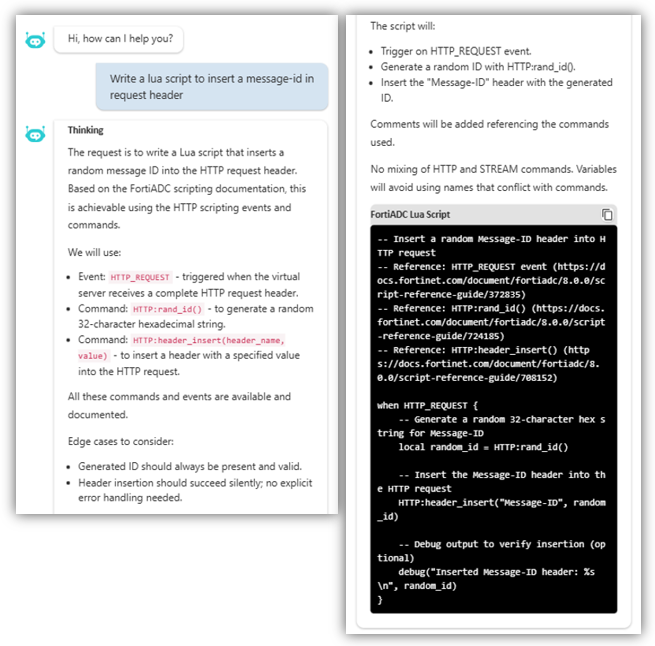
Example 9: Write a Lua script for HTTP/HTTPS virtual servers

Prompt:

Write a lua script to insert a message-id in request header

What FortiAI does:

Produces a code block using correct FortiADC Lua API syntax that can be copied into a new script object.
FortiAI Example Tasks

FortiAI Example Tasks

The FortiAI Assistant supports a variety of tasks that help you investigate virtual server status, analyze traffic logs, and access FortiADC product knowledge using natural-language queries. Each example below demonstrates a specific capability with a sample prompt and the corresponding FortiAI Assistant response.

Product Knowledge and Feature Assistance
Virtual Server and Pool Management
Log Analysis and Security Summaries
Generating Lua Scripts with Text-to-Script
tooltip icon

You can prompt the FortiAI Assistant to help at any time. For example, try asking:

“What can you help me with?”

Product Knowledge and Feature Assistance

FortiAI uses Retrieval-Augmented Generation (RAG) to provide grounded, up-to-date information directly from FortiADC documentation.

Example 1: Requesting configuration guidance

Prompt:

How do I configure advanced bot protection on FortiADC?

What FortiAI does:

Researches the official Administration Guide and returns a summarized configuration checklist. It also provides verified hyperlinks to the specific documentation pages for deeper reading.

Example 2: Asking about feature functionality

Prompt:

What can Advanced Bot Protection do?

What FortiAI does:

Provides a comprehensive summary of the module's capabilities and suggests related security features you may want to configure.

Virtual Server and Pool Management

The assistant can interact with your current configuration to retrieve real-time status and provide direct navigation to monitoring views.

Example 3: Show virtual server information

Prompt:

Show detailed information of virtual server vs-http-8888

What FortiAI does:

Queries the system database and generates a real-time status card in the chat pane, displaying the VS IP, port, and the health status of all associated real servers.

Example 4: Go to the FortiView page for an object

Prompt:

Go to the fortiview page for virtual server vs-http

Show me the real server pool used by vs-http

What FortiAI does:

Directs the management console to the relevant FortiView monitoring tab for the requested object.

Example 5: Check health check history

Prompt:

Check if virtual server vs-http experience any downtime in past one hour

What FortiAI does:

Scans the event logs for health check failures within the specified time frame and returns a summary of "Up/Down" transitions.

Log Analysis and Security Summaries

FortiAI streamlines security investigations by summarizing trends and executing GUI actions like page redirection and filter application.

Example 6: Summarizing top attack types

Prompt:

List the top 3 attack types detected in this month

What FortiAI does:

Redirects to the relevant Attack Log and aggregates the data to returns a ranked list of security violations with detection counts.

Example 7: Show logs with filters

Prompt:

Show me the url protection attack logs with severity low and generated in past one month

What FortiAI does:

Navigates to the relevant log page (if not already on the page), then generates a filter based on your query.

Example 8: Analyzing logs on the current page

Prompt:

Please analyze logs in current page

What FortiAI does:

Analyzes the visible logs in your current view to identify frequent source IPs or notable traffic patterns.

Generating Lua Scripts with Text-to-Script

The assistant simplifies traffic management by generating functional automation drafts.

Example 9: Write a Lua script for HTTP/HTTPS virtual servers

Prompt:

Write a lua script to insert a message-id in request header

What FortiAI does:

Produces a code block using correct FortiADC Lua API syntax that can be copied into a new script object.