

Viewing Adaptive Learning Analysis and Recommendation
From the Adaptive Learning View page, you can access statistical outputs derived from the Adaptive Learning engine's continuous, deep analysis of comprehensive datasets constructed from incoming traffic samples. The Adaptive Learning statistics are organized into two tabs: Analysis and Recommendation.
Analysis
The Analysis page provides graphical representations of the statistical outputs generated from the WAF Adaptive Learning engine. This page features a navigation tree that allows you to drill down to various levels of data. Each view presents a dashboard composed of various widgets that can be moved and resized. Statistics may be presented as tables or circle graphs that break-down the percentage against the total count.
Adaptive Learning statistics data are saved to the local database, ensuring persistence across reboots and upgrades. Additionally, if the interval between two requests received under the same virtual server exceeds one minute, the learned statistics will be written to the database file.
Overviews
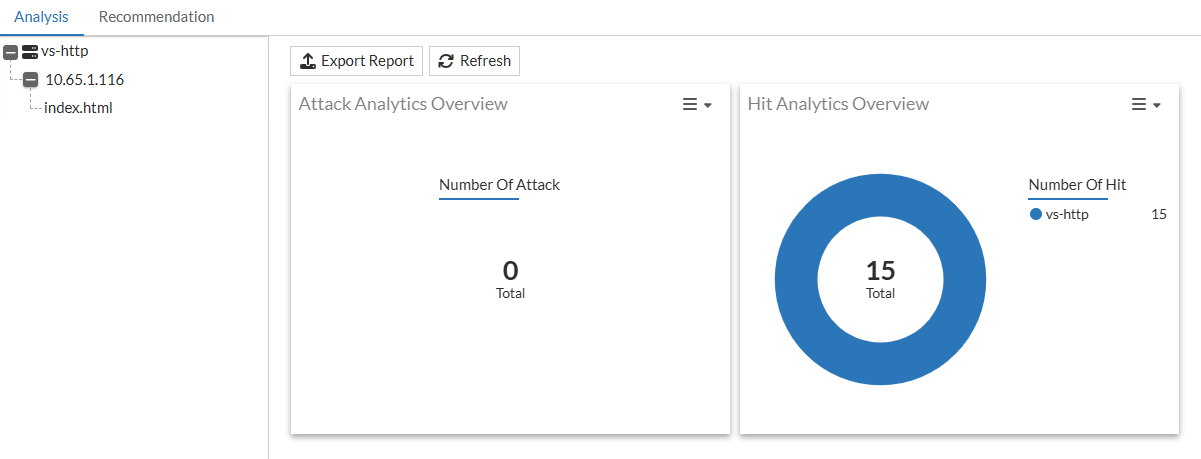
The Overview dashboard serves as the landing page of the Analysis tab. Here, you can view the Attack Analytics Overview and Hit Analytics Overview graphs that provide a comprehensive overview of the statistics collected from all virtual servers with Adaptive Learning enabled.
From this view, you can access the Export Report function to generate PDF reports containing Adaptive Learning data. Reports include:
-
Model metadata
-
Rule recommendations
-
Learning activity metrics and event logs
Reports are generated per VDOM and can include up to 12 months of historical data. This feature is intended for auditing, reporting, and operational review. Exporting data does not affect enforcement behavior or system configuration.
Virtual Server Statistics
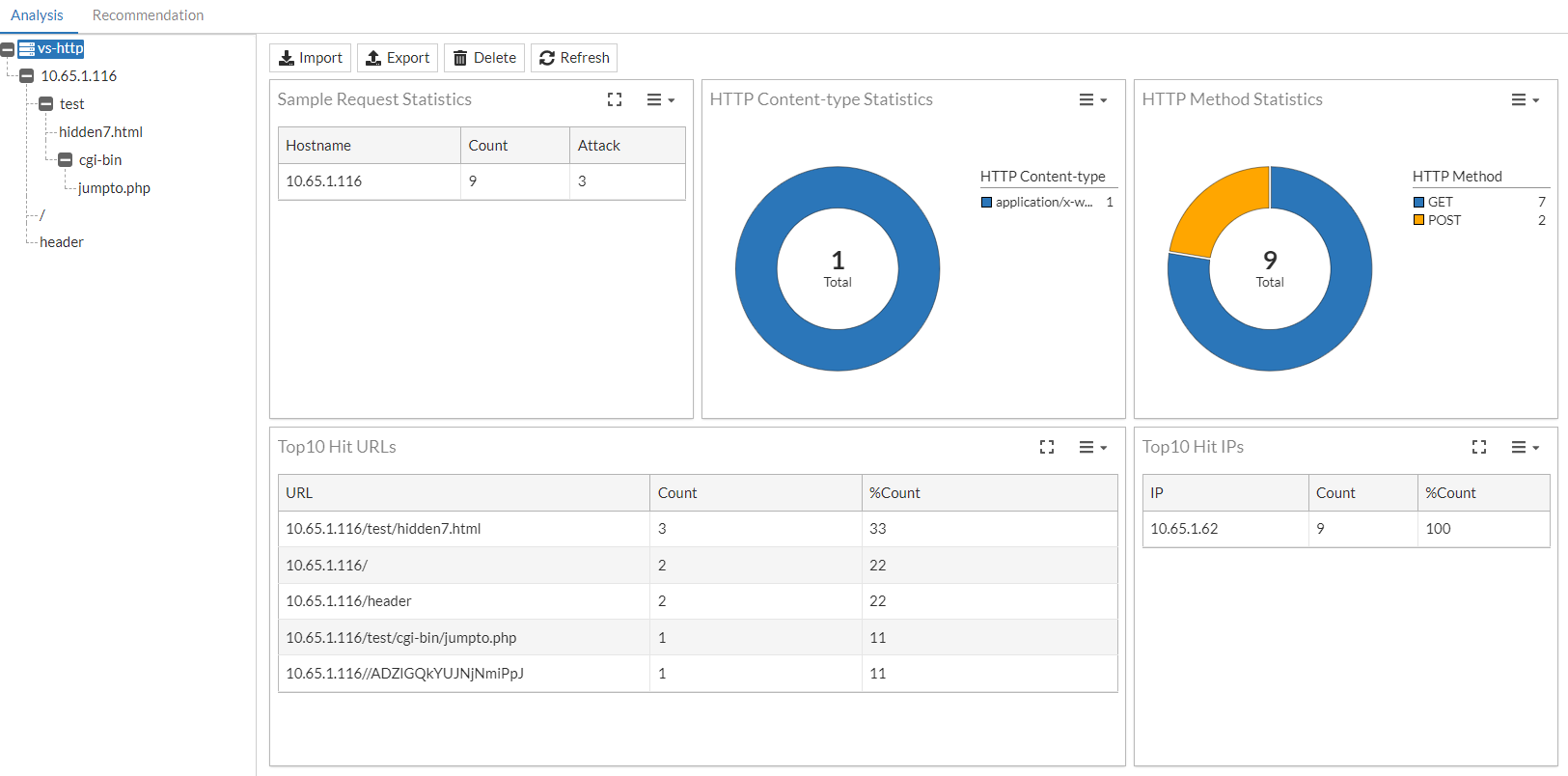
At the virtual server level, various graphs and tables consolidate the Adaptive Learning analysis statistics from the virtual server traffic.
You can perform the following actions on the virtual server statistics:
-
Import — You may import a .zip file of statistics exported from another virtual server you wish to migrate.
-
Export — The virtual server URL tree (.xml) and associated statistics (.bin) will be compressed into a .zip file and downloaded automatically. The .bin file statistics for each URL includes the parameters, hidden fields and other information that are used to determine if a recommendation should be generated.
-
Delete — Both the URL trees and associated statistics will be cleared. All subsequent recommendations will be generated based on new traffic sampling.
-
Refresh — Manually refresh the statistics for the current page.
|
Statistic |
Description |
|---|---|
| Count | The number of requests sent to Adaptive Learning for processing. |
| Attack | The number of requests that are denied by WAF policies. |
| %Count | The percentage of the current requests relative to the total number of requests. |
Host IP Statistics
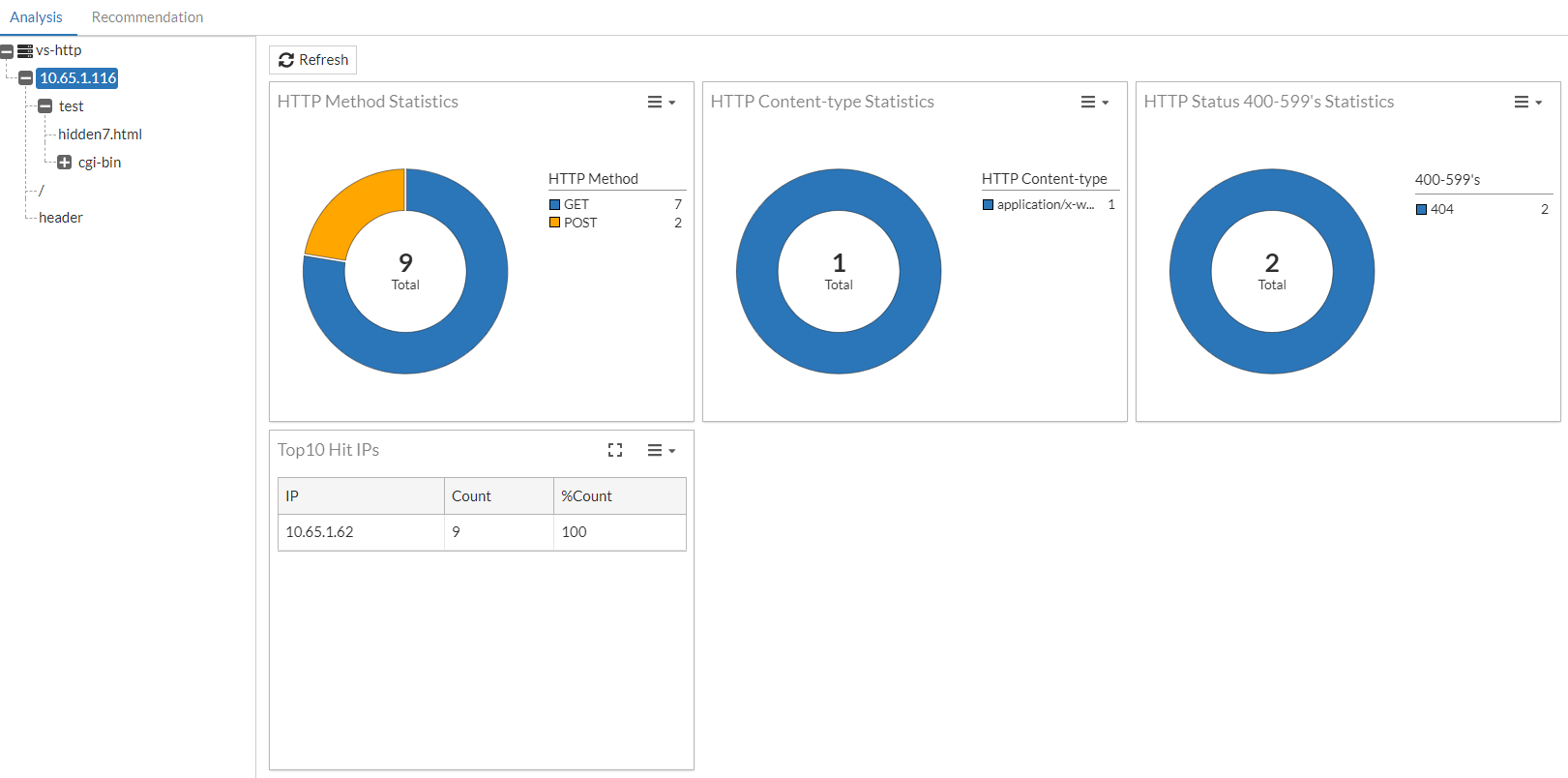
At the Host IP level, various graphs and tables consolidate the Adaptive Learning analysis statistics from each Host IP address.
|
Statistic |
Description |
|---|---|
| Count | The number of requests sent to Adaptive Learning for processing. |
| %Count | The percentage of the current requests relative to the total number of requests. |
URL Statistics
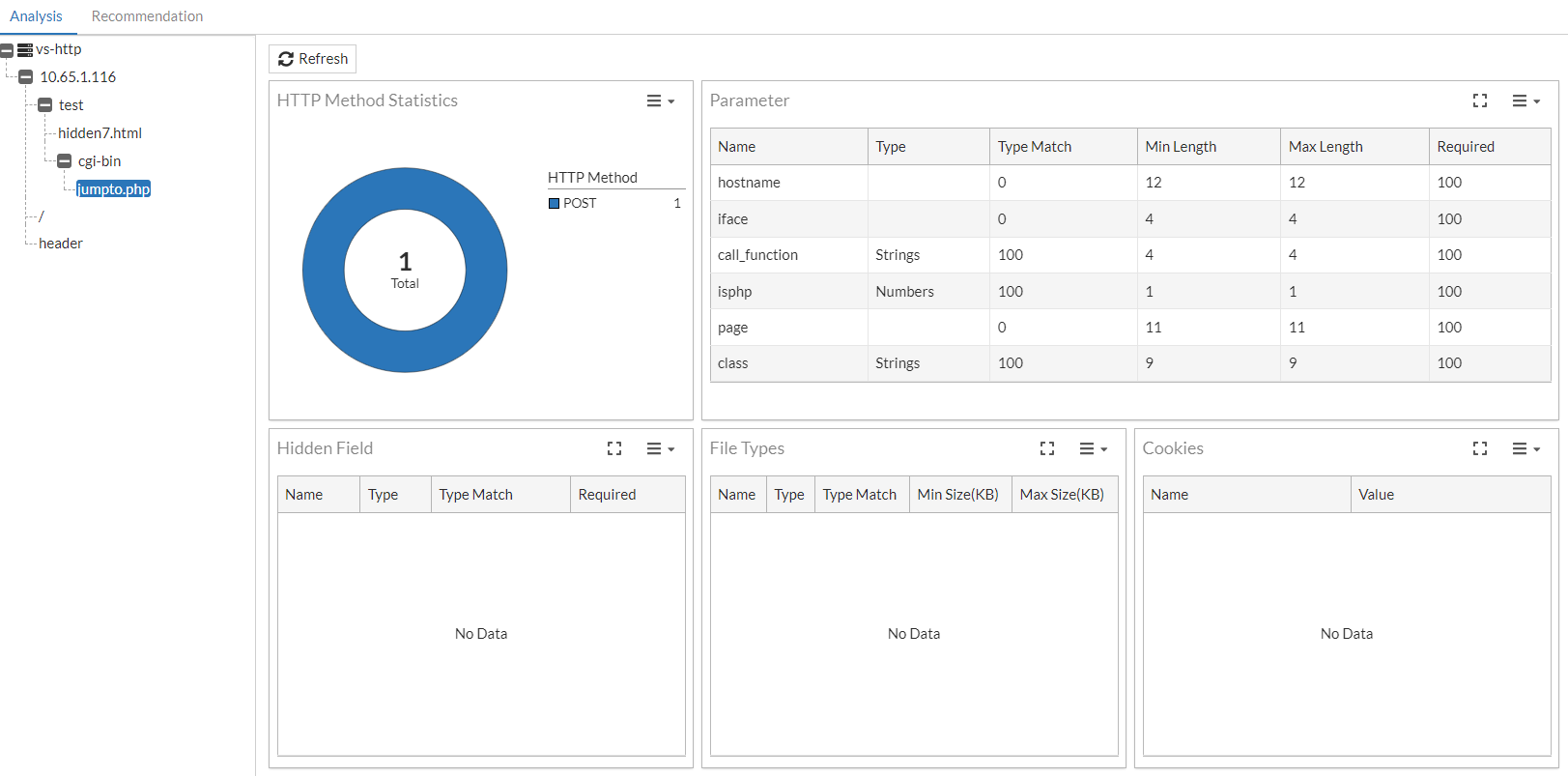
At the URL level, critical data about the URL is presented in a graph and several tables.
HTTP Method Statistics
The HTTP Method Statistics graph breaks down the types of methods that can be analyzed from this URL.
Parameter
The Parameter table captures the statistics used to generate the parameter validation policies.
Note: As HTML content is usually compressed in transferring, for most of the time, decompression should be enabled on the VS to correctly parse the HTML content.
|
Column |
Description |
|---|---|
| Name |
Parameters are parsed from the |
| Type |
The type is parsed by the WAF's built-in DLP sensitive data-type database based on parameter values from the latest POST request, rather than the input type defined in the HTML source file. The input type parsed from the HTML form determines if a parameter should be learned or ignored, while the type displayed in the statistics table is parsed by the DLP database.
Though the type is parsed from the POST request, a prior GET request is necessary to identify the parameter; otherwise, the parameter may not be recognized correctly. |
| Type Match | The percentage of the current/latest type among all received requests is calculated. Whenever the type changes, the count for the previous type is reset to 0. |
| Min Length | The minimum length of the value ever received for the current parameter. |
| Max Length | The maximum length of the value ever received for the current parameter. |
|
Required |
The percentage of times the parameter has a non-empty value out of the total occurrences. For example, if the parameter "fruit" is received 10 times and 3 times the value is empty, then the required percentage is 70%. This means that 70% of the times the parameter "fruit" is received, it has a non-empty value. |
Hidden Field
The Hidden Field table captures the statistics used to generate recommendation for hidden field validation policies.
|
Column |
Description |
|---|---|
| Name |
Parameters with an input type "hidden" in the HTML form will be recognized as Hidden Field. Parameters are parsed from the |
| Type |
The type is parsed by the WAF's built-in DLP sensitive data-type database based on parameter values from the latest POST request, rather than the input type defined in the HTML source file. The input type parsed from the HTML form determines if a parameter should be learned or ignored, while the type displayed in the statistics table is parsed by the DLP database.
Though the type is parsed from the POST request, a prior GET request is necessary to identify the parameter; otherwise, the parameter may not be recognized correctly. |
| Type Match | The percentage of the current/latest type among all received requests is calculated. Whenever the type changes, the count for the previous type is reset to 0. |
|
Required |
The percentage of times the parameter has a non-empty value out of the total occurrences. For example, if the parameter "fruit" is received 10 times and 3 times the value is empty, then the required percentage is 70%. This means that 70% of the times the parameter "fruit" is received, it has a non-empty value. |
File Types
The File Types table captures the statistics of the files uploaded through the requests.
Note: Currently, these statistics are not actively used to generate recommendations, however, these File Type statistics may be used to generate File Restriction policies in the future.
|
Column |
Description |
|---|---|
| Name |
Parsed from the multipart or form-data parts of the file. |
| Type |
The type of the uploaded file is parsed by the WAF's built-in file-type database, which is used for file restriction policies. This is independent of the type defined in the multipart/form-data headers. |
| Type Match | The percentage of the current/latest type among all received requests is calculated. Whenever the type changes, the count for the previous type is reset to 0. |
| Min Size (KB) |
The minimum size ever uploaded of the same file name. |
| Max Size (KB) | The maximum size ever uploaded of the same file name. |
Cookies
The Cookies table captures the statistics of cookies through the requests. This statistic is not used to generate recommendations.
|
Column |
Description |
|---|---|
| Name |
Parsed from the cookie pairs from request the request header "Cookie: name=value". |
| Value |
Parsed from the cookie pairs from request the request header "Cookie: name=value". |
Recommendation
From the Recommendation page, you can view all the recommendations generated from the deep analysis performed by the Adaptive Learning engine.
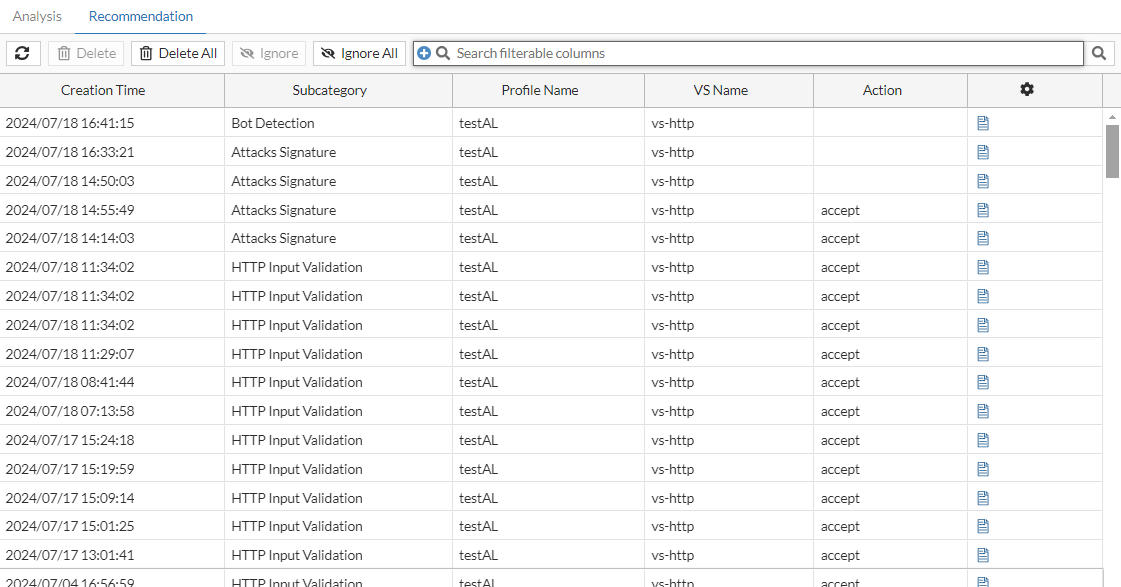
To view the Recommendation Details, select the entry and click  (page icon) to display the Recommendation Details dialog.
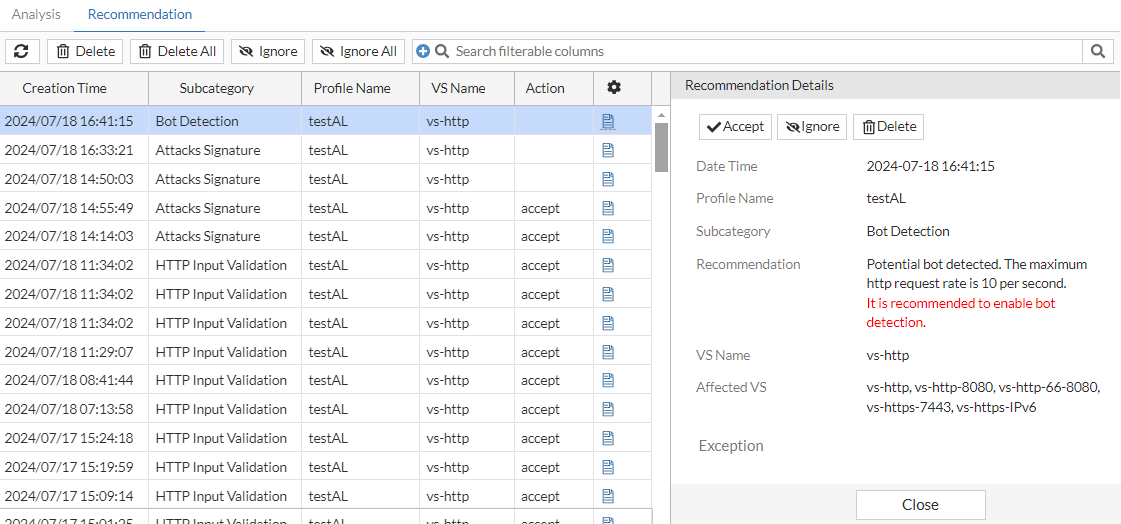
| Date Time | Records the time when the recommendation was generated. |
| Profile Name | The WAF Profile name. |
| Subcategory | The WAF module to which the recommendation applies. |
| Recommendation | The rationale behind the recommendation and the specific action it advises. |
| VS Name | The name of the virtual server where the WAF Profile is applied. |
| Affected VS | Lists the virtual servers that will be affected by the action taken for this recommendation. |
|
Exception |
Displays the WAF Exception object specified as the False Positive Policy in the corresponding Adaptive Learning configuration. If a policy is configured and the affected WAF module supports exception handling, the exception rules will be automatically applied when this recommendation is accepted. Modules that support this field:
Modules that do not support this field:
|
There are three actions you can take to address this recommendation:
-
Accept — The corresponding policy will be automatically generated or adjusted. If the current policy is read-only (a predefined policy), it will be replaced with a cloned version and adjusted with the recommended settings.
-
Ignore — This recommendation will be ignored, but will still be kept for reference. The corresponding notification will be considered "read", decreasing the notification count.
-
Delete — This recommendation will be deleted and removed from the recommendation list. The corresponding notification will be considered "read", decreasing the notification count.
For practical demonstrations of how to use Adaptive Learning recommendations, see Practical Applications of Adaptive Learning.
False Positive Recommendations
The Adaptive Learning engine monitors traffic patterns to identify potential false positives—instances where legitimate traffic is incorrectly flagged by a WAF module. When such patterns are observed repeatedly across multiple clients, the engine generates targeted recommendations to reduce unnecessary blocking while maintaining protection.
False positive identification is supported for the following WAF modules, each with context-specific actions:
-
Web Attack Signature:
Recommendations disable specific signature IDs that are triggered consistently by legitimate traffic, reducing overblocking without deactivating the entire signature set. -
Bot Detection:
-
Disable specific bad bot categories that are misclassified.
-
Adjust the request rate limit for known good bots based on observed traffic behavior.
-
-
Input Validation (Parameter Validation):
Modify the expected data type or allowable length of form parameters when legitimate client input frequently violates configured rules. -
JSON/XML Protection:
Adjust limits on value length or data structure depth when valid JSON or XML payloads exceed existing thresholds. -
HTTP Protocol Constraint:
Modify protocol-level constraints (such as header or URI lengths) when real-world client traffic regularly exceeds defaults without malicious intent. -
SQL/XSS Injection Detection:
Disable overly sensitive sub-detection categories (e.g., benign keyword matches) that generate high false positive rates in typical traffic.
These recommendations can be accepted directly or refined with exception policies, depending on your deployment’s tolerance for risk and operational requirements.
Recommendation Notifications
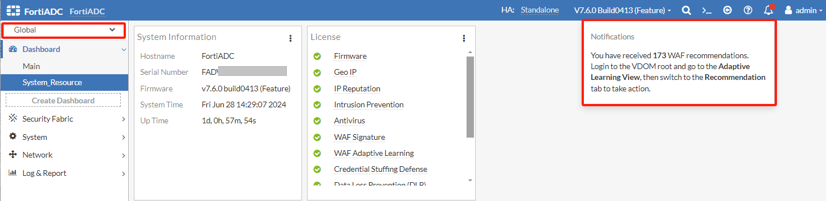
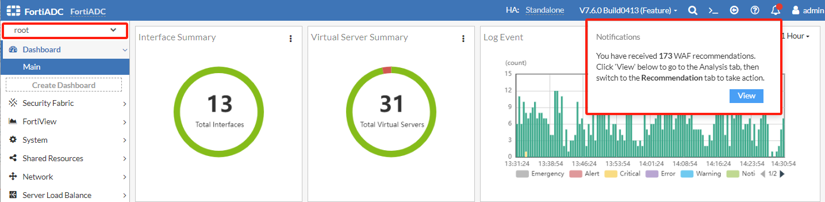
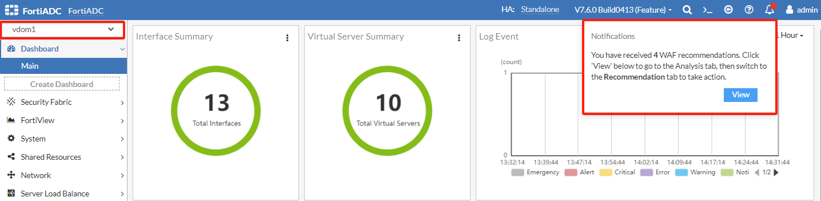
Adaptive Learning generates notifications for each unresolved recommendation. The displayed recommendation count differs based on the context in which the notification is viewed, either from the Global VDOM or specific VDOMs (root or non-root). In the Global VDOM, the recommendation count aggregates only those generated within the root VDOM. Conversely, when viewed from individual VDOMs, the count reflects recommendations generated exclusively within the respective VDOM.

|
Adaptive Learning Capacity LimitsAdaptive Learning supports up to 100,000 concurrent HTTP requests and ~1,000 parallel recommendation tasks. If request rates are too high, statistics may be incomplete or recommendations skipped. Key limits:
Use lower sampling profiles (e.g., Slow_Learning, Medium_Learning) for high-traffic environments to ensure data integrity. |