

Configuring a WAF Profile
A WAF profile references the WAF policies that are to be enforced.
Predefined WAF profiles describes the predefined profiles. In many cases, you can use predefined profiles to get started.
| Predefined Profiles | Description |
|---|---|
|
High-Level-Security |
|
|
Medium-Level-Security |
|
|
Alert-Only |
|
If desired, you can create user-defined profiles. The maximum number of profiles per VDOM is 255.
Before you begin:
- You can use predefined WAF profiles, create profiles based on predefined feature options, or create profiles based on user-defined configuration objects. If you want to add user-defined configuration objects, you must create them before using this procedure to add them to a WAF profile.
- You must have Read-Write permission for Security settings.
After you have created a WAF profile, you can specify it in a virtual server configuration.
To configure a WAF Profile:
- Go to Web Application Firewall > WAF Profile.
- Click the WAF Profile tab.
- Click Create New to display the configuration editor.
- Complete the configuration as described in WAF Profile configuration.
- Save the configuration.
| Settings | Guidelines |
|---|---|
|
Name |
Configuration name. Valid characters are After you initially save the configuration, you cannot edit the name. |
|
Exception Name |
Select a user-defined exception configuration object. Exceptions identify specific hosts or URL patterns that are not subject to processing by this rule. |
|
Description |
A string to describe the purpose of the configuration, to help you and other administrators more easily identify its use. |
|
Rule Match Record |
Enable to allow the Security Log to display the part of the rule that is matched when the security event is logged. This is disabled by default. |
|
Use Original IP |
Enable to use the client's original IP address instead of the source IP for attack identification. This is disabled by default. When enabled, the client’s original IP address from the "X-Forwarded-For" header is used in place of the standard source IP, impacting specific WAF functions. This setting affects WAF Blocked IP matching, Known Good Bots in Bot Detection, and source IP-based rules in the Exception feature. Log records are updated with the original client IP for detected attacks, ensuring accurate logging. This feature applies to both HTTP and HTTPS traffic and supports IPv4 and IPv6 addressing. Note: If the HTTP request packet does not contain the "X-Forwarded-For" information or contains invalid data, the system will default to using the HTTP source IP address instead. For further details, see Using the Original IP. |
|
Standard Protection |
|
|
Adaptive Learning |
Select a predefined or user-defined Adaptive Learning configuration object. |
|
Web Attack Signature |
Select a predefined or user-defined Web Attack Signature configuration object. |
|
HTTP Protocol Constraint |
Select a predefined or user-defined HTTP Protocol Constraint configuration object. |
|
Sensitive Data Protection |
|
|
Cookie Security |
Select a user-defined Cookie Security configuration object. |
|
Data Leak Prevention |
Select a user-defined Data Leak Prevention configuration object. |
|
HTTP Header Security |
Select a user-defined HTTP Header Security configuration object. |
|
Input Protection |
|
|
SQL/XSS Injection Detection |
Select a predefined or user-defined SQL/XSS Injection Detection configuration object. |
|
Input Validation Policy |
Select a user-defined Input Validation Policy configuration object. |
|
CORS Protection |
Select a user-defined CORS Protection configuration object. |
|
Access Protection |
|
|
Brute Force Attack Detection |
Select a user-defined Brute Force Attack Detection configuration object. |
|
URL Protection |
Select a user-defined URL Protection configuration object. |
|
Credential Stuffing Defense |
Select a user-defined Credential Stuffing Defense configuration object. |
|
API Protection |
|
|
JSON Detection |
Select a predefined or user-defined JSON Detection configuration object. |
|
XML Detection |
Select a predefined or user-defined XML Detection configuration object. |
|
OpenAPI Detection |
Select a user-defined OpenAPI Detection configuration object. |
|
API Gateway |
Select a user-defined API Gateway configuration object. |
|
Bot Mitigation |
|
|
Bot Detection |
Select a user-defined Bot Detection configuration object. |
|
Threshold Based Detection |
Select a predefined or user-defined Threshold Based Detection configuration object. |
|
Biometrics Based Detection |
Select a user-defined Biometrics Based Detection configuration object. |
|
Fingerprint Based Detection |
Select a user-defined Fingerprint Based Detection configuration object. |
|
Advanced Bot Protection |
Select a user-defined Advanced Bot Protection configuration object. |
|
Advanced Protection |
|
|
Advanced Protection |
Select a user-defined Advanced Protection configuration object. |
|
CSRF Protection |
Select a user-defined CSRF Protection configuration object. |
Using the Original IP
When FortiADC is deployed behind a proxy, incoming requests appear to originate from the proxy's IP address. If FortiADC identifies malicious requests, it may block the proxy's IP, leading to service disruptions for all legitimate clients routed through it. To address this issue, the Use Original IP option in the WAF Profile enables WAF modules to inspect the client’s original IP address instead of the HTTP source IP for attack source identification. This is accomplished by leveraging the X-Forwarded-For HTTP extension header, which contains the original client's IP address appended by the proxy. By using this information, FortiADC can accurately identify clients and apply relevant security policies and actions, allowing for more precise logging of attack incidents based on the original client IP. This enhances the effectiveness of threat detection and response mechanisms.
When Use Original IP is enabled, log records are updated with the original client IP upon attack detection. It applies to both HTTP and HTTPS traffic and supports both IPv4 and IPv6 addressing, ensuring comprehensive inspection across protocols. However, if the HTTP request packet does not contain the X-Forwarded-For information or contains invalid data, the system will default to using the HTTP source IP address instead.
Process Flow:
The following process outlines the steps taken by FortiADC when handling an incoming HTTP request with the Use Original IP option is enabled in the WAF profile. This workflow ensures accurate client identification and effective threat detection while maintaining network security.
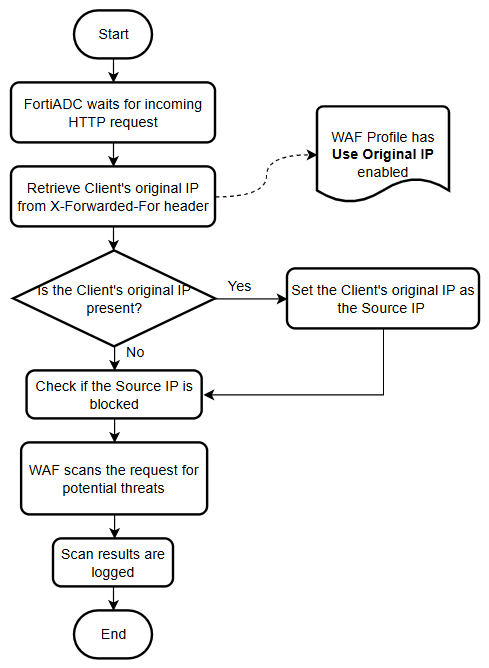
- FortiADC awaits for an incoming HTTP request.
-
Retrieve the client's original IP:
If Use Original IP is enabled in the WAF profile, retrieve the client’s original IP address from the X-Forwarded-For header. -
Check for the client's original IP in the X-Forwarded-For header:
-
Yes: If the client's original IP is present, set it as the source IP.
-
No: If absent, proceed to the next checkpoint.
-
-
Verify if the source IP is blocked:
When Use Original IP is enabled, use the client’s original IP from the X-Forwarded-For header instead of the standard Source IP for this check. -
Scan the request for potential threats:
The WAF scans the request for potential threats. Certain rules, such as the Source IP in Exception lists and Known Good Bots in Bot Detection, will use the client’s original IP if Use Original IP is enabled. -
Log the scan results:
The results are logged, and if Use Original IP is enabled, the client’s original IP from the X-Forwarded-For header is recorded in place of the standard source IP.