

OWASP Top 10 Compliance
Through the FortiView > OWASP Top 10 Compliance page, you can view your compliance rate against the OWASP Application Security Top 10 by assessing the security configuration of each application and categorizing them into the top 10 categories. Based on the assessment results, you can refine configurations to enhance the security posture of your virtual server.
The OWASP Top 10 Compliance dashboard currently only supports HTTP, HTTPS, HTTP2, and Explicit-HTTP virtual servers; no other virtual server types will be included in the OWASP Top 10 Compliance rating.

|
To view the OWASP Top 10 Compliance dashboard, you need to first enable the OWASP Top10 Compliance option from system settings. Go to System > Settings, and enable OWASP Top10 Compliance in the Basic settings. |
The OWASP Top 10 represents the most critical security risks to web applications as identified by OWASP (Open Web Application Security Project), an open community dedicated to enabling organizations to develop, purchase, and maintain applications and APIs that can be trusted. Organizations strive to comply with the OWASP Top 10 to ensure that the most critical security vulnerabilities in their web applications are addressed, allowing them to develop stronger defenses against cyber threats and reduce the risk of data breaches.
FortiADC's OWASP Top 10 Compliance dashboard empowers users to achieve full compliance by providing critical insights and evaluating the protection level of each server policy. The Compliance Rate of each virtual server is determined by analyzing their current security-related configurations—including WAF modules, Antivirus, FortiView, and Traffic log statuses—and assessing their level of protection against each OWASP Top 10 threat. This comprehensive analysis allows you to assess the effectiveness of your server policies and make the necessary adjustments to address OWASP Top 10 security risks effectively. To learn more about how the Compliance Rate is calculated, see Interpreting the Compliance Rate.
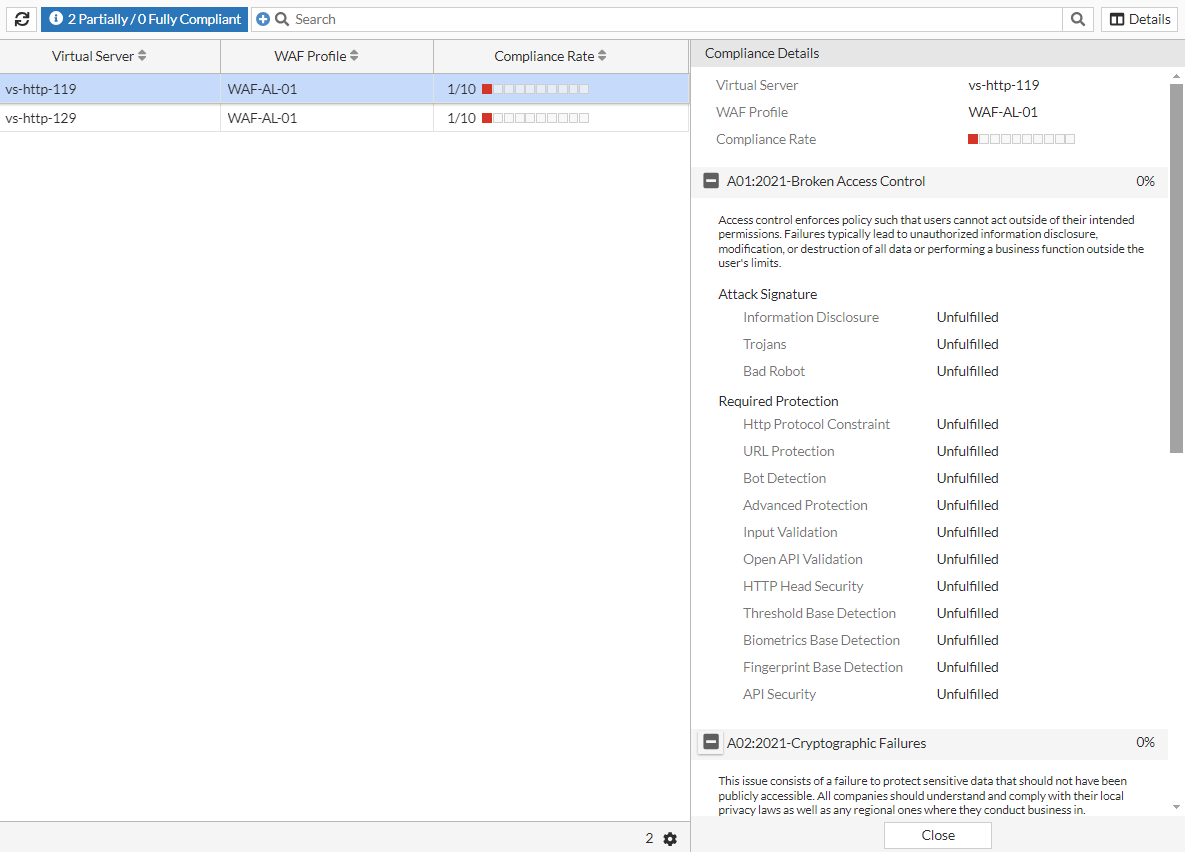
From the FortiView > OWASP Top 10 Compliance page, you can view the Compliance Rate of your virtual servers:

To view the Compliance Details, you can either select the Virtual Server and click Details or you can double-click the Virtual Server.
Interpreting the Compliance Rate
The Compliance Rate evaluates how well your virtual server policy aligns with the best practices recommended by OWASP for mitigating the Top 10 vulnerabilities. It assesses the configuration and rules in place to protect against these risks.
The Compliance Rate is calculated based on the percentage of compliance that has been reached for each OWASP Top 10 threat. For example, if the Compliance Rate is 1/10, then your virtual server configurations satisfies the protection requirements against 1 out of 10 OWASP Top 10 threats.
For each OWASP Top 10 threat, to reach 100% protection compliance, required protections must be fulfilled by completing specific security settings that target against the particular Top 10 vulnerability. The Compliance Rate is then calculated by aggregating the compliance percentage for all 10 threats.
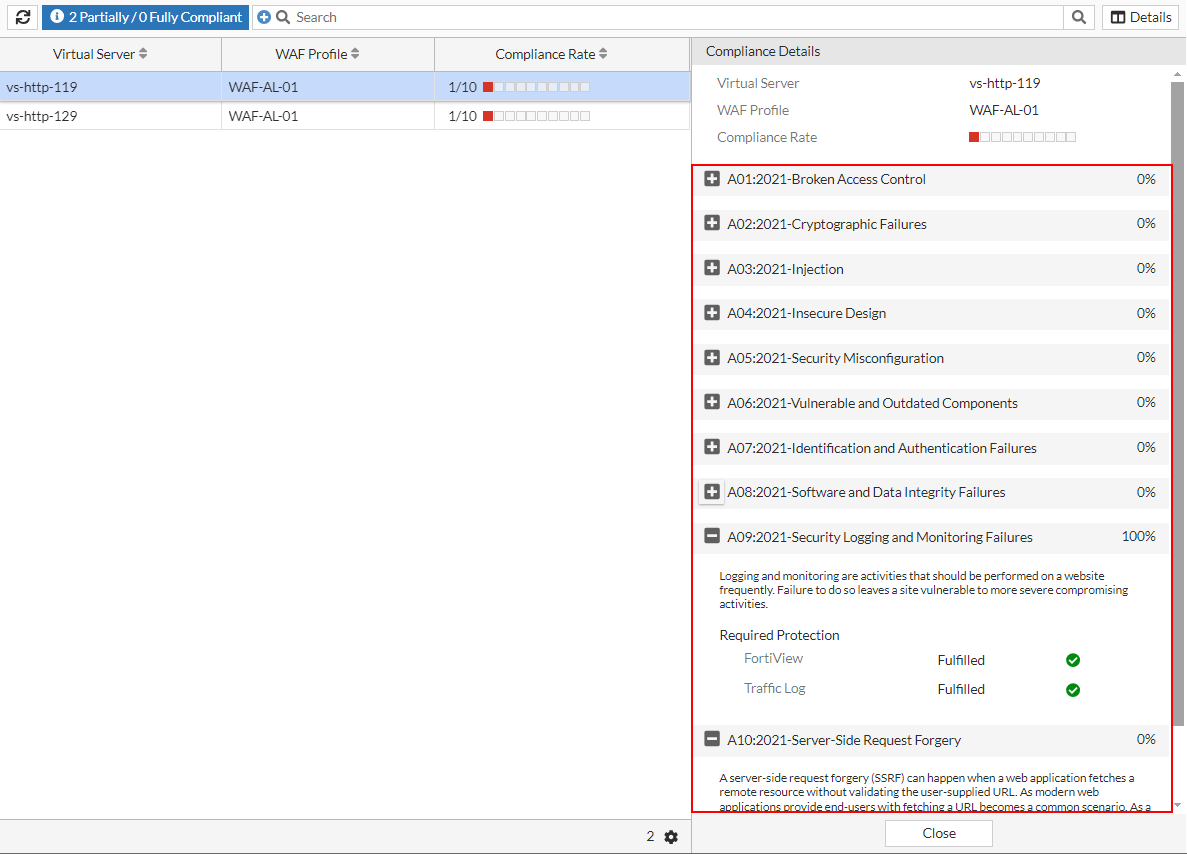
In the example below, virtual server vs-http-119 has a Compliance Rate of 1/10, with only the A09:2021-Security Logging and Monitoring Failures vulnerability having fulfilled 100% of the protection requirements by enabling FortiView and Traffic Log.
The following lists the protection requirements for each OWASP Top 10 threat.
|
OWASP Top 10 |
Category |
Configuration Setting |
|---|---|---|
|
A01:2021-Broken Access Control Access control enforces policy to ensure that users cannot act outside of their intended permissions. Failures in access control typically lead to unauthorized information disclosure, modification or destruction of data, or performing business functions beyond the user's limits. |
Attack Signature |
Information Disclosure |
| Trojans | ||
|
Bad Robot |
||
| Required Protection
|
Http Protocol Constraint | |
| URL Protection | ||
| Bot Detection | ||
| Advanced Protection | ||
| Input Validation | ||
|
Open API Validation |
||
|
HTTP Head Security |
||
|
Threshold Base Detection |
||
|
Biometrics Base Detection |
||
|
Fingerprint Base Detection |
||
|
API Security |
||
|
A02:2021-Cryptographic Failures This issue involves a failure to protect sensitive data that should not be publicly accessible. Organizations should understand and comply with their local privacy laws as well as any regional regulations where they conduct business. |
Attack Signature |
Known Exploits |
|
Credit Card Detection |
||
|
Information Disclosure |
||
|
Required Protection |
Cookie Security |
|
|
Data Loss Prevention |
||
|
A03:2021-Injection An injection occurs when an attacker sends invalid data to a web application with the intention of making it perform actions it is not designed or programmed to do. Common types of injections include SQL, NoSQL, OS command, ORM, LDAP, and EL or OGNL injections. |
Attack Signature |
Generic Attacks |
|
Cross Site Scripting |
||
|
Cross Site Scripting(Extended) |
||
|
SQL Injection |
||
|
SQL Injection(Extended) |
||
|
Required Protection |
SQL Injection Detection |
|
|
XSS Injection Detection |
||
|
XML Validation |
||
|
JSON Validation |
||
|
A04:2021-Insecure Design Insecure design is a broad category representing various weaknesses, characterized by "missing or ineffective control design". An insecure design cannot be fixed by a perfect implementation because, by definition, the necessary security controls were never created to defend against specific attacks. |
Attack Signature |
Bad Robot |
|
Credit Card Detection |
||
|
Cross Site Scripting |
||
|
Generic Attacks |
||
|
Information Disclosure |
||
|
Known Exploits |
||
|
SQL Injection |
||
|
Trojans |
||
|
Required Protection |
JSON Validation |
|
|
XML Validation |
||
|
Open API Validation |
||
|
API Gateway |
||
|
API Security |
||
|
Bot Detection |
||
|
Threshold Base Detection |
||
|
Biometrics Base Detection |
||
|
Fingerprint Base Detection |
||
|
Antivirus |
||
|
A05:2021-Security Misconfiguration Security misconfigurations are design or configuration weaknesses resulting from configuration errors or shortcomings. Without a consistent and repeatable application security configuration process, systems are at a higher risk. |
Attack Signature |
Generic Attacks |
|
Required Protection |
XML Validation |
|
|
JSON Validation |
||
|
CORS Protection |
||
|
A06:2021-Vulnerable and Outdated Components Components with known vulnerabilities, such as CVEs, should be identified and patched, while outdated or malicious components should be evaluated for viability and the risks they may introduce. Attackers actively seek out websites using vulnerable components and aggressively exploit them. |
Attack Signature |
Generic Attacks |
|
Generic Attacks(Extended) |
||
|
Known Exploits |
||
|
A07:2021-Identification and Authentication Failures Confirmation of the user's identity, authentication, and session management is critical to protect against authentication-related attacks. A broken authentication vulnerability can allow an attacker to use manual and/or automatic methods to try to gain control over any account they want in a system. |
Attack Signature |
Generic Attacks |
|
Required Protection |
CSRF Protection |
|
|
Brute Force Attack Detection |
||
|
Credential Stuffing Defense |
||
|
API Gateway |
||
|
A08:2021-Software and Data Integrity Failures Software and data integrity failures occur when code and infrastructure do not protect against integrity violations. These failures can take many forms, especially as the web evolves and the use of third-party code and services in web applications becomes increasingly common. |
Attack Signature |
Generic Attacks |
|
A09:2021-Security Logging and Monitoring Failures Logging and monitoring should be performed frequently on a website. Failure to do so leaves the site vulnerable to more severe compromise. |
Required Protection |
FortiView |
|
Traffic Log |
||
|
A10:2021-Server-Side Request Forgery Server-side request forgery (SSRF) occurs when a web application fetches a remote resource without validating the user-supplied URL. With modern web applications allowing end-users to fetch URLs, SSRF incidents are increasingly common. |
Attack Signature |
Generic Attacks |