
Fortinet white logo
Fortinet white logo

Administration Guide

FortiAI Data Privacy and Security

FortiAI Data Privacy and Security

Fortinet prioritizes data security by using a multi-layered approach involving data masking and a secure proxy architecture. These measures ensure that the large language model (LLM) processes the logic of your requests without ever seeing identifiable data from your network environment.

Data Masking

Before any data driven request is sent to the FortiAI service, FortiADC automatically applies data masking to sensitive information. This process identifies and obscures protected data types, including:

  • IPv4 and IPv6 addresses

  • MAC addresses

  • TCP/UDP port

  • Usernames

  • Email Address

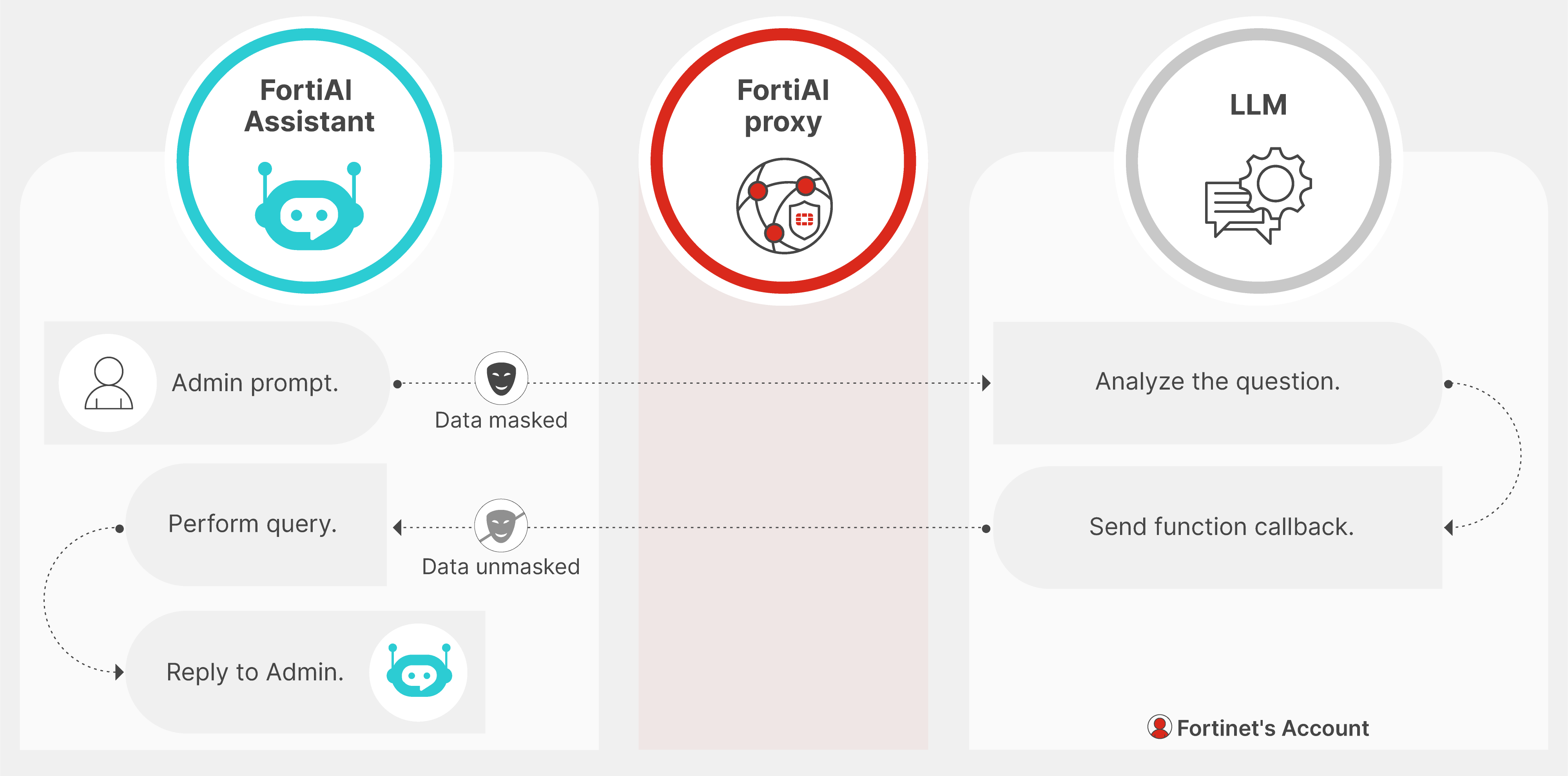
The masking logic uses a one to one mapping system based on the session cookie, ensuring that every session uses a different key to protect data. The masked values are sent to the LLM for processing, and once the response is returned to the appliance, the data is restored locally before being displayed in the assistant panel.

Workflow

  1. The administrator submits a natural-language query in the FortiAI Assistant (e.g., a specific IP or username).

  2. FortiADC identifies sensitive fields and masks them before sending the request to the LLM through the FortiAI proxy.

  3. The LLM interprets the masked prompt and returns a function callback describing the data to retrieve.

  4. FortiADC unmasks the data locally and performs the requested log query.

  5. The result is returned to the administrator with the correct unmasked values.
Data Masking Examples

The following examples illustrate how FortiADC masks sensitive network identifiers before they are transmitted to the FortiAI service.

Example: Virtual Server Traffic Analysis

User Prompt:

Why is the virtual server VS_Finance_Prod experiencing high latency for client 192.168.10.45?

Masked Prompt Sent to FortiAI:

Why is the virtual server VS_Object_721 experiencing high latency for client 10.44.182.90?

Response:

Based on the performance metrics for VS_Finance_Prod, the latency for client 192.168.10.45 is caused by a persistent health check delay on the associated real server pool.

Example: Real Server Health Investigation

User Prompt:

Summarize the health check failures for real server RS_App_01 at 10.0.5.200 over the last 24 hours.

Masked Prompt Sent to FortiAI:

Summarize the health check failures for real server RS_Node_Alpha at 172.16.254.12 over the last 24 hours.

Response:

In the last 24 hours, the real server RS_App_01 (10.0.5.200) failed 15 health checks. The primary reason was an 'HTTP 503 Service Unavailable' response during the layer 7 monitor probes.

Example: Security Event Summary

User Prompt:

Show the top 3 attack types targeting VS_Ecom_Store from source 203.0.113.88.

Masked Prompt Sent to FortiAI:

Show the top 3 attack types targeting VS_Target_99 from source 198.51.100.4.

Response:

The top 3 attack types targeting VS_Ecom_Store from source 203.0.113.88 are:

  • SQL Injection: 42 events (Blocked)

  • Cross-Site Scripting: 18 events (Blocked)

  • Illegal Header: 12 events (Alerted)

FortiAI Proxy and LLM Interaction

All prompts pass through the Fortinet FortiAI proxy before reaching the cloud service. This architecture provides several layers of protection:

  • Contextual Augmentation: The proxy augments public AI intelligence with Fortinet specific product knowledge, transforming general prompts into context aware responses for FortiADC.

  • Training Privacy: Fortinet does not permit the generative AI engine to use customer data for model training. Prompts and responses are not retained by the engine to improve public models.

  • Data Control: Cloud data sharing is strictly limited to the explicit customer interactions initiated within the assistant. No background system data is transmitted without a user prompt.

FortiAI Data Privacy and Security

FortiAI Data Privacy and Security

Fortinet prioritizes data security by using a multi-layered approach involving data masking and a secure proxy architecture. These measures ensure that the large language model (LLM) processes the logic of your requests without ever seeing identifiable data from your network environment.

Data Masking

Before any data driven request is sent to the FortiAI service, FortiADC automatically applies data masking to sensitive information. This process identifies and obscures protected data types, including:

  • IPv4 and IPv6 addresses

  • MAC addresses

  • TCP/UDP port

  • Usernames

  • Email Address

The masking logic uses a one to one mapping system based on the session cookie, ensuring that every session uses a different key to protect data. The masked values are sent to the LLM for processing, and once the response is returned to the appliance, the data is restored locally before being displayed in the assistant panel.

Workflow

  1. The administrator submits a natural-language query in the FortiAI Assistant (e.g., a specific IP or username).

  2. FortiADC identifies sensitive fields and masks them before sending the request to the LLM through the FortiAI proxy.

  3. The LLM interprets the masked prompt and returns a function callback describing the data to retrieve.

  4. FortiADC unmasks the data locally and performs the requested log query.

  5. The result is returned to the administrator with the correct unmasked values.

Data Masking Examples

The following examples illustrate how FortiADC masks sensitive network identifiers before they are transmitted to the FortiAI service.

Example: Virtual Server Traffic Analysis

User Prompt:

Why is the virtual server VS_Finance_Prod experiencing high latency for client 192.168.10.45?

Masked Prompt Sent to FortiAI:

Why is the virtual server VS_Object_721 experiencing high latency for client 10.44.182.90?

Response:

Based on the performance metrics for VS_Finance_Prod, the latency for client 192.168.10.45 is caused by a persistent health check delay on the associated real server pool.

Example: Real Server Health Investigation

User Prompt:

Summarize the health check failures for real server RS_App_01 at 10.0.5.200 over the last 24 hours.

Masked Prompt Sent to FortiAI:

Summarize the health check failures for real server RS_Node_Alpha at 172.16.254.12 over the last 24 hours.

Response:

In the last 24 hours, the real server RS_App_01 (10.0.5.200) failed 15 health checks. The primary reason was an 'HTTP 503 Service Unavailable' response during the layer 7 monitor probes.

Example: Security Event Summary

User Prompt:

Show the top 3 attack types targeting VS_Ecom_Store from source 203.0.113.88.

Masked Prompt Sent to FortiAI:

Show the top 3 attack types targeting VS_Target_99 from source 198.51.100.4.

Response:

The top 3 attack types targeting VS_Ecom_Store from source 203.0.113.88 are:

  • SQL Injection: 42 events (Blocked)

  • Cross-Site Scripting: 18 events (Blocked)

  • Illegal Header: 12 events (Alerted)

FortiAI Proxy and LLM Interaction

All prompts pass through the Fortinet FortiAI proxy before reaching the cloud service. This architecture provides several layers of protection:

  • Contextual Augmentation: The proxy augments public AI intelligence with Fortinet specific product knowledge, transforming general prompts into context aware responses for FortiADC.

  • Training Privacy: Fortinet does not permit the generative AI engine to use customer data for model training. Prompts and responses are not retained by the engine to improve public models.

  • Data Control: Cloud data sharing is strictly limited to the explicit customer interactions initiated within the assistant. No background system data is transmitted without a user prompt.