DNS Load Balancing and DDoS Protection
As a fundamental component of internet architecture, the Domain Name System (DNS) plays a pivotal role in directing user traffic to web services and applications. For GlobalNet, a leading online service provider managing a global DNS infrastructure, ensuring the reliability and performance of DNS services is critical. However, the increasing prevalence of DDoS (Distributed Denial of Service) attacks poses significant risks to DNS availability and responsiveness. This section delves into the deployment of FortiADC to optimize DNS traffic management through intelligent load balancing and distribution across multiple DNS servers. By integrating advanced features such as real-time traffic analysis, health checks, and DDoS mitigation strategies, FortiADC enhances the resilience of DNS services, ensuring high availability and robust performance against malicious disruptions. This technical overview provides insights into configuring FortiADC to safeguard DNS infrastructure while maintaining seamless access for users across diverse geographical regions.
User Scenario: DDoS Mitigation and DNS Reliability for Global Online Services
GlobalNet, a major online service provider, operates a distributed DNS infrastructure supporting essential services like email, web hosting, and online applications. To ensure high performance and service availability, safeguarding its DNS infrastructure from DDoS attacks is critical. FortiADC is deployed as the primary traffic management and DDoS mitigation solution, positioned in front of the DNS servers to manage incoming DNS queries. This deployment enables efficient traffic distribution using load balancing algorithms and DNS caching to optimize query handling and improve overall performance.
To protect against DDoS threats, FortiADC is configured with DNS Query Flood Protection and DNS Reverse Flood Protection policies, which help mitigate volumetric attacks targeting DNS services. Additionally, traffic filtering mechanisms are employed to detect and block malformed queries, ensuring that only legitimate requests are processed. This configuration enhances GlobalNet's DNS resilience, ensuring high availability and consistent service performance in a dynamic and evolving threat landscape.
Step 1: DNS Query Flood and Reverse Flood Protection
This step outlines the deployment of DNS Query Flood Protection and DNS Reverse Flood Protection mechanisms within FortiADC. By imposing rate limits on DNS queries per second, FortiADC effectively mitigates the risk of service disruptions induced by excessive query volumes. These policies will be configured in response to real-time threat intelligence, ensuring sustained availability and optimal performance of DNS services in the face of evolving attack vectors.
To configure the DNS Query Flood Protection policy:
-
Navigate to DoS Protection > Application, and click the DNS Query Flood Protection tab
-
Click Create New to display the configuration editor. Configure the required settings.
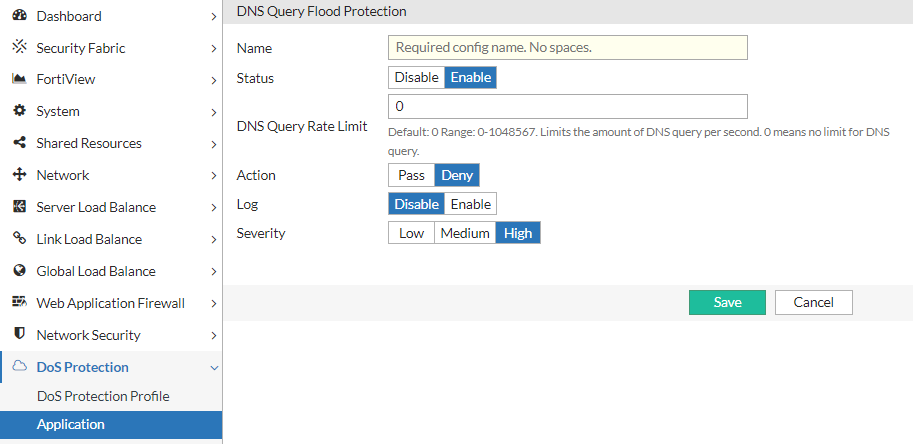
For configuration details, see Configuring a DNS Query Flood Protection policy. -
Save the configuration.
To configure the DNS Reverse Flood Protection policy:
-
Navigate to DoS Protection > Application, and click the DNS Reverse Flood Protection tab
-
Click Create New to display the configuration editor. Configure the required settings.
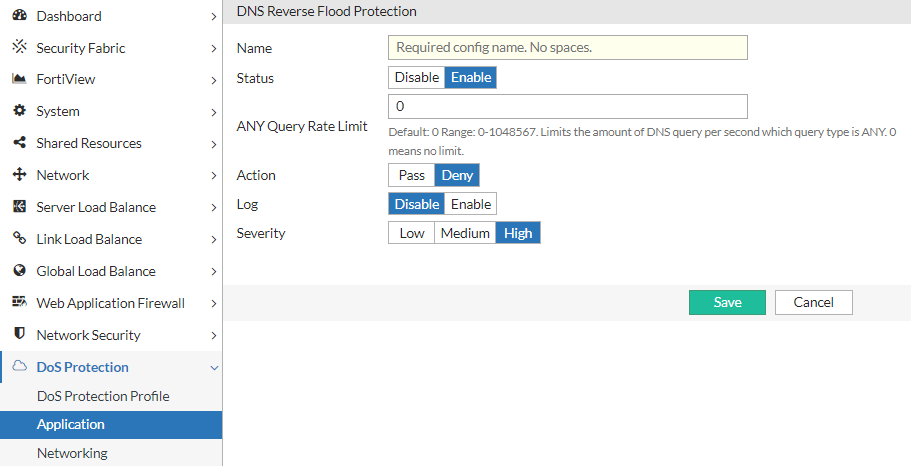
For configuration details, see Configuring a DNS Reverse Flood Protection policy. -
Save the configuration.
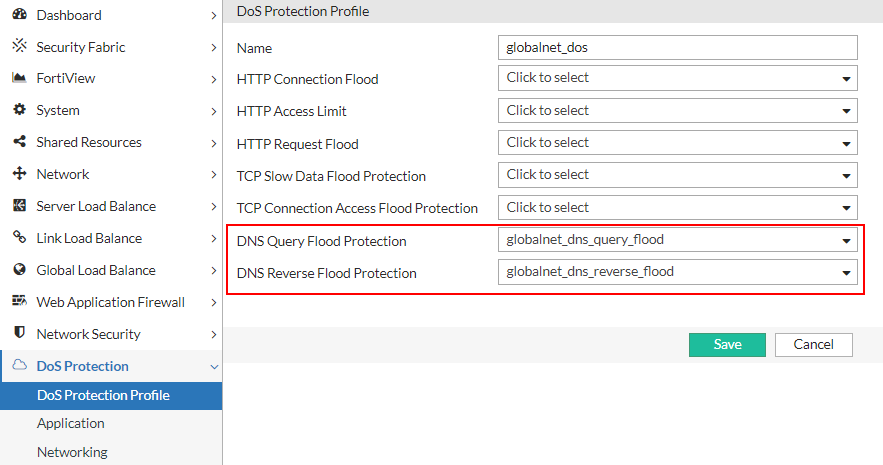
Create a DoS Protection Profile:
-
Navigate to DoS Protection > DoS Protection Profile and click Create New to display the configuration editor.
-
Select the DNS Query Flood Protection and DNS Reverse Flood Protection policies previously created.
-
Save the configuration.
Step 2: DNS Traffic Management
Implementing robust DDoS protection involves proactive traffic analysis and anomaly detection, which FortiADC supports through its Server Load Balancing (SLB) and DNS Application Profiles. By establishing baseline DNS traffic profiles using historical data, FortiADC can apply precise rate limiting to mitigate volumetric attacks by controlling query rates per IP address. Advanced DNS caching features offload backend servers by serving repetitive queries from the cache, with tunable parameters like TTL ("DNS Cache Ageout Time") and cache size to optimize performance. Additionally, detailed traffic filtering within the DNS profile allows for the detection and mitigation of malformed or anomalous DNS queries through configurable actions such as dropping, redirecting, or logging based on query attributes like type, size, and header integrity. These combined measures enhance the resilience of GlobalNet’s DNS infrastructure against DDoS attacks and service disruptions.
To configure a DNS Application Profile:
-
Navigate to Server Load Balance > Application Resources.
The configuration page displays the Application Profile tab. -
Click Create New to display the configuration editor.
-
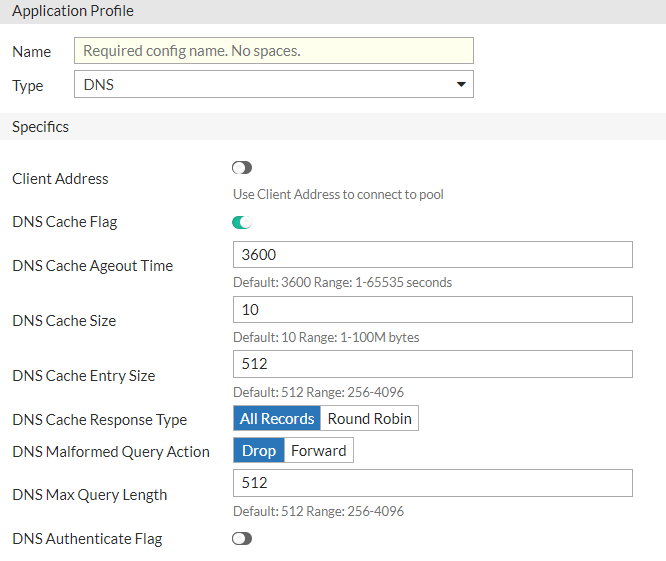
Enter a unique name for the custom profile, and select the Type as DNS. Configure the required settings to handle DNS traffic:
Parameter
Description
Client Address
Enable/disable to use the original client IP address as the source address when connecting to the real server.
DNS Cache Flag
Enable/disable the cache for the DNS virtual server.
DNS Cache Ageout Time
Specify the cache age-out time (in seconds). The default is 3,600. The valid range is 0 to 65,535.
DNS Cache Size
Specify the maximum cache size (in Megabytes). The default is 10. The valid range is 1 to 100.
DNS Cache Entry Size
Specify the maximum cache entry size. The default is 512. The valid range is 256 to 4,096.
DNS Cache Response Type
Select either of the following cache response types:
-
All Records
-
Round Robin
DNS Malform Query Action
Select either of the following reactions for the malformed requests:
-
Drop
-
Forward
DNS Max Query Length
Specify the maximum query length. The default is 512. The valid range is 256 to 4,096.
DNS Authentication Flag
Enable/disable to authenticate client by redirecting UDP query to TCP.
-
-
Save the configuration.
Alternatively, you can also use the predefined LB_PROF_DNS profile that has the following settings:
|
Parameter |
Default value |
|---|---|
| Client Address | Off |
| DNS Cache Flag | Enabled |
| DNS Cache Ageout Time | 3600 |
| DNS Cache Size | 10 |
| DNS Cache Entry Size | 512 |
| DNS Cache Response Type | All Records |
| DNS Malform Query Action | Drop |
| DNS Max Query Length | 512 |
|
DNS Authentication Flag |
Disabled |
Step 3: Applying DNS DDoS Protection to SLB
After configuring the DoS Protection Profile and the DNS Application Profile, the next step is to associate them with your Server Load Balancing (SLB) configuration. This integration ensures that all incoming DNS traffic directed to backend servers is monitored and managed according to the predefined traffic management rules and DoS protection policies. By binding the DNS Profile and DoS Protection Profile to the SLB configuration, FortiADC can effectively detect and mitigate potential DDoS attacks while maintaining consistent traffic distribution and high availability across the server pool.
To apply the DNS Profile and DoS Protection Profile to a virtual server:
-
Navigate to Server Load Balance > Virtual Server.
The configuration page displays the Virtual Server tab. -
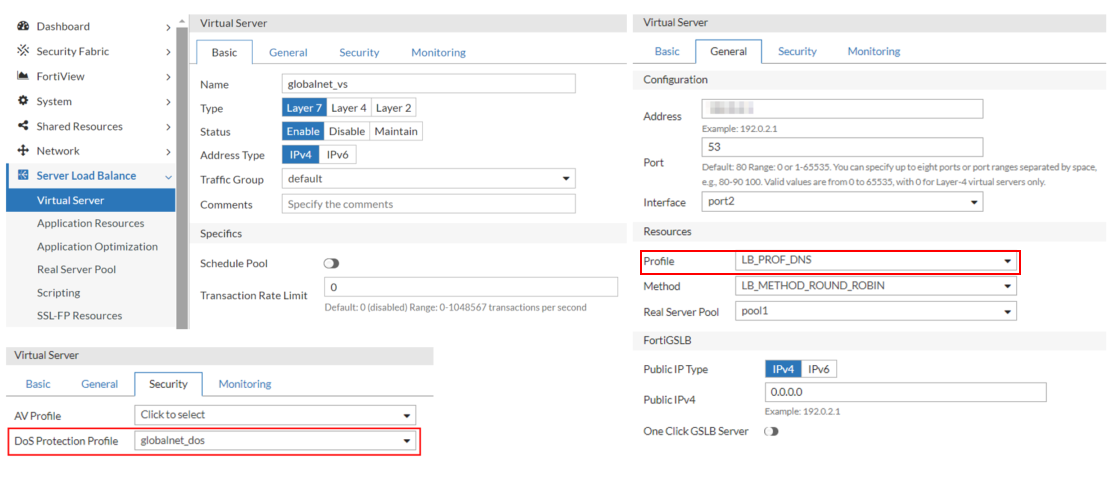
Click Create New and select the Advanced Mode to display the configuration editor. Configure the key settings:
Setting
Guideline
Name Enter a unique name for the Virtual Server. Type Select Layer 7. Address Enter the IP address for the Virtual Server. Port Enter 53 for the DNS common port Interface Select the interface to which you bind the VS. Profile Select a custom user-defined DNS Application Profile or the predefined LB_PROF_DNS Application Profile. For details, see Configuring Application profiles. Method
Select the LB_METHOD_ROUND_ROBIN predefined profile for the load-balancing method. The Round Robin method selects the next server in the series: server 1, then server 2, then server 3, and so on. For details, see Configuring load-balancing (LB) methods.
Real Server Pool
Select a real server pool configuration.
DoS Protection Profile Select the DNS Protection Profile previously created.
-
Save the configuration.
Step 4: Post-Attack Analysis and Traffic Logging
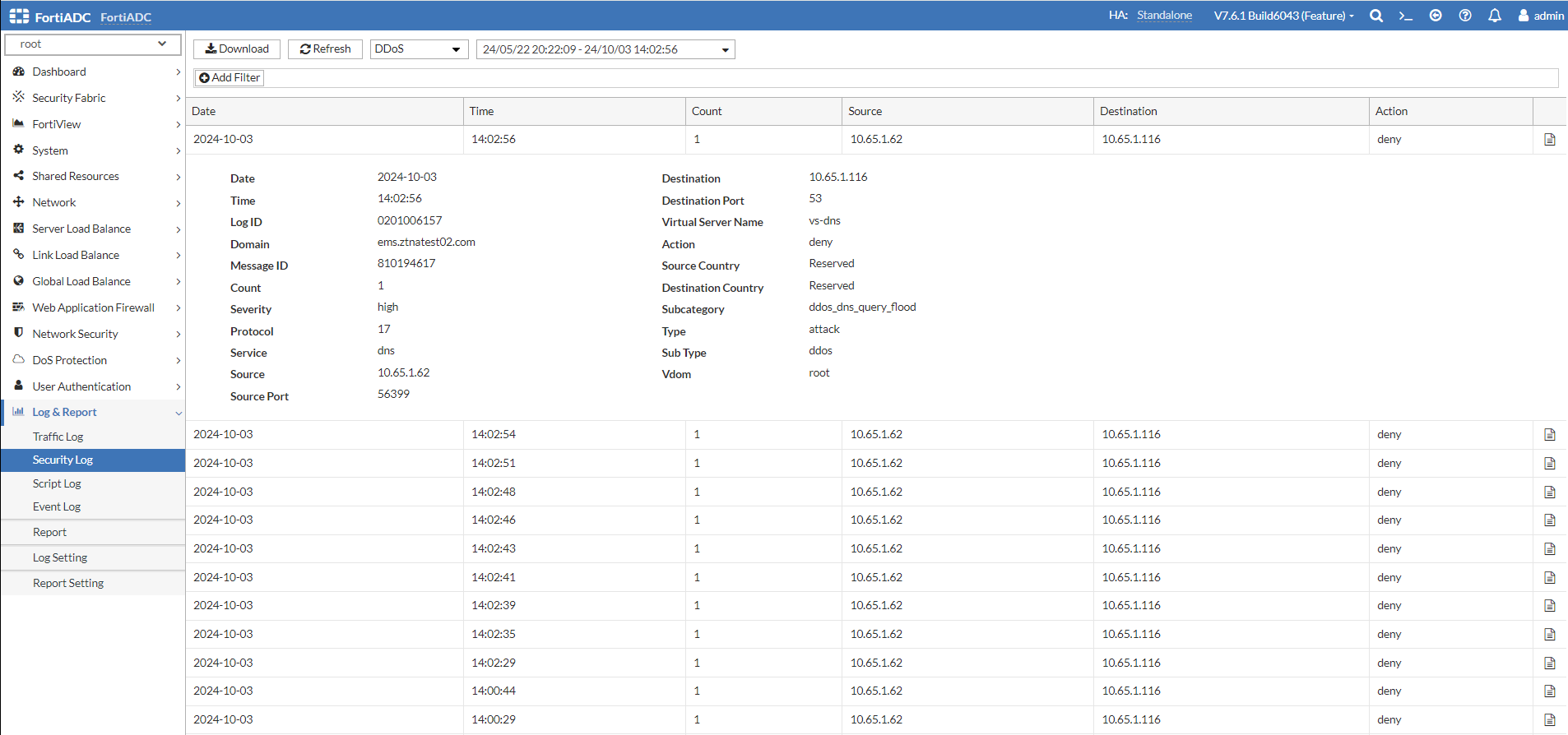
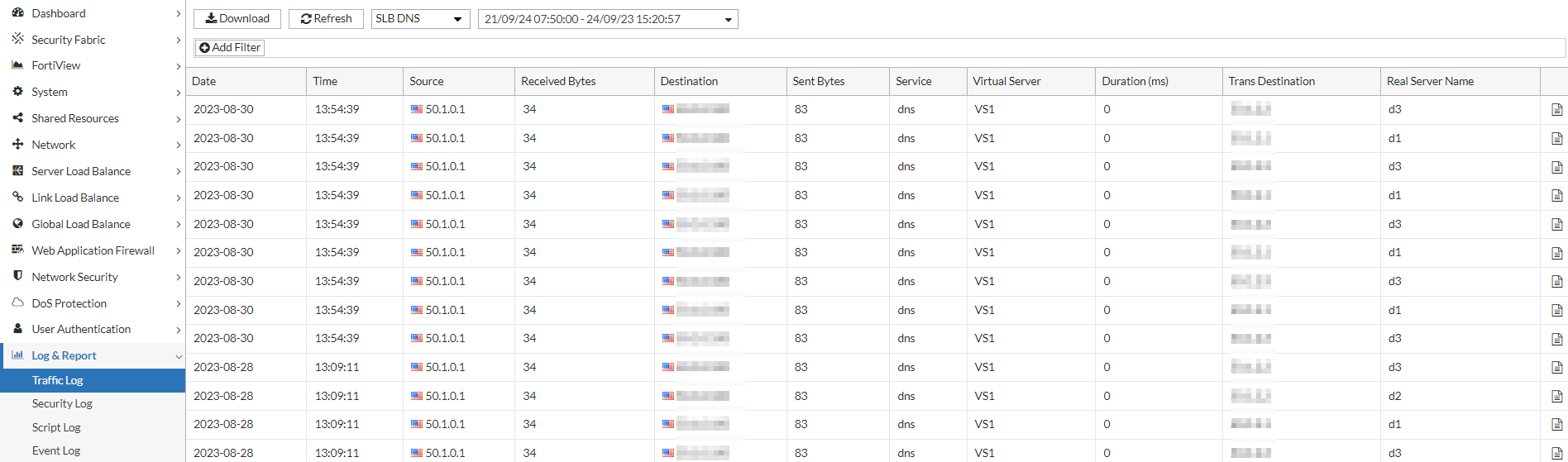
Maintaining a robust DNS infrastructure necessitates real-time monitoring and detailed post-attack analysis. This step focuses on the importance of traffic logging to capture DNS traffic patterns and attack vectors for forensic analysis. FortiADC will maintain comprehensive logs, enabling administrators to assess the effectiveness of mitigation strategies and refine policies accordingly. By monitoring security logs related to DNS Query Flood Protection and DNS Reverse Flood Protection, organizations can gain insights into attack trends and adjust their defenses proactively.
Traffic Logs:
Security Logs: