
Fortinet white logo
Fortinet white logo

Administration Guide

AliCloud SDN connector using access key

AliCloud SDN connector using access key

FortiOS automatically updates dynamic addresses for AliCloud using an AliCloud SDN connector, including mapping the following attributes from AliCloud instances to dynamic address groups in FortiOS:

  • ImageId

  • InstanceId

  • SecurityGroupId

  • VpcId

  • VSwitchId

  • TagKey

  • TagValue

Note

This topic describes one of multiple configuration methods available with this SDN connector type. See More Links on the right sidebar for other methods.

To configure AliCloud SDN connector using the GUI:
  1. Configure the AliCloud SDN connector:

    1. Go to Security Fabric > External Connectors.

    2. Click Create New, and select AliCloud.

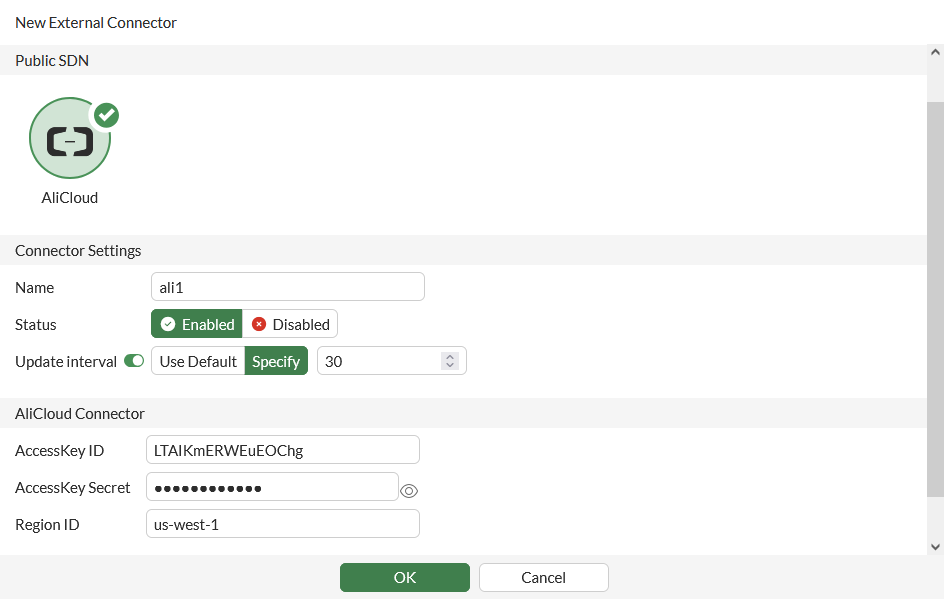
    3. Configure as shown, substituting the access key, secret, and region ID for your deployment. The update interval is in seconds.
  2. Create a dynamic firewall address for the configured AliCloud SDN connector:

    1. Go to Policy & Objects > Addresses and select Address.

    2. Click Create new.

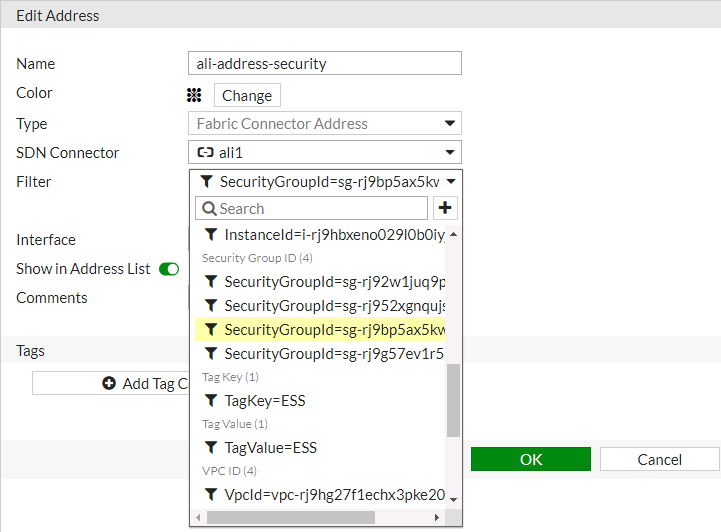
    3. Configure the address as shown, selecting the desired filter in the Filter dropdown list. In this example, the address will automatically populate and update IP addresses only for AliCloud instances that belong to the specified security group:
  3. Ensure that the AliCloud SDN connector resolves dynamic firewall IP addresses:

    1. Go to Policy & Objects > Addresses and select Address.

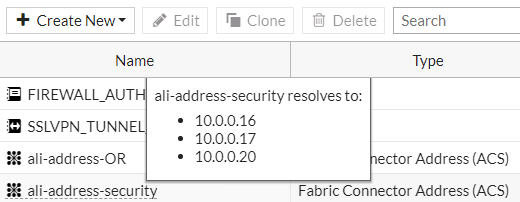
    2. Hover over the address created in step 2 to see a list of IP addresses for instances that belong to the security group configured in step 2:
To configure AliCloud SDN connector using CLI commands:
  1. Configure the AliCloud SDN connector:

    config system sdn-connector
        edit "ali1"
            set type acs
            set access-key "LTAIKmERWEuEOChg"
            set secret-key xxxxx
            set region "us-west-1"
            set update-interval 30
        next
    end
  2. Create a dynamic firewall address for the configured AliCloud SDN connector with the supported AliCloud filter. In this example, the AliCloud SDN Connector will automatically populate and update IP addresses only for instances that belong to the specified security group:

    config firewall address
        edit "ali-address-security"
            set type dynamic
            set sdn "ali1"
            set filter "SecurityGroupId=sg-rj9bp5ax5kwy3gqdizqb"
        next
    end
  3. Confirm that the AliCloud SDN connector resolves dynamic firewall IP addresses using the configured filter:

    config firewall address
        edit "ali-address-security"
            set type dynamic
            set sdn "ali1"
            set filter "SecurityGroupId=sg-rj9bp5ax5kwy3gqdizqb"
            config list
                edit "10.0.0.16"
                next
                edit "10.0.0.17"
                next
                edit "10.0.0.20"
                next
            end
        next
    end

AliCloud SDN connector using access key

AliCloud SDN connector using access key

FortiOS automatically updates dynamic addresses for AliCloud using an AliCloud SDN connector, including mapping the following attributes from AliCloud instances to dynamic address groups in FortiOS:

  • ImageId

  • InstanceId

  • SecurityGroupId

  • VpcId

  • VSwitchId

  • TagKey

  • TagValue

Note

This topic describes one of multiple configuration methods available with this SDN connector type. See More Links on the right sidebar for other methods.

To configure AliCloud SDN connector using the GUI:
  1. Configure the AliCloud SDN connector:

    1. Go to Security Fabric > External Connectors.

    2. Click Create New, and select AliCloud.

    3. Configure as shown, substituting the access key, secret, and region ID for your deployment. The update interval is in seconds.

  2. Create a dynamic firewall address for the configured AliCloud SDN connector:

    1. Go to Policy & Objects > Addresses and select Address.

    2. Click Create new.

    3. Configure the address as shown, selecting the desired filter in the Filter dropdown list. In this example, the address will automatically populate and update IP addresses only for AliCloud instances that belong to the specified security group:

  3. Ensure that the AliCloud SDN connector resolves dynamic firewall IP addresses:

    1. Go to Policy & Objects > Addresses and select Address.

    2. Hover over the address created in step 2 to see a list of IP addresses for instances that belong to the security group configured in step 2:

To configure AliCloud SDN connector using CLI commands:
  1. Configure the AliCloud SDN connector:

    config system sdn-connector
        edit "ali1"
            set type acs
            set access-key "LTAIKmERWEuEOChg"
            set secret-key xxxxx
            set region "us-west-1"
            set update-interval 30
        next
    end
  2. Create a dynamic firewall address for the configured AliCloud SDN connector with the supported AliCloud filter. In this example, the AliCloud SDN Connector will automatically populate and update IP addresses only for instances that belong to the specified security group:

    config firewall address
        edit "ali-address-security"
            set type dynamic
            set sdn "ali1"
            set filter "SecurityGroupId=sg-rj9bp5ax5kwy3gqdizqb"
        next
    end
  3. Confirm that the AliCloud SDN connector resolves dynamic firewall IP addresses using the configured filter:

    config firewall address
        edit "ali-address-security"
            set type dynamic
            set sdn "ali1"
            set filter "SecurityGroupId=sg-rj9bp5ax5kwy3gqdizqb"
            config list
                edit "10.0.0.16"
                next
                edit "10.0.0.17"
                next
                edit "10.0.0.20"
                next
            end
        next
    end