
Fortinet white logo
Fortinet white logo

Administration Guide

Oracle Kubernetes (OKE) SDN connector using certificates

Oracle Kubernetes (OKE) SDN connector using certificates

OCI SDN connectors support dynamic address groups based on Oracle Kubernetes (OKE) filters.

To enable an OCI SDN connector to fetch IP addresses from Oracle Kubernetes:
  1. Configure the OCI SDN connector:

    1. Go to Security Fabric > External Connectors.

    2. Click Create New, and select Oracle Cloud Infrastructure (OCI).

    3. Configure as shown substituting the region, tenant and client IDs, and client secret for your deployment. The update interval is in seconds.
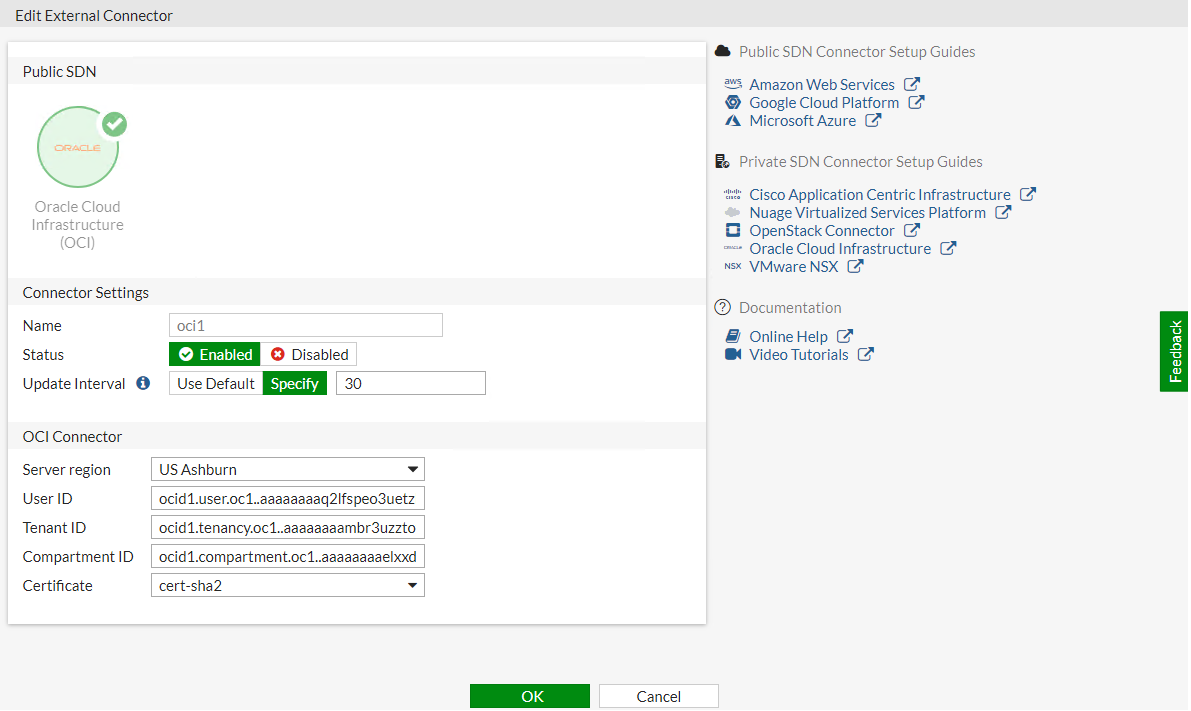
      Screenshot of SDN connector configuration for Azure AKS

  2. Create dynamic firewall addresses for the configured SDN connector with supported Kubernetes filter:

    1. Go to Policy & Objects > Addresses and select Address.

    2. Click Create new.

    3. In the Filter field, select the desired filters. The following filters are supported:

      Filter

      Description

      k8s_cluster

      Name of Kubernetes cluster.

      k8s_namespace

      Namespace of a Kubernetes service or pod.

      k8s_svcname

      Name of a Kubernetes service.

      k8s_nodename

      Name of a Kubernetes node.

      k8s_zone

      Zone of a Kubernetes node.

      k8s_region

      Region of a Kubernetes node.

      k8s_podname

      Name of a Kubernetes pod.

      k8s_label.xxx

      Name of label of a Kubernetes resource (cluster/service/node/Pod).
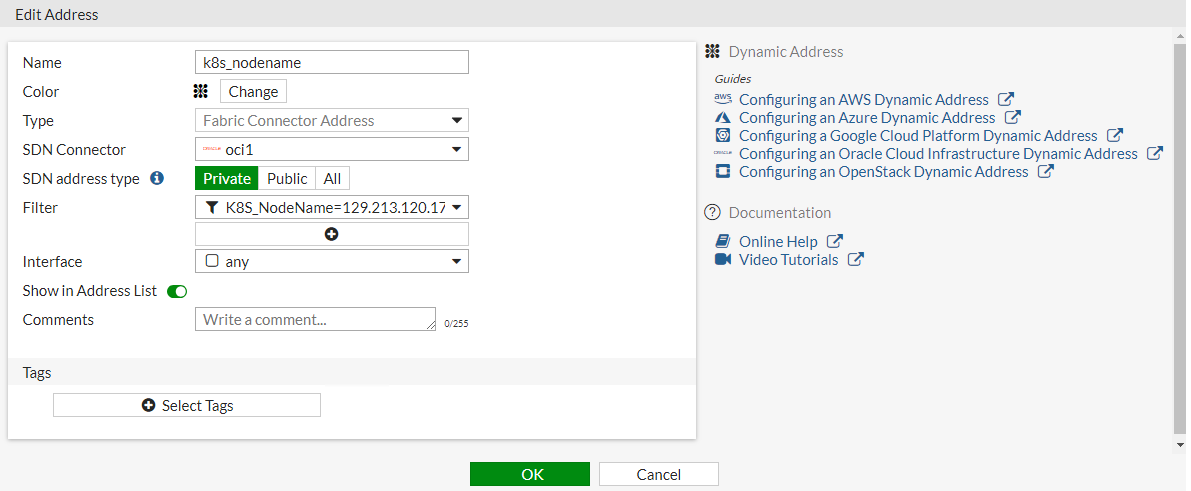
      Screenshot of Azure Kubernetes setup displaying the creation of dynamic firewall address

  3. Confirm that the SDN connector resolves dynamic firewall IP addresses:

    1. Go to Policy & Objects > Addresses.

    2. Hover over the address created in step 2 to see a list of IP addresses for instances:
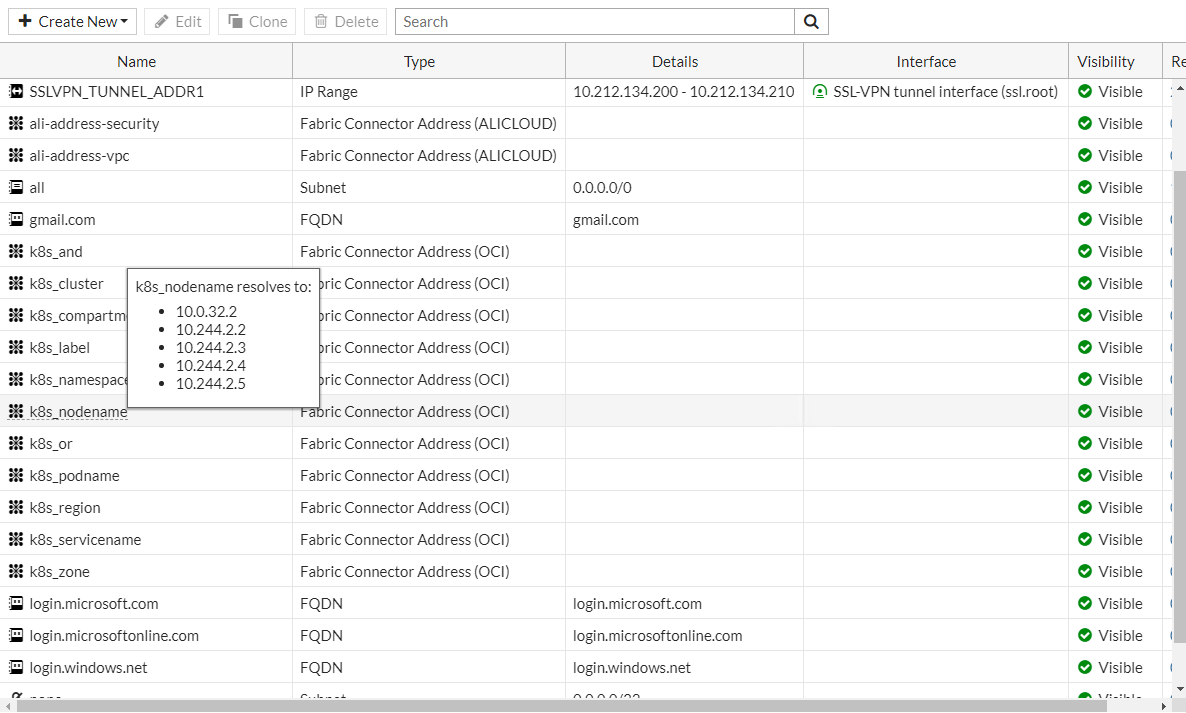
To configure an SDN connector through the CLI:
  1. Configure the OCI SDN connector:

    config system sdn-connector
        edit "oci1"
            set type oci
            set tenant-id "ocid1.tenancy.oc1..aaaaaaaambr3uzztoyhweohbzqqdo775h7d3t54zpmzkp4b2cf35vs55cxxx"
            set user-id "ocid1.user.oc1..aaaaaaaaq2lfspeo3uetzbzpiv2pqvzzevozccnys347stwssvizqlatfxxx"
            set compartment-id "ocid1.compartment.oc1..aaaaaaaaelxxdjazqo7nzczpgypyiqcgkmytjry6nfq5345vw7eavpwnmxxx"
            set oci-region ashburn
            set oci-cert "cert-sha2"
            set update-interval 30
        next 
    end
  2. Create dynamic firewall addresses for the configured SDN connector with supported Kubernetes filter:

    config firewall address
        edit "k8s_nodename"
            set type dynamic
            set sdn "oci1"
            set filter "K8S_NodeName=129.213.120.172"
        next
    end
  3. Confirm that the SDN connector resolves dynamic firewall IP addresses:

    config firewall address
        edit "k8s_nodename"
            set type dynamic
            set sdn "oci1"
            set filter "K8S_NodeName=129.213.120.172"
            config list
                edit "10.0.32.2"
                next
                edit "10.244.2.2"
                next
                edit "10.244.2.3"
                next
                edit "10.244.2.4"
                next
                edit "10.244.2.5"
                next
            end
        next
    end

Oracle Kubernetes (OKE) SDN connector using certificates

Oracle Kubernetes (OKE) SDN connector using certificates

OCI SDN connectors support dynamic address groups based on Oracle Kubernetes (OKE) filters.

To enable an OCI SDN connector to fetch IP addresses from Oracle Kubernetes:
  1. Configure the OCI SDN connector:

    1. Go to Security Fabric > External Connectors.

    2. Click Create New, and select Oracle Cloud Infrastructure (OCI).

    3. Configure as shown substituting the region, tenant and client IDs, and client secret for your deployment. The update interval is in seconds.

      Screenshot of SDN connector configuration for Azure AKS

  2. Create dynamic firewall addresses for the configured SDN connector with supported Kubernetes filter:

    1. Go to Policy & Objects > Addresses and select Address.

    2. Click Create new.

    3. In the Filter field, select the desired filters. The following filters are supported:

      Filter

      Description

      k8s_cluster

      Name of Kubernetes cluster.

      k8s_namespace

      Namespace of a Kubernetes service or pod.

      k8s_svcname

      Name of a Kubernetes service.

      k8s_nodename

      Name of a Kubernetes node.

      k8s_zone

      Zone of a Kubernetes node.

      k8s_region

      Region of a Kubernetes node.

      k8s_podname

      Name of a Kubernetes pod.

      k8s_label.xxx

      Name of label of a Kubernetes resource (cluster/service/node/Pod).

      Screenshot of Azure Kubernetes setup displaying the creation of dynamic firewall address

  3. Confirm that the SDN connector resolves dynamic firewall IP addresses:

    1. Go to Policy & Objects > Addresses.

    2. Hover over the address created in step 2 to see a list of IP addresses for instances:

To configure an SDN connector through the CLI:
  1. Configure the OCI SDN connector:

    config system sdn-connector
        edit "oci1"
            set type oci
            set tenant-id "ocid1.tenancy.oc1..aaaaaaaambr3uzztoyhweohbzqqdo775h7d3t54zpmzkp4b2cf35vs55cxxx"
            set user-id "ocid1.user.oc1..aaaaaaaaq2lfspeo3uetzbzpiv2pqvzzevozccnys347stwssvizqlatfxxx"
            set compartment-id "ocid1.compartment.oc1..aaaaaaaaelxxdjazqo7nzczpgypyiqcgkmytjry6nfq5345vw7eavpwnmxxx"
            set oci-region ashburn
            set oci-cert "cert-sha2"
            set update-interval 30
        next 
    end
  2. Create dynamic firewall addresses for the configured SDN connector with supported Kubernetes filter:

    config firewall address
        edit "k8s_nodename"
            set type dynamic
            set sdn "oci1"
            set filter "K8S_NodeName=129.213.120.172"
        next
    end
  3. Confirm that the SDN connector resolves dynamic firewall IP addresses:

    config firewall address
        edit "k8s_nodename"
            set type dynamic
            set sdn "oci1"
            set filter "K8S_NodeName=129.213.120.172"
            config list
                edit "10.0.32.2"
                next
                edit "10.244.2.2"
                next
                edit "10.244.2.3"
                next
                edit "10.244.2.4"
                next
                edit "10.244.2.5"
                next
            end
        next
    end