
Fortinet white logo
Fortinet white logo

Administration Guide

Hybrid strategy of priority and SLA modes

Hybrid strategy of priority and SLA modes

A hybrid strategy for service rules is where priority mode and SLA mode work together for sla-mode service rules. See Best quality strategy and Lowest cost (SLA) strategy for more information about priority mode and SLA mode.

With the hybrid strategy, SD-WAN selects the best member based on both SLA value and link quality (latency, jitter, packet-loss). Additionally, health-check supports custom-profile as a link-cost-factor, allowing for a more customized SLA evaluation based on various link quality metrics.

In the hybrid mode, the sla-mode service rule selects the outgoing interface based on the following criteria:

  1. Highest SLA Value: The SD-WAN member with the highest SLA value is chosen.

  2. Tie-breaker 1: If multiple members have the same SLA value, the system compares members' cost to determine the better option.

  3. Tie-breaker 2: If there is still a tie, members' quality based on specified link-cost-factor is considered and is used for ranking.

  4. Tie-breaker 3: If there is still a tie, cfg_order is considered.

The following CLI commands are available:

config system sdwan
    config health-check
        edit <health-check name>
            set packet-loss-weight <weight>
            set latency-weight <weight>
            set jitter-weight <weight>
            set bandwidth-weight <weight>
            config sla
                edit 1
                    set link-cost-factor custom-profile-1
                    set custom-profile-threshold <threshold>
                next
            end
        next
    end
    config service
        edit 1
            set mode sla
            set tie-break priority
            set link-cost-factor custom-profile-1
            set link-cost-threshold <threshold>
            config sla
                edit <health-check name> 
                    set id 1
                next
            end
        next
    end
end

Option

Description

packet-loss-weight <weight>

Coefficient of packet-loss in the formula of custom-profile-1 (0 - 10000000, default = 0).

latency-weight <weight>

Coefficient of latency in the formula of custom-profile-1 (0 - 10000000, default = 0).

jitter-weight <weight>

Coefficient of jitter in the formula of custom-profile-1 (0 - 10000000, default = 0).

bandwidth-weight <weight>

Coefficient of reciprocal of available bidirectional bandwidth in the formula of custom-profile-1 (0 - 10000000, default = 0).

link-cost-factor custom-profile-1

Custom profile allowing for a more customized SLA evaluation based on various link quality metrics.

custom-profile-threshold <threshold>

Custom profile threshold for SLA to be marked as pass (0 - 10000000, default = 0).

tie-break priority

Select the best members that meet the SLA based on link-cost-factor. This command is only configurable for sla-mode service rule.

link-cost-factor custom-profile-1

Link cost factor. This command is only configurable when tie-break is set to priority.

link-cost-threshold <threshold>

Percentage threshold change of link cost values that will result in policy route regeneration (0 - 10000000, default = 10). This command is only configurable when tie-break is set to priority.

Example

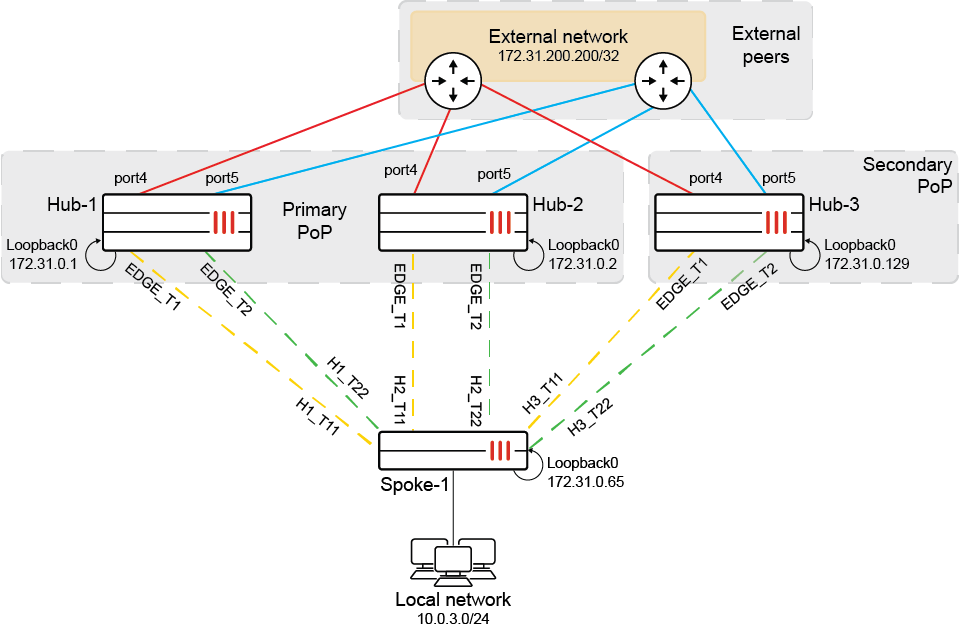
This example shows how the sla-mode service rule selects the outgoing interface based on different criteria as members experience various degradation.

The configuration contains the following components:

  • Two PoPs:

    • The primary PoP has two hubs (Hub-1 and Hub-2).

    • The secondary PoP has one hub (Hub-3).

  • Spoke-1 has six overlays, with two overlay connections to each hub.

  • Spoke-1 has three BGP neighbors, with one BGP neighbor for each hub.

    • All BGP neighbors are established on loopback IPs.

  • Each hub has two paths to external peers.
  1. Configure Spoke-1:

    config system sdwan
        set status enable
        config zone
            edit "virtual-wan-link"
            next
            edit "PoP1"
                set minimum-sla-meet-members 2
            next
            edit "PoP2"
            next
        end
        config members
            edit 1
                set interface "H1_T11"
                set zone "PoP1"
            next
            edit 2
                set interface "H1_T22"
                set zone "PoP1"
            next
            edit 3
                set interface "H2_T11"
                set zone "PoP1"
            next
            edit 4
                set interface "H2_T22"
                set zone "PoP1"
            next
            edit 5
                set interface "H3_T11"
                set zone "PoP2"
            next
            edit 6
                set interface "H3_T22"
                set zone "PoP2"
            next
        end
        config health-check
            edit "Hubs"
                set server "172.31.100.100"
                set source 172.31.0.65
                set members 0
                set packet-loss-weight 1
                set latency-weight 1
                set jitter-weight 1
                config sla
                    edit 1
                        set link-cost-factor latency packet-loss jitter custom-profile-1
                        set latency-threshold 100
                        set jitter-threshold 20
                        set packetloss-threshold 10
                        set custom-profile-threshold 60
                    next
                end
            next
        end
        config service
            edit 1
                set mode sla
                set zone-mode enable
                set dst "all"
                set src "CORP_LAN"
                set tie-break priority
                set link-cost-factor packet-loss
                set link-cost-threshold 1
                config sla
                    edit "Hubs"
                        set id 1
                    next
                end
                set priority-zone "PoP1" "PoP2"
            next
        end
    end
  2. Check the initial SD-WAN status on Spoke-1:

    # diagnose sys sdwan health-check
    Health Check(Hubs):
    Seq(1 H1_T11): state(alive), packet-loss(0.000%), latency(0.256), jitter(0.030), mos(4.404), custom_profile(0.286), bandwidth-up(999999), bandwidth-dw(999997), bandwidth-bi(1999996), sla_map=0x1
    Seq(2 H1_T22): state(alive), packet-loss(0.000%), latency(0.215), jitter(0.010), mos(4.404), custom_profile(0.225), bandwidth-up(999999), bandwidth-dw(999998), bandwidth-bi(1999997), sla_map=0x1
    Seq(3 H2_T11): state(alive), packet-loss(0.000%), latency(0.219), jitter(0.022), mos(4.404), custom_profile(0.241), bandwidth-up(999999), bandwidth-dw(999997), bandwidth-bi(1999996), sla_map=0x1
    Seq(4 H2_T22): state(alive), packet-loss(0.000%), latency(0.208), jitter(0.013), mos(4.404), custom_profile(0.221), bandwidth-up(999999), bandwidth-dw(999998), bandwidth-bi(1999997), sla_map=0x1
    Seq(5 H3_T11): state(alive), packet-loss(0.000%), latency(0.199), jitter(0.014), mos(4.404), custom_profile(0.213), bandwidth-up(999999), bandwidth-dw(999997), bandwidth-bi(1999996), sla_map=0x1
    Seq(6 H3_T22): state(alive), packet-loss(0.000%), latency(0.191), jitter(0.010), mos(4.404), custom_profile(0.200), bandwidth-up(999999), bandwidth-dw(999998), bandwidth-bi(1999997), sla_map=0x1

    Zone PoP1 is preferred over zone PoP2 because the number of in-sla members in PoP1 is four, which is more than the configured minimum-sla-meet-members.

    In the preferred zone PoP1, all members have the same SLA value (0x01), cost (0), and link quality (packet-loss 0.000%). As a result, the first member in the cfg-order, H1_T11, is selected as the best outgoing interface.

    # diagnose sys sdwan service4
    
    Service(1): Address Mode(IPV4) flags=0x14200 use-shortcut-sla use-shortcut
     Tie break: priority
     Shortcut priority: 2
      Gen(4765), TOS(0x0/0x0), Protocol(0): src(1->65535):dst(1->65535), Mode(sla), link-cost-factor(packet-loss), link-cost-threshold(1), sla-compare-order
      Service role: standalone
      Members(6):
        1: Seq_num(1 H1_T11 PoP1  active), alive, sla(0x1), gid(0), cfg_order(0), local cost(0), packet loss: 0.000%, selected
        2: Seq_num(2 H1_T22 PoP1  active), alive, sla(0x1), gid(0), cfg_order(0), local cost(0), packet loss: 0.000%, selected
        3: Seq_num(3 H2_T11 PoP1  active), alive, sla(0x1), gid(0), cfg_order(0), local cost(0), packet loss: 0.000%, selected
        4: Seq_num(4 H2_T22 PoP1  active), alive, sla(0x1), gid(0), cfg_order(0), local cost(0), packet loss: 0.000%, selected
        5: Seq_num(5 H3_T11 PoP2 standby), alive, sla(0x1), gid(0), cfg_order(1), local cost(0), packet loss: 0.000%, selected
        6: Seq_num(6 H3_T22 PoP2 standby), alive, sla(0x1), gid(0), cfg_order(1), local cost(0), packet loss: 0.000%, selected
      Src address(1):
            10.0.0.0-10.255.255.255
      Dst address(1):
            0.0.0.0-255.255.255.255

    Traffic matching service 1 selects H1_T11 as outgoing interface:

    # diagnose sniffer packet any 'host 172.31.200.200' 4
    interfaces=[any]
    filters=[host 172.31.200.200]
    2.863817 port4 in 10.0.3.2 -> 172.31.200.200: icmp: echo request
    2.863926 H1_T11 out 10.0.3.2 -> 172.31.200.200: icmp: echo request
    2.864236 H1_T11 in 172.31.200.200 -> 10.0.3.2: icmp: echo reply
    2.864389 port4 out 172.31.200.200 -> 10.0.3.2: icmp: echo reply
    3.862809 port4 in 10.0.3.2 -> 172.31.200.200: icmp: echo request
    3.862836 H1_T11 out 10.0.3.2 -> 172.31.200.200: icmp: echo request
    3.863040 H1_T11 in 172.31.200.200 -> 10.0.3.2: icmp: echo reply
    3.863072 port4 out 172.31.200.200 -> 10.0.3.2: icmp: echo reply
  3. Introduce packet-loss on some members, then check the SD-WAN status on Spoke-1:

    # diagnose sys sdwan  health-check
    Health Check(Hubs):
    Seq(1 H1_T11): state(alive), packet-loss(8.000%), latency(0.259), jitter(0.026), mos(4.400), custom_profile(8.285), bandwidth-up(999999), bandwidth-dw(999998), bandwidth-bi(1999997), sla_map=0x1
    Seq(2 H1_T22): state(alive), packet-loss(6.000%), latency(0.253), jitter(0.083), mos(4.401), custom_profile(6.337), bandwidth-up(999999), bandwidth-dw(999999), bandwidth-bi(1999998), sla_map=0x1
    Seq(3 H2_T11): state(alive), packet-loss(5.000%), latency(0.228), jitter(0.028), mos(4.402), custom_profile(5.256), bandwidth-up(999999), bandwidth-dw(999998), bandwidth-bi(1999997), sla_map=0x1
    Seq(4 H2_T22): state(alive), packet-loss(1.000%), latency(0.219), jitter(0.014), mos(4.404), custom_profile(1.232), bandwidth-up(999999), bandwidth-dw(999999), bandwidth-bi(1999998), sla_map=0x1
    Seq(5 H3_T11): state(alive), packet-loss(0.000%), latency(0.229), jitter(0.068), mos(4.404), custom_profile(0.297), bandwidth-up(999999), bandwidth-dw(999998), bandwidth-bi(1999997), sla_map=0x1
    Seq(6 H3_T22): state(alive), packet-loss(0.000%), latency(0.191), jitter(0.016), mos(4.404), custom_profile(0.207), bandwidth-up(999999), bandwidth-dw(999999), bandwidth-bi(1999998), sla_map=0x1

    Zone PoP1 is preferred over zone PoP2 because the number of in-sla members in PoP1 is four, which is more than the configured minimum-sla-meet-members.

    In the preferred zone PoP1, all members have the same SLA value (0x01) and cost (0). As a result, the members' quality based on packet-loss is considered, and the member H2_T22 with lowest packet-loss is selected as the best outgoing interface.

    # diagnose sys sdwan service4
    
    Service(1): Address Mode(IPV4) flags=0x14200 use-shortcut-sla use-shortcut
     Tie break: priority
     Shortcut priority: 2
      Gen(7067), TOS(0x0/0x0), Protocol(0): src(1->65535):dst(1->65535), Mode(sla), link-cost-factor(packet-loss), link-cost-threshold(1), sla-compare-order
      Service role: standalone
      Members(6):
        1: Seq_num(4 H2_T22 PoP1  active), alive, sla(0x1), gid(0), cfg_order(0), local cost(0), packet loss: 1.000%, selected
        2: Seq_num(3 H2_T11 PoP1  active), alive, sla(0x1), gid(0), cfg_order(0), local cost(0), packet loss: 5.000%, selected
        3: Seq_num(2 H1_T22 PoP1  active), alive, sla(0x1), gid(0), cfg_order(0), local cost(0), packet loss: 6.000%, selected
        4: Seq_num(1 H1_T11 PoP1  active), alive, sla(0x1), gid(0), cfg_order(0), local cost(0), packet loss: 8.000%, selected
        5: Seq_num(5 H3_T11 PoP2 standby), alive, sla(0x1), gid(0), cfg_order(1), local cost(0), packet loss: 0.000%, selected
        6: Seq_num(6 H3_T22 PoP2 standby), alive, sla(0x1), gid(0), cfg_order(1), local cost(0), packet loss: 0.000%, selected
      Src address(1):
            10.0.0.0-10.255.255.255
      Dst address(1):
            0.0.0.0-255.255.255.255

    Traffic matching service 1 selects H2_T22 as outgoing interface:

    # diagnose sniffer packet any 'host 172.31.200.200' 4
    interfaces=[any]
    filters=[host 172.31.200.200]
    3.755271 port4 in 10.0.3.2 -> 172.31.200.200: icmp: echo request
    3.755377 H2_T22 out 10.0.3.2 -> 172.31.200.200: icmp: echo request
    3.755708 H2_T22 in 172.31.200.200 -> 10.0.3.2: icmp: echo reply
    3.755759 port4 out 172.31.200.200 -> 10.0.3.2: icmp: echo reply
    4.754278 port4 in 10.0.3.2 -> 172.31.200.200: icmp: echo request
    4.754352 H2_T22 out 10.0.3.2 -> 172.31.200.200: icmp: echo request
    4.754572 H2_T22 in 172.31.200.200 -> 10.0.3.2: icmp: echo reply
    4.754617 port4 out 172.31.200.200 -> 10.0.3.2: icmp: echo reply
  4. Introduce some latency on H2_T22, then check the SD-WAN status on Spoke-1:

    On H2_T22, custom_profile = (weight 1 * packet-loss 1.190) + (weight 1 * latency 60.202) + (weight 1 * jitter 0.010) = 61.402, which is above the threshold of 60, so H2_T22 is out of SLA.

    # diagnose sys sdwan  health-check
    Health Check(Hubs):
    Seq(1 H1_T11): state(alive), packet-loss(8.333%), latency(0.257), jitter(0.034), mos(4.400), custom_profile(8.623), bandwidth-up(999999), bandwidth-dw(999998), bandwidth-bi(1999997), sla_map=0x1
    Seq(2 H1_T22): state(alive), packet-loss(6.052%), latency(0.219), jitter(0.012), mos(4.401), custom_profile(6.183), bandwidth-up(999999), bandwidth-dw(999999), bandwidth-bi(1999998), sla_map=0x1
    Seq(3 H2_T11): state(alive), packet-loss(5.271%), latency(0.214), jitter(0.012), mos(4.403), custom_profile(3.797), bandwidth-up(999999), bandwidth-dw(999998), bandwidth-bi(1999997), sla_map=0x1
    Seq(4 H2_T22): state(alive), packet-loss(1.190%), latency(60.202), jitter(0.010), mos(4.372), custom_profile(61.402), bandwidth-up(999999), bandwidth-dw(999999), bandwidth-bi(1999998), sla_map=0x0
    Seq(5 H3_T11): state(alive), packet-loss(0.000%), latency(0.224), jitter(0.074), mos(4.404), custom_profile(0.298), bandwidth-up(999999), bandwidth-dw(999998), bandwidth-bi(1999997), sla_map=0x1
    Seq(6 H3_T22): state(alive), packet-loss(0.000%), latency(0.194), jitter(0.017), mos(4.404), custom_profile(0.211), bandwidth-up(999999), bandwidth-dw(999999), bandwidth-bi(1999998), sla_map=0x1

    Zone PoP1 is preferred over zone PoP2 because the number of in-sla members in PoP1 is three, which is more than the configured minimum-sla-meet-members.

    In the preferred zone PoP1, H2_T11, H1_T22 and H1_T11 have the same highest SLA value (0x01) and cost(0). As a result, the members' quality based on packet-loss is considered and the member H2_T11 with lowest packet-loss is selected as the best outgoing interface.

    # diagnose sys sdwan service4
    
    Service(1): Address Mode(IPV4) flags=0x14200 use-shortcut-sla use-shortcut
     Tie break: priority
     Shortcut priority: 2
      Gen(347), TOS(0x0/0x0), Protocol(0): src(1->65535):dst(1->65535), Mode(sla), link-cost-factor(packet-loss), link-cost-threshold(1), sla-compare-order
      Service role: standalone
      Members(6):
        1: Seq_num(3 H2_T11 PoP1  active), alive, sla(0x1), gid(0), cfg_order(0), local cost(0), packet loss: 5.000%, selected
        2: Seq_num(2 H1_T22 PoP1  active), alive, sla(0x1), gid(0), cfg_order(0), local cost(0), packet loss: 6.000%, selected
        3: Seq_num(1 H1_T11 PoP1  active), alive, sla(0x1), gid(0), cfg_order(0), local cost(0), packet loss: 8.000%, selected
        4: Seq_num(5 H3_T11 PoP2 standby), alive, sla(0x1), gid(0), cfg_order(1), local cost(0), packet loss: 0.000%, selected
        5: Seq_num(6 H3_T22 PoP2 standby), alive, sla(0x1), gid(0), cfg_order(1), local cost(0), packet loss: 0.000%, selected
        6: Seq_num(4 H2_T22 PoP1 standby), alive, sla(0x0), gid(0), cfg_order(0), local cost(0), packet loss: 1.000%, selected
      Src address(1):
            10.0.0.0-10.255.255.255
      Dst address(1):
            0.0.0.0-255.255.255.255

    Traffic matching service 1 selects H2_T11 as outgoing interface:

    # diagnose sniffer packet any 'host 172.31.200.200' 4
    interfaces=[any]
    filters=[host 172.31.200.200]
    2.235538 port4 in 10.0.3.2 -> 172.31.200.200: icmp: echo request
    2.235629 H2_T11 out 10.0.3.2 -> 172.31.200.200: icmp: echo request
    2.235955 H2_T11 in 172.31.200.200 -> 10.0.3.2: icmp: echo reply
    2.235990 port4 out 172.31.200.200 -> 10.0.3.2: icmp: echo reply
    3.234544 port4 in 10.0.3.2 -> 172.31.200.200: icmp: echo request
    3.234570 H2_T11 out 10.0.3.2 -> 172.31.200.200: icmp: echo request
    3.234776 H2_T11 in 172.31.200.200 -> 10.0.3.2: icmp: echo reply
    3.234811 port4 out 172.31.200.200 -> 10.0.3.2: icmp: echo reply
  5. Introduce some latency on H2_T11 and H1_T22, then check the SD-WAN status on Spoke-1:

    H2_T11, H1_T22, and H2_T22 are out of SLA becasue custom_profile on them are above the threshold of 60.

    # diagnose sys sdwan  health-check
    Health Check(Hubs):
    Seq(1 H1_T11): state(alive), packet-loss(9.000%), latency(0.281), jitter(0.023), mos(4.400), custom_profile(9.305), bandwidth-up(999999), bandwidth-dw(999998), bandwidth-bi(1999997), sla_map=0x1
    Seq(2 H1_T22): state(alive), packet-loss(6.000%), latency(60.233), jitter(0.021), mos(4.369), custom_profile(66.254), bandwidth-up(999999), bandwidth-dw(999998), bandwidth-bi(1999997), sla_map=0x0
    Seq(3 H2_T11): state(alive), packet-loss(4.000%), latency(60.214), jitter(0.016), mos(4.371), custom_profile(64.231), bandwidth-up(999999), bandwidth-dw(999998), bandwidth-bi(1999997), sla_map=0x0
    Seq(4 H2_T22): state(alive), packet-loss(1.000%), latency(60.236), jitter(0.020), mos(4.372), custom_profile(61.255), bandwidth-up(999999), bandwidth-dw(999999), bandwidth-bi(1999998), sla_map=0x0
    Seq(5 H3_T11): state(alive), packet-loss(0.000%), latency(0.217), jitter(0.015), mos(4.404), custom_profile(0.232), bandwidth-up(999999), bandwidth-dw(999998), bandwidth-bi(1999997), sla_map=0x1
    Seq(6 H3_T22): state(alive), packet-loss(0.000%), latency(0.223), jitter(0.028), mos(4.404), custom_profile(0.251), bandwidth-up(999999), bandwidth-dw(999999), bandwidth-bi(1999998), sla_map=0x1

    Zone PoP2 is preferred over zone PoP1 because the number of in-sla members in zone PoP1 is one, which is less than the configured minimum-sla-meet-members.

    In the preferred zone PoP2, all members have the same SLA value (0x01), cost (0), and link quality (packet-loss 0.000%). As a result, the first member in cfg-order, H3_T11, is selected as the best outgoing interface.

    # diagnose sys sdwan service4
    
    Service(1): Address Mode(IPV4) flags=0x14200 use-shortcut-sla use-shortcut
     Tie break: priority
     Shortcut priority: 2
      Gen(956), TOS(0x0/0x0), Protocol(0): src(1->65535):dst(1->65535), Mode(sla), link-cost-factor(packet-loss), link-cost-threshold(1), sla-compare-order
      Service role: standalone
      Members(6):
        1: Seq_num(5 H3_T11 PoP2  active), alive, sla(0x1), gid(0), cfg_order(1), local cost(0), packet loss: 0.000%, selected
        2: Seq_num(6 H3_T22 PoP2  active), alive, sla(0x1), gid(0), cfg_order(1), local cost(0), packet loss: 0.000%, selected
        3: Seq_num(4 H2_T22 PoP1 standby), alive, sla(0x0), gid(0), cfg_order(0), local cost(0), packet loss: 1.000%, selected
        4: Seq_num(3 H2_T11 PoP1 standby), alive, sla(0x0), gid(0), cfg_order(0), local cost(0), packet loss: 4.000%, selected
        5: Seq_num(2 H1_T22 PoP1 standby), alive, sla(0x0), gid(0), cfg_order(0), local cost(0), packet loss: 6.000%, selected
        6: Seq_num(1 H1_T11 PoP1 standby), alive, sla(0x0), gid(0), cfg_order(0), local cost(0), packet loss: 9.000%, selected
      Src address(1):
            10.0.0.0-10.255.255.255
      Dst address(1):
            0.0.0.0-255.255.255.255

    Traffic matching service 1 selects H3_T11 as outgoing interface:

    # diagnose sniffer packet any 'host 172.31.200.200' 4
    interfaces=[any]
    filters=[host 172.31.200.200]
    3.611593 port4 in 10.0.3.2 -> 172.31.200.200: icmp: echo request
    3.611685 H3_T11 out 10.0.3.2 -> 172.31.200.200: icmp: echo request
    3.611972 H3_T11 in 172.31.200.200 -> 10.0.3.2: icmp: echo reply
    3.612009 port4 out 172.31.200.200 -> 10.0.3.2: icmp: echo reply
    4.611686 port4 in 10.0.3.2 -> 172.31.200.200: icmp: echo request
    4.611746 H3_T11 out 10.0.3.2 -> 172.31.200.200: icmp: echo request
    4.611916 H3_T11 in 172.31.200.200 -> 10.0.3.2: icmp: echo reply
    4.611948 port4 out 172.31.200.200 -> 10.0.3.2: icmp: echo reply

Hybrid strategy of priority and SLA modes

Hybrid strategy of priority and SLA modes

A hybrid strategy for service rules is where priority mode and SLA mode work together for sla-mode service rules. See Best quality strategy and Lowest cost (SLA) strategy for more information about priority mode and SLA mode.

With the hybrid strategy, SD-WAN selects the best member based on both SLA value and link quality (latency, jitter, packet-loss). Additionally, health-check supports custom-profile as a link-cost-factor, allowing for a more customized SLA evaluation based on various link quality metrics.

In the hybrid mode, the sla-mode service rule selects the outgoing interface based on the following criteria:

  1. Highest SLA Value: The SD-WAN member with the highest SLA value is chosen.

  2. Tie-breaker 1: If multiple members have the same SLA value, the system compares members' cost to determine the better option.

  3. Tie-breaker 2: If there is still a tie, members' quality based on specified link-cost-factor is considered and is used for ranking.

  4. Tie-breaker 3: If there is still a tie, cfg_order is considered.

The following CLI commands are available:

config system sdwan
    config health-check
        edit <health-check name>
            set packet-loss-weight <weight>
            set latency-weight <weight>
            set jitter-weight <weight>
            set bandwidth-weight <weight>
            config sla
                edit 1
                    set link-cost-factor custom-profile-1
                    set custom-profile-threshold <threshold>
                next
            end
        next
    end
    config service
        edit 1
            set mode sla
            set tie-break priority
            set link-cost-factor custom-profile-1
            set link-cost-threshold <threshold>
            config sla
                edit <health-check name> 
                    set id 1
                next
            end
        next
    end
end

Option

Description

packet-loss-weight <weight>

Coefficient of packet-loss in the formula of custom-profile-1 (0 - 10000000, default = 0).

latency-weight <weight>

Coefficient of latency in the formula of custom-profile-1 (0 - 10000000, default = 0).

jitter-weight <weight>

Coefficient of jitter in the formula of custom-profile-1 (0 - 10000000, default = 0).

bandwidth-weight <weight>

Coefficient of reciprocal of available bidirectional bandwidth in the formula of custom-profile-1 (0 - 10000000, default = 0).

link-cost-factor custom-profile-1

Custom profile allowing for a more customized SLA evaluation based on various link quality metrics.

custom-profile-threshold <threshold>

Custom profile threshold for SLA to be marked as pass (0 - 10000000, default = 0).

tie-break priority

Select the best members that meet the SLA based on link-cost-factor. This command is only configurable for sla-mode service rule.

link-cost-factor custom-profile-1

Link cost factor. This command is only configurable when tie-break is set to priority.

link-cost-threshold <threshold>

Percentage threshold change of link cost values that will result in policy route regeneration (0 - 10000000, default = 10). This command is only configurable when tie-break is set to priority.

Example

This example shows how the sla-mode service rule selects the outgoing interface based on different criteria as members experience various degradation.

The configuration contains the following components:

  • Two PoPs:

    • The primary PoP has two hubs (Hub-1 and Hub-2).

    • The secondary PoP has one hub (Hub-3).

  • Spoke-1 has six overlays, with two overlay connections to each hub.

  • Spoke-1 has three BGP neighbors, with one BGP neighbor for each hub.

    • All BGP neighbors are established on loopback IPs.

  • Each hub has two paths to external peers.

  1. Configure Spoke-1:

    config system sdwan
        set status enable
        config zone
            edit "virtual-wan-link"
            next
            edit "PoP1"
                set minimum-sla-meet-members 2
            next
            edit "PoP2"
            next
        end
        config members
            edit 1
                set interface "H1_T11"
                set zone "PoP1"
            next
            edit 2
                set interface "H1_T22"
                set zone "PoP1"
            next
            edit 3
                set interface "H2_T11"
                set zone "PoP1"
            next
            edit 4
                set interface "H2_T22"
                set zone "PoP1"
            next
            edit 5
                set interface "H3_T11"
                set zone "PoP2"
            next
            edit 6
                set interface "H3_T22"
                set zone "PoP2"
            next
        end
        config health-check
            edit "Hubs"
                set server "172.31.100.100"
                set source 172.31.0.65
                set members 0
                set packet-loss-weight 1
                set latency-weight 1
                set jitter-weight 1
                config sla
                    edit 1
                        set link-cost-factor latency packet-loss jitter custom-profile-1
                        set latency-threshold 100
                        set jitter-threshold 20
                        set packetloss-threshold 10
                        set custom-profile-threshold 60
                    next
                end
            next
        end
        config service
            edit 1
                set mode sla
                set zone-mode enable
                set dst "all"
                set src "CORP_LAN"
                set tie-break priority
                set link-cost-factor packet-loss
                set link-cost-threshold 1
                config sla
                    edit "Hubs"
                        set id 1
                    next
                end
                set priority-zone "PoP1" "PoP2"
            next
        end
    end
  2. Check the initial SD-WAN status on Spoke-1:

    # diagnose sys sdwan health-check
    Health Check(Hubs):
    Seq(1 H1_T11): state(alive), packet-loss(0.000%), latency(0.256), jitter(0.030), mos(4.404), custom_profile(0.286), bandwidth-up(999999), bandwidth-dw(999997), bandwidth-bi(1999996), sla_map=0x1
    Seq(2 H1_T22): state(alive), packet-loss(0.000%), latency(0.215), jitter(0.010), mos(4.404), custom_profile(0.225), bandwidth-up(999999), bandwidth-dw(999998), bandwidth-bi(1999997), sla_map=0x1
    Seq(3 H2_T11): state(alive), packet-loss(0.000%), latency(0.219), jitter(0.022), mos(4.404), custom_profile(0.241), bandwidth-up(999999), bandwidth-dw(999997), bandwidth-bi(1999996), sla_map=0x1
    Seq(4 H2_T22): state(alive), packet-loss(0.000%), latency(0.208), jitter(0.013), mos(4.404), custom_profile(0.221), bandwidth-up(999999), bandwidth-dw(999998), bandwidth-bi(1999997), sla_map=0x1
    Seq(5 H3_T11): state(alive), packet-loss(0.000%), latency(0.199), jitter(0.014), mos(4.404), custom_profile(0.213), bandwidth-up(999999), bandwidth-dw(999997), bandwidth-bi(1999996), sla_map=0x1
    Seq(6 H3_T22): state(alive), packet-loss(0.000%), latency(0.191), jitter(0.010), mos(4.404), custom_profile(0.200), bandwidth-up(999999), bandwidth-dw(999998), bandwidth-bi(1999997), sla_map=0x1

    Zone PoP1 is preferred over zone PoP2 because the number of in-sla members in PoP1 is four, which is more than the configured minimum-sla-meet-members.

    In the preferred zone PoP1, all members have the same SLA value (0x01), cost (0), and link quality (packet-loss 0.000%). As a result, the first member in the cfg-order, H1_T11, is selected as the best outgoing interface.

    # diagnose sys sdwan service4
    
    Service(1): Address Mode(IPV4) flags=0x14200 use-shortcut-sla use-shortcut
     Tie break: priority
     Shortcut priority: 2
      Gen(4765), TOS(0x0/0x0), Protocol(0): src(1->65535):dst(1->65535), Mode(sla), link-cost-factor(packet-loss), link-cost-threshold(1), sla-compare-order
      Service role: standalone
      Members(6):
        1: Seq_num(1 H1_T11 PoP1  active), alive, sla(0x1), gid(0), cfg_order(0), local cost(0), packet loss: 0.000%, selected
        2: Seq_num(2 H1_T22 PoP1  active), alive, sla(0x1), gid(0), cfg_order(0), local cost(0), packet loss: 0.000%, selected
        3: Seq_num(3 H2_T11 PoP1  active), alive, sla(0x1), gid(0), cfg_order(0), local cost(0), packet loss: 0.000%, selected
        4: Seq_num(4 H2_T22 PoP1  active), alive, sla(0x1), gid(0), cfg_order(0), local cost(0), packet loss: 0.000%, selected
        5: Seq_num(5 H3_T11 PoP2 standby), alive, sla(0x1), gid(0), cfg_order(1), local cost(0), packet loss: 0.000%, selected
        6: Seq_num(6 H3_T22 PoP2 standby), alive, sla(0x1), gid(0), cfg_order(1), local cost(0), packet loss: 0.000%, selected
      Src address(1):
            10.0.0.0-10.255.255.255
      Dst address(1):
            0.0.0.0-255.255.255.255

    Traffic matching service 1 selects H1_T11 as outgoing interface:

    # diagnose sniffer packet any 'host 172.31.200.200' 4
    interfaces=[any]
    filters=[host 172.31.200.200]
    2.863817 port4 in 10.0.3.2 -> 172.31.200.200: icmp: echo request
    2.863926 H1_T11 out 10.0.3.2 -> 172.31.200.200: icmp: echo request
    2.864236 H1_T11 in 172.31.200.200 -> 10.0.3.2: icmp: echo reply
    2.864389 port4 out 172.31.200.200 -> 10.0.3.2: icmp: echo reply
    3.862809 port4 in 10.0.3.2 -> 172.31.200.200: icmp: echo request
    3.862836 H1_T11 out 10.0.3.2 -> 172.31.200.200: icmp: echo request
    3.863040 H1_T11 in 172.31.200.200 -> 10.0.3.2: icmp: echo reply
    3.863072 port4 out 172.31.200.200 -> 10.0.3.2: icmp: echo reply
  3. Introduce packet-loss on some members, then check the SD-WAN status on Spoke-1:

    # diagnose sys sdwan  health-check
    Health Check(Hubs):
    Seq(1 H1_T11): state(alive), packet-loss(8.000%), latency(0.259), jitter(0.026), mos(4.400), custom_profile(8.285), bandwidth-up(999999), bandwidth-dw(999998), bandwidth-bi(1999997), sla_map=0x1
    Seq(2 H1_T22): state(alive), packet-loss(6.000%), latency(0.253), jitter(0.083), mos(4.401), custom_profile(6.337), bandwidth-up(999999), bandwidth-dw(999999), bandwidth-bi(1999998), sla_map=0x1
    Seq(3 H2_T11): state(alive), packet-loss(5.000%), latency(0.228), jitter(0.028), mos(4.402), custom_profile(5.256), bandwidth-up(999999), bandwidth-dw(999998), bandwidth-bi(1999997), sla_map=0x1
    Seq(4 H2_T22): state(alive), packet-loss(1.000%), latency(0.219), jitter(0.014), mos(4.404), custom_profile(1.232), bandwidth-up(999999), bandwidth-dw(999999), bandwidth-bi(1999998), sla_map=0x1
    Seq(5 H3_T11): state(alive), packet-loss(0.000%), latency(0.229), jitter(0.068), mos(4.404), custom_profile(0.297), bandwidth-up(999999), bandwidth-dw(999998), bandwidth-bi(1999997), sla_map=0x1
    Seq(6 H3_T22): state(alive), packet-loss(0.000%), latency(0.191), jitter(0.016), mos(4.404), custom_profile(0.207), bandwidth-up(999999), bandwidth-dw(999999), bandwidth-bi(1999998), sla_map=0x1

    Zone PoP1 is preferred over zone PoP2 because the number of in-sla members in PoP1 is four, which is more than the configured minimum-sla-meet-members.

    In the preferred zone PoP1, all members have the same SLA value (0x01) and cost (0). As a result, the members' quality based on packet-loss is considered, and the member H2_T22 with lowest packet-loss is selected as the best outgoing interface.

    # diagnose sys sdwan service4
    
    Service(1): Address Mode(IPV4) flags=0x14200 use-shortcut-sla use-shortcut
     Tie break: priority
     Shortcut priority: 2
      Gen(7067), TOS(0x0/0x0), Protocol(0): src(1->65535):dst(1->65535), Mode(sla), link-cost-factor(packet-loss), link-cost-threshold(1), sla-compare-order
      Service role: standalone
      Members(6):
        1: Seq_num(4 H2_T22 PoP1  active), alive, sla(0x1), gid(0), cfg_order(0), local cost(0), packet loss: 1.000%, selected
        2: Seq_num(3 H2_T11 PoP1  active), alive, sla(0x1), gid(0), cfg_order(0), local cost(0), packet loss: 5.000%, selected
        3: Seq_num(2 H1_T22 PoP1  active), alive, sla(0x1), gid(0), cfg_order(0), local cost(0), packet loss: 6.000%, selected
        4: Seq_num(1 H1_T11 PoP1  active), alive, sla(0x1), gid(0), cfg_order(0), local cost(0), packet loss: 8.000%, selected
        5: Seq_num(5 H3_T11 PoP2 standby), alive, sla(0x1), gid(0), cfg_order(1), local cost(0), packet loss: 0.000%, selected
        6: Seq_num(6 H3_T22 PoP2 standby), alive, sla(0x1), gid(0), cfg_order(1), local cost(0), packet loss: 0.000%, selected
      Src address(1):
            10.0.0.0-10.255.255.255
      Dst address(1):
            0.0.0.0-255.255.255.255

    Traffic matching service 1 selects H2_T22 as outgoing interface:

    # diagnose sniffer packet any 'host 172.31.200.200' 4
    interfaces=[any]
    filters=[host 172.31.200.200]
    3.755271 port4 in 10.0.3.2 -> 172.31.200.200: icmp: echo request
    3.755377 H2_T22 out 10.0.3.2 -> 172.31.200.200: icmp: echo request
    3.755708 H2_T22 in 172.31.200.200 -> 10.0.3.2: icmp: echo reply
    3.755759 port4 out 172.31.200.200 -> 10.0.3.2: icmp: echo reply
    4.754278 port4 in 10.0.3.2 -> 172.31.200.200: icmp: echo request
    4.754352 H2_T22 out 10.0.3.2 -> 172.31.200.200: icmp: echo request
    4.754572 H2_T22 in 172.31.200.200 -> 10.0.3.2: icmp: echo reply
    4.754617 port4 out 172.31.200.200 -> 10.0.3.2: icmp: echo reply
  4. Introduce some latency on H2_T22, then check the SD-WAN status on Spoke-1:

    On H2_T22, custom_profile = (weight 1 * packet-loss 1.190) + (weight 1 * latency 60.202) + (weight 1 * jitter 0.010) = 61.402, which is above the threshold of 60, so H2_T22 is out of SLA.

    # diagnose sys sdwan  health-check
    Health Check(Hubs):
    Seq(1 H1_T11): state(alive), packet-loss(8.333%), latency(0.257), jitter(0.034), mos(4.400), custom_profile(8.623), bandwidth-up(999999), bandwidth-dw(999998), bandwidth-bi(1999997), sla_map=0x1
    Seq(2 H1_T22): state(alive), packet-loss(6.052%), latency(0.219), jitter(0.012), mos(4.401), custom_profile(6.183), bandwidth-up(999999), bandwidth-dw(999999), bandwidth-bi(1999998), sla_map=0x1
    Seq(3 H2_T11): state(alive), packet-loss(5.271%), latency(0.214), jitter(0.012), mos(4.403), custom_profile(3.797), bandwidth-up(999999), bandwidth-dw(999998), bandwidth-bi(1999997), sla_map=0x1
    Seq(4 H2_T22): state(alive), packet-loss(1.190%), latency(60.202), jitter(0.010), mos(4.372), custom_profile(61.402), bandwidth-up(999999), bandwidth-dw(999999), bandwidth-bi(1999998), sla_map=0x0
    Seq(5 H3_T11): state(alive), packet-loss(0.000%), latency(0.224), jitter(0.074), mos(4.404), custom_profile(0.298), bandwidth-up(999999), bandwidth-dw(999998), bandwidth-bi(1999997), sla_map=0x1
    Seq(6 H3_T22): state(alive), packet-loss(0.000%), latency(0.194), jitter(0.017), mos(4.404), custom_profile(0.211), bandwidth-up(999999), bandwidth-dw(999999), bandwidth-bi(1999998), sla_map=0x1

    Zone PoP1 is preferred over zone PoP2 because the number of in-sla members in PoP1 is three, which is more than the configured minimum-sla-meet-members.

    In the preferred zone PoP1, H2_T11, H1_T22 and H1_T11 have the same highest SLA value (0x01) and cost(0). As a result, the members' quality based on packet-loss is considered and the member H2_T11 with lowest packet-loss is selected as the best outgoing interface.

    # diagnose sys sdwan service4
    
    Service(1): Address Mode(IPV4) flags=0x14200 use-shortcut-sla use-shortcut
     Tie break: priority
     Shortcut priority: 2
      Gen(347), TOS(0x0/0x0), Protocol(0): src(1->65535):dst(1->65535), Mode(sla), link-cost-factor(packet-loss), link-cost-threshold(1), sla-compare-order
      Service role: standalone
      Members(6):
        1: Seq_num(3 H2_T11 PoP1  active), alive, sla(0x1), gid(0), cfg_order(0), local cost(0), packet loss: 5.000%, selected
        2: Seq_num(2 H1_T22 PoP1  active), alive, sla(0x1), gid(0), cfg_order(0), local cost(0), packet loss: 6.000%, selected
        3: Seq_num(1 H1_T11 PoP1  active), alive, sla(0x1), gid(0), cfg_order(0), local cost(0), packet loss: 8.000%, selected
        4: Seq_num(5 H3_T11 PoP2 standby), alive, sla(0x1), gid(0), cfg_order(1), local cost(0), packet loss: 0.000%, selected
        5: Seq_num(6 H3_T22 PoP2 standby), alive, sla(0x1), gid(0), cfg_order(1), local cost(0), packet loss: 0.000%, selected
        6: Seq_num(4 H2_T22 PoP1 standby), alive, sla(0x0), gid(0), cfg_order(0), local cost(0), packet loss: 1.000%, selected
      Src address(1):
            10.0.0.0-10.255.255.255
      Dst address(1):
            0.0.0.0-255.255.255.255

    Traffic matching service 1 selects H2_T11 as outgoing interface:

    # diagnose sniffer packet any 'host 172.31.200.200' 4
    interfaces=[any]
    filters=[host 172.31.200.200]
    2.235538 port4 in 10.0.3.2 -> 172.31.200.200: icmp: echo request
    2.235629 H2_T11 out 10.0.3.2 -> 172.31.200.200: icmp: echo request
    2.235955 H2_T11 in 172.31.200.200 -> 10.0.3.2: icmp: echo reply
    2.235990 port4 out 172.31.200.200 -> 10.0.3.2: icmp: echo reply
    3.234544 port4 in 10.0.3.2 -> 172.31.200.200: icmp: echo request
    3.234570 H2_T11 out 10.0.3.2 -> 172.31.200.200: icmp: echo request
    3.234776 H2_T11 in 172.31.200.200 -> 10.0.3.2: icmp: echo reply
    3.234811 port4 out 172.31.200.200 -> 10.0.3.2: icmp: echo reply
  5. Introduce some latency on H2_T11 and H1_T22, then check the SD-WAN status on Spoke-1:

    H2_T11, H1_T22, and H2_T22 are out of SLA becasue custom_profile on them are above the threshold of 60.

    # diagnose sys sdwan  health-check
    Health Check(Hubs):
    Seq(1 H1_T11): state(alive), packet-loss(9.000%), latency(0.281), jitter(0.023), mos(4.400), custom_profile(9.305), bandwidth-up(999999), bandwidth-dw(999998), bandwidth-bi(1999997), sla_map=0x1
    Seq(2 H1_T22): state(alive), packet-loss(6.000%), latency(60.233), jitter(0.021), mos(4.369), custom_profile(66.254), bandwidth-up(999999), bandwidth-dw(999998), bandwidth-bi(1999997), sla_map=0x0
    Seq(3 H2_T11): state(alive), packet-loss(4.000%), latency(60.214), jitter(0.016), mos(4.371), custom_profile(64.231), bandwidth-up(999999), bandwidth-dw(999998), bandwidth-bi(1999997), sla_map=0x0
    Seq(4 H2_T22): state(alive), packet-loss(1.000%), latency(60.236), jitter(0.020), mos(4.372), custom_profile(61.255), bandwidth-up(999999), bandwidth-dw(999999), bandwidth-bi(1999998), sla_map=0x0
    Seq(5 H3_T11): state(alive), packet-loss(0.000%), latency(0.217), jitter(0.015), mos(4.404), custom_profile(0.232), bandwidth-up(999999), bandwidth-dw(999998), bandwidth-bi(1999997), sla_map=0x1
    Seq(6 H3_T22): state(alive), packet-loss(0.000%), latency(0.223), jitter(0.028), mos(4.404), custom_profile(0.251), bandwidth-up(999999), bandwidth-dw(999999), bandwidth-bi(1999998), sla_map=0x1

    Zone PoP2 is preferred over zone PoP1 because the number of in-sla members in zone PoP1 is one, which is less than the configured minimum-sla-meet-members.

    In the preferred zone PoP2, all members have the same SLA value (0x01), cost (0), and link quality (packet-loss 0.000%). As a result, the first member in cfg-order, H3_T11, is selected as the best outgoing interface.

    # diagnose sys sdwan service4
    
    Service(1): Address Mode(IPV4) flags=0x14200 use-shortcut-sla use-shortcut
     Tie break: priority
     Shortcut priority: 2
      Gen(956), TOS(0x0/0x0), Protocol(0): src(1->65535):dst(1->65535), Mode(sla), link-cost-factor(packet-loss), link-cost-threshold(1), sla-compare-order
      Service role: standalone
      Members(6):
        1: Seq_num(5 H3_T11 PoP2  active), alive, sla(0x1), gid(0), cfg_order(1), local cost(0), packet loss: 0.000%, selected
        2: Seq_num(6 H3_T22 PoP2  active), alive, sla(0x1), gid(0), cfg_order(1), local cost(0), packet loss: 0.000%, selected
        3: Seq_num(4 H2_T22 PoP1 standby), alive, sla(0x0), gid(0), cfg_order(0), local cost(0), packet loss: 1.000%, selected
        4: Seq_num(3 H2_T11 PoP1 standby), alive, sla(0x0), gid(0), cfg_order(0), local cost(0), packet loss: 4.000%, selected
        5: Seq_num(2 H1_T22 PoP1 standby), alive, sla(0x0), gid(0), cfg_order(0), local cost(0), packet loss: 6.000%, selected
        6: Seq_num(1 H1_T11 PoP1 standby), alive, sla(0x0), gid(0), cfg_order(0), local cost(0), packet loss: 9.000%, selected
      Src address(1):
            10.0.0.0-10.255.255.255
      Dst address(1):
            0.0.0.0-255.255.255.255

    Traffic matching service 1 selects H3_T11 as outgoing interface:

    # diagnose sniffer packet any 'host 172.31.200.200' 4
    interfaces=[any]
    filters=[host 172.31.200.200]
    3.611593 port4 in 10.0.3.2 -> 172.31.200.200: icmp: echo request
    3.611685 H3_T11 out 10.0.3.2 -> 172.31.200.200: icmp: echo request
    3.611972 H3_T11 in 172.31.200.200 -> 10.0.3.2: icmp: echo reply
    3.612009 port4 out 172.31.200.200 -> 10.0.3.2: icmp: echo reply
    4.611686 port4 in 10.0.3.2 -> 172.31.200.200: icmp: echo request
    4.611746 H3_T11 out 10.0.3.2 -> 172.31.200.200: icmp: echo request
    4.611916 H3_T11 in 172.31.200.200 -> 10.0.3.2: icmp: echo reply
    4.611948 port4 out 172.31.200.200 -> 10.0.3.2: icmp: echo reply