Fortinet white logo
Fortinet white logo

Administration Guide

Multus CNI for Kubernetes connectors

Multus CNI for Kubernetes connectors

FortiGate now supports Multus CNI (container network interface) for Kubernetes connectors, ensuring that all IP addresses, including those configured at runtime, are accurately retrieved and added to Firewall address dynamic objects, enhancing network security integration.

Prerequisites

To enable FortiGate to integrate with a Kubernetes cluster using Multus CNI, the following prerequisites must be met:

Kubernetes cluster setup:
  • A Kubernetes cluster must be deployed and operational.

  • The cluster must have Multus CNI configured to support multiple network interfaces per pod.

Pod deployment with required annotations:

A pod must be deployed with the appropriate Multus CNI annotations to expose both IPv4 and IPv6 addresses. Ensure the following:

  1. k8s.v1.cni.cncf.io/network-status

    This annotation must include a default network interface:

    • IPv4 address: 10.244.0.11

    • Interface name: such as eth0

  2. k8s.v1.cni.cncf.io/network-extra-info

    This annotation must define two additional networks:

    • Network 1:

      • default/bridge-net-static

      • IPv4 address: 10.244.1.111

      • IPv6 address: 2001:0db8:85a3:0000:0000:8a2e:0370:0033

    • Network 2:

      • default/bridge-net-static-2

      • IPv4 address: 10.244.2.122

      • IPv6 address: 2001:db8:85a3::8a2e:370:7334

FortiGate configuration

To configure a Kubernetes SDN connector in the GUI:
  1. Go to Security Fabric > External Connectors and click Create New.

  2. Select Kubernetes.

  3. Set IP to 172.19.137.22.

  4. Set Port to Specify, then enter the port number 6443.

  5. In the Secret token field, enter the token.
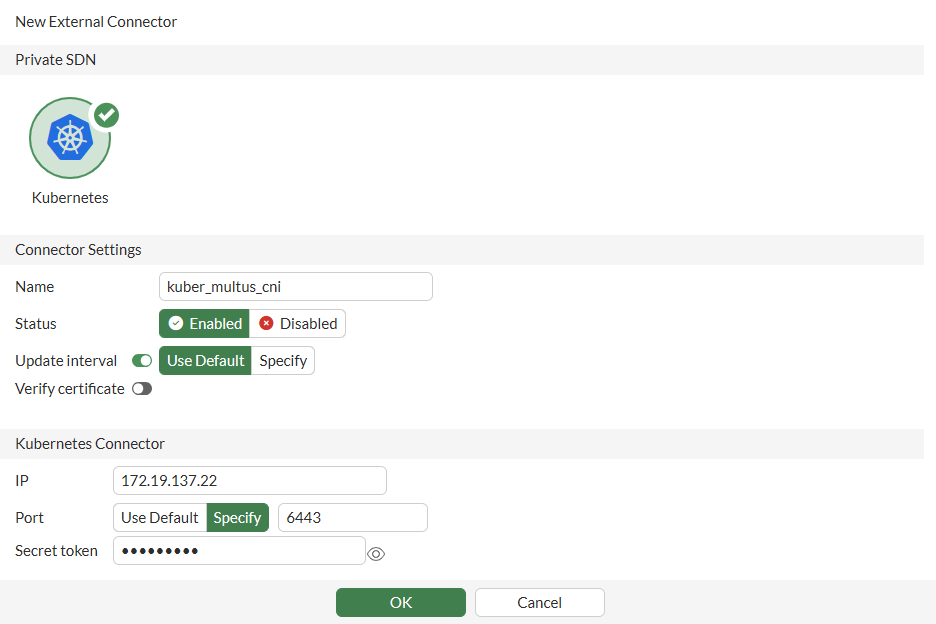
    For more information, see Private cloud K8s SDN connector using secret token and Obtaining the IP address, port, and secret token in Kubernetes.

  6. Configure the other fields as needed, then click OK.

  7. Hover over the connector and ensure that the Status is Up.

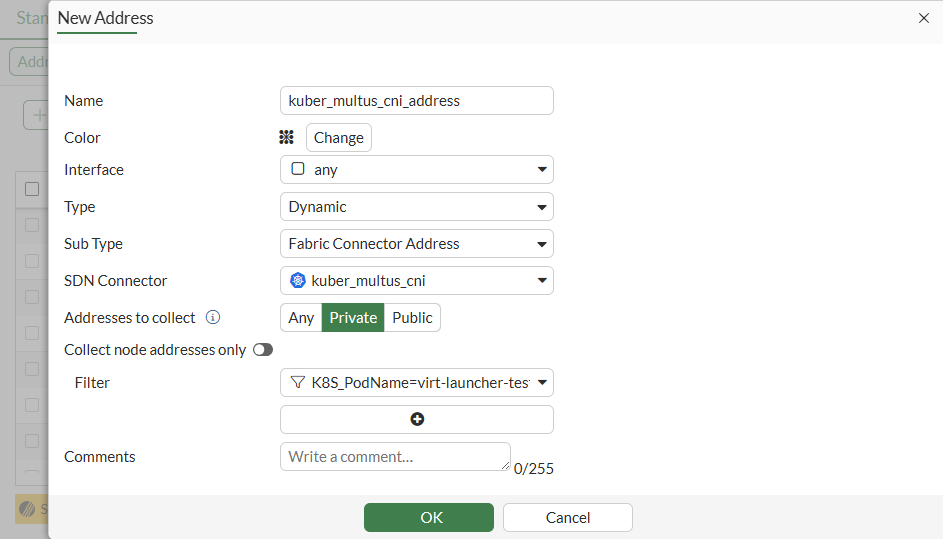
To create dynamic firewall addresses associated with the SDN connector in the GUI:
  1. Go to Policy & Objects > Addresses, and on the Standard tab, select Address then click Create New.

  2. Configure the address:

    Field

    Value

    Name

    kuber_multus_cni_address

    Interface

    any

    Type

    Dynamic

    Sub Type

    Fabric Connector Address

    SDN Connector

    kuber_multi_cni

    Addresses to collect

    Private

    Filter

    K8S_PodName=virt-launcher-testvm3-7q5gl

  3. Click OK.

    IPv6 dynamic addresses can only be configure in the CLI.

To ensure that the connector resolves dynamic firewall IP addresses in the GUI:
  1. Go to Policy & Objects > Addresses.

  2. Hover over the kuber_multus_cni_address address and click View Matched Addresses in the pop-up.

    The resolved addresses are shown. They are the same as the IP addresses configured in the Kubernetes cluster.
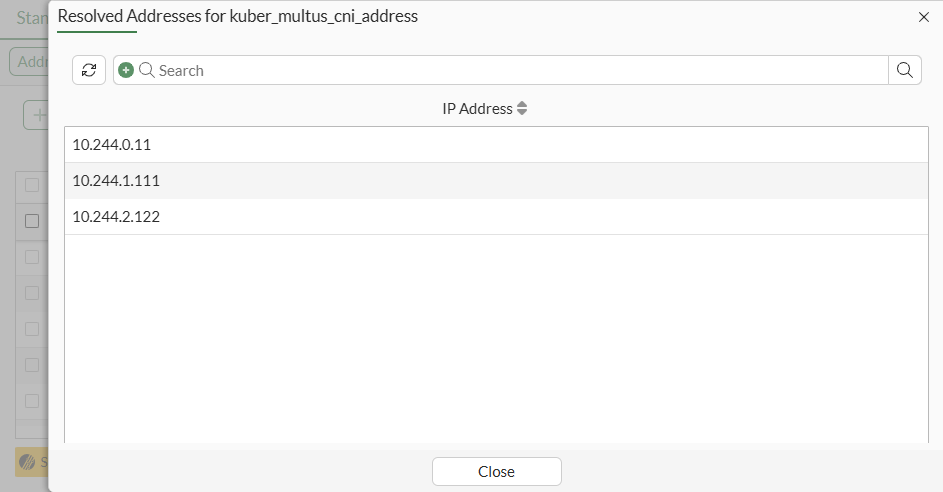
    You can also view the matched addresses by edit the addresses and clicking View Matched Addresses in the right side bar.

To configure a Kubernetes SDN connector in the CLI:
config system sdn-connector
    edit "kuber_multus_cni"
        set type kubernetes
        set verify-certificate disable
        set server "172.19.137.22"
        set server-port 6443
        set secret-token xxxxxx
    next
end

Confirm that the connector is up:

# diagnose sys sdn status "kuber_multus_cni"
SDN Connector                       Type        Status
-------------------------------------------------------------
kuber_multus_cni                    kubernetes  Up
To create dynamic firewall addresses associated with the SDN connector in the CLI:
config firewall address
    edit "kuber_multus_cni_address"
        set type dynamic
        set sdn "kuber_multus_cni"
        set filter "K8S_PodName=virt-launcher-testvm3-7q5gl"
    next
end
config firewall address6
    edit "kuber_multus_cni_address6"
        set type dynamic
        set sdn "kuber_multus_cni"
        set filter "K8S_PodName=virt-launcher-testvm3-7q5gl"
    next
end
To ensure that the connector resolves dynamic firewall IP addresses:
# show firewall address "kuber_multus_cni_address"
config firewall address
    edit "kuber_multus_cni_address"
        set uuid 78cff8c2-53a7-51f0-ced2-eec27f839f7b
        set type dynamic
        set sdn "kuber_multus_cni"
        set color 19
        set filter "K8S_PodName=virt-launcher-testvm3-7q5gl"
        config list
            edit "10.244.0.11"
            next
            edit "10.244.1.111"
            next
            edit "10.244.2.122"
            next
        end
    next
end
# show firewall address6 "kuber_multus_cni_address6"
config firewall address6
    edit "kuber_multus_cni_address6"
        set uuid 40f105f0-53ab-51f0-d04d-21cbd699b4d9
        set type dynamic
        set sdn "kuber_multus_cni"
        set filter "K8S_PodName=virt-launcher-testvm3-7q5gl"
        config list
            edit "2001:db8:85a3::8a2e:370:33"
            next
            edit "2001:db8:85a3::8a2e:370:7334"
            next
        end
    next
end

Multus CNI for Kubernetes connectors

Multus CNI for Kubernetes connectors

FortiGate now supports Multus CNI (container network interface) for Kubernetes connectors, ensuring that all IP addresses, including those configured at runtime, are accurately retrieved and added to Firewall address dynamic objects, enhancing network security integration.

Prerequisites

To enable FortiGate to integrate with a Kubernetes cluster using Multus CNI, the following prerequisites must be met:

Kubernetes cluster setup:
  • A Kubernetes cluster must be deployed and operational.

  • The cluster must have Multus CNI configured to support multiple network interfaces per pod.

Pod deployment with required annotations:

A pod must be deployed with the appropriate Multus CNI annotations to expose both IPv4 and IPv6 addresses. Ensure the following:

  1. k8s.v1.cni.cncf.io/network-status

    This annotation must include a default network interface:

    • IPv4 address: 10.244.0.11

    • Interface name: such as eth0

  2. k8s.v1.cni.cncf.io/network-extra-info

    This annotation must define two additional networks:

    • Network 1:

      • default/bridge-net-static

      • IPv4 address: 10.244.1.111

      • IPv6 address: 2001:0db8:85a3:0000:0000:8a2e:0370:0033

    • Network 2:

      • default/bridge-net-static-2

      • IPv4 address: 10.244.2.122

      • IPv6 address: 2001:db8:85a3::8a2e:370:7334

FortiGate configuration

To configure a Kubernetes SDN connector in the GUI:
  1. Go to Security Fabric > External Connectors and click Create New.

  2. Select Kubernetes.

  3. Set IP to 172.19.137.22.

  4. Set Port to Specify, then enter the port number 6443.

  5. In the Secret token field, enter the token.

    For more information, see Private cloud K8s SDN connector using secret token and Obtaining the IP address, port, and secret token in Kubernetes.

  6. Configure the other fields as needed, then click OK.

  7. Hover over the connector and ensure that the Status is Up.

To create dynamic firewall addresses associated with the SDN connector in the GUI:
  1. Go to Policy & Objects > Addresses, and on the Standard tab, select Address then click Create New.

  2. Configure the address:

    Field

    Value

    Name

    kuber_multus_cni_address

    Interface

    any

    Type

    Dynamic

    Sub Type

    Fabric Connector Address

    SDN Connector

    kuber_multi_cni

    Addresses to collect

    Private

    Filter

    K8S_PodName=virt-launcher-testvm3-7q5gl

  3. Click OK.

    IPv6 dynamic addresses can only be configure in the CLI.

To ensure that the connector resolves dynamic firewall IP addresses in the GUI:
  1. Go to Policy & Objects > Addresses.

  2. Hover over the kuber_multus_cni_address address and click View Matched Addresses in the pop-up.

    The resolved addresses are shown. They are the same as the IP addresses configured in the Kubernetes cluster.

    You can also view the matched addresses by edit the addresses and clicking View Matched Addresses in the right side bar.

To configure a Kubernetes SDN connector in the CLI:
config system sdn-connector
    edit "kuber_multus_cni"
        set type kubernetes
        set verify-certificate disable
        set server "172.19.137.22"
        set server-port 6443
        set secret-token xxxxxx
    next
end

Confirm that the connector is up:

# diagnose sys sdn status "kuber_multus_cni"
SDN Connector                       Type        Status
-------------------------------------------------------------
kuber_multus_cni                    kubernetes  Up
To create dynamic firewall addresses associated with the SDN connector in the CLI:
config firewall address
    edit "kuber_multus_cni_address"
        set type dynamic
        set sdn "kuber_multus_cni"
        set filter "K8S_PodName=virt-launcher-testvm3-7q5gl"
    next
end
config firewall address6
    edit "kuber_multus_cni_address6"
        set type dynamic
        set sdn "kuber_multus_cni"
        set filter "K8S_PodName=virt-launcher-testvm3-7q5gl"
    next
end
To ensure that the connector resolves dynamic firewall IP addresses:
# show firewall address "kuber_multus_cni_address"
config firewall address
    edit "kuber_multus_cni_address"
        set uuid 78cff8c2-53a7-51f0-ced2-eec27f839f7b
        set type dynamic
        set sdn "kuber_multus_cni"
        set color 19
        set filter "K8S_PodName=virt-launcher-testvm3-7q5gl"
        config list
            edit "10.244.0.11"
            next
            edit "10.244.1.111"
            next
            edit "10.244.2.122"
            next
        end
    next
end
# show firewall address6 "kuber_multus_cni_address6"
config firewall address6
    edit "kuber_multus_cni_address6"
        set uuid 40f105f0-53ab-51f0-d04d-21cbd699b4d9
        set type dynamic
        set sdn "kuber_multus_cni"
        set filter "K8S_PodName=virt-launcher-testvm3-7q5gl"
        config list
            edit "2001:db8:85a3::8a2e:370:33"
            next
            edit "2001:db8:85a3::8a2e:370:7334"
            next
        end
    next
end