

Agentless VPN monitor
The Agentless VPN monitor displays remote user logins and active connections. You can use the monitor to disconnect a specific connection. The monitor will notify you when VPN users have not enabled two-factor authentication.
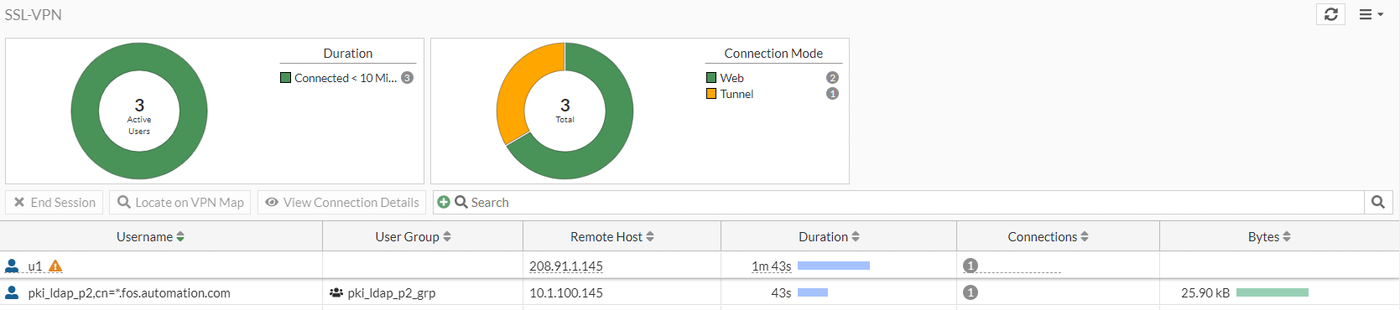
To view the Agentless VPN monitor in the GUI:
- Go to Dashboard > Agentless VPN Monitor.
If the Agentless VPN Monitor is hidden, click + under the Dashboard, search for Agentless VPN Monitor, and add it to the display.

|
To filter or configure a column in the table, hover over the column heading and click the Filter/Configure Column button. |
To disconnect a user:
- Select a user in the table.
- In the table, right-click the user, and click End Session. The Confirm window opens.
- Click OK.
To monitor Agentless VPN users in the CLI:
# get vpn ssl monitor
Sample output
Agentless VPN Login Users:
Index 	 User 	 Group 	 Auth Type 	Timeout 	From	 HTTP in/out	HTTPS in/out
0 	 amitchell 	 TAC	 1(1) 		 296 	 10.100.64.101	3838502/11077721	0/0
1 	 mmiles 	 Dev	 1(1) 		 292 	 10.100.64.101	4302506/11167442	0/0

Agentless VPN sessions:
Index 	 User 	 Group 	 Source IP 	Duration	I/O Bytes	Tunnel/Dest IP