

Configuring SD-WAN interfaces
In order for us to steer traffic based on SD-WAN rules, first we need to configure SD-WAN interface members. To know more about creating SD-WAN interfaces, refer to the Configuring the SD-WAN interface section.
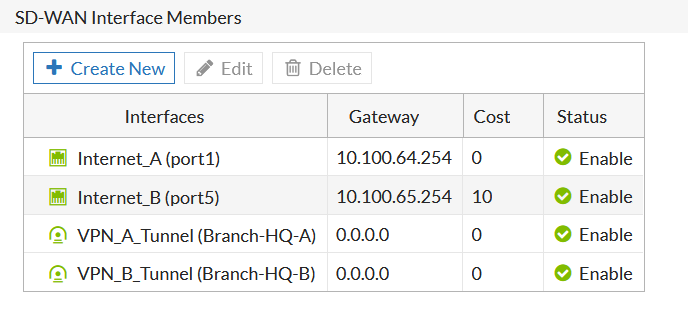
In our example, we created four SD-WAN interface members. SD-WAN interfaces Internet_A(port1) and Internet_B(port5) for the underlay traffic, and Branch-HQ-A and Branch-HQ-B interfaces for the overlay traffic.
Verify the configurations on the Network > SD-WAN screen:

|
In the screenshot above, we have configured the |
We also need to configure a static route that points to the SD-WAN interface. To know more about static routes, refer to the Adding a static route section.