

Webhook action
The webhook automation stitch action makes HTTP and HTTPS requests to a specified server, with custom headers, bodies, ports, and methods. It can be used to leverage the ubiquity of HTML requests and APIs to integrate with other tools.

|
The URI and HTTP body can use parameters from logs or previous action results. Wrapping the parameter with %% will replace the expression with the JSON value for the parameter, for example: %%results.source%% is the source property from the previous action. |
In this example, a specific log message (failed administrator log in attempt) triggers the FortiGate to send the contents of the log to a server. The server responds with a generic reply. This example assumes that the server is already configured and able to communicate with the FortiGate.
To configure the webhook automation stitch in the GUI:
-
Go to Security Fabric > Automation and click Create New.
-
Enter the stitch name (badLogin).
-
Configure the trigger:
-
Click Add Trigger.
-
Click Create and select FortiOS Event Log.
-
Enter the following:
Name
badLogin
Event
Admin login failed
-
Click OK.
-
Select the trigger in the list and click Apply.
-
-
Configure the automation stitch action:
-
Click Add Action.
-
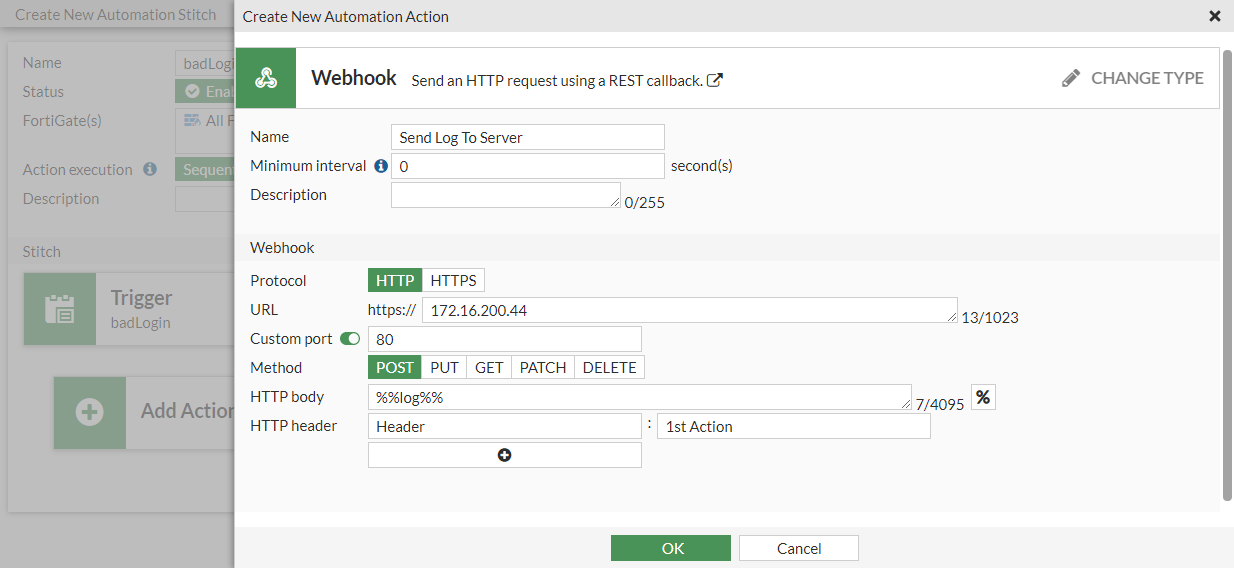
Click Create and select Webhook.
-
Enter the following:
Name
Send Log To Server
Protocol
HTTP
URL
172.16.200.44
Custom port
Enable and enter 80
Method
POST
HTTP body
%%log%%
HTTP header
Header : 1st Action
-
Click OK.
-
Select the action in the list and click Apply.
-
-
Click OK.
To configure the webhook automation stitch in the CLI:
-
Create an automation trigger:
config system automation-trigger edit "badLogin" set event-type event-log set logid 32002 next end -
Create the automation action:
config system automation-action edit "Send Log To Server" set action-type webhook set uri "172.16.200.44" set http-body "%%log%%" set port 80 config http-headers edit 1 set key "Header" set value "1st Action" next end next end -
Create the automation stitch:
config system automation-stitch
    edit "badLogin"
        set trigger "badLogin"
        config actions
            edit 1
                set action "Send Log To Server"
                set required enable
            next
        end
    next
end
To test the automation stitch:
- Attempt to log in to the FortiGate with an incorrect username or password.
- On the server, check the log to see that its contents were sent by the FortiGate.
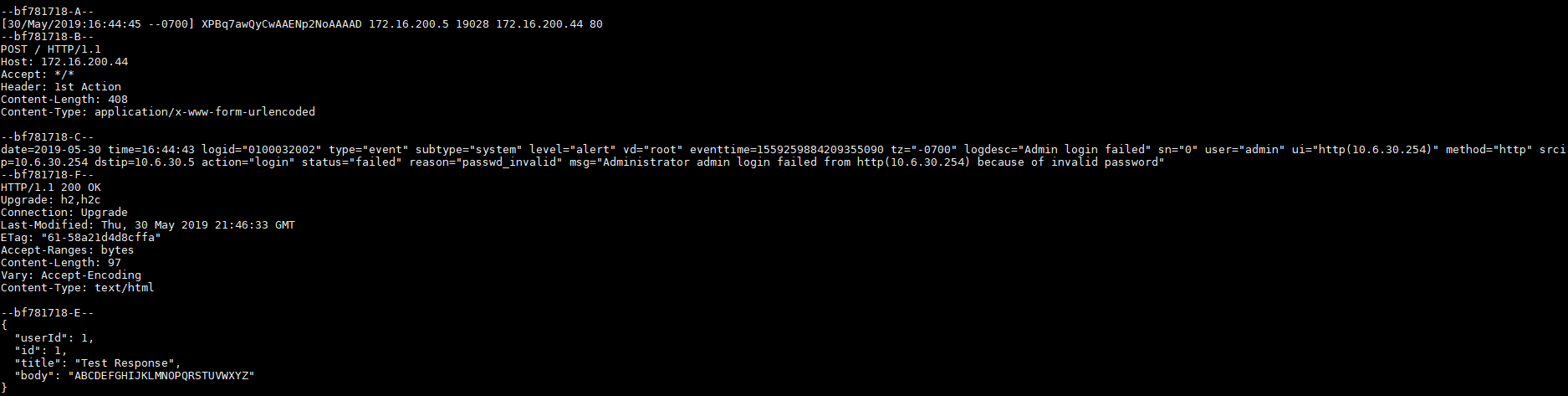
The body content is replaced with the log from the trigger.
- On the FortiGate, go to Log & Report > System Events to confirm that the stitch was activated.
- Go to Security Fabric > Automation to see the last time that the stitch was triggered.
Diagnose commands
To enable log dumping:
# diagnose test application autod 1
autod dumped total:1 logs, num of logids:1
autod log dumping is enabled

vdom:root(0) logid:32002 len:408 log:
date=2019-05-30 time=17:41:03 logid="0100032002" type="event" subtype="system" level="alert" vd="root" eventtime=1559263263858888451 tz="-0700" logdesc="Admin login failed" sn="0" user="admin" ui="http(10.6.30.254)" method="http" srcip=10.6.30.254 dstip=10.6.30.5 action="login" status="failed" reason="passwd_invalid" msg="Administrator admin login failed from http(10.6.30.254) because of invalid password"
autod log dumping is disabled

autod logs dumping summary:
        logid:32002 count:1

autod dumped total:1 logs, num of logids:1
To show the automation settings:
# diagnose test application autod 2
csf: enabled 	root:yes
total stitches activated: 2

stitch: badLogin
	destinations: all
	trigger: badLogin

	local hit: 6 relayed to: 6 relayed from: 6
	actions:
		Send Log To Server type:webhook interval:0
			delay:0 required:no
			proto:0 method:0 port:80
			uri: 172.16.200.44
			http body: %%log%%
			headers:
			0. Header:1st Action
To show the automation statistics:
# diagnose test application autod 3

stitch: badLogin

	local hit: 1 relayed to: 1 relayed from: 1
	last trigger:Wed Jul 10 12:14:14 2019
	last relay:Wed Jul 10 12:14:14 2019

	actions:
		Send Log To Server:
			done: 1 relayed to: 1 relayed from: 1
			last trigger:Wed Jul 10 12:14:14 2019
			last relay:Wed Jul 10 12:14:14 2019

logid2stitch mapping:
id:32002  local hit: 3 relayed to: 3 relayed from: 3
	badLogin

action run cfg&stats:
total:55 cur:0 done:55 drop:0
	email:
		flags:10
		stats: total:4 cur:0 done:4 drop:0
	fortiexplorer-notification:
		flags:1
		stats: total:0 cur:0 done:0 drop:0
	alert:
		flags:0
		stats: total:0 cur:0 done:0 drop:0
	disable-ssid:
		flags:7
		stats: total:0 cur:0 done:0 drop:0
	quarantine:
		flags:7
		stats: total:0 cur:0 done:0 drop:0
	quarantine-forticlient:
		flags:4
		stats: total:0 cur:0 done:0 drop:0
	quarantine-nsx:
		flags:4
		stats: total:0 cur:0 done:0 drop:0
	ban-ip:
		flags:7
		stats: total:0 cur:0 done:0 drop:0
	aws-lambda:
		flags:11
		stats: total:21 cur:0 done:21 drop:0
	webhook:
		flags:11
		stats: total:6 cur:0 done:6 drop:0
	cli-script:
		flags:10
		stats: total:4 cur:0 done:4 drop:0
	azure-function:
		flags:11
		stats: total:0 cur:0 done:0 drop:0
	google-cloud-function:
		flags:11
		stats: total:0 cur:0 done:0 drop:0
	alicloud-function:
		flags:11
		stats: total:20 cur:0 done:20 drop:0
To enable debug output and turn on automation debug messages for about 30 minutes:
# diagnose debug enable
# diagnose debug application autod -1
__auto_generate_generic_curl_request()-358: Generating generic automation CURL request for action (Send Log To Server).
__auto_generate_generic_curl_request()-406: Generic automation CURL request POST data for action (Send Log To Server):
date=2019-05-30 time=16:44:43 logid="0100032002" type="event" subtype="system" level="alert" vd="root" eventtime=1559259884209355090 tz="-0700" logdesc="Admin login failed" sn="0" user="admin" ui="http(10.6.30.254)" method="http" srcip=10.6.30.254 dstip=10.6.30.5 action="login" status="failed" reason="passwd_invalid" msg="Administrator admin login failed from http(10.6.30.254) because of invalid password"

__auto_generic_curl_request_close()-512: Generic CURL request response body from http://172.16.200.44:
{
  "userId": 1,
  "id": 1,
  "title": "Test Response",
  "body": "ABCDEFGHIJKLMNOPQRSTUVWXYZ"
}