
Fortinet white logo
Fortinet white logo

Administration Guide

Trigger RADIUS authentication with DNS and ICMP queries

Trigger RADIUS authentication with DNS and ICMP queries

DNS and ICMP queries can trigger RADIUS authentication. In some situations, a RADIUS client cannot trigger authentication with only HTTP, HTTPS, or Telnet traffic, such as VoIP gateways or servers. Without RADIUS authentication there is no RADIUS accounting, which can be required in some circumstances.

In this example, a Client PC is used as a VoIP gateway.
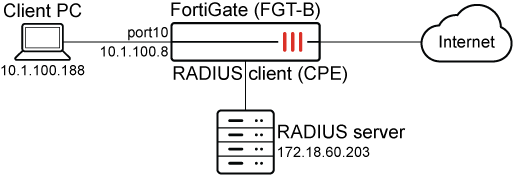
To configure FGT-B:
  1. Configure a RADIUS user:

    config user radius
        edit "FreeRADIUS"
            set server "172.18.60.203"
            set secret **********
            set acct-interim-interval 600
            set auth-type pap
            set password-renewal disable
            config accounting-server                   
                edit 1
                    set status enable
                    set server "172.18.60.203"
                    set secret **********
                next
            end
        next
    end
  2. Find the MAC address on the interface. In the RADIUS accounting start message it will be the Called-Station-Id.

    # get hardware nic port10 | grep HW
    Current_HWaddr   80:80:2c:a3:50:f3  
    Permanent_HWaddr 80:80:2c:a3:50:f3
  3. Add the RADIUS user to a group:

    config user group
        edit "remote-radius"
            set member "FreeRADIUS"
        next
    end
  4. Configure the interface:

    config system interface
        edit "port10"
            set vdom "root"
            set ip 10.1.100.8 255.255.255.0
            set allowaccess ping https ssh http telnet
            set type physical
            set security-mode captive-portal           
            set security-ip-auth-bypass enable      
            set security-groups "remote-radius"
            set device-identification enable
            set snmp-index 12
            config ipv6
                set ip6-address 2008::8/64
                set ip6-allowaccess ping https http
            end
        next
    end
  5. Configure a policy:

    config firewall policy
        edit 1
            set name "pol1"
            set srcintf "port10"
            set dstintf "port9"
            set action accept
            set srcaddr "all"
            set dstaddr "all"
            set schedule "always"
            set service "ALL"
            set utm-status enable
            set ssl-ssh-profile "custom-deep-inspection"
            set av-profile "default"
            set logtraffic all
            set nat enable
            set groups "remote-radius"
            set radius-ip-auth-bypass enable
        next
    end
To test the configuration:
  1. Trigger RADIUS authentication on the Client PC using the ip-auth-bypass feature configured on the FortiGate. This can be done by either:

    • Pinging any external resource (ICMP query).

    • Connecting to an external webpage using an FQDN URL in a browser with an empty cache, which requires a new DNS query.

    The FortiGate will use the Client PC IP address as the credentials for authentication. If successful, this will be followed by a RADIUS accounting start message.

  2. On FGT-B, check the local firewall authentication list.

    The RADIUS user that is used for ip-auth-bypass is the IP address of the Client PC. The source MAC address is the MAC address of the Client PC.

    # diagnose firewall auth list
    
    10.1.100.188, 10.1.100.188                                     
            src_mac: 00:0c:29:44:be:b9                            
            type: fw, id: 0, duration: 16, idled: 10
            expire: 284, allow-idle: 300, max-life: 2384
            flag(14): hard radius
            server: FreeRADIUS
            packets: in 4 out 5, bytes: in 1105 out 1044
            group_id: 5
            group_name: remote-radius
    
    ----- 1 listed, 0 filtered ------
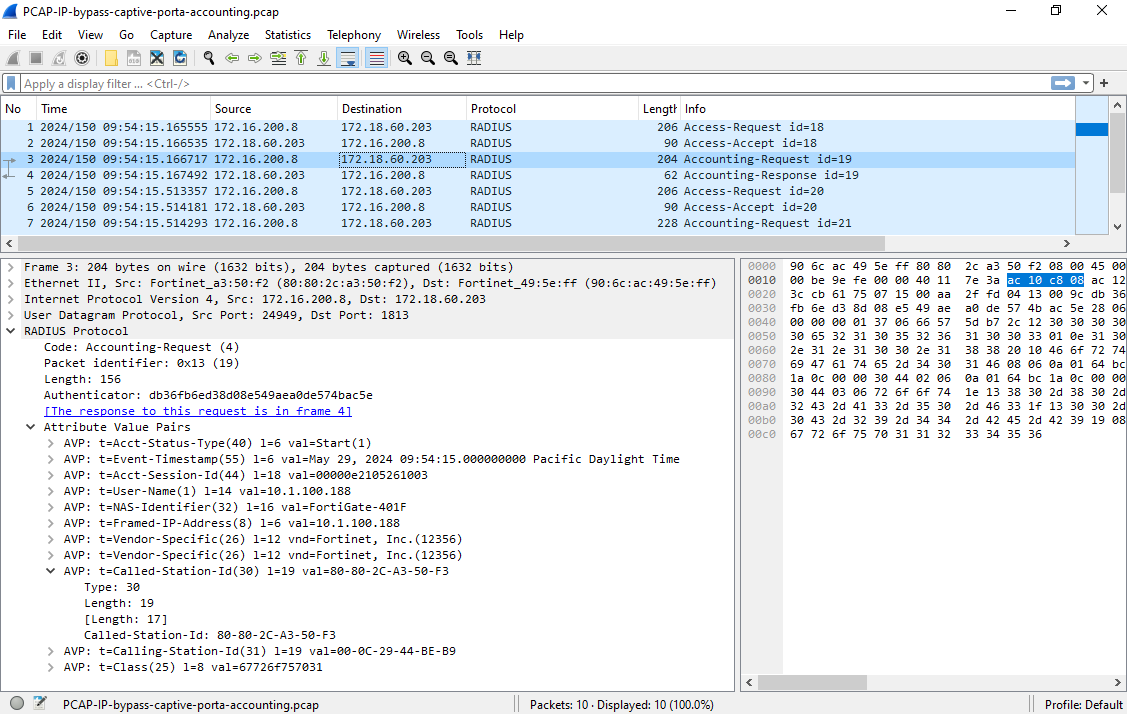
  3. Check the RADIUS accounting start messages in the traffic between FGT-B and the RADIUS server. The MAC address of FGT-B is the Called-Station-Id, and the IP address of the Client PC is the User-Name.
Trigger RADIUS authentication with DNS and ICMP queries

Trigger RADIUS authentication with DNS and ICMP queries

DNS and ICMP queries can trigger RADIUS authentication. In some situations, a RADIUS client cannot trigger authentication with only HTTP, HTTPS, or Telnet traffic, such as VoIP gateways or servers. Without RADIUS authentication there is no RADIUS accounting, which can be required in some circumstances.

In this example, a Client PC is used as a VoIP gateway.

To configure FGT-B:
  1. Configure a RADIUS user:

    config user radius
        edit "FreeRADIUS"
            set server "172.18.60.203"
            set secret **********
            set acct-interim-interval 600
            set auth-type pap
            set password-renewal disable
            config accounting-server                   
                edit 1
                    set status enable
                    set server "172.18.60.203"
                    set secret **********
                next
            end
        next
    end
  2. Find the MAC address on the interface. In the RADIUS accounting start message it will be the Called-Station-Id.

    # get hardware nic port10 | grep HW
    Current_HWaddr   80:80:2c:a3:50:f3  
    Permanent_HWaddr 80:80:2c:a3:50:f3
  3. Add the RADIUS user to a group:

    config user group
        edit "remote-radius"
            set member "FreeRADIUS"
        next
    end
  4. Configure the interface:

    config system interface
        edit "port10"
            set vdom "root"
            set ip 10.1.100.8 255.255.255.0
            set allowaccess ping https ssh http telnet
            set type physical
            set security-mode captive-portal           
            set security-ip-auth-bypass enable      
            set security-groups "remote-radius"
            set device-identification enable
            set snmp-index 12
            config ipv6
                set ip6-address 2008::8/64
                set ip6-allowaccess ping https http
            end
        next
    end
  5. Configure a policy:

    config firewall policy
        edit 1
            set name "pol1"
            set srcintf "port10"
            set dstintf "port9"
            set action accept
            set srcaddr "all"
            set dstaddr "all"
            set schedule "always"
            set service "ALL"
            set utm-status enable
            set ssl-ssh-profile "custom-deep-inspection"
            set av-profile "default"
            set logtraffic all
            set nat enable
            set groups "remote-radius"
            set radius-ip-auth-bypass enable
        next
    end
To test the configuration:
  1. Trigger RADIUS authentication on the Client PC using the ip-auth-bypass feature configured on the FortiGate. This can be done by either:

    • Pinging any external resource (ICMP query).

    • Connecting to an external webpage using an FQDN URL in a browser with an empty cache, which requires a new DNS query.

    The FortiGate will use the Client PC IP address as the credentials for authentication. If successful, this will be followed by a RADIUS accounting start message.

  2. On FGT-B, check the local firewall authentication list.

    The RADIUS user that is used for ip-auth-bypass is the IP address of the Client PC. The source MAC address is the MAC address of the Client PC.

    # diagnose firewall auth list
    
    10.1.100.188, 10.1.100.188                                     
            src_mac: 00:0c:29:44:be:b9                            
            type: fw, id: 0, duration: 16, idled: 10
            expire: 284, allow-idle: 300, max-life: 2384
            flag(14): hard radius
            server: FreeRADIUS
            packets: in 4 out 5, bytes: in 1105 out 1044
            group_id: 5
            group_name: remote-radius
    
    ----- 1 listed, 0 filtered ------
  3. Check the RADIUS accounting start messages in the traffic between FGT-B and the RADIUS server. The MAC address of FGT-B is the Called-Station-Id, and the IP address of the Client PC is the User-Name.