

ISDB FQDN groups
ISDB Fully Qualified Domain Name (FQDN) groups are groups of well-known services like Amazon-AWS, Cisco-Webex, Google-Gmail, Microsoft-Update, and others that are comprised of various FDQNs that make up the service.
For example, Microsoft-Microsoft.Update includes several FQDNs used for their updating service:
-
*.dsp.mp.microsoft.com
-
*.windowsupdate.com
-
windowsupdate.microsoft.com
-
*.update.microsoft.com
-
and others
FortiGate can resolve these FDQN addresses to their respective IP addresses and groups.
ISDB FQDN groups allow users to select well-known services as an FQDN group, as opposed to individual ISDB addresses that map directly to IP address and port entries.
ISDB FQDN groups can be used in firewall policies and in security policies when FortiGate is in NGFW policy-based mode.
Applying FQDN address groups within the ISDB in the GUI
The option to filter ISDB entries by FQDN group is available in the Policy & Objects > Internet Service Database page. On the Internet Service tab, select Internet Service FQDN to view the list of FQDN entries. These address group entries can be applied to a policy in the GUI.
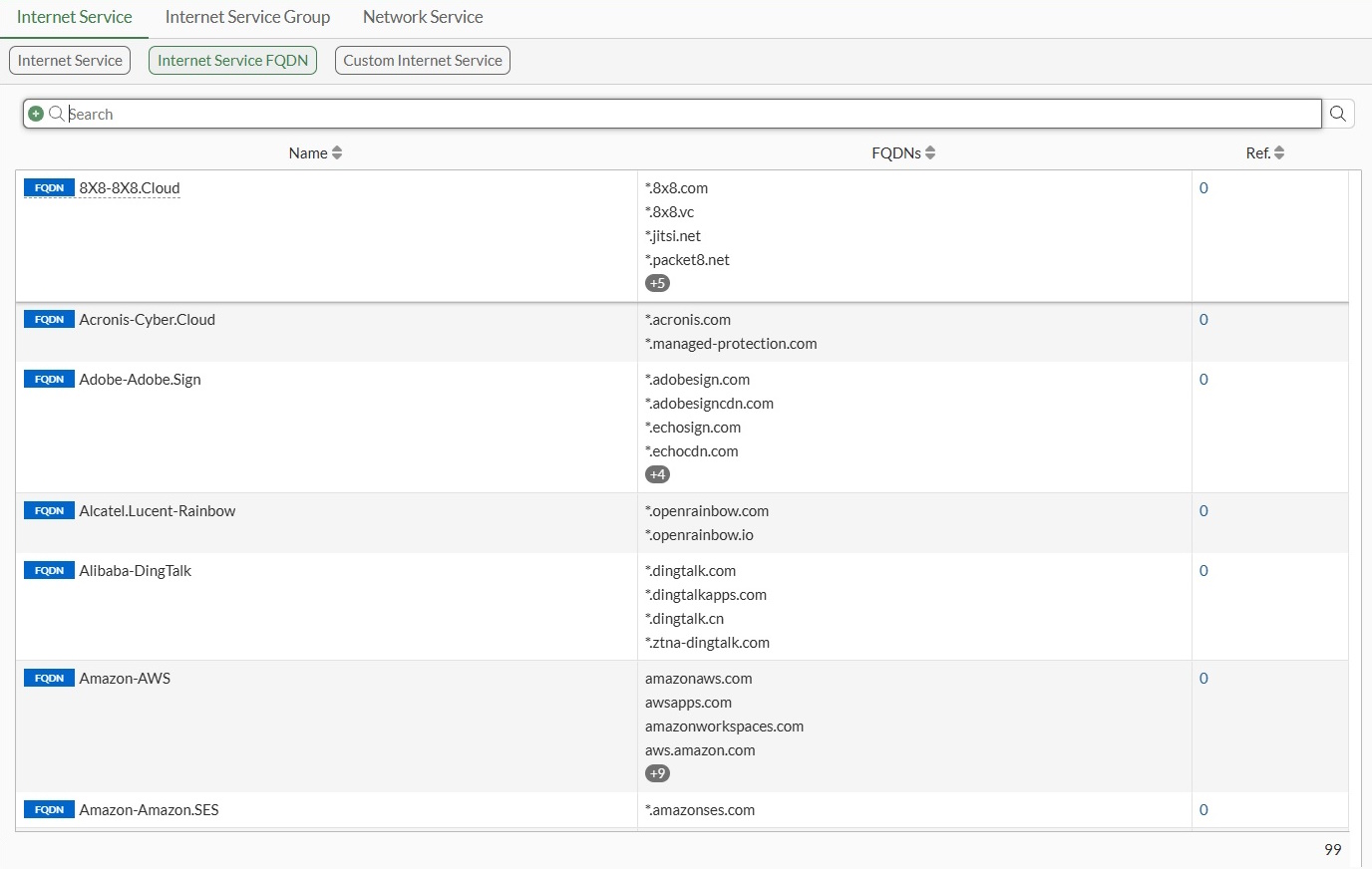
To apply an ISDB FQDN group to a firewall policy in the GUI:
-
Go to Policy & Objects > Firewall Policy.
-
Click Create New or edit an existing policy.
-
Assign the FQDN address group:
-
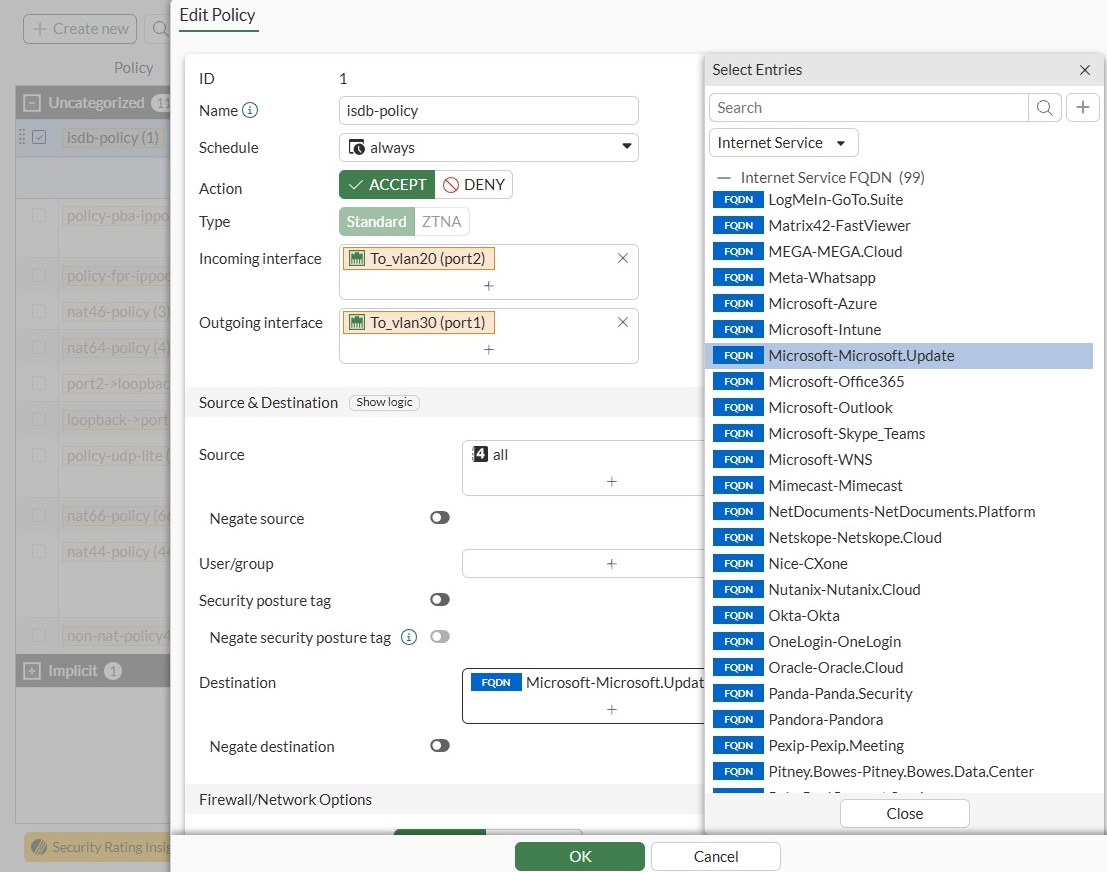
Select the Source or Destination field. The Select Entries pane is displayed.
-
Select Internet Service from the dropdown list.
-
In the Internet Service FQDN section, select the FQDN address groups you would like to assign.
-
Click Close.
-
-
Configure the other fields, as needed.
-
Click OK.
To apply an ISDB FQDN group to an NGFW policy in the GUI:
-
Ensure policy-based NGFW mode is enabled. See NGFW policy.
-
Go to Policy & Objects > Security Policy.
-
Click Create New or edit an existing policy.
-
Assign the FQDN address group:
-
Select the Source or Destination field. The Select Entries pane is displayed.
-
Select Internet Service from the dropdown list.
-
In the Internet Service FQDN section, select the FQDN address groups you would like to assign.
-
Click Close.
-
-
Configure the other fields, as needed.
-
Click OK.
Applying FQDN address groups within the ISDB in the CLI
FQDN address groups can be applied in the CLI. Likewise, the following diagnose commands identify predefined FQDNs:
# diagnose ffdb-fqdn group-list [<Built-in group name>]
# diagnose ffdb-fqdn group-get <Built-in FQDN name>
# diagnose ffdb-fqdn icon-get <Built-in FQDN group name>
|
Command |
Description |
|---|---|
|
ffdb-fqdn group-list |
List all of the built-in ISDB FQDN groups. If the specific built-in FQDN name is appended to the end of the command, only that entry's information is displayed. If the specific built-in FQDN name name is not defined, all entries in the current database will be listed. |
|
ffdb-fqdn group-get |
Determine which built-in FQDN group the given FQDN name belongs to. |
|
ffdb-fqdn icon-get |
Determine which icon ID the given FQDN group name belongs to. |
Example: firewall policy
In the following example, a predefined FQDN Internet service, g-BuiltIn-Microsoft-Microsoft.Update, is applied to a firewall policy. We will then review how the customer Internet service is loaded in the kernel and try to send packets to the FortiGate from the client to hit the policy. Finally, we will review the Internet service related fields in the traffic logs.
To apply an ISDB FQDN group to a firewall policy in the CLI:
-
Apply the built-in FQDN entry to the firewall policy:
config firewall policy edit 1 set name "isdb-policy" set srcintf "port2" set dstintf "port1" set action accept set srcaddr "all" set internet-service enable set internet-service-fortiguard "FQDN-Microsoft-Microsoft.Update" set schedule "always" set logtraffic all set auto-asic-offload disable set nat enable next end -
Review how the built-in FQDN entry is loaded into the kernel:
# diagnose firewall iprope list 100004 | grep -A 16 index=1 policy index=1 uuid_idx=8207 action=accept flag (8050109): log redir nat master use_src pol_stats flag2 (6200): no_asic log_fail resolve_sso flag3 (a0): link-local best-route flag4 (200): port-preserve schedule(always) cos_fwd=255 cos_rev=255 group=00100004 av=00004e20 au=00000000 split=00000000 host=0 chk_client_info=0x0 app_list=0 ips_view=0 misc=0 zone(1): 8 -> zone(1): 7 source(1): 0.0.0.0-255.255.255.255, uuid_idx=8050, dest(1): 0.0.0.0-255.255.255.255, uuid_idx=8050, service(1): [0:0x0:0/(0,65535)->(0,65535)] flags:0 helper:auto internet service(1): FQDN-Microsoft-Microsoft.Update(4278190087,0,0,0) -
Review the FQDN domain name and corresponding IP address information contained in the built-in FQDN entry are listed. The resolution of these domain names comes from the DNS server set by the FortiGate.
# diagnose firewall internet-service-fortiguard list List internet service in kernel(fortiguard): name=FQDN-Microsoft-Microsoft.Update id=4278190087 reputation=3 Unverified site. singularity=0 flags=0x0 protocol=0 fqdn=(9): devicelistenerprod.microsoft.com ID(26) ADDR(4.255.252.37) *.download.microsoft.com ID(42) *.update.microsoft.com ID(79) *.dsp.mp.microsoft.com ID(83) ntservicepack.microsoft.com ID(147) ADDR(132.196.74.18) windowsupdate.microsoft.com ID(210) ADDR(20.72.235.82) wustat.windows.com ID(216) *.windowsupdate.com ID(241) *.delivery.mp.microsoft.com ID(339) dynamic=(0): -
Send packets from the client to the FQDN domain
windowsupdate.microsoft.com, which is one of the FQDN domains included inFQDN-Microsoft-Microsoft.Update. The traffic will hit and be forwarded by the firewall policy.1: date=2025-06-16 time=12:30:24 eventtime=1729107023938309279 tz="-0700" logid="0000000013" type="traffic" subtype="forward" level="notice" vd="root" srcip=10.1.100.41 srcport=46900 srcintf="port2" srcintfrole="undefined" dstip=20.72.235.82 dstport=443 dstintf="port1" dstintfrole="undefined" srcuuid="5cfbeb4e-b05e-51ee-233c-5026f6bf6d00" srccountry="Reserved" dstcountry="United States" dstreputation=3 sessionid=1243 proto=6 action="close" policyid=1 policytype="policy" poluuid="ea3d8560-ea62-51ee-fa88- 20dfc247a38c" policyname="isdb-policy" dstinetsvc="FQDN-Microsoft-Microsoft.Update" service="FQDN-Microsoft-Microsoft.Update" trandisp="snat" transip=172.16.200.6 transport=46900 appcat="unscanned" duration=2 sentbyte=1623 rcvdbyte=5268 sentpkt=16 rcvdpkt=13
Example: NGFW policy
To apply an ISDB FQDN group to an NGFW policy:
-
Ensure policy-based NGFW mode is enabled. See NGFW policy.
-
Apply the built-in FQDN entry to a security policy in NGFW policy-based mode:
config firewall security-policy edit 100 set uuid 4473436c-9b01-51f0-eea3-44af202bf3a1 set srcintf "port3" set dstintf "port1" set srcaddr "all" set internet-service enable set internet-service-fortiguard "FQDN-Microsoft-Microsoft.Update" set action accept set schedule "always" set logtraffic all next end -
Send packets from the client to the FQDN domain
windowsupdate.microsoft.com(IP address128.85.102.70), which is one of the FQDN domains included inFQDN-Microsoft-Microsoft.Update. The traffic is affected, and FortiGate forwards the traffic according to the security policy.1: date=2025-09-26 time=10:54:25 eventtime=1758909265590012214 tz="-0700" logid="0000000013" type="traffic" subtype="forward" level="notice" vd="vdom1" srcip=10.1.100.11 identifier=987 srcintf="port3" srcintfrole="undefined" dstip=128.85.102.70 dstintf="port1" dstintfrole="undefined" srccountry="Reserved" dstinetsvc="FQDN-Microsoft-Microsoft.Update" dstcountry="United States" dstregion="Washington" dstcity="Quincy" sessionid=10391 proto=1 action="accept" policyid=100 policytype="security-policy" poluuid="4473436c-9b01-51f0-eea3-44af202bf3a1" centralnatid=1 service="FQDN-Microsoft-Microsoft.Update" trandisp="snat" transip=172.16.200.68 appid=24466 app="Ping" appcat="Network.Service" apprisk="elevated" duration=119 sentbyte=4956 rcvdbyte=0 sentpkt=59 rcvdpkt=0 srchwvendor="Fortinet" devtype="Router" srcfamily="FortiGate" osname="FortiOS" srchwversion="200F" mastersrcmac="d4:76:a0:03:23:38" srcmac="d4:76:a0:03:23:38" srcserver=0 dstdevtype="Unknown" dstosname="Unknown" masterdstmac="90:6c:ac:c2:75:cb" dstmac="90:6c:ac:c2:75:cb" dstserver=0