

ZTNA troubleshooting with error messages
As part of the troubleshooting process, one essential step is to utilize the error messages displayed on the client endpoints to deduce the issue encountered. This is particularly important when accessing a resource from a web browser.
When a problem is encountered, the user is likely to see a replacement message.
For example, if a FortiGate is configured with a deny policy when matching a specific security posture tag called ZTNA_ZT_FILE_CERTFILE, and the endpoint client hit the deny policy because it matched this tag, an access denied message is would be shown.
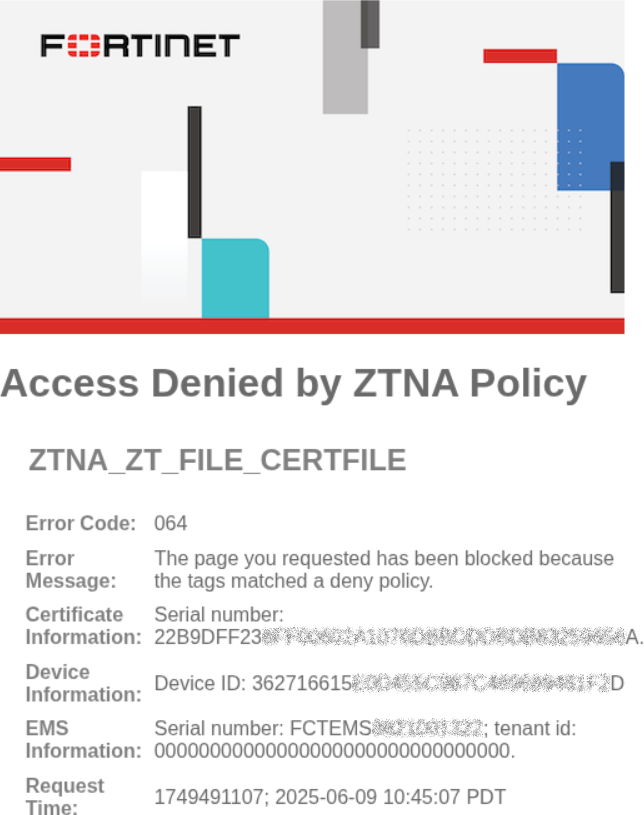
The replacement message includes all or a subset of the following information:
|
Field |
Description |
|---|---|
|
Title |
Short summary of the issue |
|
Subtitle |
Additional details of the issue |
|
Error Code |
Code based on Error codes and replacement messages |
|
Error Message |
Specific error behavior encountered |
|
User name |
If the policy has user group defined, display the username |
|
Certificate Information |
The SN of the FortiClient endpoint certificate |
|
Device Information |
The Device ID of the FortiClient endpoint |
|
Destination |
The destination in which the client is trying to reach |
|
EMS Information |
Information about the EMS server including:
|
|
Request Time |
When the request was made |
Correlating with FortiGate ZTNA event logs
The replacement message information helps administrators correlate the event with the ZTNA event logs. If multiple EMS servers or tenants are used, the information helps pinpoint the relevant EMS server or tenant. Administrators can find the specific firewall policy that was matched to determine if the violation is legitimate, or if there is a misconfiguration.
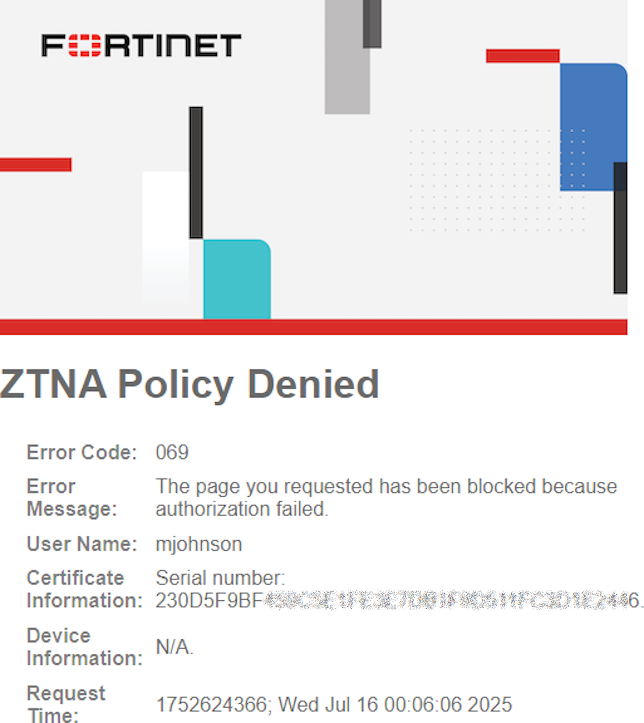
For example, the following replacement message and log show that a user named mjohnson attempted to match a policy on the FortiGate against the ZTNA-webserver access proxy but was unable to match a policy that authorized its access due to no user group matched.
# execute log filter field subtype ztna
# execute log display
1 logs found.
1 logs returned.
1: date=2025-07-15 time=17:06:06 eventtime=1752624366166875160 tz="-0700" logid="0005000024" type="traffic" subtype="ztna" level="notice" vd="root" srcip=10.0.3.2 srcport=50177 srcintf="port3" srcintfrole="wan" dstcountry="Reserved" srccountry="Reserved" dstip=10.0.3.10 dstport=9043 dstintf="root" dstintfrole="undefined" sessionid=13512 srcuuid="1a4694b6-6106-51f0-d0c6-2c91f714c2ec" service="tcp/9043" proxyapptype="http" proto=6 action="deny" policyid=0 policytype="proxy-policy" appcat="unscanned" duration=0 user="mjohnson" vip="ZTNA-webserver" accessproxy="ZTNA-webserver" clientdevicemanageable="manageable" clientcert="yes" msg="Traffic denied because failed to match a policy or proxy-policy" wanin=0 rcvdbyte=0 wanout=0 lanin=2051 sentbyte=2051 lanout=3014 crscore=30 craction=131072 crlevel="high"
Additional Examples
Issue attempting to reach a destination
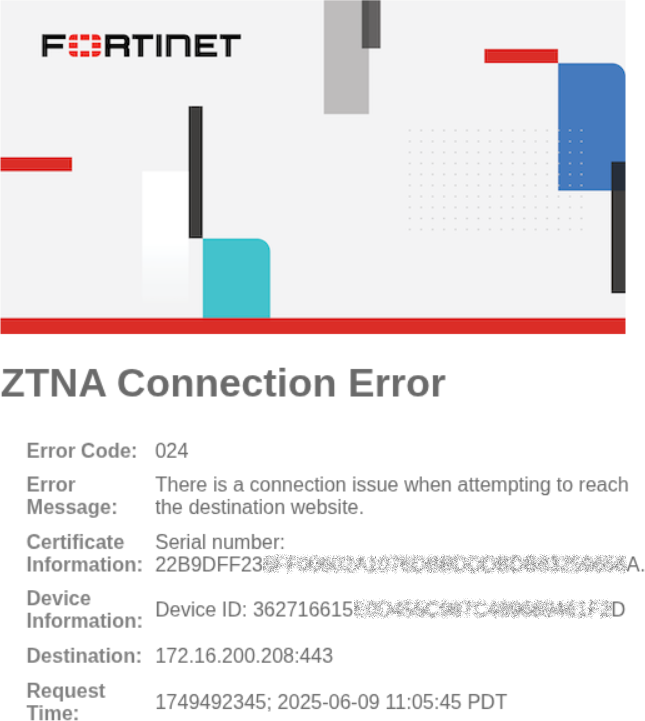
A client tries to access the destination 172.16.200.208:443, but the destination cannot be reached from the FortiGate. Before this enhancement, this resulted in a non-ZTNA replacement message, stating 504 Gateway Timeout: remote server did not respond to the proxy.
After this enhancement, a ZTNA Connection Error replacement message with Error Code 024 is displayed:
DNS resolution when matching a wildcard domain
A FortiGate has a real server definition for TCP forwarding using a wildcard domain match:
config firewall access-proxy
    edit "ztna"
        set vip "ztna"
            edit 2
                set url-map "/tcp"
                set service tcp-forwarding
                config realservers
                    edit 1
                        set address "ftnttest.com"
                        set domain "*.ftnttest.com"
                    next
                end
            next
        end
    next
end
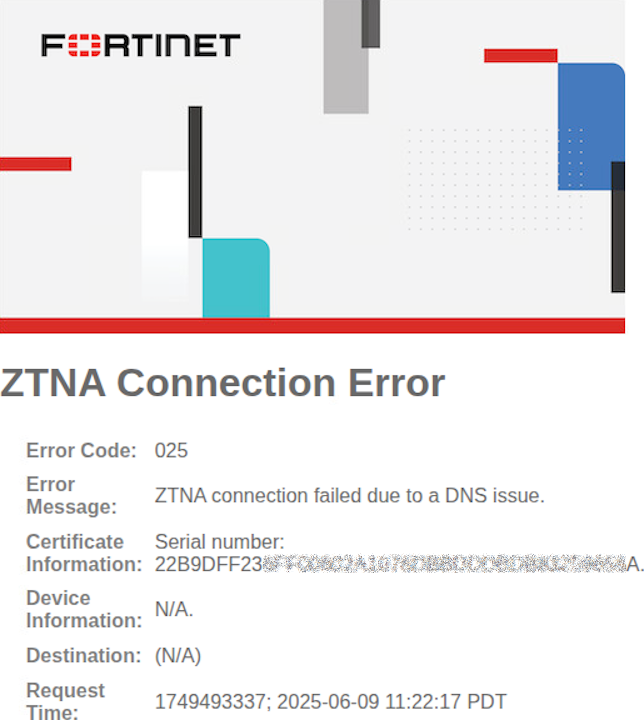
When the endpoint client requests the TCP forwarding resource that matches the wildcard domain, but this address cannot be resolved by the FortiGate, a ZTNA Connection Error replacement message with Error Code 025 is displayed:
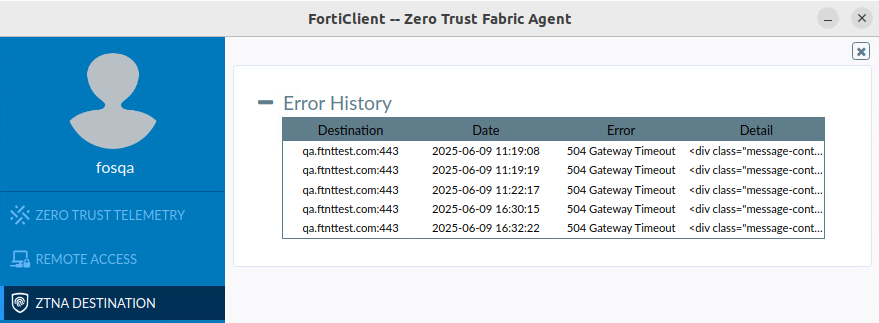
Additionally, on FortiClient, the Error History indicates a 504 Gateway Timeout when accessing the resource:
Tag(s) matched a deny policy
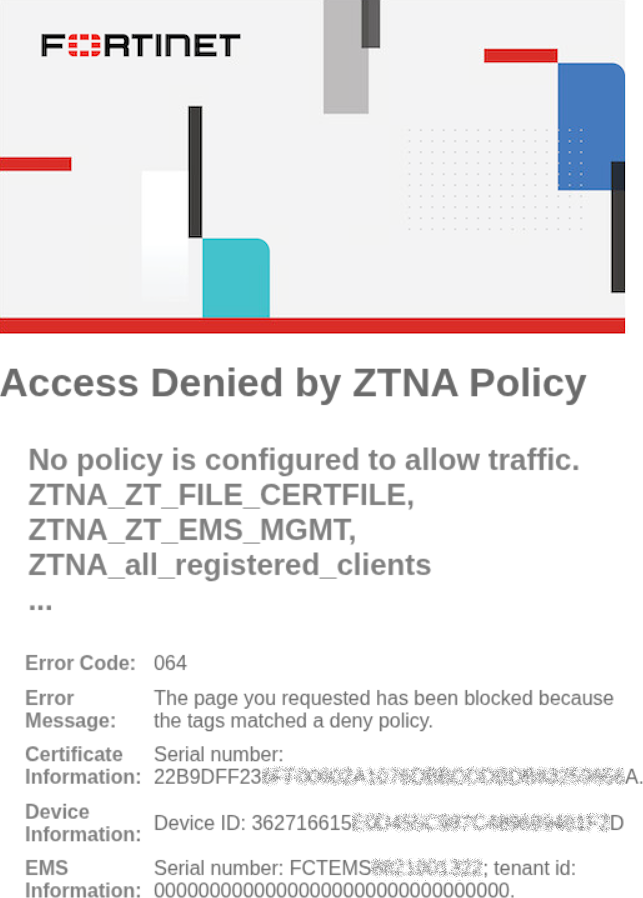
A FortiGate is configured with a deny policy when matching a specific security posture tag called ZTNA_ZT_FILE_CERTFILE. An Access Denied by ZTNA policy replacement message with Error Code 064 is displayed:
Tag(s) matched one or more deny policy
A FortiGate is configured with one or more deny policies, without any allow policies for ZTNA traffic. Client matches one of more of the deny policies based on its tags. An Access Denied by ZTNA policy replacement message with Error Code 064 is displayed:
Client tags do not match any allowed ZTNA policy
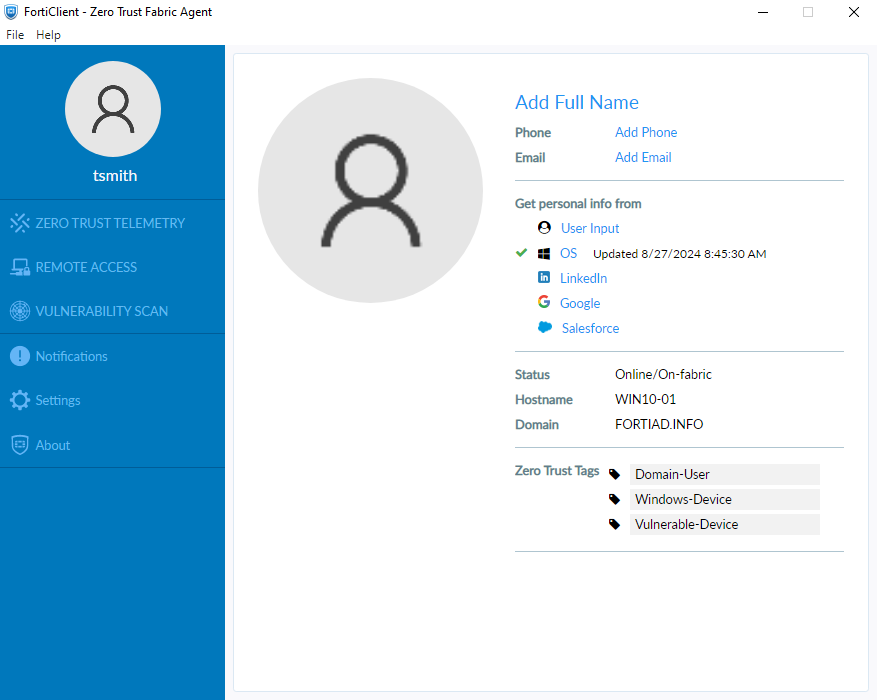
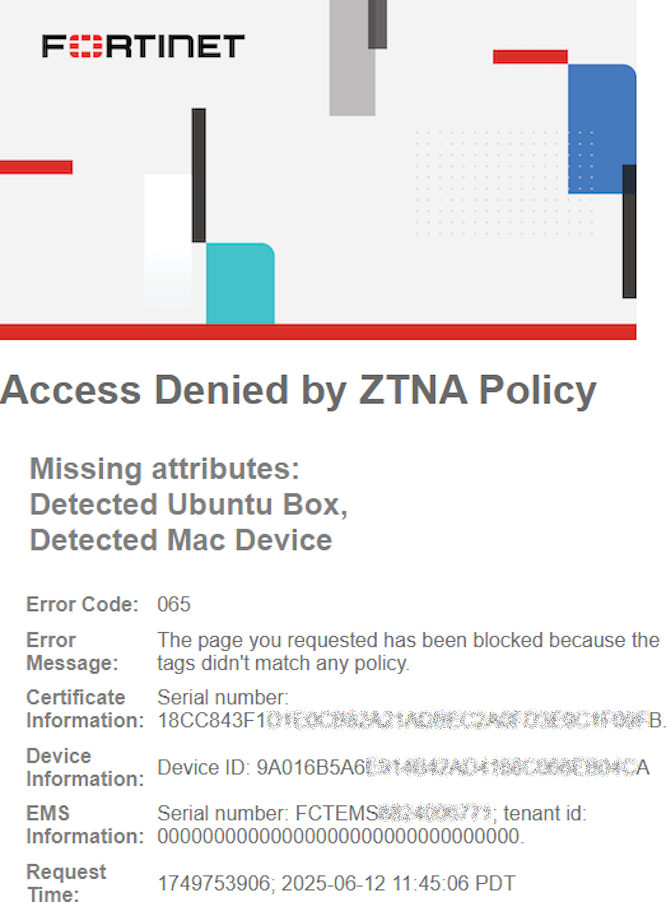
One or more allow ZTNA policies are configured, with tags that are required for each policy. Client tags do not match the tag criteria in the allowed ZTNA policy, resulting in an implicit deny. An Access Denied by ZTNA policy replacement message with Error Code 065 is displayed, along with the missing attributes/tags that would have matched a policy.
ZTNA policy configuration:

FortiClient tags:
Replacement Message:
Log message:
1: date=2025-06-12 time=11:45:06 eventtime=1749753906319108035 tz="-0700" logid="0005000024" type="traffic" subtype="ztna" level="notice" vd="root" srcip=10.0.3.2 srcport=20444 srcintf="port3" srcintfrole="wan" dstcountry="Reserved" srccountry="Reserved" dstip=10.0.3.10 dstport=9043 dstintf="root" dstintfrole="undefined" sessionid=1989 srcuuid="b458a65a-f759-51ea-d7df-ef2e750026d1" dstuuid="617b9fe2-4753-51f0-781e-613b9b51f53e" service="tcp/9043" proxyapptype="ztna-proxy" proto=6 action="deny" policyid=0 policytype="policy" appcat="unscanned" duration=0 vip="ZTNA-webserver" vipincomingip=10.0.3.10 accessproxy="ZTNA-webserver" clientdeviceid="9A016B5A6E914B42AD4168C066EB04CA" clientdevicemanageable="manageable" clientdeviceems="FCTEMS8824006771" clientdevicetags="Vulnerable-Device/Windows-Device/all_registered_clients/Domain-User" clientcert="yes" emsconnection="online" msg="Traffic denied because failed to match a policy or proxy-policy" wanin=0 rcvdbyte=0 wanout=0 lanin=3720 sentbyte=3720 lanout=3452 fctuid="9A016B5A6E914B42AD4168C066EB04CA" crscore=30 craction=131072 crlevel="high"
Client tags match a negated tag in an allowed ZTNA policy
One or more allow ZTNA policies are configured, with negated tag(s) that are required for each policy. For example, the negated Vulnerable-Device, Mac-Device, and Linux-box tags are applied to a ZTNA policy:

The same client from Example 5 with a Vulnerable-Device tag attempts to connect to a ZTNA resource. An Access Denied by ZTNA policy replacement message with Error Code 065 is displayed, along with the tag matching the negate tag on the allowed policy.
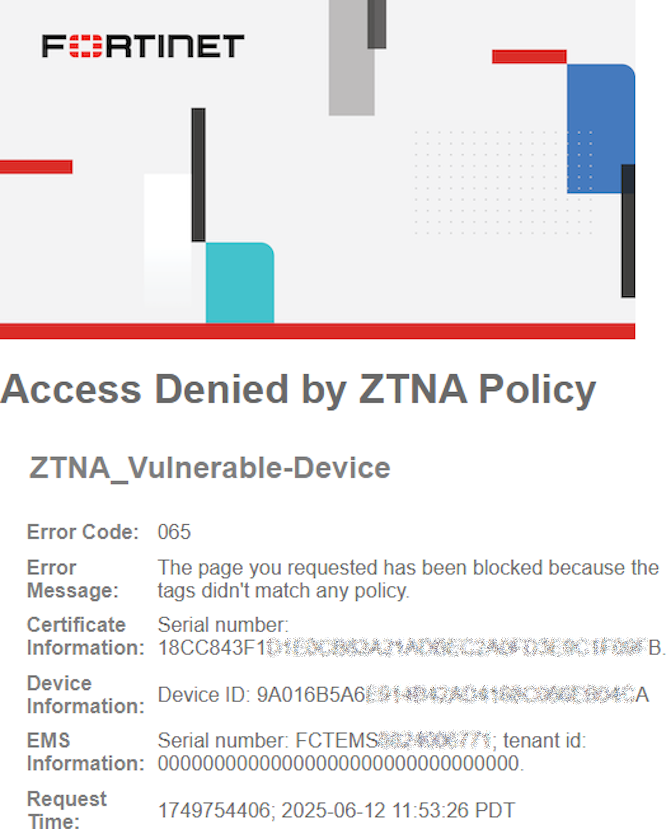
Log message:
1: date=2025-06-12 time=11:53:26 eventtime=1749754406771205939 tz="-0700" logid="0005000024" type="traffic" subtype="ztna" level="notice" vd="root" srcip=10.0.3.2 srcport=20560 srcintf="port3" srcintfrole="wan" dstcountry="Reserved" srccountry="Reserved" dstip=10.0.3.10 dstport=9043 dstintf="root" dstintfrole="undefined" sessionid=2095 srcuuid="b458a65a-f759-51ea-d7df-ef2e750026d1" dstuuid="617b9fe2-4753-51f0-781e-613b9b51f53e" service="tcp/9043" proxyapptype="ztna-proxy" proto=6 action="deny" policyid=0 policytype="policy" appcat="unscanned" duration=0 vip="ZTNA-webserver" vipincomingip=10.0.3.10 accessproxy="ZTNA-webserver" clientdeviceid="9A016B5A6E914B42AD4168C066EB04CA" clientdevicemanageable="manageable" clientdeviceems="FCTEMS8824006771" clientdevicetags="Vulnerable-Device/Windows-Device/all_registered_clients/Domain-User" clientcert="yes" emsconnection="online" msg="Traffic denied because failed to match a policy or proxy-policy" wanin=0 rcvdbyte=0 wanout=0 lanin=3624 sentbyte=3624 lanout=3452 fctuid="9A016B5A6E914B42AD4168C066EB04CA" crscore=30 craction=131072 crlevel="high"