
Fortinet white logo
Fortinet white logo

Administration Guide

Proxy-based inspection for email protocols supported on models with 2 GB RAM NEW

Proxy-based inspection for email protocols supported on models with 2 GB RAM NEW

Previously in FortiOS 7.4.4, proxy-related features were disabled on FortiGate models with 2 GB RAM or less. See Proxy-related features no longer supported on FortiGate 2 GB RAM models for more information.

FortiOS 7.6.5 and later supports proxy-based inspection for email protocols on FortiGate models with 2 GB RAM for the following services:

  • SMTP(s)

  • POP3(s)

  • IMAP(s)

  • NNTP

Firewall policies support proxy-based inspection mode when you select one or more of the supported services in a firewall policy.

When configuring a firewall policy in the GUI, a warning is displayed when the selected services, protocol options, and SSL inspection profile contain non-mail protocols. Therefore, at least one of the services, protocol options, and SSL inspection profile must contain strictly mail protocols.

Even if you select a non-mail protocol as a service and FortiOS allows the configuration, traffic hitting the policy for the non-mail protocol is dropped. Therefore, it is recommended to define only the mail protocols that you want to inspect in the proxy-based inspection policy under the services field.

Furthermore, the following proxy-based UTM profiles are not supported in either proxy-based or flow-based policies:

• casb-profile

• waf-profile

• videofilter-profile

• icap-profile

• ssh-filter-profile

The following profiles are not supported in proxy-based policies, but are supported in flow-based policies:

• dnsfilter-profile

• webfilter-profile

• voip-profile

Other UTM profiles, such as AV, IPS, application control, file filter, DLP, and so on have no restrictions.

Finally, if inspect-all is enabled in an SSL inspection profile, then the profile cannot be used in a proxy-based firewall policy.

These changes impact the FortiGate/FortiWiFi 40F, 60E, 60F, 80E, and 90E series of devices and their variants and FortiGate-Rugged 60F (2 GB versions only).

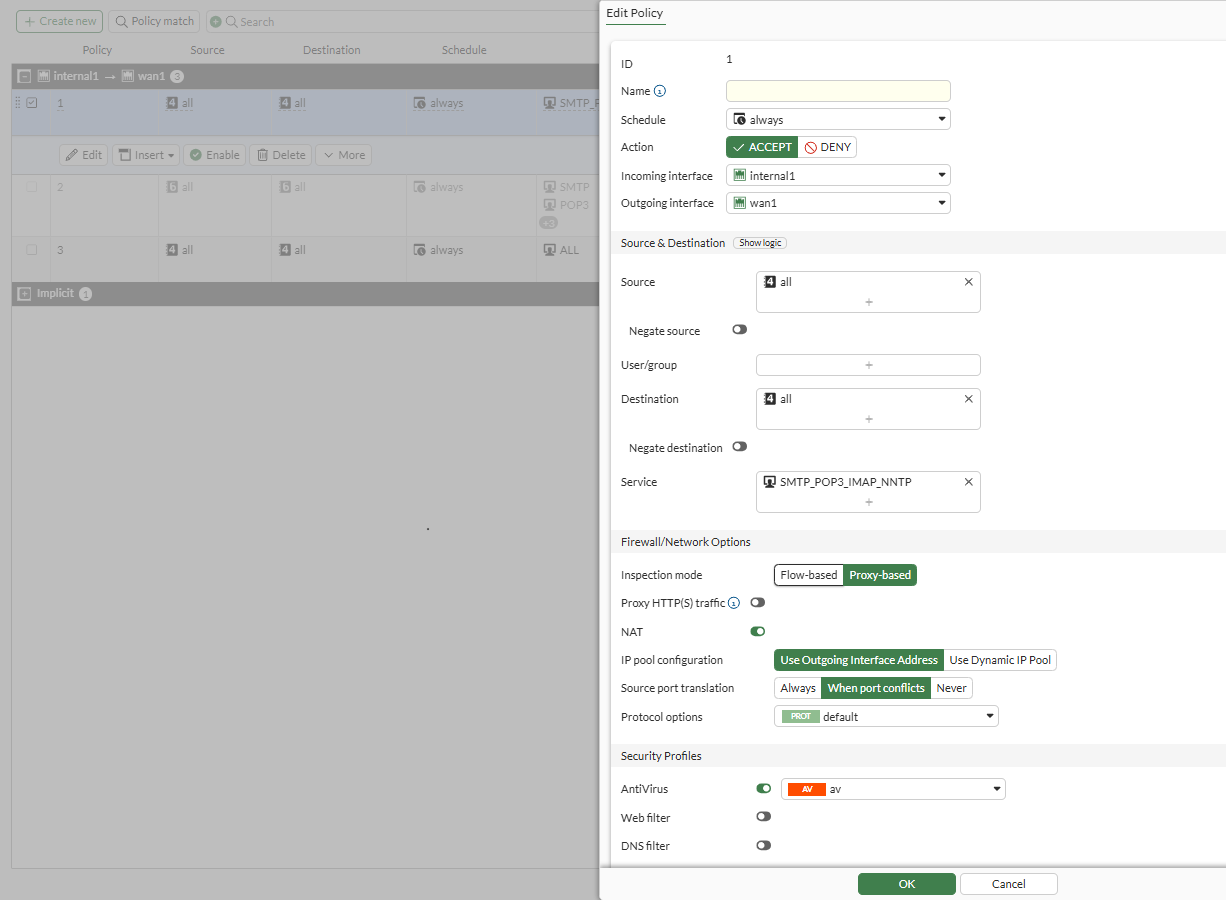
The following screen shot shows a firewall policy correctly configured with email/NNTP services, proxy-based inspection mode, and a proxy UTM profile:

  • Service is set to SMTP_POP3_IMAP_NNTP.

  • Inspection mode is set to Proxy-based.

  • Protocol Options is set to the default profile.

  • Under Security Profiles, AntiVirus is enabled, and the av profile is selected.

  • SSL Inspection is set to the deep-inspection profile.

Conclusion: Because the Service defined contains only mail protocols, this configuration is accepted.
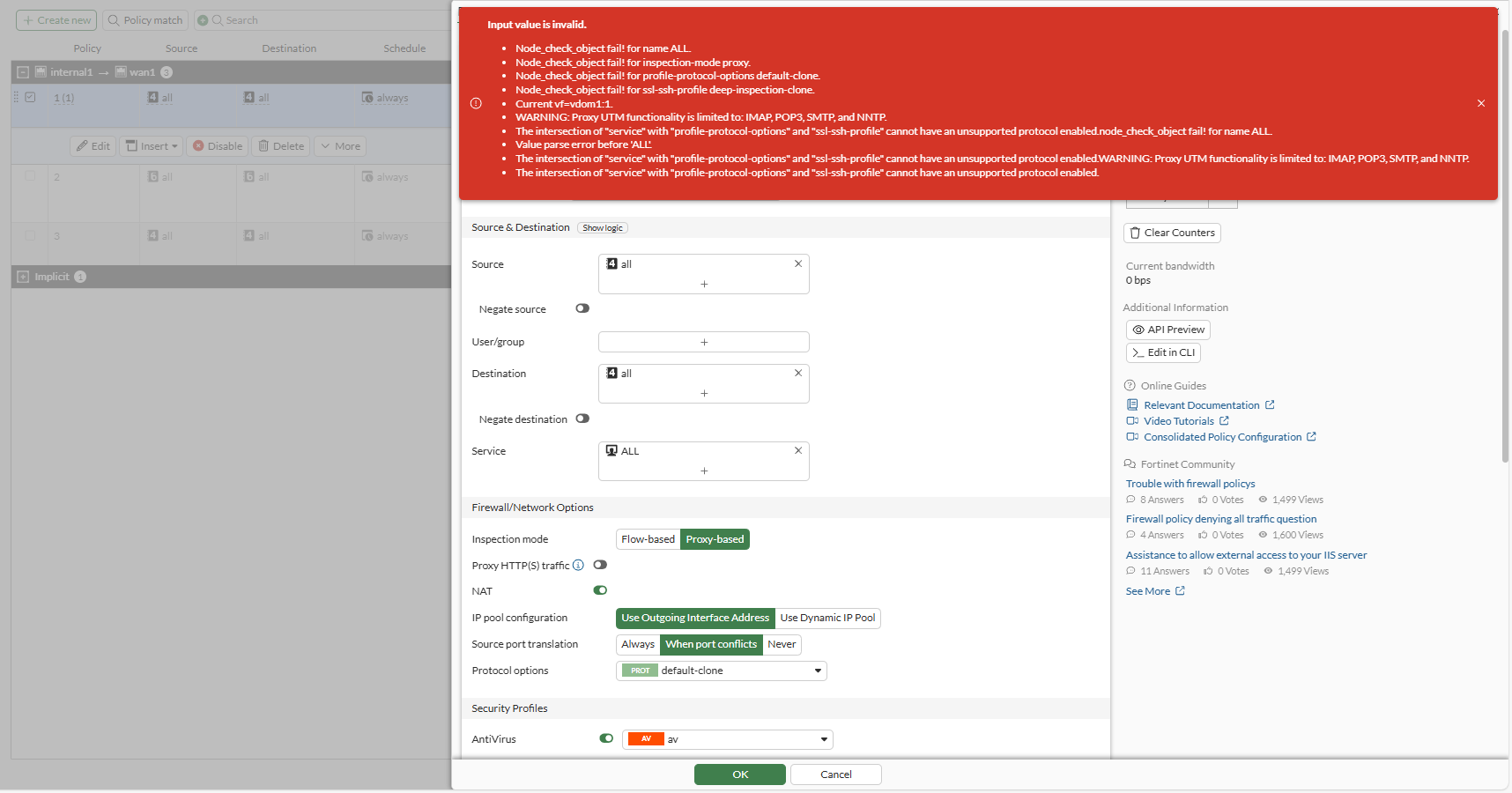
The following GUI example shows the warning message that displays with an unsupported firewall policy configuration:

  • Service is set to ALL.

    The ALL setting includes ports, such as 80 and 443, that are used for protocols other than the supported email protocols of SMTP, POP3, IMAP, and NNTP.

  • Inspection mode is set to Proxy-based.

  • Protocol Options is set to the default-clone profile, which inspects HTTP.

  • Under Security Profiles, AntiVirus is enabled, and the av profile is selected.

  • SSL Inspection is set to the deep-inspection-clone profile, which inspects HTTP.

Conclusion: Between the Service selected, the Protocol Options, and SSL Inspection profile, all three include inspection on non-mail protocols.
Example
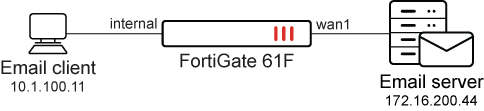
In this example, a firewall policy is configured to scan email traffic sent from an email client through FortiGate to an email server. The firewall policy is configured with a proxy-based inspection mode and mail services and profiles. The FortiGate 61F has less than 2 GB RAM.

To configure a firewall policy:
  1. Configure the service to include mail protocols in the TCP port range:

    config firewall service custom
        edit "SMTP_POP3_IMAP_NNTP"
            set uuid 8fa0520e-afcd-51f0-ecf3-f5bc0e446b3b
            set category "General"
            set tcp-portrange 25 110 143 119 465 995 993
        next
    end
  2. Configure the protocol profile:

    config firewall profile-protocol-options
        edit "default-clone"
            set comment "All default services."
            config http
                set ports 80 8080
                unset options
                unset post-lang
            end
            config ftp
                set ports 21
                set options splice
            end
            config imap
                set ports 143
                set options fragmail
            end
            config pop3
                set ports 110
                set options fragmail
            end
            config smtp
                set ports 25
                set options fragmail splice
            end
            config nntp
                set ports 119
                set options splice
            end
            config dns
                set ports 53
            end
            config cifs
                set ports 445
                unset options
            end
        next
    end
  3. Configure an SSL inspection profile:

    This example uses the default deep-inspection-clone profile.

    config firewall ssl-ssh-profile
        edit "deep-inspection-clone"
            set comment "Read-only deep inspection profile."
            config https
                set ports 443
                set status deep-inspection
            end
            config ftps
                set ports 990
                set status deep-inspection
            end
            config imaps
                set ports 993
                set status deep-inspection
            end
            config pop3s
                set ports 995
                set status deep-inspection
            end
            config smtps
                set ports 465
                set status deep-inspection
            end
            config dot
                set status disable
            end
            set ssl-exemption-log enable
            set ssl-server-cert-log enable
            set ssl-handshake-log enable
        next
    end
  4. Configure an antivirus profile with proxy-only feature and content-disarm:

    config antivirus profile
        edit "av"
            set feature-set proxy
            config http
                set av-scan block
            end
            config ftp
                set av-scan block
            end
            config imap
                set av-scan block
            end
            config pop3
                set av-scan block
            end
            config smtp
                set av-scan block
            end
            config content-disarm
                set analytics-suspicious disable
            end
        next
    end
  5. Configure the firewall policy:

    config firewall policy
        edit 1
            set name "1"
            set uuid a85736ea-79dd-51ef-103d-0791ae4d6152
            set srcintf "internal"
            set dstintf "wan1"
            set action accept
            set srcaddr "all"
            set dstaddr "all"
            set schedule "always"
            set service "SMTP_POP3_IMAP_NNTP"
            set utm-status enable
            set inspection-mode proxy
            set profile-protocol-options "default-clone"
            set ssl-ssh-profile "deep-inspection-clone"
            set av-profile "av"
            set logtraffic all
            set nat enable
        next
    end

When email traffic of SMTP(s), POP3(s), or IMAP(s) contains a virus and is sent through the firewall policy, the antivirus profile blocks the traffic. Following are examples of the generated utm-av logs for SMTP(s), POP3(s), and IMAP(s):

  • SMTP(s):

    3: date=2025-10-23 time=12:21:34 eventtime=1761178894206730660 tz="+1200" logid="0211008194" type="utm" subtype="virus" eventtype="infected" level="warning" vd="vdom1" policyid=1 poluuid="a85736ea-79dd-51ef-103d-0791ae4d6152" policytype="policy" msg="MIME data detected to have a virus and blocked by Antivirus." action="blocked" service="SMTPS" sessionid=849 srcip=10.1.100.11 dstip=172.16.200.44 srcport=52746 dstport=465 srccountry="Reserved" dstcountry="Reserved" srcintf="internal" srcintfrole="lan" dstintf="wan1" dstintfrole="wan" srcuuid="427663be-79dd-51ef-b8ee-20c97371a015" dstuuid="427663be-79dd-51ef-b8ee-20c97371a015" proto=6 direction="outgoing" filename="eicar.com" quarskip="Quarantine-disabled" virus="EICAR_TEST_FILE" viruscat="Virus" dtype="av-engine" itype="infected" ref="https://fortiguard.com/encyclopedia/virus/2172" virusid=2172 profile="av" from="pc1smtp@kunal.com" to="pc4@kunal.com" sender="pc4user2@qa.fortinet.com" recipient="pc4user1@qa.fortinet.com" messageid="<46095C0D.5000203@kunal.com>" subject="attachment with eicar.com" attachment="yes" analyticscksum="275a021bbfb6489e54d471899f7db9d1663fc695ec2fe2a2c4538aabf651fd0f" analyticssubmit="false" crscore=50 craction=2 crlevel="critical"
  • POP3(s):

    2: date=2025-10-23 time=12:21:48 eventtime=1761178908394447280 tz="+1200" logid="0211008194" type="utm" subtype="virus" eventtype="infected" level="warning" vd="vdom1" policyid=1 poluuid="a85736ea-79dd-51ef-103d-0791ae4d6152" policytype="policy" msg="MIME data detected to have a virus and blocked by Antivirus." action="attachment-removed" service="POP3S" sessionid=850 srcip=10.1.100.11 dstip=172.16.200.44 srcport=40020 dstport=995 srccountry="Reserved" dstcountry="Reserved" srcintf="internal" srcintfrole="lan" dstintf="wan1" dstintfrole="wan" srcuuid="427663be-79dd-51ef-b8ee-20c97371a015" dstuuid="427663be-79dd-51ef-b8ee-20c97371a015" proto=6 direction="incoming" filename="eicar.com" quarskip="Quarantine-disabled" virus="EICAR_TEST_FILE" viruscat="Virus" dtype="av-engine" itype="infected" ref="https://fortiguard.com/encyclopedia/virus/2172" virusid=2172 profile="av" from="test1@qa.fortinet.com" to="test1@qa.fortinet.com" recipient="pc4user2" messageid="<1426193044.8910.11.camel@nan-desktop>" subject="eicar file" attachment="yes" analyticscksum="275a021bbfb6489e54d471899f7db9d1663fc695ec2fe2a2c4538aabf651fd0f" analyticssubmit="false" crscore=50 craction=2 crlevel="critical"
    
  • IMAP(s):

    1: date=2025-10-23 time=12:22:04 eventtime=1761178923814916760 tz="+1200" logid="0211008194" type="utm" subtype="virus" eventtype="infected" level="warning" vd="vdom1" policyid=1 poluuid="a85736ea-79dd-51ef-103d-0791ae4d6152" policytype="policy" msg="MIME data detected to have a virus and blocked by Antivirus." action="attachment-removed" service="IMAPS" sessionid=854 srcip=10.1.100.11 dstip=172.16.200.44 srcport=45458 dstport=993 srccountry="Reserved" dstcountry="Reserved" srcintf="internal" srcintfrole="lan" dstintf="wan1" dstintfrole="wan" srcuuid="427663be-79dd-51ef-b8ee-20c97371a015" dstuuid="427663be-79dd-51ef-b8ee-20c97371a015" proto=6 direction="incoming" filename="eicar.com" quarskip="Quarantine-disabled" virus="EICAR_TEST_FILE" viruscat="Virus" dtype="av-engine" itype="infected" ref="https://fortiguard.com/encyclopedia/virus/2172" virusid=2172 profile="av" from="test1@qa.fortinet.com" to="test1@qa.fortinet.com" recipient="pc4user2" messageid="<1426193044.8910.11.camel@nan-desktop>" subject="eicar file" attachment="yes" analyticscksum="275a021bbfb6489e54d471899f7db9d1663fc695ec2fe2a2c4538aabf651fd0f" analyticssubmit="false" crscore=50 craction=2 crlevel="critical"
    

Proxy-based inspection for email protocols supported on models with 2 GB RAM NEW

Proxy-based inspection for email protocols supported on models with 2 GB RAM NEW

Previously in FortiOS 7.4.4, proxy-related features were disabled on FortiGate models with 2 GB RAM or less. See Proxy-related features no longer supported on FortiGate 2 GB RAM models for more information.

FortiOS 7.6.5 and later supports proxy-based inspection for email protocols on FortiGate models with 2 GB RAM for the following services:

  • SMTP(s)

  • POP3(s)

  • IMAP(s)

  • NNTP

Firewall policies support proxy-based inspection mode when you select one or more of the supported services in a firewall policy.

When configuring a firewall policy in the GUI, a warning is displayed when the selected services, protocol options, and SSL inspection profile contain non-mail protocols. Therefore, at least one of the services, protocol options, and SSL inspection profile must contain strictly mail protocols.

Even if you select a non-mail protocol as a service and FortiOS allows the configuration, traffic hitting the policy for the non-mail protocol is dropped. Therefore, it is recommended to define only the mail protocols that you want to inspect in the proxy-based inspection policy under the services field.

Furthermore, the following proxy-based UTM profiles are not supported in either proxy-based or flow-based policies:

• casb-profile

• waf-profile

• videofilter-profile

• icap-profile

• ssh-filter-profile

The following profiles are not supported in proxy-based policies, but are supported in flow-based policies:

• dnsfilter-profile

• webfilter-profile

• voip-profile

Other UTM profiles, such as AV, IPS, application control, file filter, DLP, and so on have no restrictions.

Finally, if inspect-all is enabled in an SSL inspection profile, then the profile cannot be used in a proxy-based firewall policy.

These changes impact the FortiGate/FortiWiFi 40F, 60E, 60F, 80E, and 90E series of devices and their variants and FortiGate-Rugged 60F (2 GB versions only).

The following screen shot shows a firewall policy correctly configured with email/NNTP services, proxy-based inspection mode, and a proxy UTM profile:

  • Service is set to SMTP_POP3_IMAP_NNTP.

  • Inspection mode is set to Proxy-based.

  • Protocol Options is set to the default profile.

  • Under Security Profiles, AntiVirus is enabled, and the av profile is selected.

  • SSL Inspection is set to the deep-inspection profile.

Conclusion: Because the Service defined contains only mail protocols, this configuration is accepted.

The following GUI example shows the warning message that displays with an unsupported firewall policy configuration:

  • Service is set to ALL.

    The ALL setting includes ports, such as 80 and 443, that are used for protocols other than the supported email protocols of SMTP, POP3, IMAP, and NNTP.

  • Inspection mode is set to Proxy-based.

  • Protocol Options is set to the default-clone profile, which inspects HTTP.

  • Under Security Profiles, AntiVirus is enabled, and the av profile is selected.

  • SSL Inspection is set to the deep-inspection-clone profile, which inspects HTTP.

Conclusion: Between the Service selected, the Protocol Options, and SSL Inspection profile, all three include inspection on non-mail protocols.

Example

In this example, a firewall policy is configured to scan email traffic sent from an email client through FortiGate to an email server. The firewall policy is configured with a proxy-based inspection mode and mail services and profiles. The FortiGate 61F has less than 2 GB RAM.

To configure a firewall policy:
  1. Configure the service to include mail protocols in the TCP port range:

    config firewall service custom
        edit "SMTP_POP3_IMAP_NNTP"
            set uuid 8fa0520e-afcd-51f0-ecf3-f5bc0e446b3b
            set category "General"
            set tcp-portrange 25 110 143 119 465 995 993
        next
    end
  2. Configure the protocol profile:

    config firewall profile-protocol-options
        edit "default-clone"
            set comment "All default services."
            config http
                set ports 80 8080
                unset options
                unset post-lang
            end
            config ftp
                set ports 21
                set options splice
            end
            config imap
                set ports 143
                set options fragmail
            end
            config pop3
                set ports 110
                set options fragmail
            end
            config smtp
                set ports 25
                set options fragmail splice
            end
            config nntp
                set ports 119
                set options splice
            end
            config dns
                set ports 53
            end
            config cifs
                set ports 445
                unset options
            end
        next
    end
  3. Configure an SSL inspection profile:

    This example uses the default deep-inspection-clone profile.

    config firewall ssl-ssh-profile
        edit "deep-inspection-clone"
            set comment "Read-only deep inspection profile."
            config https
                set ports 443
                set status deep-inspection
            end
            config ftps
                set ports 990
                set status deep-inspection
            end
            config imaps
                set ports 993
                set status deep-inspection
            end
            config pop3s
                set ports 995
                set status deep-inspection
            end
            config smtps
                set ports 465
                set status deep-inspection
            end
            config dot
                set status disable
            end
            set ssl-exemption-log enable
            set ssl-server-cert-log enable
            set ssl-handshake-log enable
        next
    end
  4. Configure an antivirus profile with proxy-only feature and content-disarm:

    config antivirus profile
        edit "av"
            set feature-set proxy
            config http
                set av-scan block
            end
            config ftp
                set av-scan block
            end
            config imap
                set av-scan block
            end
            config pop3
                set av-scan block
            end
            config smtp
                set av-scan block
            end
            config content-disarm
                set analytics-suspicious disable
            end
        next
    end
  5. Configure the firewall policy:

    config firewall policy
        edit 1
            set name "1"
            set uuid a85736ea-79dd-51ef-103d-0791ae4d6152
            set srcintf "internal"
            set dstintf "wan1"
            set action accept
            set srcaddr "all"
            set dstaddr "all"
            set schedule "always"
            set service "SMTP_POP3_IMAP_NNTP"
            set utm-status enable
            set inspection-mode proxy
            set profile-protocol-options "default-clone"
            set ssl-ssh-profile "deep-inspection-clone"
            set av-profile "av"
            set logtraffic all
            set nat enable
        next
    end

When email traffic of SMTP(s), POP3(s), or IMAP(s) contains a virus and is sent through the firewall policy, the antivirus profile blocks the traffic. Following are examples of the generated utm-av logs for SMTP(s), POP3(s), and IMAP(s):

  • SMTP(s):

    3: date=2025-10-23 time=12:21:34 eventtime=1761178894206730660 tz="+1200" logid="0211008194" type="utm" subtype="virus" eventtype="infected" level="warning" vd="vdom1" policyid=1 poluuid="a85736ea-79dd-51ef-103d-0791ae4d6152" policytype="policy" msg="MIME data detected to have a virus and blocked by Antivirus." action="blocked" service="SMTPS" sessionid=849 srcip=10.1.100.11 dstip=172.16.200.44 srcport=52746 dstport=465 srccountry="Reserved" dstcountry="Reserved" srcintf="internal" srcintfrole="lan" dstintf="wan1" dstintfrole="wan" srcuuid="427663be-79dd-51ef-b8ee-20c97371a015" dstuuid="427663be-79dd-51ef-b8ee-20c97371a015" proto=6 direction="outgoing" filename="eicar.com" quarskip="Quarantine-disabled" virus="EICAR_TEST_FILE" viruscat="Virus" dtype="av-engine" itype="infected" ref="https://fortiguard.com/encyclopedia/virus/2172" virusid=2172 profile="av" from="pc1smtp@kunal.com" to="pc4@kunal.com" sender="pc4user2@qa.fortinet.com" recipient="pc4user1@qa.fortinet.com" messageid="<46095C0D.5000203@kunal.com>" subject="attachment with eicar.com" attachment="yes" analyticscksum="275a021bbfb6489e54d471899f7db9d1663fc695ec2fe2a2c4538aabf651fd0f" analyticssubmit="false" crscore=50 craction=2 crlevel="critical"
  • POP3(s):

    2: date=2025-10-23 time=12:21:48 eventtime=1761178908394447280 tz="+1200" logid="0211008194" type="utm" subtype="virus" eventtype="infected" level="warning" vd="vdom1" policyid=1 poluuid="a85736ea-79dd-51ef-103d-0791ae4d6152" policytype="policy" msg="MIME data detected to have a virus and blocked by Antivirus." action="attachment-removed" service="POP3S" sessionid=850 srcip=10.1.100.11 dstip=172.16.200.44 srcport=40020 dstport=995 srccountry="Reserved" dstcountry="Reserved" srcintf="internal" srcintfrole="lan" dstintf="wan1" dstintfrole="wan" srcuuid="427663be-79dd-51ef-b8ee-20c97371a015" dstuuid="427663be-79dd-51ef-b8ee-20c97371a015" proto=6 direction="incoming" filename="eicar.com" quarskip="Quarantine-disabled" virus="EICAR_TEST_FILE" viruscat="Virus" dtype="av-engine" itype="infected" ref="https://fortiguard.com/encyclopedia/virus/2172" virusid=2172 profile="av" from="test1@qa.fortinet.com" to="test1@qa.fortinet.com" recipient="pc4user2" messageid="<1426193044.8910.11.camel@nan-desktop>" subject="eicar file" attachment="yes" analyticscksum="275a021bbfb6489e54d471899f7db9d1663fc695ec2fe2a2c4538aabf651fd0f" analyticssubmit="false" crscore=50 craction=2 crlevel="critical"
    
  • IMAP(s):

    1: date=2025-10-23 time=12:22:04 eventtime=1761178923814916760 tz="+1200" logid="0211008194" type="utm" subtype="virus" eventtype="infected" level="warning" vd="vdom1" policyid=1 poluuid="a85736ea-79dd-51ef-103d-0791ae4d6152" policytype="policy" msg="MIME data detected to have a virus and blocked by Antivirus." action="attachment-removed" service="IMAPS" sessionid=854 srcip=10.1.100.11 dstip=172.16.200.44 srcport=45458 dstport=993 srccountry="Reserved" dstcountry="Reserved" srcintf="internal" srcintfrole="lan" dstintf="wan1" dstintfrole="wan" srcuuid="427663be-79dd-51ef-b8ee-20c97371a015" dstuuid="427663be-79dd-51ef-b8ee-20c97371a015" proto=6 direction="incoming" filename="eicar.com" quarskip="Quarantine-disabled" virus="EICAR_TEST_FILE" viruscat="Virus" dtype="av-engine" itype="infected" ref="https://fortiguard.com/encyclopedia/virus/2172" virusid=2172 profile="av" from="test1@qa.fortinet.com" to="test1@qa.fortinet.com" recipient="pc4user2" messageid="<1426193044.8910.11.camel@nan-desktop>" subject="eicar file" attachment="yes" analyticscksum="275a021bbfb6489e54d471899f7db9d1663fc695ec2fe2a2c4538aabf651fd0f" analyticssubmit="false" crscore=50 craction=2 crlevel="critical"