

Geography based addresses
Geography addresses are those determined by country of origin. The IP for the country or region is automatically determined from the Geography IP database. The geoip-full-db option controls whether the full geographic database is loaded into the kernel.
To view IP Geography database:
# diagnose autoupdate versions | grep -A 6 "IP Geography DB"
IP Geography DB
---------
Version: 3.00152
Contract Expiry Date: n/a
Last Updated using manual update on Thu Nov 17 17:52:00 2022
Last Update Attempt: Wed Nov 23 10:56:46 2022
Result: No Updates

|
Without a valid license, local IP geography database will continue to work. However the FortiGate will stop receiving geography IP updates from the FortiGuard servers and the geography IP database will no longer be updated. IP geolocation service is part of base services included with all FortiCare support contracts. See FortiGuard Security Services for more information. |
To control if the full database is loaded:
config sys global
    set geoip-full-db {enable | disable}
end
|
Option |
Description |
|---|---|
|
enable |
The full Geography IP database is downloaded, and geographic information is available in traffic logs. The FortiView Countries/Regions widget and monitor are available. |
|
disable |
The full Geography IP database is not downloaded, conserving memory. The FortiView Countries/Regions widget and monitor cannot be used. |
By default, after upgrading to FortiOS 7.6.5:
-
On devices with 4GB RAM or more,
geoip-full-dbis enabled. -
On devices with 2GB RAM,
geoip-full-dbis disabled. If required, it must be enabled manually after upgrading, but note that doing so will increase memory usage and may affect device performance.
To create a geography address:
-
Go to Policy & Objects > Addresses and select Address.
-
Select Create new.
-
Enter a Name for the address object.
-
In the Type field, select Geography from the dropdown menu.
-
In the Country/Region field, select a single country from the dropdown menu.
-
In the Interface field, leave as the default any or select a specific interface from the dropdown menu.
-
Enter any additional information in the Comments field.
-
Click OK.
Overrides
It is possible to assign a specific IP address range to a customized country ID. Generally, geographic addressing is done at the VDOM level; it could be considered global if you are using the root VDOM, but the geoip-override setting is a global setting.
To configure a geography IP override:
-
Assign a specific IP address range to a customized country ID:
config system geoip-override edit "MyCustomCountry" config ip-range edit 1 set start-ip 1.1.1.1 set end-ip 1.1.1.2 next end next end -
Use get sys geoip-country XX to determine the name corresponding to the custom 2-digit country code A0:
# get sys geoip-country A0
id                  : A0
name                : MyCustomCountry
-
Show the full configuration of the geography IP override just created to show that it corresponds to country code A0:
# show full sys geoip-override
config system geoip-override
    edit "MyCustomCountry"
        set description ''
        set country-id "A0"
        config ip-range
            edit 1
                set start-ip 1.1.1.1
                set end-ip 1.1.1.2
            next
        end
    next
end
To configure a geography address:
-
Enable debug to display the CLI commands running on the backend in response to certain GUI configuration:
# diagnose debug enable
# diagnose debug cli 7
Debug messages will be on for 30 minutes.
-
Go to Policy & Objects > Addresses and create a geography address using the previously created custom country code:
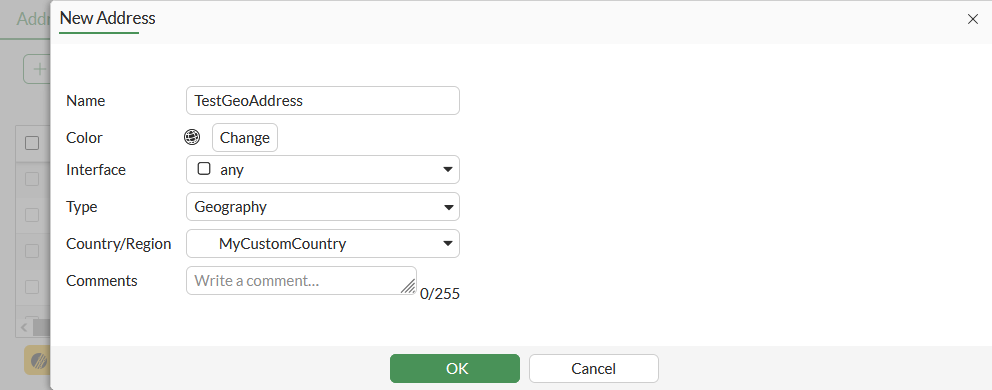
-
Observe the corresponding CLI commands run on the backend:
FGT # 0: config firewall address
0: edit "TestGeoAddress"
0: set type geography
0: set country "A0"
0: end
Diagnose commands
There are a few diagnose commands used with geographic addresses:
diagnose firewall ipgeo [country-list | ip-list | ip2country | override | copyright-notice]
|
Diagnose command |
Description |
|---|---|
|
country-list |
List of all countries. |
|
ip-list |
List of the IP addresses associated with the country. |
|
ip2country |
Used to determine the physical and registered locations of the IP address as well and if the type is anycast. |
|
override |
List of user defined geography data; items configured with the |
|
copyright-notice |
Shows the copyright notice. |
diagnose geoip [geoip-query | ip2country | iprange]
|
Diagnose command |
Description |
|---|---|
|
geoip-query |
Used to determine the complete geolocation of a specific IP address from the FortiGuard IP Geography DB. |
|
ip2country |
Used to determine which country a specific IP address is assigned to. |
|
Iprange |
List the IP addresses or IP ranges associated with the country. |
For more details and examples using these diagnose commands, see the Fortinet Community article Technical Tip: Commands to verify GeoIP information and troubleshoot GeoIP database.