
Fortinet white logo
Fortinet white logo

New Features

FortiExtender interface status improvements 6.4.2

FortiExtender interface status improvements 6.4.2

When FortiManager manages a FortiGate with FortiExtender, the following FortiExtender interfaces statuses are used to help FortiManager accurately report status:

  • Admin status

    The admin controls the FortiExtender interface status by changing the configuration using the GUI or CLI. The status is stored in CMDB, and the status change triggers a checksum change. FortiManager detects the change when managing a FortiGate with FortiExtender and updates the interface status accordingly.

  • Link status

    The FortiExtender interface link status is dynamically detected. The status is not stored in CMDB and does not trigger a checksum change. As a result, FortiManager does not detect this status change.

Example

In this example, FortiManager manages a FortiGate with FortiExtender. FortiManager reports the status of the FortiExtender interface based on the configuration set by the administrator.

config system interface
    edit fext-wan 
        set status {up | down}
    next
end 
To view the FortiExtender interface status in the GUI:
  1. On FortiGate, view the FortiExtender interface status.

    The LTE type of interface link is down. This status is not a configuration change and is not stored in CMDB.

    FX212E5920000050 (lte1) # show
    edit lte1
        set type lte
        set status down 
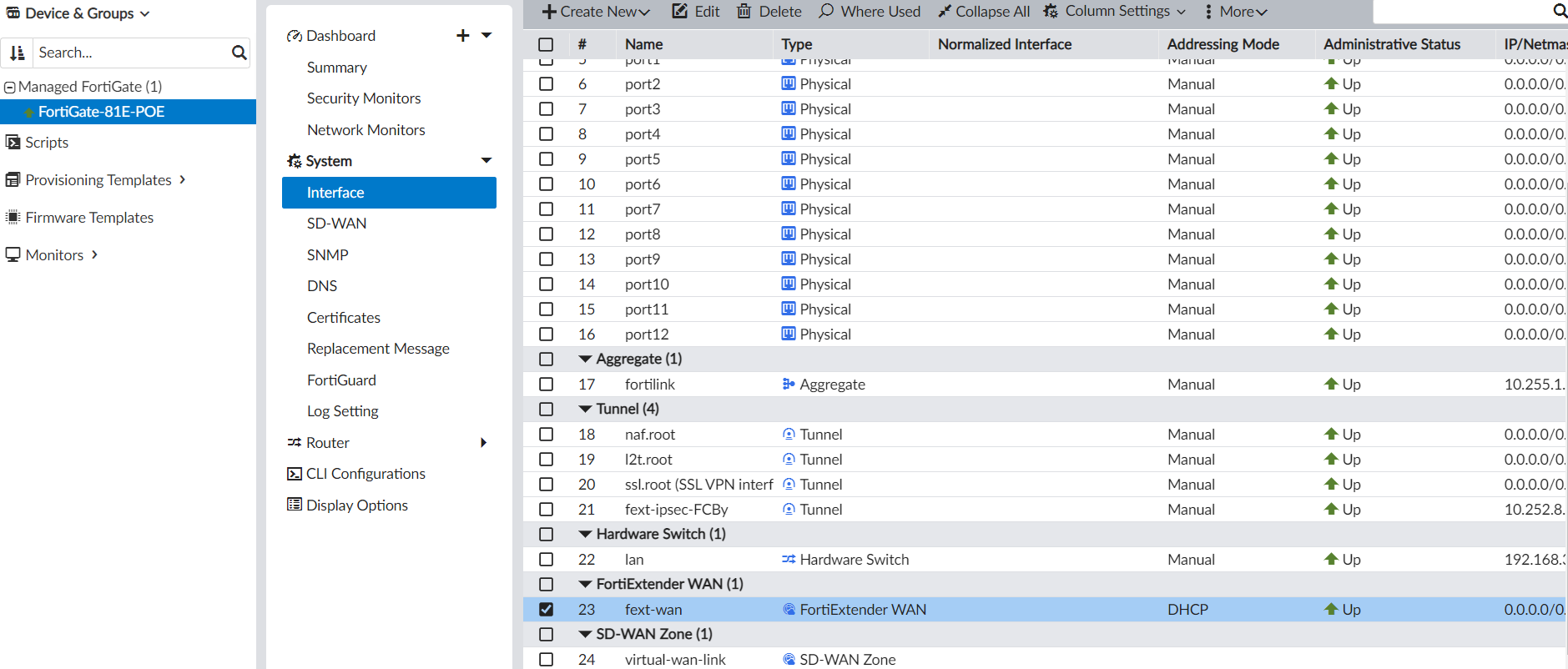
  2. On FortiManager, view interfaces for the FortiGate, and expand the FortiExtender WAN section to view the FortiExtender interface.

    Because the configuration remains unchanged, no checksum change is triggered for FortiManager, and the interface status is Up.
  3. On FortiGate, set the FortiExtender interface status to down.

    This configuration change is stored in CMDB and triggers a checksum change.

    config system interface
        edit fext-wan 
            set status down
        next
    end 
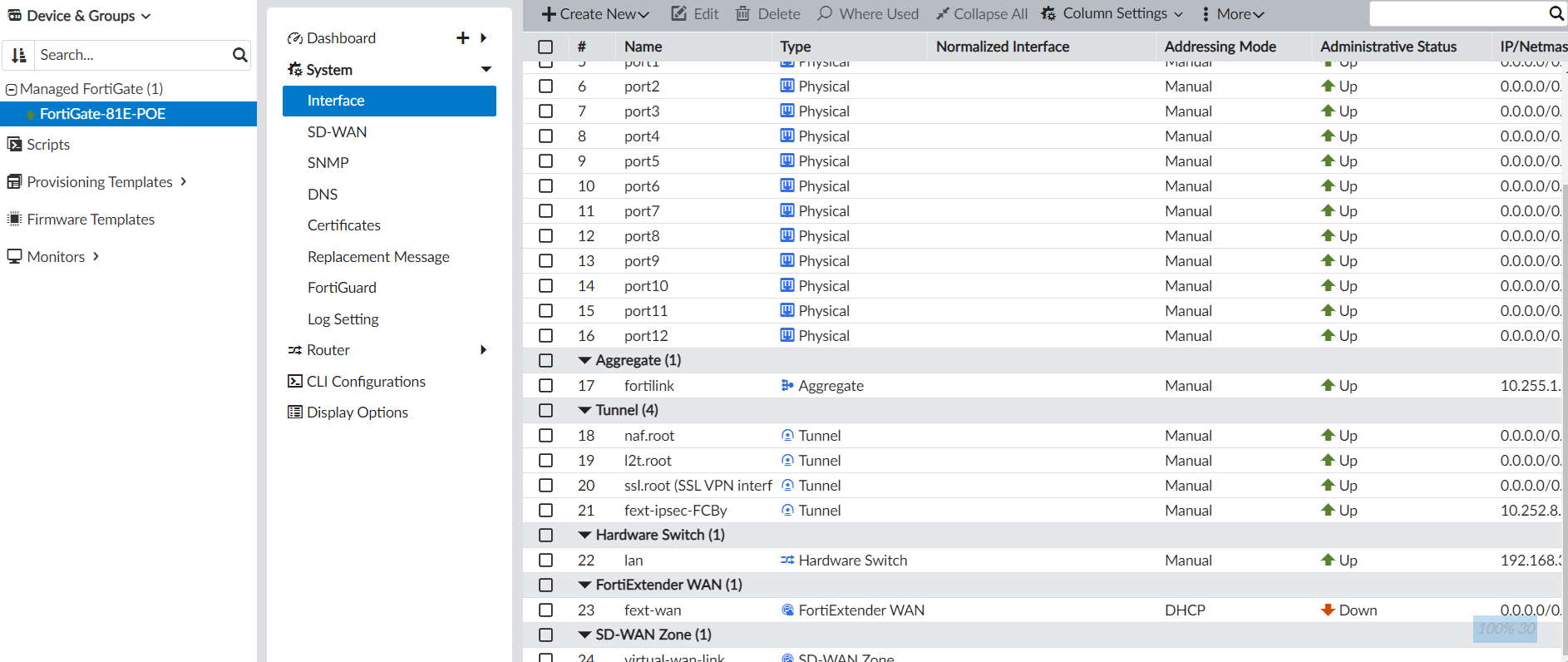
  4. Go to FortiManager, and view interfaces for the FortiGate and FortiExtender.

    FortiManager detects the checksum change and changes the interface status to Down for the FortiExtender interface.
FortiExtender interface status improvements 6.4.2

FortiExtender interface status improvements 6.4.2

When FortiManager manages a FortiGate with FortiExtender, the following FortiExtender interfaces statuses are used to help FortiManager accurately report status:

  • Admin status

    The admin controls the FortiExtender interface status by changing the configuration using the GUI or CLI. The status is stored in CMDB, and the status change triggers a checksum change. FortiManager detects the change when managing a FortiGate with FortiExtender and updates the interface status accordingly.

  • Link status

    The FortiExtender interface link status is dynamically detected. The status is not stored in CMDB and does not trigger a checksum change. As a result, FortiManager does not detect this status change.

Example

In this example, FortiManager manages a FortiGate with FortiExtender. FortiManager reports the status of the FortiExtender interface based on the configuration set by the administrator.

config system interface
    edit fext-wan 
        set status {up | down}
    next
end 
To view the FortiExtender interface status in the GUI:
  1. On FortiGate, view the FortiExtender interface status.

    The LTE type of interface link is down. This status is not a configuration change and is not stored in CMDB.

    FX212E5920000050 (lte1) # show
    edit lte1
        set type lte
        set status down 
  2. On FortiManager, view interfaces for the FortiGate, and expand the FortiExtender WAN section to view the FortiExtender interface.

    Because the configuration remains unchanged, no checksum change is triggered for FortiManager, and the interface status is Up.

  3. On FortiGate, set the FortiExtender interface status to down.

    This configuration change is stored in CMDB and triggers a checksum change.

    config system interface
        edit fext-wan 
            set status down
        next
    end 
  4. Go to FortiManager, and view interfaces for the FortiGate and FortiExtender.

    FortiManager detects the checksum change and changes the interface status to Down for the FortiExtender interface.