
Fortinet white logo
Fortinet white logo

Administration Guide

SNMP traps and automation-stitch notifications for DIO module

SNMP traps and automation-stitch notifications for DIO module

FortiGate Rugged 70F and FortiGate Rugged 70F-3G4G include a general purpose input output (GPIO) module, also known as a digital I/O (DIO) module. The module supports SNMP traps and automation-stitch notifications when DIO module alarm functionality is activated. The DIO module triggers an alarm when it detects a change in any digital input, and the digital output is activated. Notification support depends on previously configured config system digital-io and execute digital-io set-output settings prior to event notification. See FGR-70F/70F-3G4G GPIO/DIO module for more information.

CLI for configuring SNMP traps and automation-stitch notifications is available only on FortiGate Rugged 70F and FortiGate Rugged 70F-3G4G devices.

The config system automation-condition command includes the following relevant options:

config system automation-condition
    edit <name>
        set condition-type input
        set input-state {open|close}        
    next
end

Command

Description

condition-type input

Configure the type of condition to input for the DIO module on the FortiGate 70F series.

input-state {open|close}

Configure the input state:

  • open: Input switch is open.

  • close: Input switch is closed.

The config system snmp community command includes the following relevant option:

config system snmp community
    edit <id>
        set events dio
    next
end

Command

Description

events dio

Configure the SNMP trap event for the DIO module of the FortiGate Rugged 70F series. When enabled, system events are also logged.

For more information about the DIO module, see the FortiGate Rugged 70F Series QuickStart Guide and the Technical Tip: Overview of the Digital Input/Output (DIO) Module in FortiGate Rugged 70F Series community article.

Example

In this example, a FortiGate Rugged 70F is configured to monitor the open/close status of a cabinet door, and the output is connected to a buzzer. An automation stitch and SNMP trap are also configured.

When the status of the cabinet door changes from open to closed or closed to open, FortiGate triggers the buzzer, automation stitch, and SNMP trap. A system event is also logged when SNMP traps are sent.
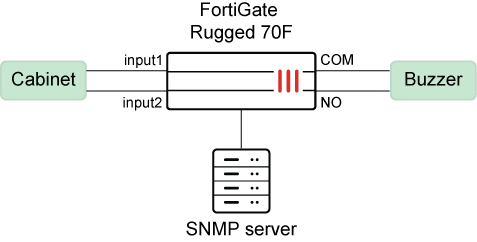
Before you configure automation stitches and SNMP traps for DIO module alarms, you must configure the alarms using the config system digital-io and execute digital-io set-output settings. See FGR-70F/70F-3G4G GPIO/DIO module for more information.

To configure an automation stitch for DIO module alarms:
  1. Configure an automation-stitch condition for when the DIO module detects an input state of open:

    In this example, the condition type is set to input, and the input state is set to open.

    config system automation-condition
        edit "Cabinet-Open"
            set description "Cabinet open"
            set condition-type input
            set input-state open
        next
    end
  2. Configure an automation-stitch trigger:

    config system automation-trigger
        edit "DIO-trigger"
            set description "DIO-trigger"
        next
    end
  3. Configure a stitch to use the condition to trigger an action, such as an email notification:

    In this example, the automation stitch uses the previously configured trigger (DIO-trigger) and condition (Cabinet-Open) to trigger an email notification.

    config system automation-stitch
        edit "dio"
            set description "DIO-stitch"
            set trigger "DIO-trigger"
            set condition "Cabinet-Open"
            config actions
                edit 1
                    set action "Email Notification"
                    set required enable
                next
            end
        next
    end
To configure an SNMP trap for DIO module alarms:
  1. Configure a DIO module event in an SNMP community:

    With set events dio configured, SNMP traps are triggered for DIO module alarms.

    config system snmp community
        edit 1
            set name "DIO_TEST"
            config hosts
                edit 1
                    set ip 172.16.200.55 255.255.255.255
                next
            end
            set events dio
        next
    end
Results:

When the cabinet door being monitored by the DIO module opens unexpectedly, it triggers an SNMP event:
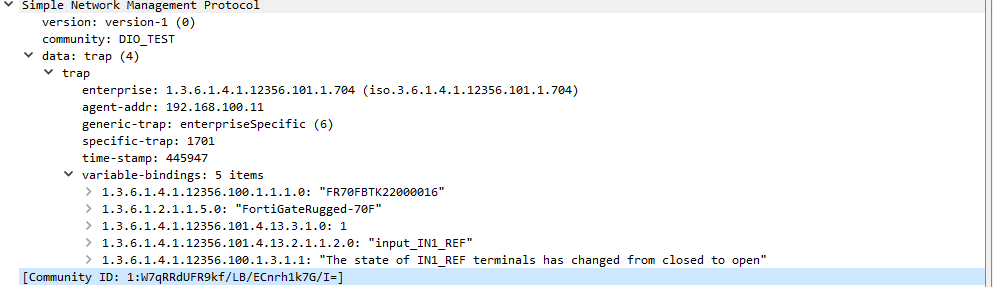
It also triggers a system log:

9: date=2024-11-18 time=17:26:13 eventtime=1731979573581176380 tz="-0800" logid="0100022907" type="event" subtype="system" level="notice" vd="root" logdesc="Digital-IO input state change" connector="input_IN1_REF" mode="default" state="open" msg="The state of IN1_REF terminals has changed from closed to open"

When the cabinet door is opened, it also triggers an email notification as configured by the automation stitch.

SNMP traps and automation-stitch notifications for DIO module

SNMP traps and automation-stitch notifications for DIO module

FortiGate Rugged 70F and FortiGate Rugged 70F-3G4G include a general purpose input output (GPIO) module, also known as a digital I/O (DIO) module. The module supports SNMP traps and automation-stitch notifications when DIO module alarm functionality is activated. The DIO module triggers an alarm when it detects a change in any digital input, and the digital output is activated. Notification support depends on previously configured config system digital-io and execute digital-io set-output settings prior to event notification. See FGR-70F/70F-3G4G GPIO/DIO module for more information.

CLI for configuring SNMP traps and automation-stitch notifications is available only on FortiGate Rugged 70F and FortiGate Rugged 70F-3G4G devices.

The config system automation-condition command includes the following relevant options:

config system automation-condition
    edit <name>
        set condition-type input
        set input-state {open|close}        
    next
end

Command

Description

condition-type input

Configure the type of condition to input for the DIO module on the FortiGate 70F series.

input-state {open|close}

Configure the input state:

  • open: Input switch is open.

  • close: Input switch is closed.

The config system snmp community command includes the following relevant option:

config system snmp community
    edit <id>
        set events dio
    next
end

Command

Description

events dio

Configure the SNMP trap event for the DIO module of the FortiGate Rugged 70F series. When enabled, system events are also logged.

For more information about the DIO module, see the FortiGate Rugged 70F Series QuickStart Guide and the Technical Tip: Overview of the Digital Input/Output (DIO) Module in FortiGate Rugged 70F Series community article.

Example

In this example, a FortiGate Rugged 70F is configured to monitor the open/close status of a cabinet door, and the output is connected to a buzzer. An automation stitch and SNMP trap are also configured.

When the status of the cabinet door changes from open to closed or closed to open, FortiGate triggers the buzzer, automation stitch, and SNMP trap. A system event is also logged when SNMP traps are sent.

Before you configure automation stitches and SNMP traps for DIO module alarms, you must configure the alarms using the config system digital-io and execute digital-io set-output settings. See FGR-70F/70F-3G4G GPIO/DIO module for more information.

To configure an automation stitch for DIO module alarms:
  1. Configure an automation-stitch condition for when the DIO module detects an input state of open:

    In this example, the condition type is set to input, and the input state is set to open.

    config system automation-condition
        edit "Cabinet-Open"
            set description "Cabinet open"
            set condition-type input
            set input-state open
        next
    end
  2. Configure an automation-stitch trigger:

    config system automation-trigger
        edit "DIO-trigger"
            set description "DIO-trigger"
        next
    end
  3. Configure a stitch to use the condition to trigger an action, such as an email notification:

    In this example, the automation stitch uses the previously configured trigger (DIO-trigger) and condition (Cabinet-Open) to trigger an email notification.

    config system automation-stitch
        edit "dio"
            set description "DIO-stitch"
            set trigger "DIO-trigger"
            set condition "Cabinet-Open"
            config actions
                edit 1
                    set action "Email Notification"
                    set required enable
                next
            end
        next
    end
To configure an SNMP trap for DIO module alarms:
  1. Configure a DIO module event in an SNMP community:

    With set events dio configured, SNMP traps are triggered for DIO module alarms.

    config system snmp community
        edit 1
            set name "DIO_TEST"
            config hosts
                edit 1
                    set ip 172.16.200.55 255.255.255.255
                next
            end
            set events dio
        next
    end
Results:

When the cabinet door being monitored by the DIO module opens unexpectedly, it triggers an SNMP event:

It also triggers a system log:

9: date=2024-11-18 time=17:26:13 eventtime=1731979573581176380 tz="-0800" logid="0100022907" type="event" subtype="system" level="notice" vd="root" logdesc="Digital-IO input state change" connector="input_IN1_REF" mode="default" state="open" msg="The state of IN1_REF terminals has changed from closed to open"

When the cabinet door is opened, it also triggers an email notification as configured by the automation stitch.