

DHCP-PD support for MAP-E
Mapping of address and port with encapsulation (MAP-E) can operate in DHCPv6 prefix delegation (DHCPv6-PD) environments, providing greater flexibility, improved automation, and scalability in network configurations. Previously, MAP-E utilized the RA IPv6 prefix for deployment; see MAP-E support.
MAP-E mode
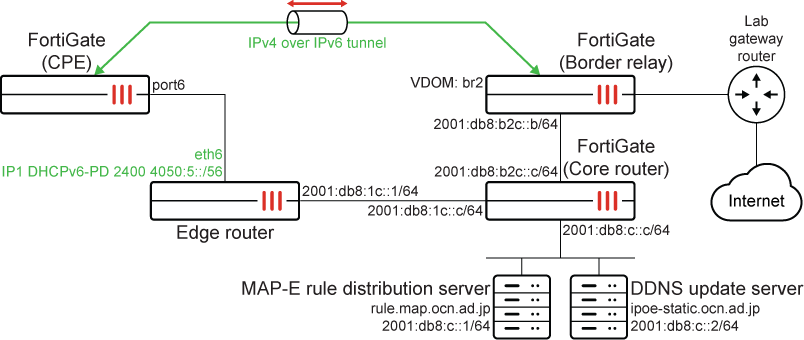
To configure MAP-E mode:
-
Configure the border relay FortiGate:
config system interface edit "core-br21" set vdom "br2" set type vdom-link set snmp-index 27 config ipv6 set ip6-address 2001:db8:b2c::b/64 set ip6-allowaccess ping end next end config system ipv6-tunnel edit "6" set source 2001:db8:b2c::b set destination 2400:4050:6:0:c0:2:2200:0 next end -
Configure the CPE FortiGate:
-
Configure port6 to get an IPv6 address through the delegate:
config system interface
    edit "port6"
        set vdom "root"
        set type physical
        set snmp-index 6
        config ipv6
            set ip6-mode delegated
            set ip6-allowaccess ping
            set dhcp6-prefix-delegation enable
            set ip6-delegated-prefix-iaid 1
            set ip6-upstream-interface "port6"
            set ip6-subnet ::1/64
            config dhcp6-iapd-list
                edit 1
                    set prefix-hint ::/56
                next
            end
        end
    next
end
# dianose ipv ad list | grep port6 dev=7 devname=port6 flag= scope=0 prefix=64 addr=2400:4050:6::1 preferred=22 valid=45 cstamp=9913 tstamp=6047755 dev=7 devname=port6 flag=P scope=253 prefix=64 addr=fe80::20c:29ff:fe7b:d83b preferred=4294967295 valid=4294967295 cstamp=6263 tstamp=6263
-
Configure the virtual network enabler (VNE) tunnel:
config system vne-interface
    edit "vne.port6"
        set interface "port6"
    next
end
# diagnose test application vned 1 ---------------------------------------------------------------------------- vdom: root/0, is master, devname=port6 link=1 tun=vne.port6 mode=map-e ssl_cert=Fortinet_Factory end user ipv6 perfix: 2400:4050:6::/56 interface ipv6 addr: 2400:4050:6::1 bmr rule ipv6 perfix: 2400:4050:6::/56 bmr rule ipv4 perfix: 192.0.2.34/32 bmr rule br: 2001:db8:b2c::b bmr rule hostname: Testbed6_dhcpv6-pd-IP1 saved hostname: Testbed6_dhcpv6-pd-IP1 tunnel br: 2001:db8:b2c::b tunnel ipv6 addr: 2400:4050:6:0:c0:2:2200:0 tunnel ipv4 addr: 192.0.2.34/255.255.255.255 update result: good Map-e rule client: state=succeed retries=0 interval=60 expiry=23634 reply_code=200 fqdn=rule.map.ocn.ad.jp num=1 cur=0 ttl=86400 expiry=0 2001:db8:c::1 Map-e DDNS client: state=succeed retries=0 interval=120 expiry=61372 reply_code=200 fqdn=ipoe-static.ocn.ad.jp num=1 cur=0 ttl=86400 expiry=0 2001:db8:c::2
vne.port6 is automatically configured after the VNE tunnel is set up:
config system interface
    edit "vne.port6"
        set vdom "root"
        set ip 192.0.2.34 255.255.255.255
        set type tunnel
        set snmp-index 16
        set interface "port6"
    next
end
# diagnose ipv ad li | grep port6 dev=7 devname=port6 flag=Pn scope=0 prefix=128 addr=2400:4050:6:0:c0:2:2200:0 preferred=4294967295 valid=4294967295 cstamp=10620 tstamp=10620 dev=7 devname=port6 flag= scope=0 prefix=64 addr=2400:4050:6::1 preferred=37 valid=60 cstamp=9913 tstamp=6108593 dev=7 devname=port6 flag=P scope=253 prefix=64 addr=fe80::20c:29ff:fe7b:d83b preferred=4294967295 valid=4294967295 cstamp=6263 tstamp=6263
-
Traffic can now pass through the VNE tunnel:
config router static
    edit 1
        set device "vne.port6"
    next
end
# execute ping 8.8.8.8 PING 8.8.8.8 (8.8.8.8): 56 data bytes 64 bytes from 8.8.8.8: icmp_seq=0 ttl=116 time=5.3 ms 64 bytes from 8.8.8.8: icmp_seq=1 ttl=116 time=4.1 ms 64 bytes from 8.8.8.8: icmp_seq=2 ttl=116 time=3.7 ms 64 bytes from 8.8.8.8: icmp_seq=3 ttl=116 time=4.2 ms 64 bytes from 8.8.8.8: icmp_seq=4 ttl=116 time=4.0 ms --- 8.8.8.8 ping statistics --- 5 packets transmitted, 5 packets received, 0% packet loss round-trip min/avg/max = 3.7/4.2/5.3 ms
# diagnose sniffer packet port6 'ip6'
Using Original Sniffing Mode
interfaces=[port6]
filters=[ip6]
pcap_lookupnet: port6: no IPv4 address assigned
3.091513 2400:4050:6:0:c0:2:2200:0 -> 2001:db8:b2c::b: 192.0.2.34 -> 8.8.8.8: icmp: echo request
3.096651 2001:db8:b2c::b -> 2400:4050:6:0:c0:2:2200:0: 8.8.8.8 -> 192.0.2.34: icmp: echo reply
4.091842 2400:4050:6:0:c0:2:2200:0 -> 2001:db8:b2c::b: 192.0.2.34 -> 8.8.8.8: icmp: echo request
4.095918 2001:db8:b2c::b -> 2400:4050:6:0:c0:2:2200:0: 8.8.8.8 -> 192.0.2.34: icmp: echo reply
5.092029 2400:4050:6:0:c0:2:2200:0 -> 2001:db8:b2c::b: 192.0.2.34 -> 8.8.8.8: icmp: echo request
5.095576 2001:db8:b2c::b -> 2400:4050:6:0:c0:2:2200:0: 8.8.8.8 -> 192.0.2.34: icmp: echo reply
6.092221 2400:4050:6:0:c0:2:2200:0 -> 2001:db8:b2c::b: 192.0.2.34 -> 8.8.8.8: icmp: echo request
6.096358 2001:db8:b2c::b -> 2400:4050:6:0:c0:2:2200:0: 8.8.8.8 -> 192.0.2.34: icmp: echo reply
7.092372 2400:4050:6:0:c0:2:2200:0 -> 2001:db8:b2c::b: 192.0.2.34 -> 8.8.8.8: icmp: echo request
7.096299 2001:db8:b2c::b -> 2400:4050:6:0:c0:2:2200:0: 8.8.8.8 -> 192.0.2.34: icmp: echo reply
-
Fixed IP mode
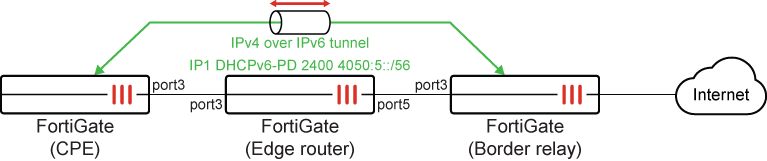
To configure fixed IP mode:
-
Configure the border relay FortiGate:
config system ipv6-tunnel edit "VNE-IPV6-2" set source 2606:f900:8102:302::2 set destination 2606:f900:8102:301:8000:: set interface "port3" next end config system interface edit "port3" set vdom "root" set type physical set snmp-index 9 config ipv6 set ip6-address 2606:f900:8102:302::2/64 set ip6-allowaccess ping end next end -
Configure the CPE FortiGate:
-
Configure port3 to get an IPv6 address through the delegate:
config system interface
    edit "port3"
        set vdom "root"
        set type physical
        set snmp-index 9
        config ipv6
            set ip6-mode delegated
            set ip6-allowaccess ping
            set dhcp6-prefix-delegation enable
            set ip6-delegated-prefix-iaid 1
            set ip6-upstream-interface "port3"
            set ip6-subnet ::8000:0:0:0/64
            config dhcp6-iapd-list
                edit 1
                    set prefix-hint 2606:f900:8102:301::/64
                next
                edit 2
                    set prefix-hint 2606:f900:8102:303::/64
                next
            end
        end
    next
end
# diagnose ipv ad list | grep port3 dev=13 devname=port3 flag=P scope=0 prefix=64 addr=2606:f900:8102:301:8000:: preferred=4294967295 valid=4294967295 cstamp=61106 tstamp=61106 dev=13 devname=port3 flag=P scope=253 prefix=64 addr=fe80::e223:ffff:fe67:8e6e preferred=4294967295 valid=4294967295 cstamp=56882 tstamp=56882
-
Configure the VNE tunnel:
config system vne-interface
    edit "VNE"
        set interface "port3"
        set ipv4-address 10.100.100.1 255.255.255.255
        set br "2606:f900:8102:302::2"
        set update-url "http://test.com"
        set mode fixed-ip
    next
end
# diagnose test application vned 1 ---------------------------------------------------------------------------- vdom: root/0, is master, devname=port3 link=1 tun=VNE mode=fixed-ip ssl_cert=Fortinet_Factory end user ipv6 perfix: 2606:f900:8102:301::/64 interface ipv6 addr: 2606:f900:8102:301:8000:: config ipv4 perfix: 10.100.100.1/255.255.255.0 config br: 2606:f900:8102:302::2 HTTP username: update url: http://test.com host: test.com path: / port:80 ssl: 0 tunnel br: 2606:f900:8102:302::2 tunnel ipv6 addr: 2606:f900:8102:301:8000:: tunnel ipv4 addr: 10.100.100.1/255.255.255.0 update result: Fixed IP rule client: state=succeed retries=0 interval=0 expiry=0 reply_code=0 fqdn=2606:f900:8102:302::2 num=1 cur=0 ttl=4294967295 expiry=0 2606:f900:8102:302::2 Fixed IP DDNS client: state=init retries=0 interval=10 expiry=4 reply_code=0 fqdn=test.com num=0 cur=0 ttl=0 expiry=0
-
Traffic can now pass through the VNE tunnel:
# execute ping 8.8.8.8
PING 8.8.8.8 (8.8.8.8): 56 data bytes
64 bytes from 8.8.8.8: icmp_seq=0 ttl=52 time=5.0 ms
64 bytes from 8.8.8.8: icmp_seq=1 ttl=52 time=6.4 ms
64 bytes from 8.8.8.8: icmp_seq=2 ttl=52 time=4.7 ms
64 bytes from 8.8.8.8: icmp_seq=3 ttl=52 time=4.6 ms
64 bytes from 8.8.8.8: icmp_seq=4 ttl=52 time=4.6 ms

--- 8.8.8.8 ping statistics ---
5 packets transmitted, 5 packets received, 0% packet loss
round-trip min/avg/max = 4.6/5.0/6.4 mss
# diagnose sniffer packet port3 'ip6'
interfaces=[port3]
filters=[ip6]
4.319283 2606:f900:8102:301:8000:: -> 2606:f900:8102:302::2: 10.100.100.1 -> 8.8.8.8: icmp: echo request
4.324193 2606:f900:8102:302::2 -> 2606:f900:8102:301:8000::: 8.8.8.8 -> 10.100.100.1: icmp: echo reply
5.331276 2606:f900:8102:301:8000:: -> 2606:f900:8102:302::2: 10.100.100.1 -> 8.8.8.8: icmp: echo request
5.337550 2606:f900:8102:302::2 -> 2606:f900:8102:301:8000::: 8.8.8.8 -> 10.100.100.1: icmp: echo reply
6.341289 2606:f900:8102:301:8000:: -> 2606:f900:8102:302::2: 10.100.100.1 -> 8.8.8.8: icmp: echo request
6.345900 2606:f900:8102:302::2 -> 2606:f900:8102:301:8000::: 8.8.8.8 -> 10.100.100.1: icmp: echo reply
7.351258 2606:f900:8102:301:8000:: -> 2606:f900:8102:302::2: 10.100.100.1 -> 8.8.8.8: icmp: echo request
7.355743 2606:f900:8102:302::2 -> 2606:f900:8102:301:8000::: 8.8.8.8 -> 10.100.100.1: icmp: echo reply
8.361257 2606:f900:8102:301:8000:: -> 2606:f900:8102:302::2: 10.100.100.1 -> 8.8.8.8: icmp: echo request
8.365788 2606:f900:8102:302::2 -> 2606:f900:8102:301:8000::: 8.8.8.8 -> 10.100.100.1: icmp: echo reply
-