
Fortinet white logo
Fortinet white logo

Administration Guide

Wildcard addressing

Wildcard addressing

Wildcard addresses are addresses that identify ranges of IP addresses, reducing the amount of firewall addresses and security policies required to match some of the traffic on your network. Wildcard addresses are an advanced feature, usually required only for complex networks with complex firewall filtering requirements. By using these wildcard addresses in the firewall configuration, administrators can eliminate creating multiple, separate IP-based address objects and then grouping them to then apply to multiple security policies.

A wildcard address consists of an IP address and a wildcard netmask, for example, 192.168.0.56 255.255.0.255 or 2000:172:16:200::55 ffff:ffff:ffff:ffff::ffff. The IP address defines the networks to match and the wildcard netmask defines the specific addresses to match on these networks.

In a wildcard netmask, zero denotes ignoring the value of the octet in the IP address. This means that the wildcard firewall address matches any number in this address octet. This also means that the number included in this octet of IP address is ignored and can be any number. Usually, if the octet in the wildcard netmask is zero, the corresponding octet in the IP address is also zero.

In a wildcard netmask, a number denotes matching addresses according to how the numbers translate into binary addresses. For example, the wildcard netmask is 255; the wildcard address will only match addresses with the value for this octet that is in the IP address part of the wildcard address. So, if the first octet of the IP address is 192 and the first octet of the wildcard netmask is 255, the wildcard address will only match addresses with 192 in the first octet.

For example, if the IP address is 192.168.0.56 and the wildcard netmask is 255.255.0.255, then the wildcard address would match the following IP addresses:

192.168.0.56
192.168.1.56
192.168.2.56
...
192.168.255.56

The wildcard addresses 192.168.0.56 255.255.0.255 and 192.168.1.56 255.255.0.255 define the same thing since the 0 in the wildcard mask means to match any address in the third octet.

To configure an IPv4 wildcard address in the GUI:
  1. Go to Policy & Objects > Addresses and, on the Address tab, click Create New.

  2. Enter a name for the address.

  3. Set Type to Wildcard.

  4. Set IP/Wildcard Mask to the IPv4 address and wildcard netmask.
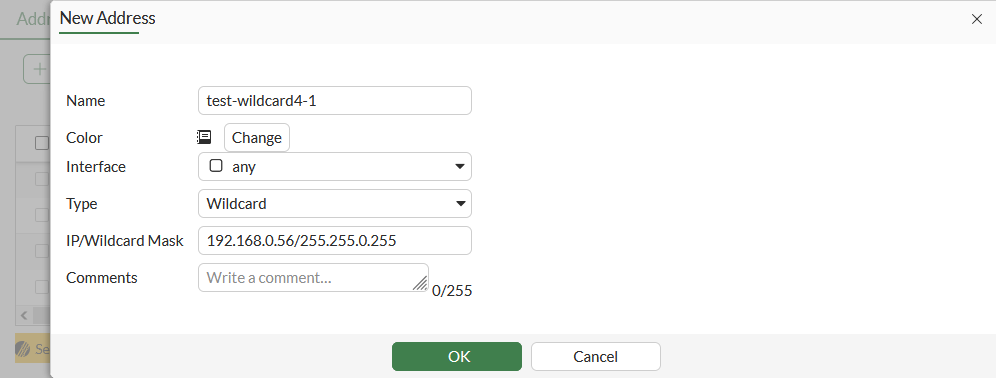
  5. Click OK.

To configure an IPv4 wildcard address in the CLI:
config firewall address
    edit "test-wildcard4-1"
        set type wildcard
        set wildcard 192.168.0.56 255.255.0.255
    next
end
To configure an IPv6 wildcard address in the GUI:
  1. Go to Policy & Objects > Addresses and, on the IPv6 Address tab, click Create New.

  2. Enter a name for the address.

  3. Set Type to IPv6 Wildcard.

  4. Set IPv6 address/mask to the IPv6 address and wildcard netmask.
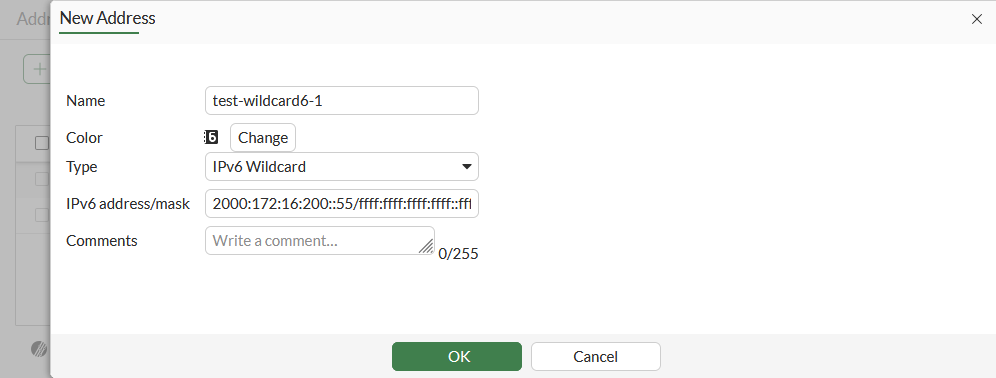
  5. Click OK.

To configure an IPv6 wildcard address in the CLI:
config firewall address6
    edit "test-wildcard6-1"
        set type wildcard
        set wildcard 2000:172:16:200::55 ffff:ffff:ffff:ffff::ffff
    next
end

Wildcard addressing

Wildcard addressing

Wildcard addresses are addresses that identify ranges of IP addresses, reducing the amount of firewall addresses and security policies required to match some of the traffic on your network. Wildcard addresses are an advanced feature, usually required only for complex networks with complex firewall filtering requirements. By using these wildcard addresses in the firewall configuration, administrators can eliminate creating multiple, separate IP-based address objects and then grouping them to then apply to multiple security policies.

A wildcard address consists of an IP address and a wildcard netmask, for example, 192.168.0.56 255.255.0.255 or 2000:172:16:200::55 ffff:ffff:ffff:ffff::ffff. The IP address defines the networks to match and the wildcard netmask defines the specific addresses to match on these networks.

In a wildcard netmask, zero denotes ignoring the value of the octet in the IP address. This means that the wildcard firewall address matches any number in this address octet. This also means that the number included in this octet of IP address is ignored and can be any number. Usually, if the octet in the wildcard netmask is zero, the corresponding octet in the IP address is also zero.

In a wildcard netmask, a number denotes matching addresses according to how the numbers translate into binary addresses. For example, the wildcard netmask is 255; the wildcard address will only match addresses with the value for this octet that is in the IP address part of the wildcard address. So, if the first octet of the IP address is 192 and the first octet of the wildcard netmask is 255, the wildcard address will only match addresses with 192 in the first octet.

For example, if the IP address is 192.168.0.56 and the wildcard netmask is 255.255.0.255, then the wildcard address would match the following IP addresses:

192.168.0.56
192.168.1.56
192.168.2.56
...
192.168.255.56

The wildcard addresses 192.168.0.56 255.255.0.255 and 192.168.1.56 255.255.0.255 define the same thing since the 0 in the wildcard mask means to match any address in the third octet.

To configure an IPv4 wildcard address in the GUI:
  1. Go to Policy & Objects > Addresses and, on the Address tab, click Create New.

  2. Enter a name for the address.

  3. Set Type to Wildcard.

  4. Set IP/Wildcard Mask to the IPv4 address and wildcard netmask.

  5. Click OK.

To configure an IPv4 wildcard address in the CLI:
config firewall address
    edit "test-wildcard4-1"
        set type wildcard
        set wildcard 192.168.0.56 255.255.0.255
    next
end
To configure an IPv6 wildcard address in the GUI:
  1. Go to Policy & Objects > Addresses and, on the IPv6 Address tab, click Create New.

  2. Enter a name for the address.

  3. Set Type to IPv6 Wildcard.

  4. Set IPv6 address/mask to the IPv6 address and wildcard netmask.

  5. Click OK.

To configure an IPv6 wildcard address in the CLI:
config firewall address6
    edit "test-wildcard6-1"
        set type wildcard
        set wildcard 2000:172:16:200::55 ffff:ffff:ffff:ffff::ffff
    next
end