
Fortinet white logo
Fortinet white logo

Administration Guide

Assigning multiple remote Autonomous Systems to a single BGP neighbor group

Assigning multiple remote Autonomous Systems to a single BGP neighbor group

FortiOS allows the assignment of multiple remote Autonomous Systems (AS) to a single BGP neighbor group using the remote-as-filter command. This is achieved through the utilization of AS path lists. This enhancement offers increased flexibility and efficiency in managing BGP configurations, especially in intricate network environments.

config router bgp
    set as <local AS>
    config neighbor-group
        edit <name>
            set remote-as-filter <BGP filter for remote AS>
        next
    end
end
Note

The remote-as and remote-as-filter commands are mutually exclusive in the BGP neighbor group. Unset the pre-existing value to use the other command. For example, to change from using remote-as to remote-as-filter, implement unset remote-as.

Example

The following example demonstrates assigning the remote AS of two spokes (AS65505 and AS65006) to a single BGP neighbor group of a hub (AS65505).
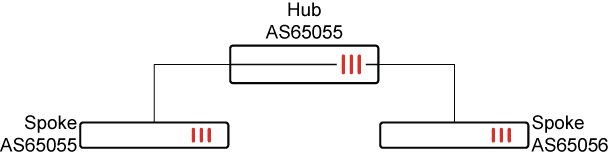
To assign multiple remote AS to a single BGP neighbor group in the local hub:
  1. Configure the AS path list:

    config router aspath-list
        edit "aslist1"
            config rule
                edit 1
                    set action permit
                    set regexp "^6550[1-6]$"
                next
            end
        next
    end
  2. Configure the BGP neighbor group of the hub to point to the AS path list:

    config router bgp
        set as 65505
        config neighbor-group
            edit "gr1"
                set remote-as-filter "aslist1"
            next
        end
    end
  3. Configure the BGP neighbor range:

    config router bgp
        config neighbor-range
            edit 1
                set prefix 10.10.100.0 255.255.255.0
                set neighbor-group "gr1"
            next
        end
    end
  4. Verify that multiple remote AS have been assigned to the BGP neighbor group:

    # get router info bgp summary
    
    VRF 0 BGP router identifier 11.11.11.11, local AS number 65505
    BGP table version is 4
    2 BGP AS-PATH entries
    0 BGP community entries
    Next peer check timer due in 55 seconds
    
    Neighbor    V         AS MsgRcvd MsgSent   TblVer  InQ OutQ Up/Down  State/PfxRcd
    10.10.100.2 4      65505    8240    8229        4    0    0 5d00h03m        2
    10.10.100.3 4      65506    8229    8253        4    0    0 4d23h59m        2
    Total number of neighbors 2

Assigning multiple remote Autonomous Systems to a single BGP neighbor group

Assigning multiple remote Autonomous Systems to a single BGP neighbor group

FortiOS allows the assignment of multiple remote Autonomous Systems (AS) to a single BGP neighbor group using the remote-as-filter command. This is achieved through the utilization of AS path lists. This enhancement offers increased flexibility and efficiency in managing BGP configurations, especially in intricate network environments.

config router bgp
    set as <local AS>
    config neighbor-group
        edit <name>
            set remote-as-filter <BGP filter for remote AS>
        next
    end
end
Note

The remote-as and remote-as-filter commands are mutually exclusive in the BGP neighbor group. Unset the pre-existing value to use the other command. For example, to change from using remote-as to remote-as-filter, implement unset remote-as.

Example

The following example demonstrates assigning the remote AS of two spokes (AS65505 and AS65006) to a single BGP neighbor group of a hub (AS65505).

To assign multiple remote AS to a single BGP neighbor group in the local hub:
  1. Configure the AS path list:

    config router aspath-list
        edit "aslist1"
            config rule
                edit 1
                    set action permit
                    set regexp "^6550[1-6]$"
                next
            end
        next
    end
  2. Configure the BGP neighbor group of the hub to point to the AS path list:

    config router bgp
        set as 65505
        config neighbor-group
            edit "gr1"
                set remote-as-filter "aslist1"
            next
        end
    end
  3. Configure the BGP neighbor range:

    config router bgp
        config neighbor-range
            edit 1
                set prefix 10.10.100.0 255.255.255.0
                set neighbor-group "gr1"
            next
        end
    end
  4. Verify that multiple remote AS have been assigned to the BGP neighbor group:

    # get router info bgp summary
    
    VRF 0 BGP router identifier 11.11.11.11, local AS number 65505
    BGP table version is 4
    2 BGP AS-PATH entries
    0 BGP community entries
    Next peer check timer due in 55 seconds
    
    Neighbor    V         AS MsgRcvd MsgSent   TblVer  InQ OutQ Up/Down  State/PfxRcd
    10.10.100.2 4      65505    8240    8229        4    0    0 5d00h03m        2
    10.10.100.3 4      65506    8229    8253        4    0    0 4d23h59m        2
    Total number of neighbors 2