Fortinet white logo
Fortinet white logo

Administration Guide

Sensitivity labels

Sensitivity labels

In order to safeguard your organization's data, labels can be employed as markers for sensitive information. Microsoft provides sensitivity labels, which act as identifiers emphasizing the importance of the data they're associated with, thereby enhancing the security measures in place. See Protect your sensitive data with Microsoft Purview (formerly MIP) for more information.

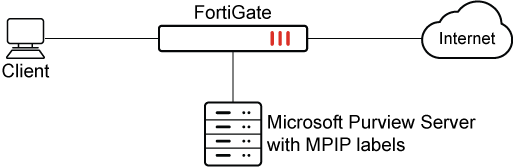
Any data traffic that includes a sensitivity label can be effectively managed using FortiGate. This is made possible through the utilization of a predefined label type, mpip, specifically designed for Microsoft Purview Information Protection. See Microsoft Purview sensitivity labels for more information.

MPIP labels have their own settings and can be used directly with DLP profiles without needing a dictionary. Additionally, remote MPIP labels can be synchronized automatically from a Microsoft Purview account through the Azure SDN connector, complementing locally defined labels.
Prerequisites

The following procedures should be completed before configuring the FortiGate:

  1. Create and configure sensitivity labels and their policies. See Create sensitivity labels for more information.

  2. Apply a sensitivity label to content. See Apply sensitivity labels to your files and email for more information.

Example 1: Verifying that a user's attempt to post a file matching the remote MPIP label through HTTPS will be blocked

The following example demonstrates configuring a remote MPIP label to block HTTPS-POST actions.

To configure remote MPIP labels in the GUI:
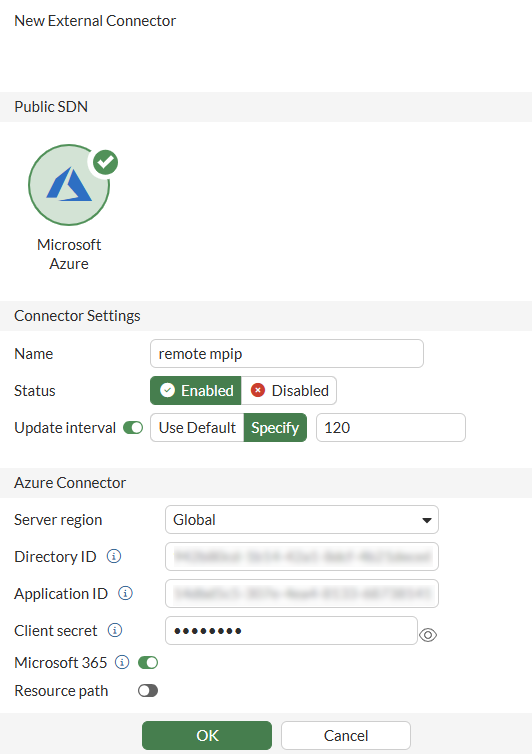
  1. Configure the external connector:

    1. Go to Security Fabric > External Connectors.

    2. Click Create New.

    3. Configure a Microsoft Azure connector with Microsoft 365 enabled. See Azure SDN connector using service principle for more information.
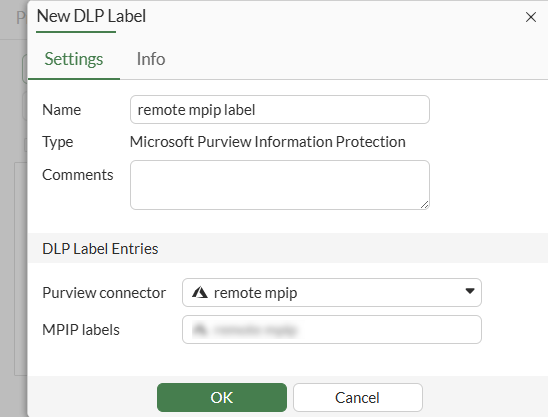
  2. Configure the DLP label:

    1. Go to Security Profiles > Data Loss Prevention.

    2. Select the Label tab.

    3. Click Create New.

    4. Set Purview connector to the new connector.

    5. Select the MPIP labels synced from the connector to match sensitive files.

    6. Click OK.

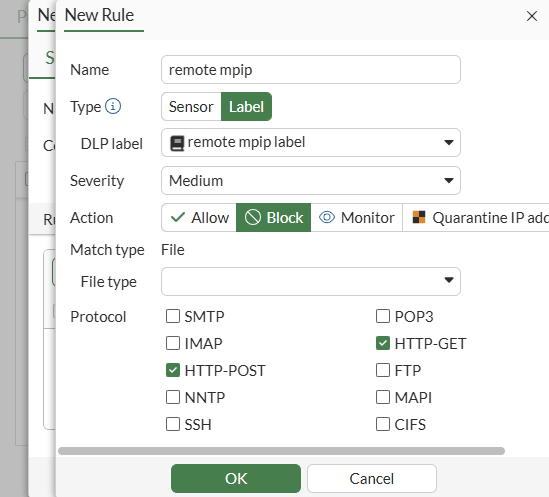
  3. Configure the DLP profile:

    1. Go to Security Profiles > Data Loss Prevention.

    2. Select the Profile tab.

    3. Click Create New.

    4. Configure the DLP profile with the new DLP label applied in a rule set to block HTTP-POST and HTTP-GET. See Basic DLP settings for more information.
  4. Add the DLP profile to a firewall policy:

    1. Go to Policy & Objects > Firewall Policy.

    2. Click Create New.

    3. Set the Inspection Mode to Proxy-based.

    4. In the Security Profiles section, enable DLP Profile and select the new DLP profile.

    5. Set SSL Inspection to deep-inspection.

    6. Configure the other settings as needed.

    7. Click OK.

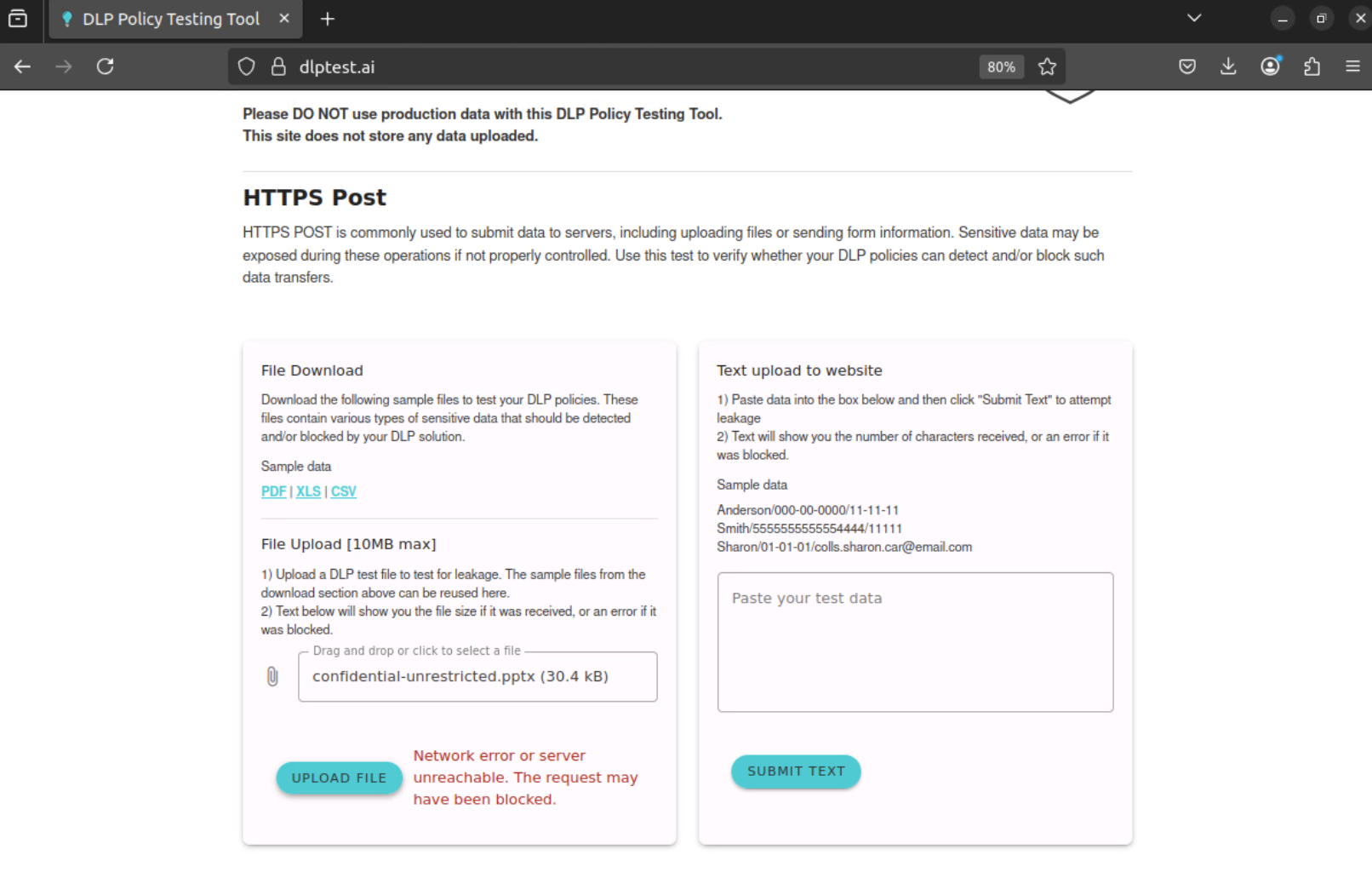
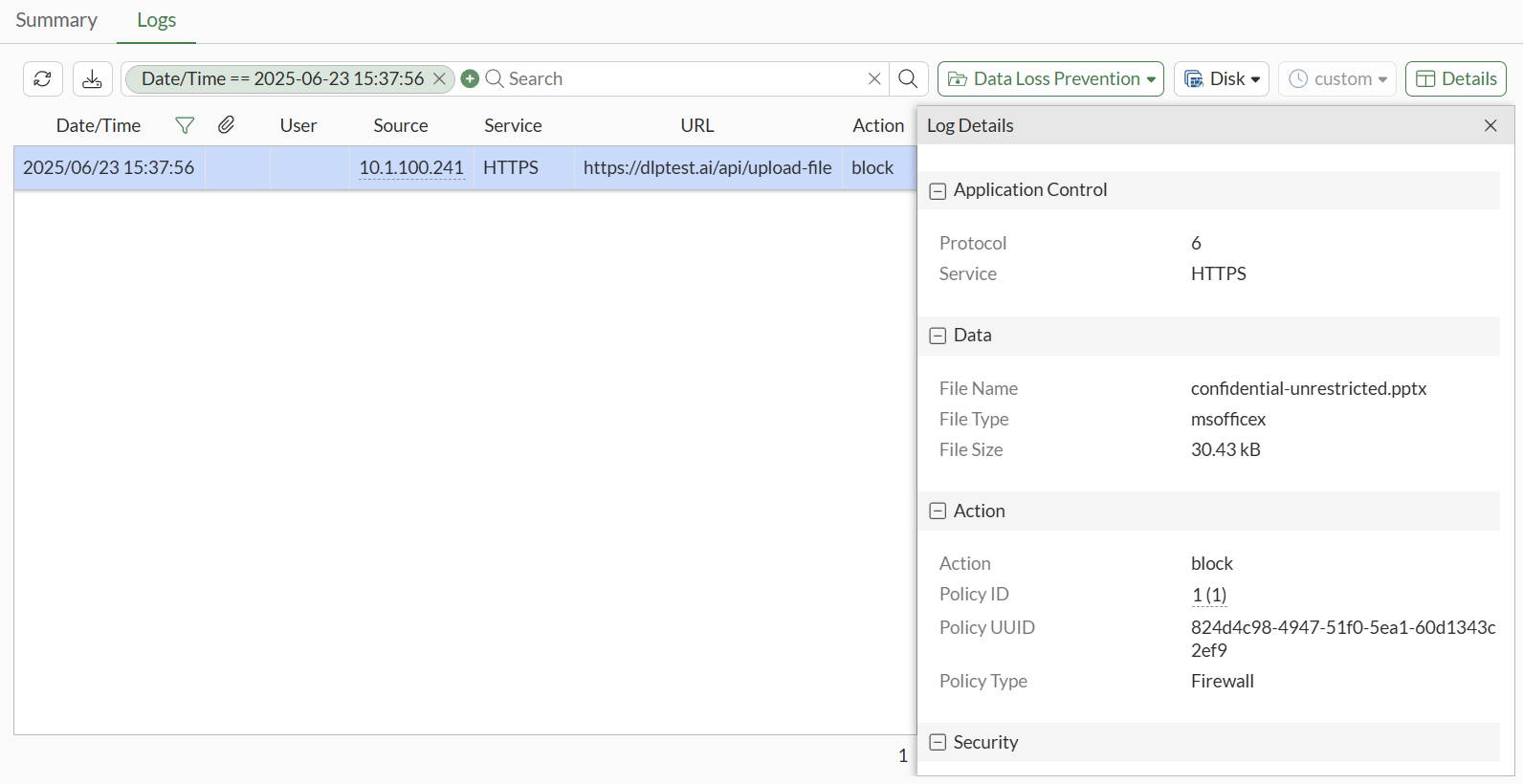
  5. Attempt an HTTPS-POST action.

    The action matches the remote MPIP label and is blocked by the FortiGate.
To configure remote MPIP labels in the CLI:
  1. Configure the external connector with Microsoft 365 enabled:

    config system sdn-connector
        edit remote-mpip
            set type azure
            set azure-region global
            set tenant-id eca3011d-89ec-481d-9ed0-a0f7d2bb9b45
            set client-id 44ac574f-227a-4e90-a33b-820f2d7230b2
            set client-secret XXXXXXXX
            set update-interval 30
            set microsoft-365 enable
        next
    end 
  2. Configure the DLP label:

    config dlp label
        edit "remote-mpip-label"
            set type mpip
            set mpip-type remote
            set connector "remote-mpip"
            config entries
                edit 1
                    set mpip-label-name "Confidential/Anyone (unrestricted)"
                next
            end
        next
    end
  3. Configure the DLP profile to block HTTP-POST and HTTP-GET:

    config dlp profile
        edit "remote-mpip-profile"
            config rule
                edit 1
                    set proto http-get http-post
                    set filter-by label
                    set label "remote-mpip-label"
                    set action block
                next
            end
        next
    end
  4. Add the DLP profile to a firewall policy:

    config firewall policy
        edit 1
            set srcintf "port2"
            set dstintf "port1"
            set action accept
            set srcaddr "all"
            set dstaddr "all"
            set schedule "always"
            set service "ALL"
            set utm-status enable
            set inspection-mode proxy
            set ssl-ssh-profile "deep-inpsection"
            set dlp-profile "remote-mpip-profile"
            set nat enable
        next
    end
  5. Attempt an HTTPS-POST action.

    The action matches the remote MPIP label and is blocked by the FortiGate:

    1: date=2025-06-23 time=15:36:53 eventtime=1750718213619030708 tz="-0700" logid="0954024576" type="utm" subtype="dlp" eventtype="dlp" level="warning" vd="vdom1" ruleid=1 dlpextra="remote-mpip-label" filtertype="label" filtercat="file" severity="medium" policyid=1 poluuid="824d4c98-4947-51f0-5ea1-60d1343c2ef9" policytype="policy" sessionid=720 epoch=1656654802 eventid=1 srcip=10.1.100.241 srcport=41346 srccountry="Reserved" srcintf="port2" srcintfrole="undefined" srcuuid="4a1017e8-4947-51f0-55cb-8c18f3765a3f" dstip=206.47.132.132 dstport=443 dstcountry="Canada" dstintf="port1" dstintfrole="undefined" dstuuid="4a1017e8-4947-51f0-55cb-8c18f3765a3f" proto=6 service="HTTPS" filetype="msofficex" direction="outgoing" action="block" hostname="dlptest.ai" url="https://dlptest.ai/api/upload-file" agent="Mozilla/5.0 (X11; Ubuntu; Linux x86_64; rv:139.0) Gecko/20100101 Firefox/139.0" httpmethod="POST" referralurl="https://dlptest.ai/" filename="confidential-unrestricted.pptx" filesize=30427 profile="remote-mpip-profile" infectedfilename="docProps/custom.xml" infectedfilesize=2025 infectedfilelevel=1

Example 2: Verifying that a user's attempt to post a file matching the local MPIP label's GUID will be monitored through FTPS

The following example demonstrates configuring a local MPIP label with a Globally Unique Identifier (GUID) that will monitor files posted through FTPS.

Note

Local MPIP label configuration is not supported in the GUI. However, once the local MPIP label has been configured in the CLI, it can be applied to a DLP profile in the GUI. See Basic DLP settings.

To configure and apply a local MPIP label:
  1. Obtain a GUID for your sensitivity labels. See Search for documents by sensitivity label for more information.

  2. Configure the local MPIP label:

    config dlp label
        edit "local-mpip-label"
            set type mpip
            set mpip-type local
            config entries
                edit 1
                    set guid "c0ef495a-6714-4056-a44b-a9cb63fa9161"
                next
            end
        next
    end
  3. Configure the DLP profile:

    config dlp profile
       edit "local-mpip-profile"
            config rule
                edit 1
                    set proto ftp
                    set filter-by label
                    set label "local-mpip-label"
                    set action log-only
                next
            end
        next
    end
  4. Add the DLP profile to a firewall policy:

    config firewall policy
        edit 2
            set srcintf "port2"
            set dstintf "port1"
            set action accept
            set srcaddr "all"
            set dstaddr "all"
            set schedule "always"
            set service "ALL"
            set utm-status enable
            set inspection-mode proxy
            set ssl-ssh-profile "deep-inpsection"
            set dlp-profile "local-mpip-profile"
            set nat enable
        next
    end
  5. Attempt to transfer a file matching the remote MPIP label through FTPS.
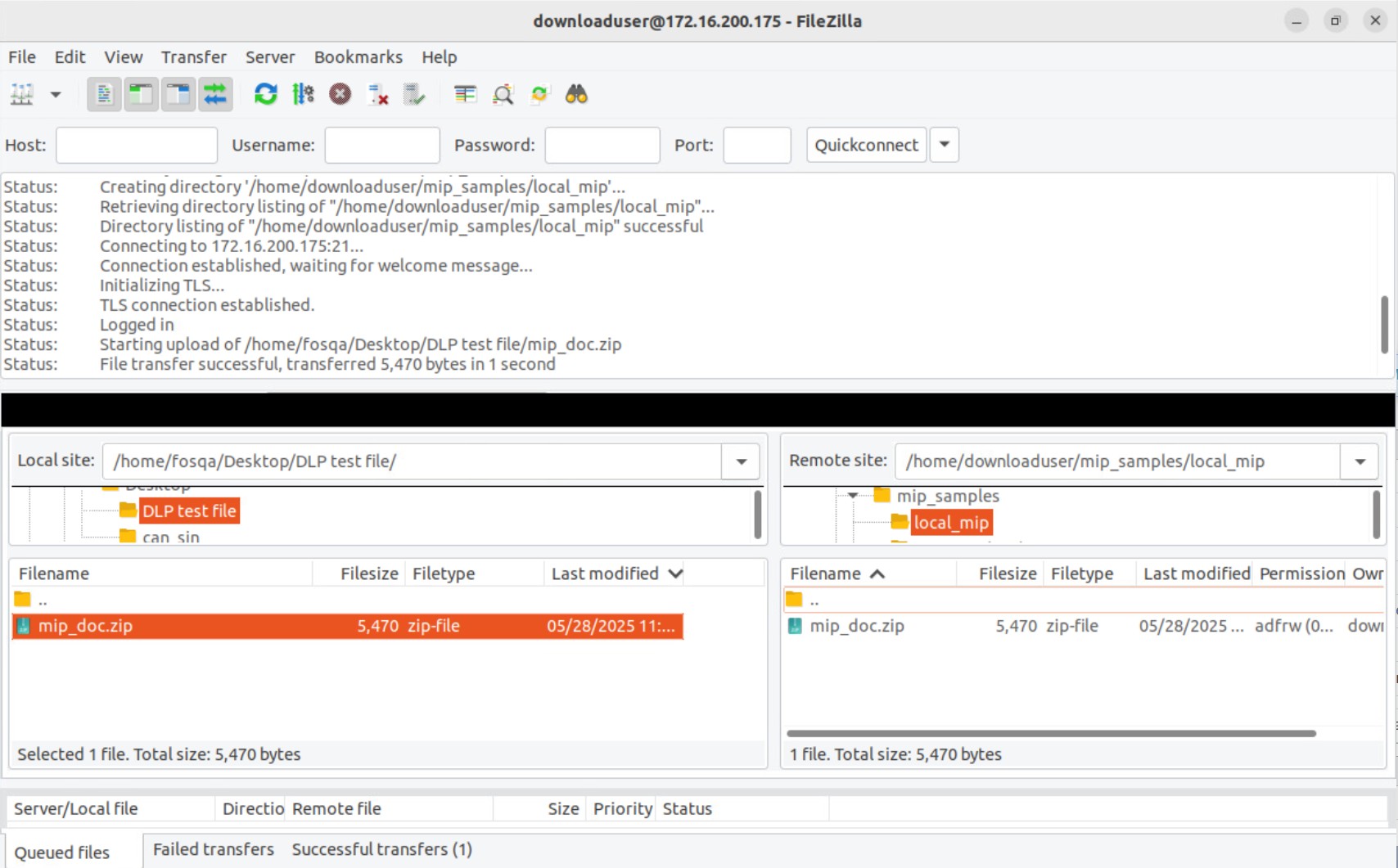
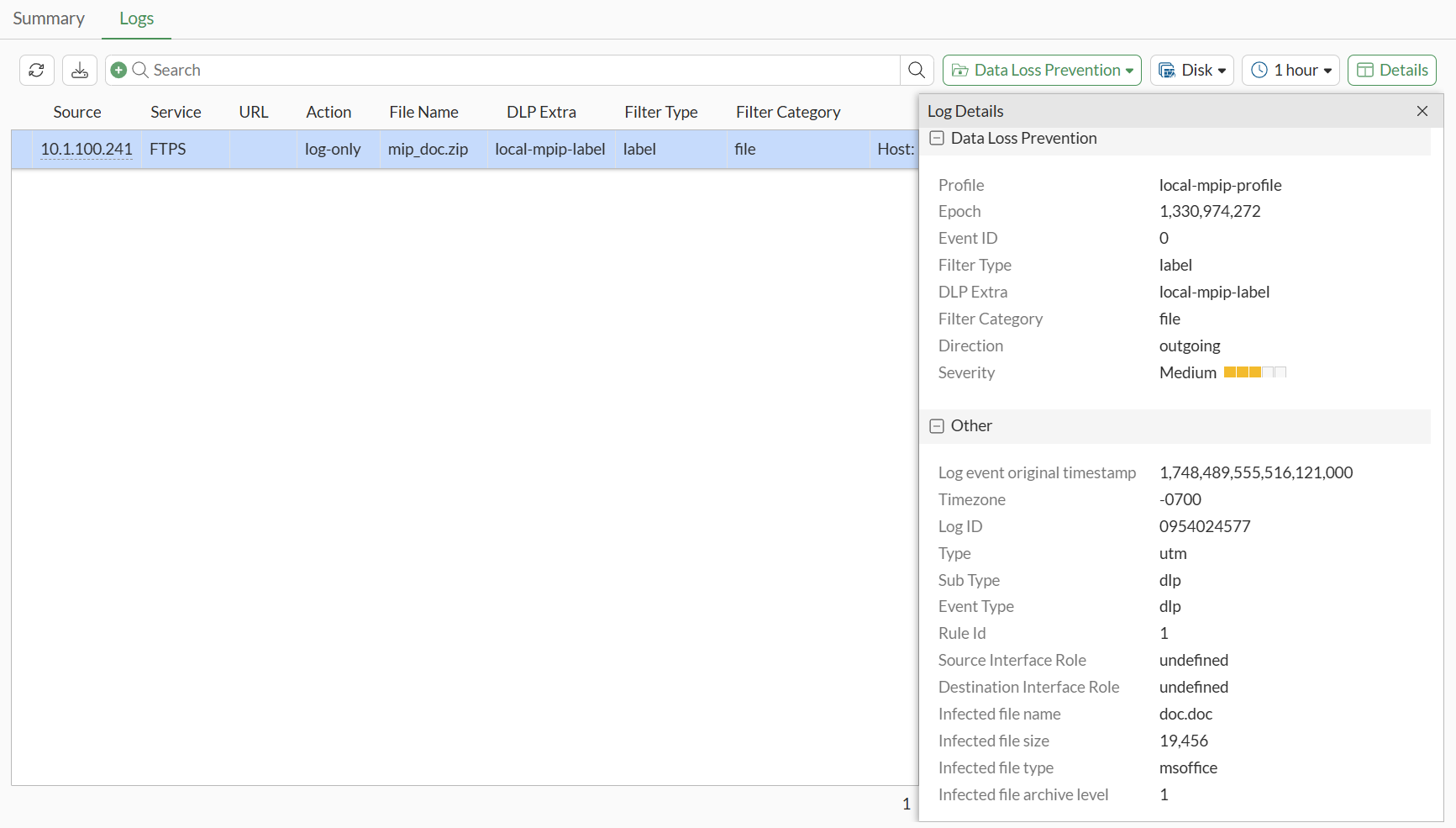
    The file passes and DLP monitor logs are generated:

    • A GUI log can be reviewed:

    • A CLI log can be reviewed:

      1: date=2025-05-28 time=20:32:35 eventtime=1748489555516121022 tz="-0700" logid="0954024577" type="utm" subtype="dlp" eventtype="dlp" level="notice" vd="vdom1" ruleid=1 dlpextra="local-mpip-label" filtertype="label" filtercat="file" severity="medium" policyid=1 poluuid="319d6e9e-3c23-51f0-3a27-434de0e559ee" policytype="policy" sessionid=8379 epoch=1330974272 eventid=0 srcip=10.1.100.241 srcport=57865 srccountry="Reserved" srcintf="port2" srcintfrole="undefined" srcuuid="f9cd0f6a-3c22-51f0-b75c-6fad5f412db5" dstip=172.16.200.175 dstport=38353 dstcountry="Reserved" dstintf="port1" dstintfrole="undefined" dstuuid="f9cd0f6a-3c22-51f0-b75c-6fad5f412db5" proto=6 service="FTPS" filetype="zip" direction="outgoing" action="log-only" filename="mip_doc.zip" filesize=5470 profile="local-mpip-profile" infectedfilename="doc.doc" infectedfilesize=19456 infectedfiletype="msoffice" infectedfilelevel=1

Sensitivity labels

Sensitivity labels

In order to safeguard your organization's data, labels can be employed as markers for sensitive information. Microsoft provides sensitivity labels, which act as identifiers emphasizing the importance of the data they're associated with, thereby enhancing the security measures in place. See Protect your sensitive data with Microsoft Purview (formerly MIP) for more information.

Any data traffic that includes a sensitivity label can be effectively managed using FortiGate. This is made possible through the utilization of a predefined label type, mpip, specifically designed for Microsoft Purview Information Protection. See Microsoft Purview sensitivity labels for more information.

MPIP labels have their own settings and can be used directly with DLP profiles without needing a dictionary. Additionally, remote MPIP labels can be synchronized automatically from a Microsoft Purview account through the Azure SDN connector, complementing locally defined labels.

Prerequisites

The following procedures should be completed before configuring the FortiGate:

  1. Create and configure sensitivity labels and their policies. See Create sensitivity labels for more information.

  2. Apply a sensitivity label to content. See Apply sensitivity labels to your files and email for more information.

Example 1: Verifying that a user's attempt to post a file matching the remote MPIP label through HTTPS will be blocked

The following example demonstrates configuring a remote MPIP label to block HTTPS-POST actions.

To configure remote MPIP labels in the GUI:
  1. Configure the external connector:

    1. Go to Security Fabric > External Connectors.

    2. Click Create New.

    3. Configure a Microsoft Azure connector with Microsoft 365 enabled. See Azure SDN connector using service principle for more information.

  2. Configure the DLP label:

    1. Go to Security Profiles > Data Loss Prevention.

    2. Select the Label tab.

    3. Click Create New.

    4. Set Purview connector to the new connector.

    5. Select the MPIP labels synced from the connector to match sensitive files.

    6. Click OK.

  3. Configure the DLP profile:

    1. Go to Security Profiles > Data Loss Prevention.

    2. Select the Profile tab.

    3. Click Create New.

    4. Configure the DLP profile with the new DLP label applied in a rule set to block HTTP-POST and HTTP-GET. See Basic DLP settings for more information.

  4. Add the DLP profile to a firewall policy:

    1. Go to Policy & Objects > Firewall Policy.

    2. Click Create New.

    3. Set the Inspection Mode to Proxy-based.

    4. In the Security Profiles section, enable DLP Profile and select the new DLP profile.

    5. Set SSL Inspection to deep-inspection.

    6. Configure the other settings as needed.

    7. Click OK.

  5. Attempt an HTTPS-POST action.

    The action matches the remote MPIP label and is blocked by the FortiGate.

To configure remote MPIP labels in the CLI:
  1. Configure the external connector with Microsoft 365 enabled:

    config system sdn-connector
        edit remote-mpip
            set type azure
            set azure-region global
            set tenant-id eca3011d-89ec-481d-9ed0-a0f7d2bb9b45
            set client-id 44ac574f-227a-4e90-a33b-820f2d7230b2
            set client-secret XXXXXXXX
            set update-interval 30
            set microsoft-365 enable
        next
    end 
  2. Configure the DLP label:

    config dlp label
        edit "remote-mpip-label"
            set type mpip
            set mpip-type remote
            set connector "remote-mpip"
            config entries
                edit 1
                    set mpip-label-name "Confidential/Anyone (unrestricted)"
                next
            end
        next
    end
  3. Configure the DLP profile to block HTTP-POST and HTTP-GET:

    config dlp profile
        edit "remote-mpip-profile"
            config rule
                edit 1
                    set proto http-get http-post
                    set filter-by label
                    set label "remote-mpip-label"
                    set action block
                next
            end
        next
    end
  4. Add the DLP profile to a firewall policy:

    config firewall policy
        edit 1
            set srcintf "port2"
            set dstintf "port1"
            set action accept
            set srcaddr "all"
            set dstaddr "all"
            set schedule "always"
            set service "ALL"
            set utm-status enable
            set inspection-mode proxy
            set ssl-ssh-profile "deep-inpsection"
            set dlp-profile "remote-mpip-profile"
            set nat enable
        next
    end
  5. Attempt an HTTPS-POST action.

    The action matches the remote MPIP label and is blocked by the FortiGate:

    1: date=2025-06-23 time=15:36:53 eventtime=1750718213619030708 tz="-0700" logid="0954024576" type="utm" subtype="dlp" eventtype="dlp" level="warning" vd="vdom1" ruleid=1 dlpextra="remote-mpip-label" filtertype="label" filtercat="file" severity="medium" policyid=1 poluuid="824d4c98-4947-51f0-5ea1-60d1343c2ef9" policytype="policy" sessionid=720 epoch=1656654802 eventid=1 srcip=10.1.100.241 srcport=41346 srccountry="Reserved" srcintf="port2" srcintfrole="undefined" srcuuid="4a1017e8-4947-51f0-55cb-8c18f3765a3f" dstip=206.47.132.132 dstport=443 dstcountry="Canada" dstintf="port1" dstintfrole="undefined" dstuuid="4a1017e8-4947-51f0-55cb-8c18f3765a3f" proto=6 service="HTTPS" filetype="msofficex" direction="outgoing" action="block" hostname="dlptest.ai" url="https://dlptest.ai/api/upload-file" agent="Mozilla/5.0 (X11; Ubuntu; Linux x86_64; rv:139.0) Gecko/20100101 Firefox/139.0" httpmethod="POST" referralurl="https://dlptest.ai/" filename="confidential-unrestricted.pptx" filesize=30427 profile="remote-mpip-profile" infectedfilename="docProps/custom.xml" infectedfilesize=2025 infectedfilelevel=1

Example 2: Verifying that a user's attempt to post a file matching the local MPIP label's GUID will be monitored through FTPS

The following example demonstrates configuring a local MPIP label with a Globally Unique Identifier (GUID) that will monitor files posted through FTPS.

Note

Local MPIP label configuration is not supported in the GUI. However, once the local MPIP label has been configured in the CLI, it can be applied to a DLP profile in the GUI. See Basic DLP settings.

To configure and apply a local MPIP label:
  1. Obtain a GUID for your sensitivity labels. See Search for documents by sensitivity label for more information.

  2. Configure the local MPIP label:

    config dlp label
        edit "local-mpip-label"
            set type mpip
            set mpip-type local
            config entries
                edit 1
                    set guid "c0ef495a-6714-4056-a44b-a9cb63fa9161"
                next
            end
        next
    end
  3. Configure the DLP profile:

    config dlp profile
       edit "local-mpip-profile"
            config rule
                edit 1
                    set proto ftp
                    set filter-by label
                    set label "local-mpip-label"
                    set action log-only
                next
            end
        next
    end
  4. Add the DLP profile to a firewall policy:

    config firewall policy
        edit 2
            set srcintf "port2"
            set dstintf "port1"
            set action accept
            set srcaddr "all"
            set dstaddr "all"
            set schedule "always"
            set service "ALL"
            set utm-status enable
            set inspection-mode proxy
            set ssl-ssh-profile "deep-inpsection"
            set dlp-profile "local-mpip-profile"
            set nat enable
        next
    end
  5. Attempt to transfer a file matching the remote MPIP label through FTPS.

    The file passes and DLP monitor logs are generated:

    • A GUI log can be reviewed:

    • A CLI log can be reviewed:

      1: date=2025-05-28 time=20:32:35 eventtime=1748489555516121022 tz="-0700" logid="0954024577" type="utm" subtype="dlp" eventtype="dlp" level="notice" vd="vdom1" ruleid=1 dlpextra="local-mpip-label" filtertype="label" filtercat="file" severity="medium" policyid=1 poluuid="319d6e9e-3c23-51f0-3a27-434de0e559ee" policytype="policy" sessionid=8379 epoch=1330974272 eventid=0 srcip=10.1.100.241 srcport=57865 srccountry="Reserved" srcintf="port2" srcintfrole="undefined" srcuuid="f9cd0f6a-3c22-51f0-b75c-6fad5f412db5" dstip=172.16.200.175 dstport=38353 dstcountry="Reserved" dstintf="port1" dstintfrole="undefined" dstuuid="f9cd0f6a-3c22-51f0-b75c-6fad5f412db5" proto=6 service="FTPS" filetype="zip" direction="outgoing" action="log-only" filename="mip_doc.zip" filesize=5470 profile="local-mpip-profile" infectedfilename="doc.doc" infectedfilesize=19456 infectedfiletype="msoffice" infectedfilelevel=1