

Action Manager
EDR enables you to define connectors to external systems, so that EDR will automatically trigger predefined actions when a security event is triggered in EDR. You can define your own actions while defining a Custom integration connector, Firewall integration connector or NAC integration connector (as described above). Each action is comprised of a Python script (one or several ones) that calls an API from the third-party system in order to perform the relevant action.
The Action Manager enables you to upload and manage (add, modify and delete) these actions and the Python scripts that call third-party systems’ APIs. Python 2.7 or later is supported.
To display the Action Manager:
- Go to Profiles > Integrations > Connectors.
- Click the Action Manager button. The following displays:
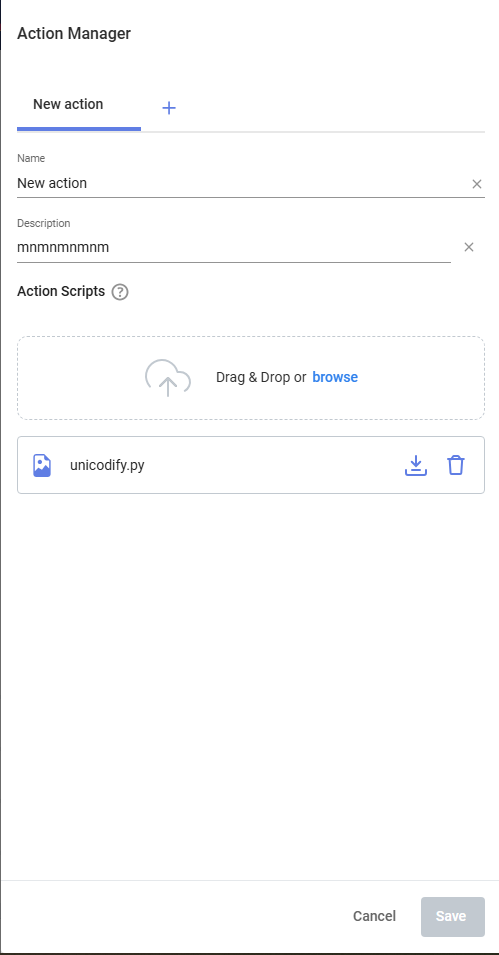
To define a new action:
- Click the + Add action button.
- Fill out the fields of this window as follows in order to define a new action to be triggered in response to an incident.

In order to trigger this action, a Playbook policy must be defined that triggers this action to execute the script when a security event is triggered. The definition of this new action here automatically adds this action as an option in a Playbook policy. This action however, is not selected by default in the Playbook policy. Therefore, you must go to the Playbook policy and select it in order for it to be triggered when a security event is triggered.
Field
Definition
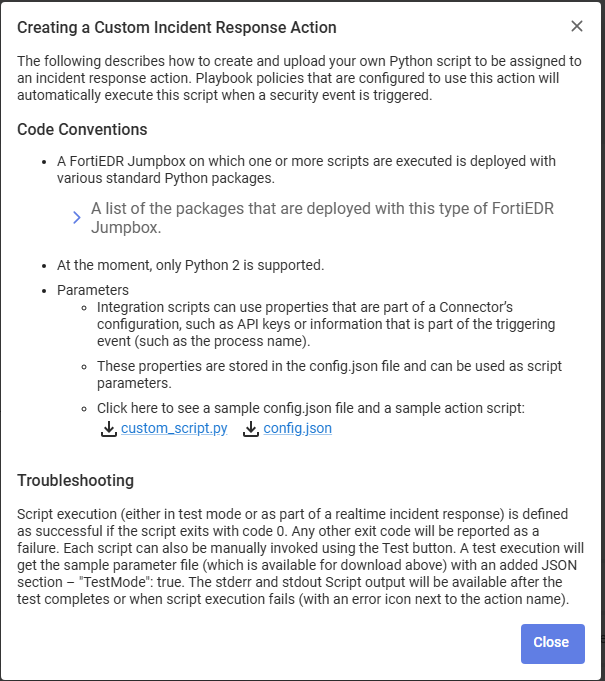
Name Enter any name for this action. Description Enter a description of this action. Upload Upload a Python script that calls an API from the third-party system in order to perform the relevant action. Python 2.7 or later is supported. This Python script must be created according to the coding conventions that can be displayed by clicking the icon next to the Action Scripts field. The following displays providing an explanation of these coding conventions and provides various links that you can click to see more detail and/or to download sample files.
- Click Save.
To modify the script of an action:
- Go to Profiles > Integrations > Connectors.
- Click the Action Manager button.
- Select the action of the script to be modified.
- In the Action Scripts area, hover over the name of the script in order to display various tools, as follows:
Tool
Description

To download the action’s current script. For example, so that you can edit it. 
To delete the action’s selected script. 
To upload a new Python script that calls an API from the third-party system in order to perform the relevant action. Python 2.7 or later is supported. - Click Save.